

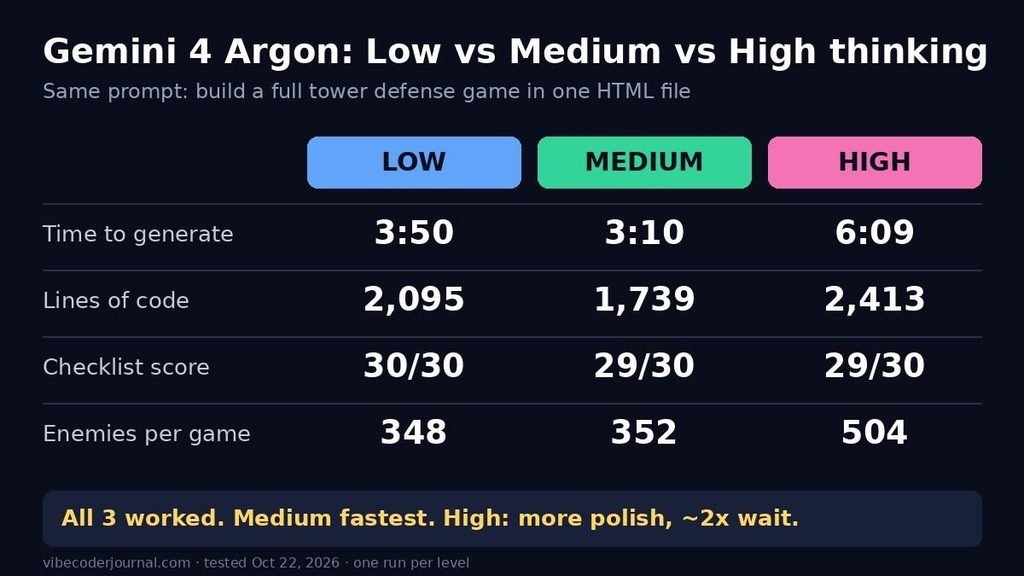
Results card: Gemini 4 Argon Low took 3:50, wrote 2,095 lines, scored 30/30 and sent 348 enemies; Medium took 3:10, wrote 1,739 lines, scored 29/30 and sent 352 enemies; High took 6:09, wrote 2,413 lines, scored 29/30 and sent 504 enemies
Quick answer: In our test, Medium was the best pick. We gave Gemini 4 Argon the same prompt for a full tower defense game at Low, Medium and High thinking. All three games worked. Low passed all 30 checks, and Medium and High passed 29 each, with one small flaw apiece. Medium finished fastest (3:10), Low took 3:50, and High took 6:09, almost twice as long. High’s extra time bought a more polished interface and about 150 more enemies per game. It did not buy fewer bugs. Use Medium for most coding, and switch to High when you want a bigger, more polished result and can wait.
| Low | Medium | High | |
|---|---|---|---|
| Time to generate | 3:50 | 3:10 | 6:09 |
| Code length | 2,095 lines | 1,739 lines | 2,413 lines |
| Our 30-point checklist | 30/30 | 29/30 | 29/30 |
| Lost a point for | – | Score hidden behind a button | Start button hidden on phones |
| Beat all 10 waves (test bot) | Yes | Yes | Yes |
| Enemies in one full game | 348 | 352 | 504 |
| Console errors | 0 | 0 | 0 |
| Best for | Nothing over Medium here | Most coding tasks | Polish and extra content |
You can play all three games and download our raw data further down this page.
What are Gemini 4 Argon’s thinking levels?
Gemini 4 Argon (API model ID gemini-4-argon) is Google’s newest frontier model. It launched for developers on October 13, 2026 and is rolling out to Google AI Pro and Ultra subscribers in the Gemini app. Like other “thinking” models, it reasons before it answers. You choose how much it reasons:
- Low: “Quick and efficient” (the Gemini app’s own label)
- Medium: “Balanced depth”
- High: “Extra thorough”
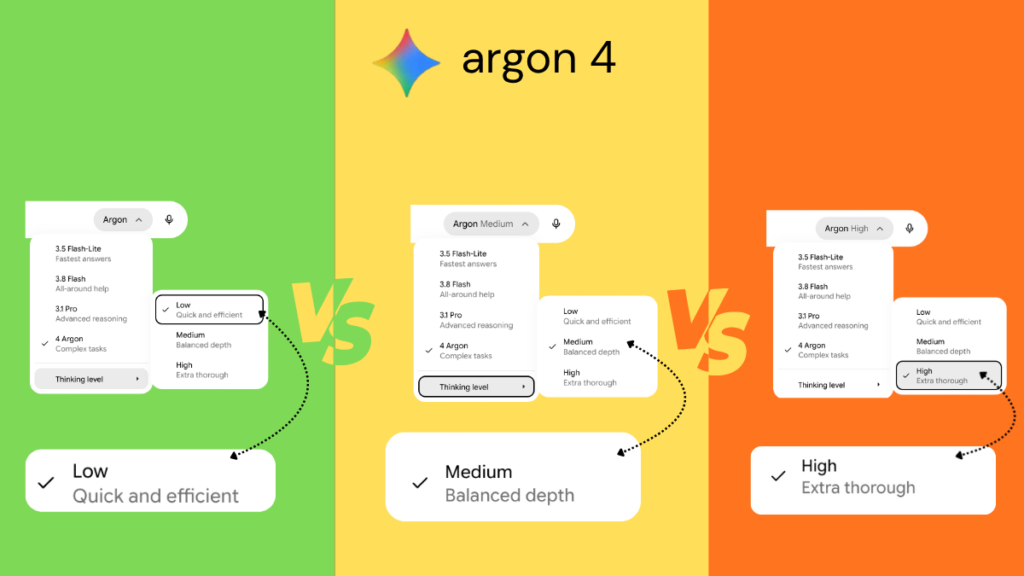
In the Gemini app, you pick Argon from the model menu, then open Thinking level.
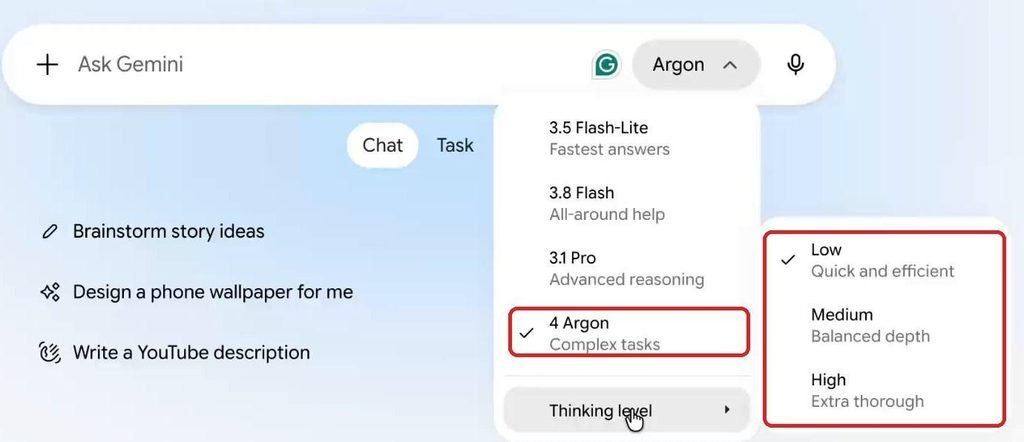
Gemini app model menu with 4 Argon selected and the Thinking level submenu open, showing Low (Quick and efficient), Medium (Balanced depth) and High (Extra thorough)
The Gemini app’s model menu during our test. 4 Argon and the three thinking levels are boxed in red.
On the API, the same setting is called thinking_level, with the values low, medium and high. Google’s developer docs say medium is the default, and they recommend testing all three and using the lowest level that meets your quality bar. That’s exactly what we did.
How we tested
We wanted a task hard enough for the thinking level to matter. So instead of small snippets, we asked for a complete game: “Neon Defense,” a tower defense game in a single HTML file. It had to include:
- enemies that follow a winding path
- 3 enemy types and 10 waves, with bosses on waves 5 and 10
- 3 tower types (single-target, splash damage and slow)
- placement rules and upgrades to level 3
- a 70% sell refund
- gold, lives and score
- pause, 2x speed and restart
- particles and screen shake
- a best score saved in the browser
- mouse and touch support
- a fixed-timestep game loop that stays smooth with 100+ objects on screen
The setup:
- Model: Gemini 4 Argon in the Gemini app, on a Google AI Pro plan, in Chrome on a MacBook Air.
- Runs: three runs (Low, Medium, High), each in a new chat, with the exact same prompt. The full prompt is at the end of this article.
- Timing: each run was screen-recorded. We timed it from pressing Send until Gemini’s stop button disappeared, read from the recording at half-second steps.
- Scoring: we played each saved game with an automated test bot in a real Chrome browser. The bot:
- clicked through our 30-point checklist
- played all 10 waves with the same simple build strategy
- did a second run with no towers to trigger game over
- ran a stress test with 200+ enemies on screen
- How the bot read the games: we added a small read-only hook to test copies, so the bot could read live game numbers (gold, lives, wave, towers). For the stress test, the hook also added extra enemies. The games you can play below are the unedited originals. A few checks (bosses costing 5 lives, splash damage and slow, particles and screen shake) we verified in the code and by eye. The checklist says which method we used for each item.
Result 1: High took almost twice as long, and Medium beat Low
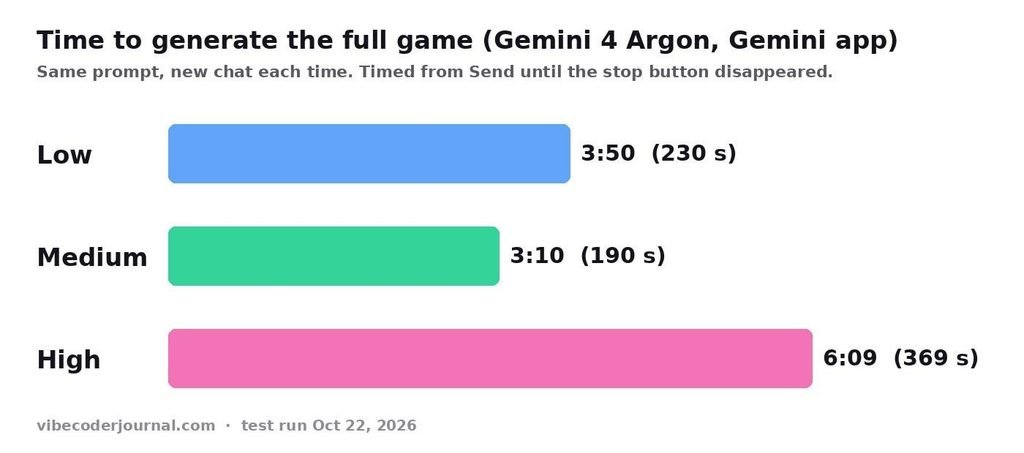
Bar chart of generation time for Gemini 4 Argon: Low 3:50, Medium 3:10, High 6:09
Time from Send to the finished answer, for the same prompt at each thinking level.
| Thinking level | Time to finish | Answer complete? | Followed “code only, no extra text”? |
|---|---|---|---|
| Low | 3:50 (230 s) | Yes, ends with </html> | Yes |
| Medium | 3:10 (190 s) | Yes, ends with </html> | Yes |
| High | 6:09 (369 s) | Yes, ends with </html> | No. It added a list of follow-up ideas after the code |
Three things stood out:
- Medium was faster than Low. Low wrote more code (2,095 lines vs 1,739). In a long answer, writing out the code takes most of the time, so less reasoning doesn’t guarantee a faster finish. This is one run, so treat it as a single data point, not a rule.
- High took about 3 minutes longer than either. It also wrote the longest file: 2,413 lines (74 KB).
- High broke the “no explanation” rule. After the code, it printed three follow-up ideas as a raw list: a 4th tower, sound effects, and more maps. It’s harmless, and it’s the only version that broke the “code only” reply rule.
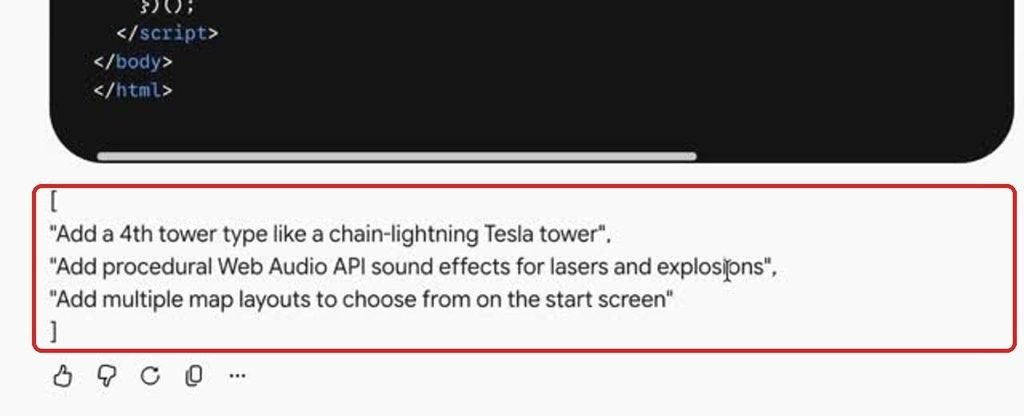
End of Gemini 4 Argon High’s answer: after the closing html tag it added a bracketed list of three follow-up ideas
High’s answer ended with extra suggestions, even though the prompt said “No explanation before or after.”
Result 2: Every game worked, and two lost one point each
All three games passed every core gameplay rule:
- you can’t build on the path or on another tower, or without enough gold
- pause, 2x speed and restart work
- upgrades go to level 3
- the 70% sell refund is calculated correctly
- game over and the victory screen both work
- the best score survives a reload
- touch works on a phone
- the console shows zero errors
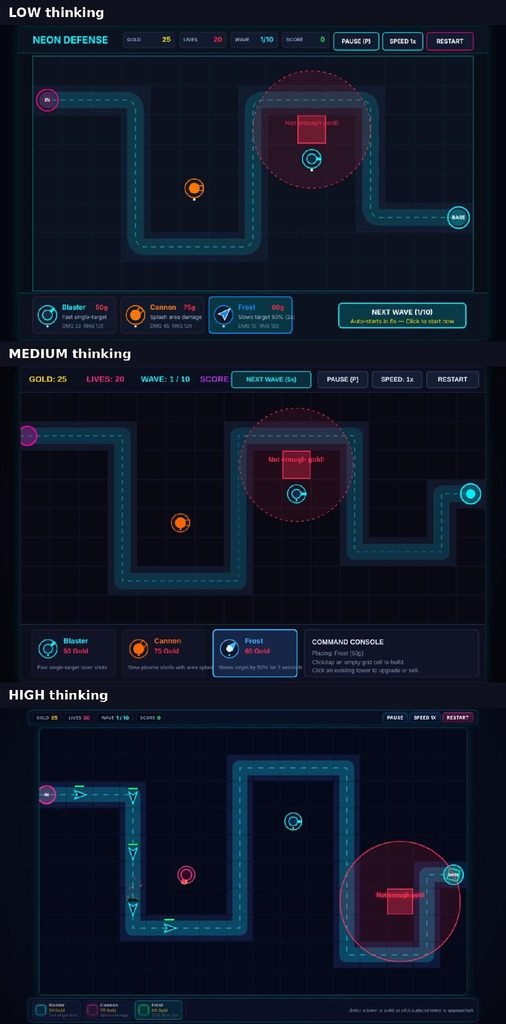
Trying to build a Frost tower with only 25 gold in all three games: each shows a red highlight and a “Not enough gold!” message
All three block building without enough gold, with a red highlight and an in-game message, just as the prompt asked.
The two lost points:
- Medium hides the score. In its top bar, the “Next wave” button sits on top of the score number, so during play you only see “SCORE:” with no value. The prompt asked for a HUD that shows the score.
- High hides its Start button on phones. On a 390px-wide phone, High’s “How to play” box gets cut off, and you have to scroll inside it to find Start. The game works once you find it.
We also checked the code. All three use a proper fixed-timestep loop (an “accumulator”), so they run at the same speed on 60 Hz and 120 Hz screens. All three set bosses to cost 5 lives, and none of them uses alert().
The full 30-point checklist
How we checked each item: Bot = our automated test read the game’s live state. Code = checked in the source code. Eye = checked on screenshots or recordings.
| # | Check | How | Low | Medium | High |
|---|---|---|---|---|---|
| 1 | Start screen with title, best score, how to play and Start | Eye | ✅ | ✅ | ✅ |
| 2 | HUD shows gold, lives, wave and score | Eye | ✅ | ❌ score hidden by button | ✅ |
| 3 | Fits the window, no scrollbars (desktop and phone) | Bot + Eye | ✅ | ✅ | ❌ Start hidden on phone |
| 4 | Polished look | Eye | ✅ | ✅ | ✅ |
| 5 | Enemies follow the path smoothly | Eye | ✅ | ✅ | ✅ |
| 6 | 3 enemy types (fast, tank, swarm) | Code + Eye | ✅ | ✅ | ✅ |
| 7 | Health bars on enemies | Eye | ✅ | ✅ | ✅ |
| 8 | Harder waves, Next wave button and 10-second auto-countdown | Bot | ✅ | ✅ | ✅* |
| 9 | Bosses on waves 5 and 10 | Code | ✅ | ✅ | ✅ |
| 10 | 3 tower types that look different | Eye | ✅ | ✅ | ✅ |
| 11 | Can’t build on the path | Bot | ✅ | ✅ | ✅ |
| 12 | Can’t build on another tower | Bot | ✅ | ✅ | ✅ |
| 13 | Can’t build without enough gold (with a message) | Bot + Eye | ✅ | ✅ | ✅ |
| 14 | Range circle and green or red highlight while placing | Eye | ✅ | ✅ | ✅ |
| 15 | Towers rotate, and projectiles travel to the target | Eye | ✅ | ✅ | ✅ |
| 16 | Cannon splash and 50% Frost slow | Code | ✅ | ✅ | ✅ |
| 17 | Upgrade to level 3 (stats and look change) | Bot + Eye | ✅ | ✅ | ✅ |
| 18 | Starts with 150 gold and 20 lives | Bot | ✅ | ✅ | ✅ |
| 19 | Kills give gold | Bot | ✅ | ✅ | ✅ |
| 20 | Sell refund is 70% of all gold spent | Bot | ✅ 119g of 170g | ✅ 62g of 90g | ✅ 62g of 90g |
| 21 | Leaks cost lives (boss costs 5) | Bot + Code | ✅ | ✅ | ✅ |
| 22 | Game over at 0 lives, then Play Again | Bot | ✅ | ✅ | ✅ |
| 23 | Win screen after wave 10 with stats | Bot | ✅ | ✅ | ✅ |
| 24 | Pause freezes everything, and the P key works | Bot | ✅ | ✅ | ✅ |
| 25 | 2x speed | Bot | ✅ | ✅ | ✅ |
| 26 | Restart | Bot | ✅ | ✅ | ✅ |
| 27 | Particles and screen shake | Code + Eye | ✅ | ✅ | ✅ |
| 28 | Best score kept after reload | Bot | ✅ | ✅ | ✅ |
| 29 | Touch works on a phone | Bot | ✅ | ✅ | ✅ |
| 30 | Smooth with lots of objects, zero console errors | Bot | ✅ | ✅ | ✅ |
| Total | 30/30 | 29/30 | 29/30 |
*High starts wave 1 immediately instead of counting down first. Its Next wave button and 10-second countdown work between all later waves.
Result 3: The difference is polish and content, not correctness
If all three work, what did High’s extra 3 minutes buy? Here they are side by side:
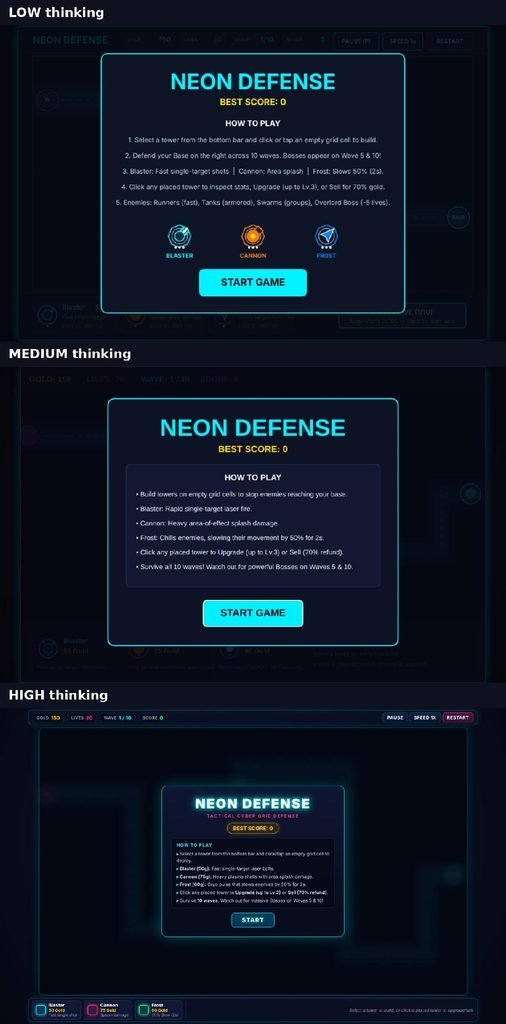
Start screens of the three Neon Defense games built by Gemini 4 Argon at Low, Medium and High thinking
Start screens. Low and Medium draw everything, buttons included, on one canvas. High builds its menus and buttons as separate web elements.
- High has the most polished interface. Its buttons, tower shop and tower inspector are real web elements, so the text stays crisp at any size. It also adds a “Wave started” banner and a clean card-style end screen.
- High has more content. In a full 10-wave game, High sent 504 enemies, against 348 (Low) and 352 (Medium). That’s about 150 more, because its waves are bigger.
- Medium has the clearest tower upgrades. Upgraded towers get a bold hexagon frame, so you can read their level at a glance. Low and High mostly mark levels with small dots and color changes.
- Low is solid but plain. It works fully and looks good, but it adds nothing over Medium.
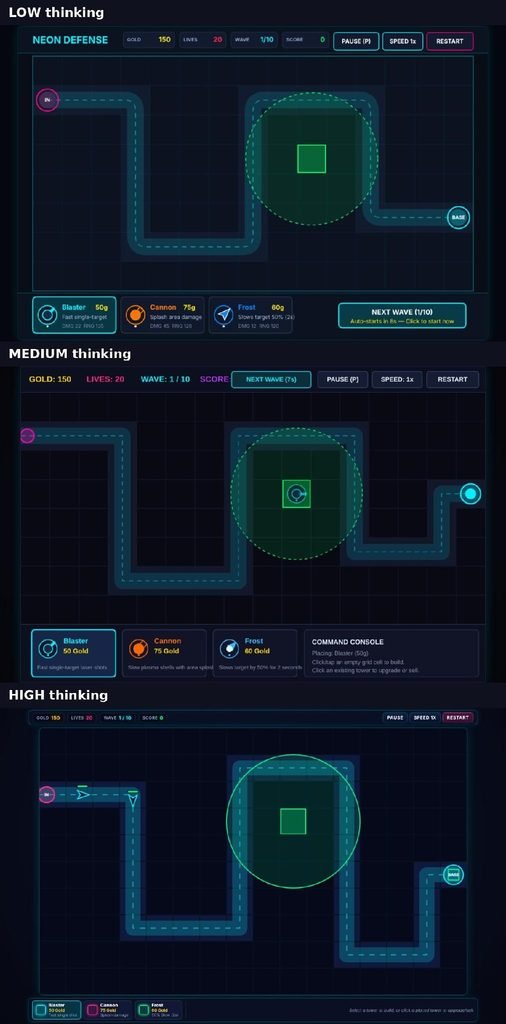
Placing a Blaster tower in all three games: each shows a green cell highlight and a dashed range circle
Tower placement preview in each version: a green highlight plus the range circle.
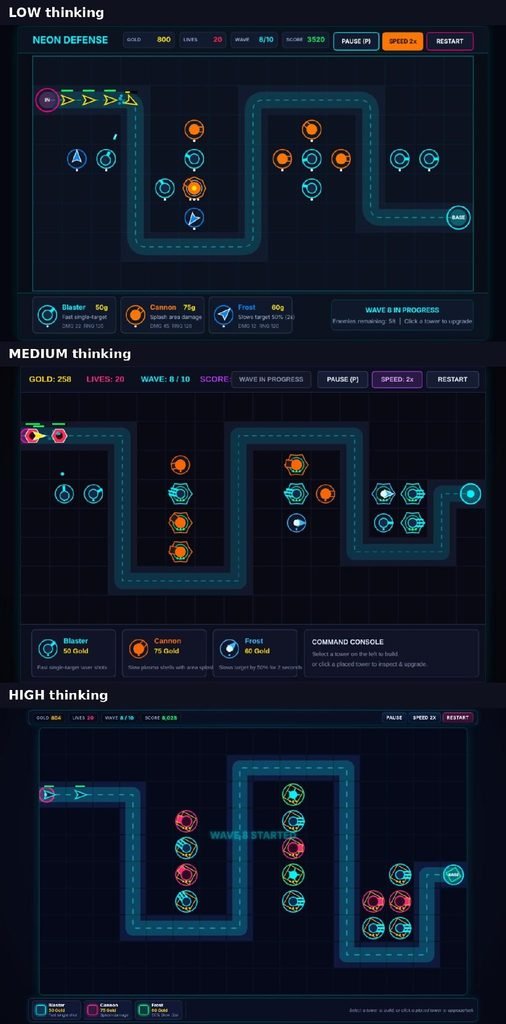
Wave 8 in progress in all three games, showing towers, enemies and the path
Wave 8 in each version, with the same number of towers built by our bot. You can see the different upgrade visuals. In Medium’s top bar, the button covers the score.
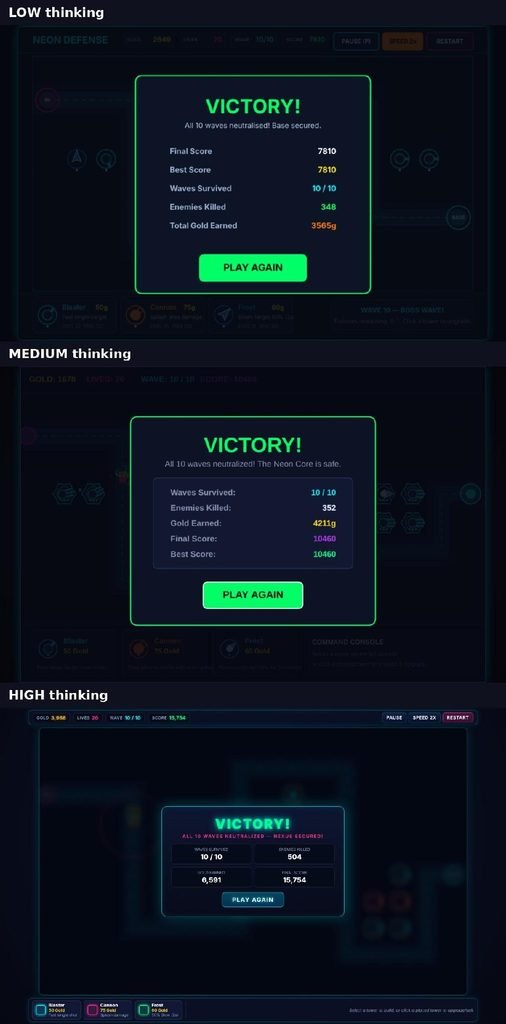
Victory screens of all three games with waves survived, enemies killed, gold earned and final score
All three reached a victory screen with the stats the prompt asked for. Each game scores points differently, so don’t compare scores between them.
Result 4: Performance is fine everywhere
We pushed each game to more than 200 enemies on screen at once. All three stayed smooth.
| Normal play | 200+ enemies | |
|---|---|---|
| Low | 326 fps | 149 fps |
| Medium | 301 fps | 131 fps |
| High | 428 fps | 152 fps |
These are uncapped frame rates in headless Chrome, so they only compare the three games with each other. They won’t predict your own device, and they change a little from run to run. What matters is that every version stayed far above 60 fps.
Where all three fell short
- Too easy. Our test bot built towers in a simple pattern and won all 10 waves without losing a single life, in every version. With no towers at all, each game ended on wave 2. So the challenge only exists if you don’t build. A human designer would have play-tested the balance.
- Slightly soft on Retina screens. All three draw the game at 960 to 1,024 pixels wide, stretch it to fit the screen, and ignore high-resolution displays. On a MacBook, edges and canvas text look a little soft.
- Small on phones. Every version fits a 390px-wide phone, but each grid cell is only about 24 pixels wide. Low and Medium also shrink their buttons and text along with the canvas, so the text gets tiny.
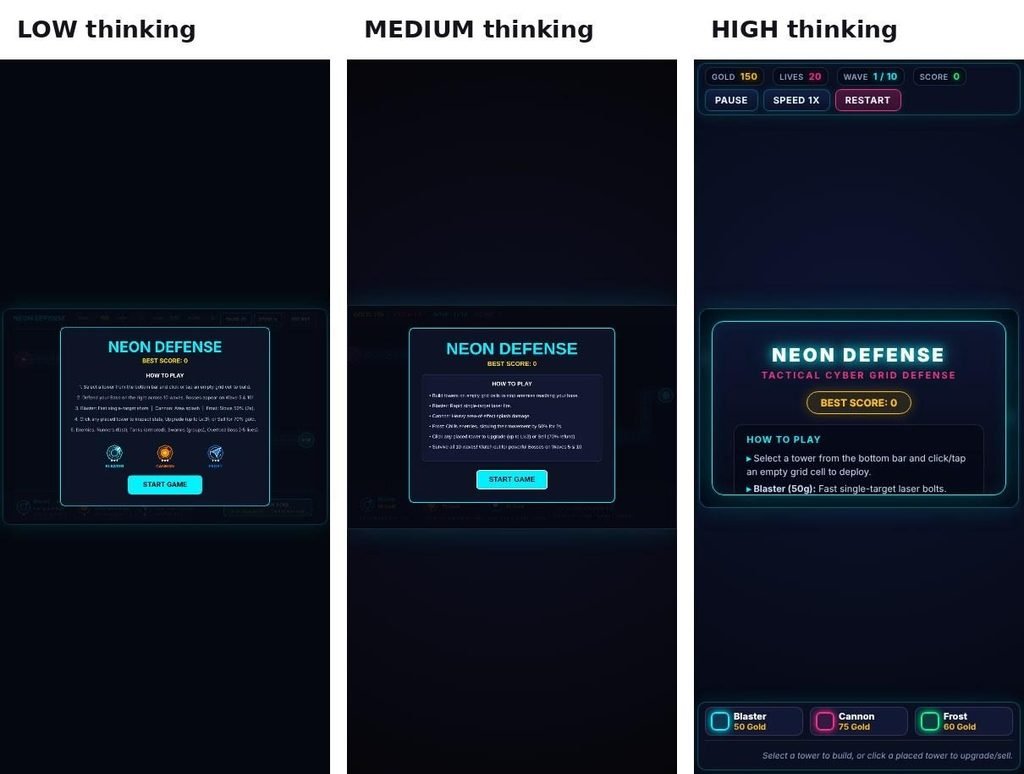
All three games’ start screens on a 390px-wide phone screen
On a phone, Low and Medium shrink the whole game. High’s start box needs scrolling to reach the Start button.
So, is High thinking worth it?
For this kind of task, mostly no. Gemini 4 Argon wrote a complete, working game at every level. The thinking level didn’t decide whether the code worked. It decided how big and polished the result was.
Use Medium for most coding. It was the fastest, wrote the shortest code and only missed one small display issue. Low scored the only 30/30, but Medium’s one miss is cosmetic, and Medium finished 40 seconds sooner with less code. Medium is also Google’s default on the API.
Use High when polish or depth matters more than time. Good examples are a demo you’ll show people, a big feature where you want more built in, or a tricky bug where you’d rather wait than retry. Expect roughly double the wait, and a few extra lines of chat after the code.
Skip Low for big builds. In our test it was slower than Medium and gave nothing extra. Low makes more sense for short questions and small edits, where its speed actually shows.
What it costs on the API
The Gemini app doesn’t show token counts, so we couldn’t measure the cost of each run. If you use Gemini 4 Argon through the API, these are Google’s published prices (checked October 22, 2026):
| Until Nov 30, 2026 (intro price) | From Dec 1, 2026 | |
|---|---|---|
| Input | $2 per 1M tokens | $4 per 1M tokens |
| Output (thinking tokens included) | $10 per 1M tokens | $20 per 1M tokens |
Thinking tokens are billed as output, so High usually costs more per answer as well as taking longer. Argon isn’t available on the API’s free tier. To estimate a workload, try our LLM token calculator.
Limits of this test
- One run per level. AI output varies from run to run, so another attempt could flip the Low and Medium times. Read the results as “what happened in our test”, not a rule.
- One kind of task. We tested one large front-end build. Hard algorithm, math or debugging tasks may benefit more from High.
- App, not API. We used the Gemini app on a Google AI Pro plan. API results with different settings may differ.
FAQ
What are the thinking levels in Gemini 4 Argon? Low, Medium and High. They control how much the model reasons before it answers. The Gemini app describes them as Quick and efficient, Balanced depth and Extra thorough. On the API, the setting is called thinking_level.
Which Gemini 4 Argon thinking level is best for coding? In our test, Medium. It built a complete, working game fastest (3:10) and passed 29 of 30 checks. High added polish and content, but took 6:09.
Is Gemini 4 Argon on High thinking slower? Yes. In our test it took 6:09, against 3:10 on Medium and 3:50 on Low, for the same prompt.
Does High thinking make fewer bugs? Not in our test. All three levels passed every core gameplay check with zero console errors. High made a bigger, more polished game, not a more correct one.
How do I change the thinking level in the Gemini app? Open the model menu next to the message box, select 4 Argon, then hover over Thinking level and pick Low, Medium or High.
Is Gemini 4 Argon free? In the Gemini app, it’s available to Google AI Pro and Ultra subscribers. On the API, it isn’t on the free tier. The intro price is $2 per 1M input tokens and $10 per 1M output tokens until Nov 30, 2026.
The exact prompt we used
Copy this into Gemini 4 Argon (or any model) to repeat the test:
You are an expert game developer. Build the game below in ONE pass.
RULES
– Output ONE self-contained file named index.html: HTML, CSS in a <style> tag, JavaScript in a <script> tag, using the HTML5 Canvas.
– No frameworks, libraries, CDNs, external fonts, images, sounds or network requests. Draw everything with code. It must work offline.
– Do not use alert(), confirm() or prompt(). Show all messages inside the game.
– Polished, modern visual style: smooth animation, clear UI, a consistent color palette.
– Must work with mouse AND touch, and fit any screen from 360px to 1400px wide without scrolling (scale the canvas and keep its aspect ratio).
– Do not ask me questions. If something is unclear, choose the most sensible option.
– Reply with ONLY the complete file in one code block. No explanation before or after.
GAME: “Neon Defense”, a tower defense game
MAP AND ENEMIES
1. A grid map with one winding path from an entry point on the left to a base on the right. Enemies follow the path smoothly.
2. Three enemy types with different looks and stats:
– Runner: fast, low HP
– Tank: slow, high HP
– Swarm: weak, comes in groups
Each enemy shows a health bar.
3. 10 waves that get harder. Wave 5 and wave 10 each have a boss with much more HP. Between waves there is a “Next wave” button and a 10-second countdown that starts the next wave automatically.
TOWERS
4. Three tower types:
– Blaster: fast single-target shots
– Cannon: slow splash damage that hits all enemies in a radius
– Frost: slows enemies by 50% for 2 seconds
Each has a different look and cost.
5. Place towers by choosing one from a bottom bar, then clicking or tapping an empty grid cell. While placing, show the range circle and a green or red highlight. Towers CANNOT be placed on the path, on another tower, or without enough gold.
6. Towers aim at the enemy furthest along the path within range, and visibly rotate toward it. Projectiles travel to the target; they don’t hit instantly.
7. Click a placed tower to select it and see its stats. Upgrade it up to level 3 (more damage and range, a different look per level). Sell it for 70% of all the gold spent on it.
ECONOMY AND RULES
8. Start with 150 gold and 20 lives. Killing an enemy gives gold (more for tougher enemies). An enemy that reaches the base costs lives (a boss costs 5).
9. Game over at 0 lives, and win after wave 10. Both show an in-game screen with stats (waves survived, enemies killed, gold earned) and a “Play again” button.
CONTROLS AND QUALITY
10. A HUD showing gold, lives, wave number and score.
11. Buttons for Pause/Resume, Speed 1x/2x, and Restart. Pause freezes everything. The P key also pauses.
12. Particle effects when enemies die, and a short screen shake when a boss dies or when lives are lost.
13. Save the best score in localStorage (key “neon-defense-best”) and show it on the start screen.
14. A start screen with the title, the best score, a short “how to play”, and a Start button.
15. Use a fixed-timestep game loop (delta time) so the game runs the same speed on 60Hz and 120Hz screens. It must stay smooth with 100+ enemies and projectiles on screen.
16. Zero errors in the browser console.
Related
- AI coding benchmarks and rankings: how Gemini, Claude and GPT models compare on standard benchmarks
- Best Claude model for coding
- 12 best vibe coding tools
Sources: – Google AI for Developers: What’s new in Gemini 4 Argon (model ID, thinking levels, default, pricing) – Google blog: Gemini 4 Argon is now available for developers (release date and availability) – Our own test: screen recordings, game files and test results from October 22, 2026
Leave a Reply