

By Abdullah Zulfiqar · Last updated October 18, 2026 · Checked against OpenAI’s Help Center and status page.
ChatGPT is usually slow because of high server demand during peak global hours, the extended computational time required by deep reasoning models, or a massive conversation context that forces the system to re-read thousands of previous tokens. Starting a new chat restores instant response speed immediately.
Quick Fixes at a Glance (Under 2 Minutes)
- Start a fresh chat thread: Purges accumulated context history and immediately speeds up streaming tokens.
- Switch from reasoning to standard models: Use everyday models when you need fast, immediate text output.
- Check status.openai.com: Confirm whether OpenAI is experiencing a server-side degraded performance event.
- Clear browser cache and site data: Removes stale JavaScript bundles causing local interface lag.
- Disable VPNs and extensions: Bypasses throttled proxies and unblocks WebSocket handshakes over port 443.
If ChatGPT has completely halted rather than just crawling slowly, see our companion guide on how to fix ChatGPT when it is not working at all.
Table of Contents
- Cause → Fix Diagnosis Table
- Is It ChatGPT or You? Diagnostic Flowchart
- Why Is ChatGPT So Slow? 5 Main Reasons
- 12 Ways to Make ChatGPT Faster
- Why Long Chats Make ChatGPT Slow: The Context Effect
- Fast vs Thinking Models: When to Switch
- Slow on Phone vs Computer: Device Differences
- Does ChatGPT Plus Make It Faster?
- Still Slow? When to Contact OpenAI Support
- Sources & References
Cause → Fix Diagnosis Table: Why Is My ChatGPT So Slow?
Match your exact symptom below to pinpoint why ChatGPT is lagging and how quickly it can be resolved.
| What You Experience | Likely Cause | Verified Fix | Time to Fix |
|---|---|---|---|
| Words trickle out one by one | Peak global server congestion or free-tier throttling | Switch to off-peak hours or upgrade to Plus priority tier. | 1–2 mins |
| Chat takes 10+ seconds to start typing | Reasoning model (“Thinking mode”) processing internal logic | Switch from deep reasoning to standard everyday models. | 10 secs |
| Typing or scrolling lags severely | Context bloat in a conversation with 30+ back-and-forth turns | Click New Chat and carry over only a summary prompt. | 30 secs |
| Browser tab freezes or crashes | Hardware acceleration conflict or tab memory exhaustion | Toggle graphics acceleration in Chrome system settings. | 1 min |
| Output pauses repeatedly mid-stream | WebSocket packet drops caused by VPN, proxy, or strict firewall | Disconnect VPN and ensure port 443 allows WebSocket handshakes. | 1 min |
| Sluggish only when analyzing files | Sandbox execution delay during Python or multimodal analysis | Compress documents under 512 MB or disable unused tools. | 2 mins |
| Fast on mobile, sluggish on PC | Browser extension interference (ad-blockers, script-shields) | Launch ChatGPT in an Incognito / Private browsing window. | 30 secs |
| Stuck indefinitely on “Thinking…” | Server connection desync or backend compute queue stall | Press Stop Generating, hard reload (Cmd+Shift+R), and retry. | 20 secs |
Is It ChatGPT or You? How to Tell
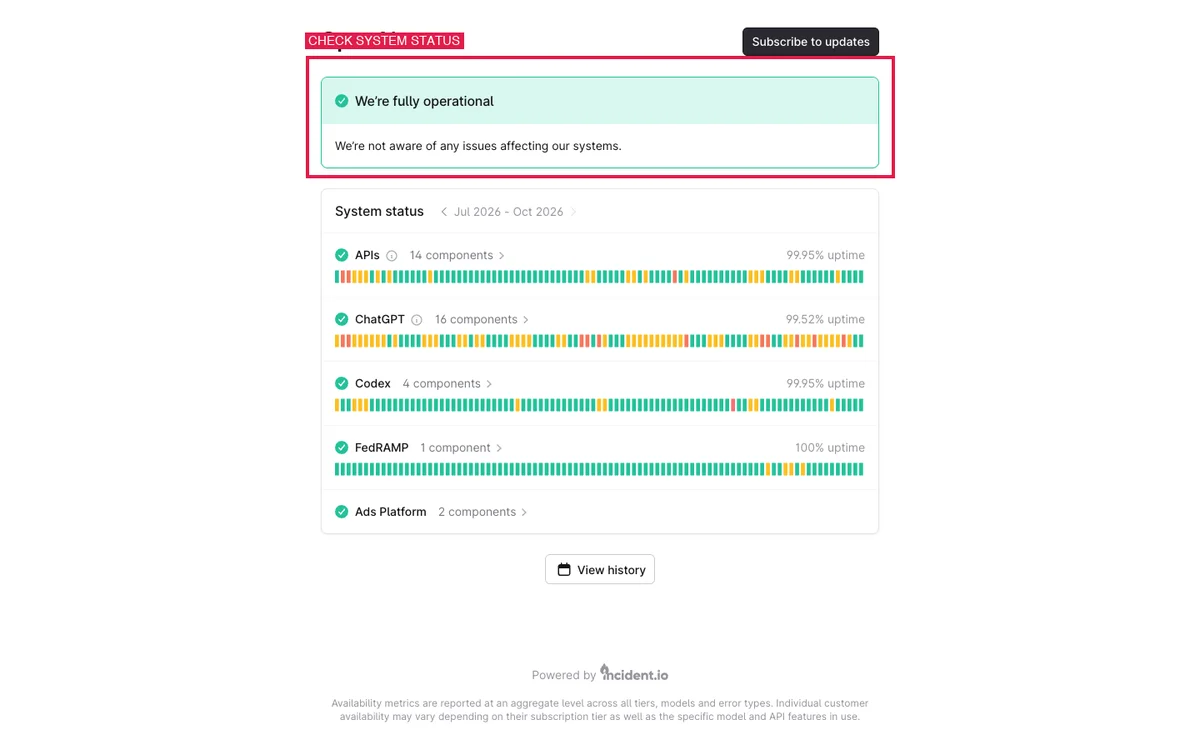
When troubleshooting a persistent ChatGPT slow response issue, first determine whether the bottleneck is on OpenAI’s infrastructure or inside your device. Before tweaking your local operating system or network settings, you need to establish whether the bottleneck is on OpenAI’s infrastructure or inside your device. If OpenAI is suffering an active service disruption, no amount of browser clearing will make ChatGPT faster.
Open status.openai.com. Look closely at the status color next to ChatGPT and Chat Completions:
- Operational (Green): OpenAI’s API clusters are operating within baseline latency limits. The slowness is almost certainly caused by local context bloat, model selection, or browser configuration.
- Degraded Performance (Yellow): OpenAI’s systems are experiencing elevated queue lengths or inference latency. In this state, response times can slow by 300% to 500% across the board.
- Major Outage (Red): Core API nodes or authentication gateways are down. Prompts will fail with timeout errors.
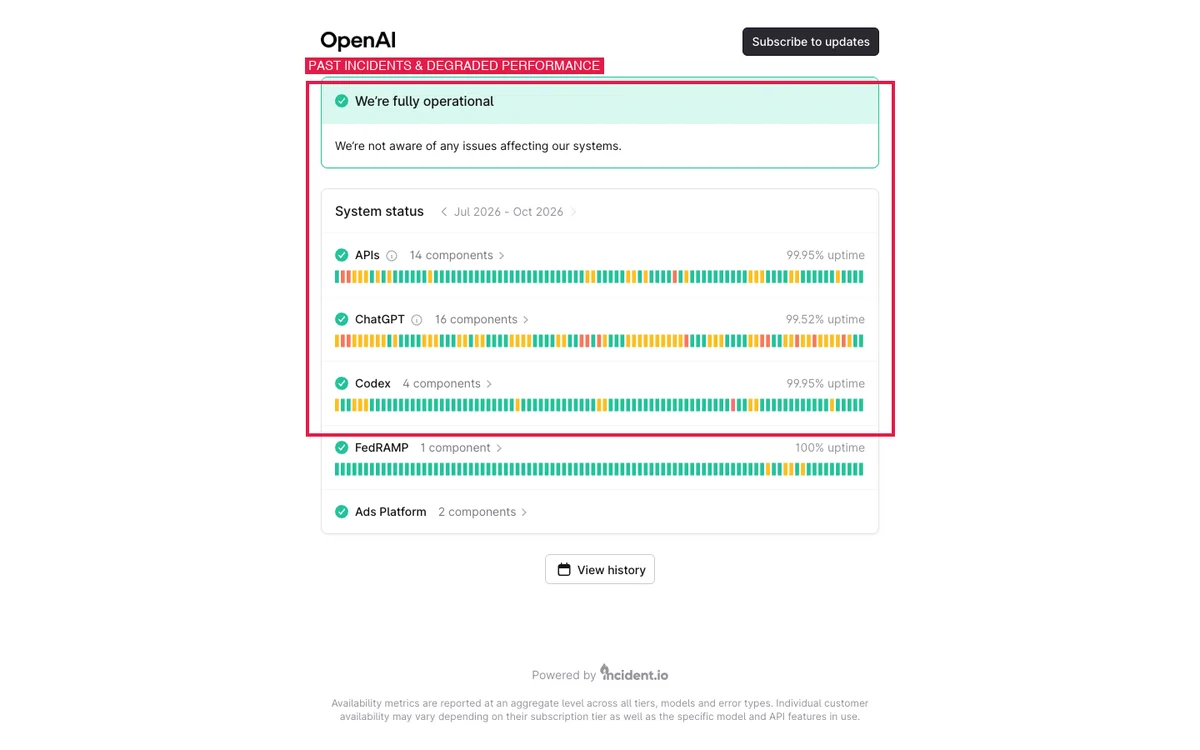
You can also inspect the Past Incidents section at the bottom of the status page. OpenAI logs historical incidents where degraded performance impacted chat response times, detailing the exact timeline when engineers resolved server-side capacity constraints.
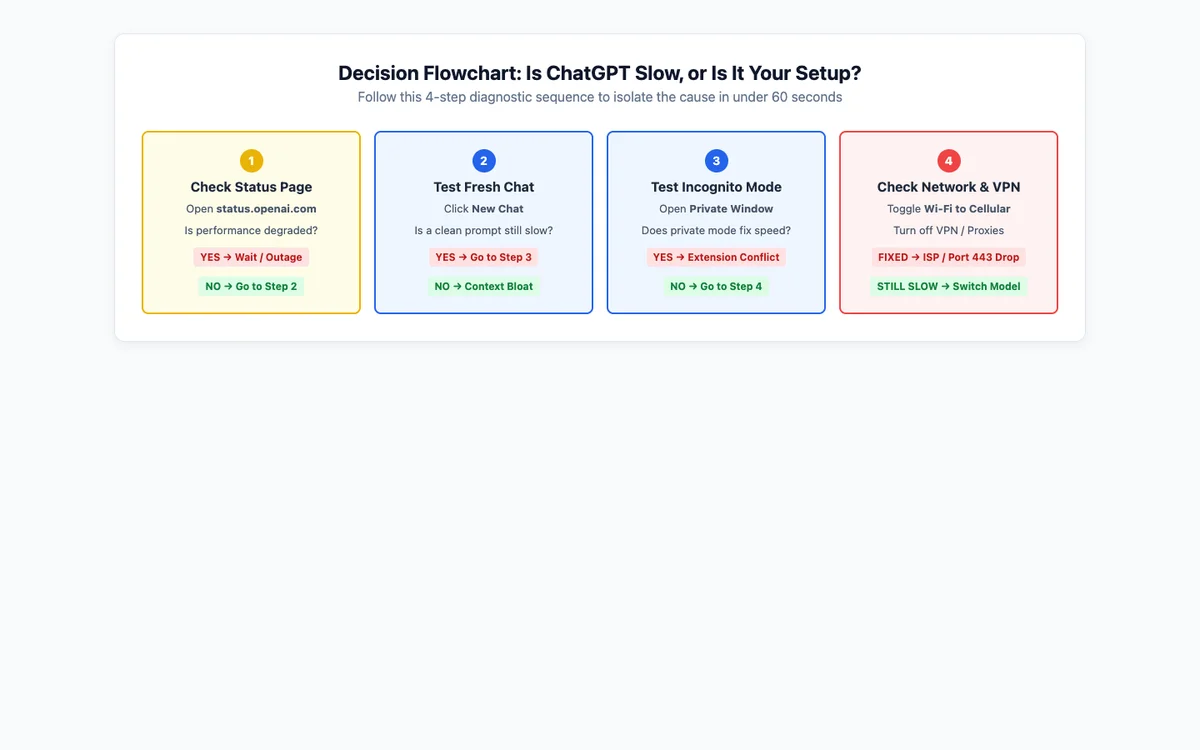
To eliminate guesswork, follow this 4-step diagnostic decision tree to determine exactly where the latency originates:
Why Is ChatGPT So Slow? 5 Main Reasons Explained
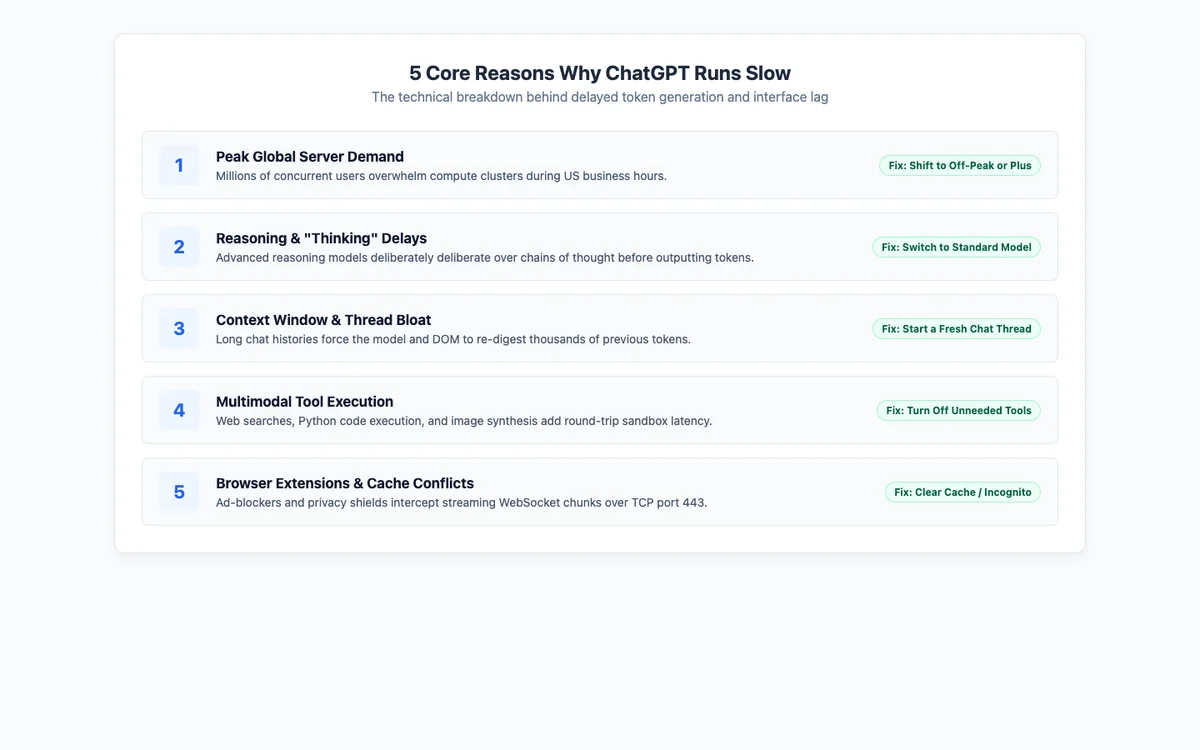
When users ask why is chat gpt so slow, the issue usually stems from one of five core bottlenecks operating on the server, the model architecture, or the local client.
1. Peak Global Server Demand & Capacity Throttling
OpenAI serves hundreds of millions of weekly active users. During global business peaks—particularly between 8:00 AM and 5:00 PM US Eastern Time (13:00–22:00 UTC)—GPU clusters operate near saturation. To prevent widespread system crashes, OpenAI’s load balancers throttle per-user generation speed, queuing requests and reducing the rate of output tokens delivered per second.
2. Reasoning Models (“Thinking Mode”) Processing Internal Logic
Modern reasoning architectures (such as o-series and Think modes) do not begin outputting tokens instantly. Instead, they produce extensive internal chains of thought to plan, verify, and correct logic before revealing the final response. This deliberate architectural delay can take between 5 and 30 seconds, leading users to complain about ChatGPT taking forever to respond when it is simply working as designed.
3. Context Window Inflation & Long Chat Bloat
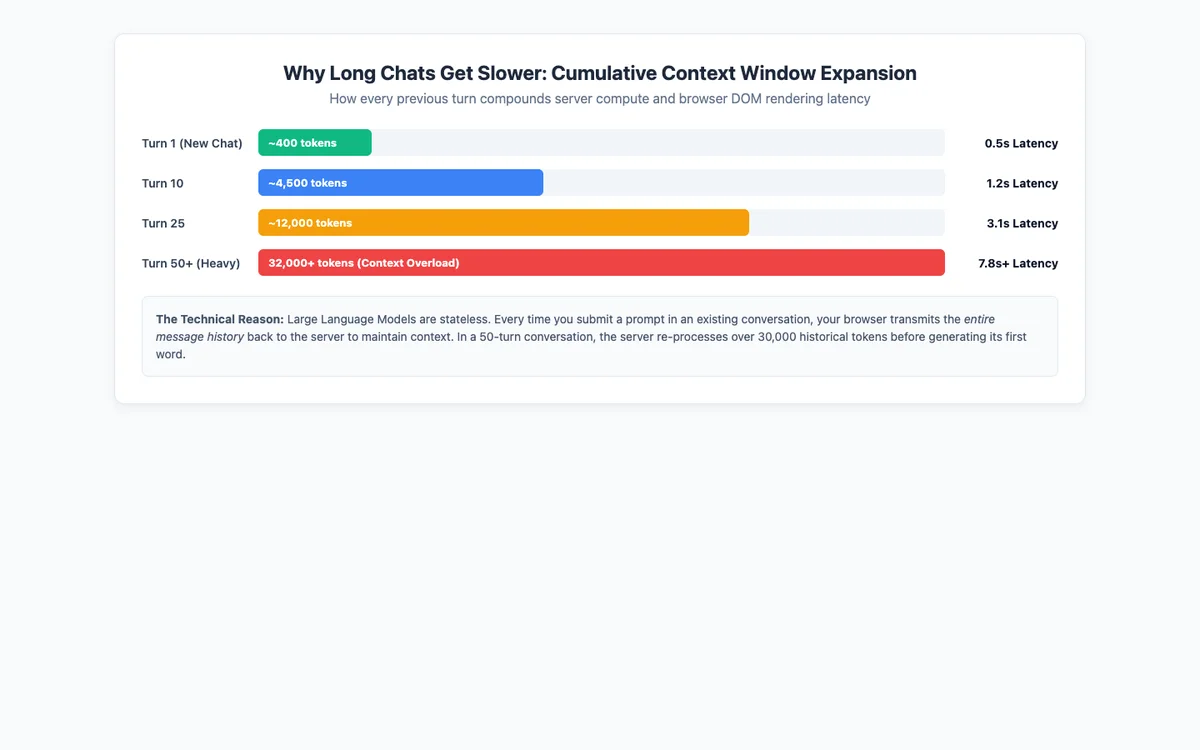
Large Language Models are completely stateless. Every time you submit a prompt in an existing thread, ChatGPT must send the entire conversational history back into the model’s context window. In a 40-turn chat, the system must process tens of thousands of tokens before outputting a single word, creating severe computational latency.
4. Multimodal Tool Execution (Search, Code Interpreter, File OCR)
When you ask ChatGPT to search the web, execute Python code, or analyze uploaded spreadsheets, it doesn’t just generate text. It must dispatch external HTTP requests, await third-party page scrapes, spin up an isolated Python sandbox container, or perform OCR on image pixels. Each external tool call adds seconds of execution overhead.
5. Browser Extensions, Cache Corruption, & WebSocket Interference
ChatGPT streams responses via persistent WebSockets (connecting to wss://ws.chatgpt.com over TCP port 443). Aggressive ad-blockers, grammar plugins, and privacy extensions inspect and buffer incoming network packets, disrupting the live stream and causing visible interface lag.
12 Ways to Make ChatGPT Faster (Step-by-Step Fixes)
If you need to know how to make ChatGPT faster, follow these 12 verified fixes. They are ranked from the fastest instant solutions to advanced browser and network optimizations.
1. Start a New Chat Session
The single most effective fix for a lagging chat is starting a fresh conversation. Click New Chat in the left sidebar. If you need details from your previous session, ask ChatGPT to write a brief summary bullet list, copy it, and paste it into the new thread. Your token processing speed will reset immediately.
2. Pick a Faster Model Tier
If you don’t require complex mathematical derivations or deep code architectural reasoning, switch to an everyday standard model. Standard models output tokens nearly instantly, whereas reasoning tiers intentionally pause to formulate multi-step internal plans.
3. Turn Off Tools You Don’t Actively Need
Unless your query specifically requires live web data or Python script execution, avoid invoking search or code analysis tools. Explicitly state in your prompt: “Answer based solely on your internal training data without browsing the web.” This bypasses external network latency completely.
4. Check OpenAI’s Status Dashboard
Check status.openai.com before spending time reconfiguring your computer. If the dashboard shows a yellow degraded performance indicator, OpenAI’s engineers are managing high traffic or server latency. Wait for the incident to clear rather than altering your local network.
5. Hard Refresh and Re-Authenticate
Session authentication tokens can desynchronize, causing intermittent connection stalls. Press Cmd + Shift + R (Mac) or Ctrl + Shift + R (Windows) to force a clean reload. If response stalls persist, log out of your account, close the tab, and log back in at chatgpt.com/auth/login.
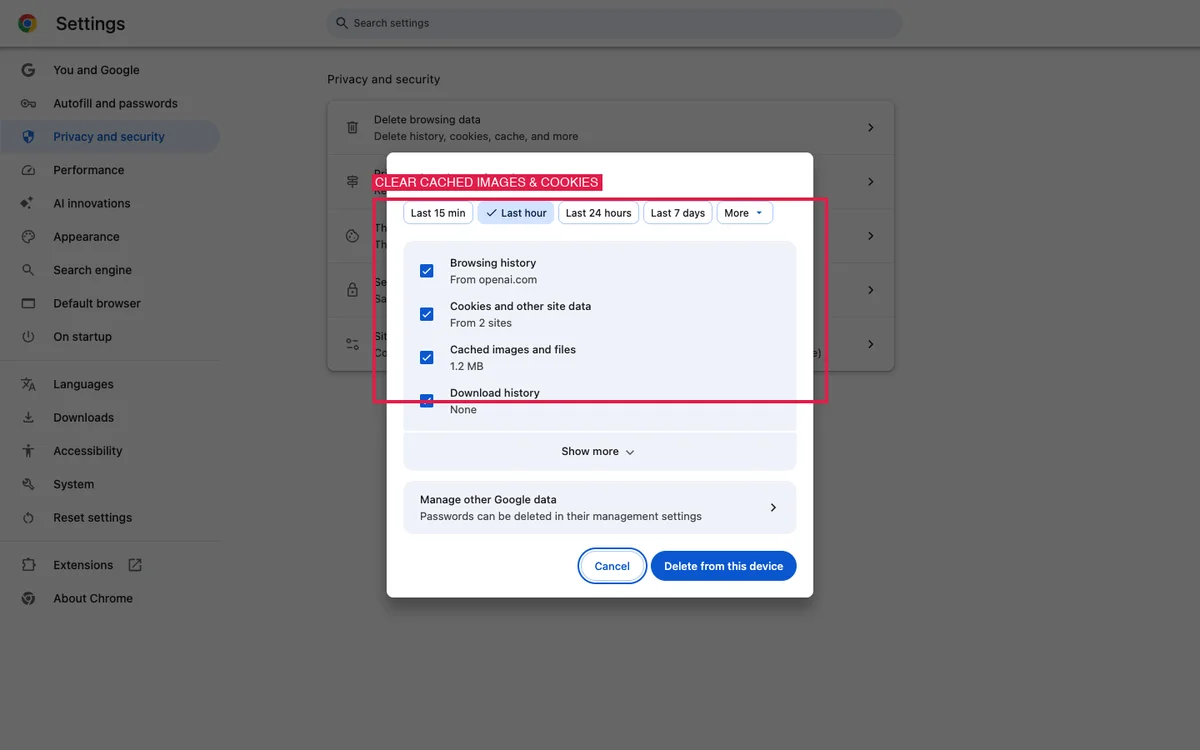
6. Clear Browser Cache and Site Cookies
Corrupted local web caches create severe UI stutter. In Google Chrome, go to Settings > Privacy and security > Delete browsing data. Select Cookies and other site data and Cached images and files for at least the last 24 hours, clear the data, and relaunch your browser.
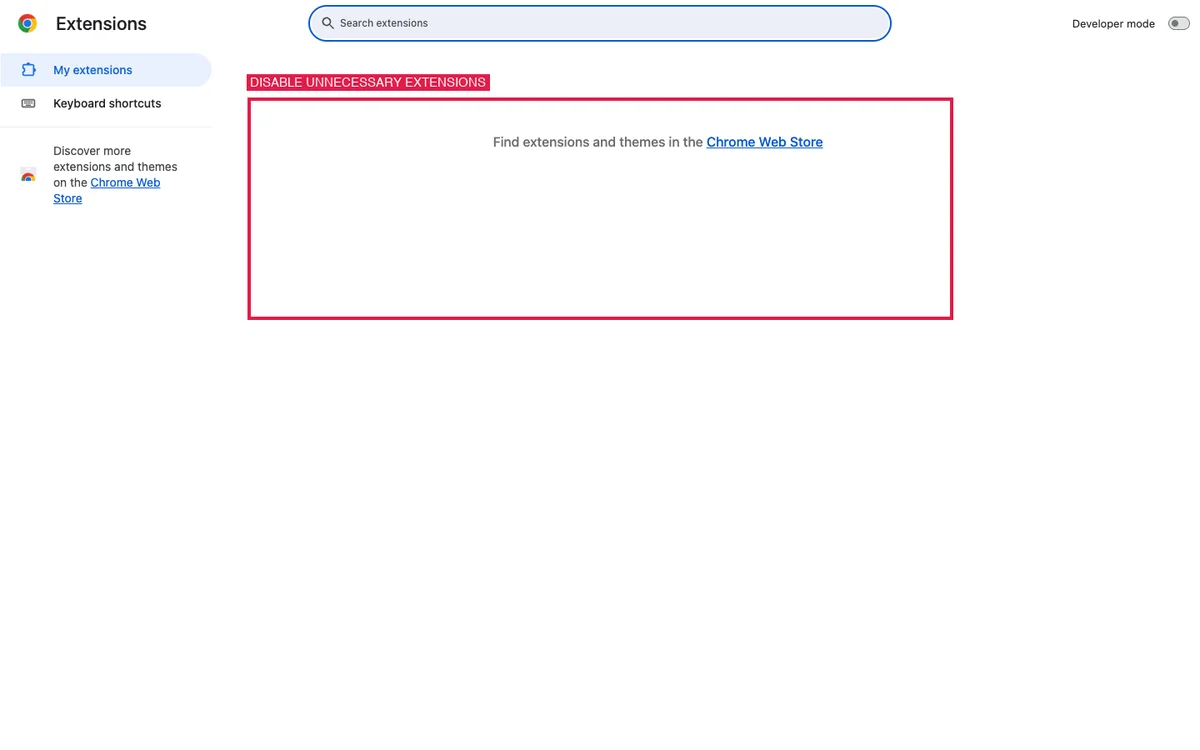
7. Disable Browser Extensions or Use Incognito Mode
Third-party extensions—particularly ad-blockers and translation add-ons—frequently buffer streaming WebSocket tokens. Open a private window using Incognito Mode (Cmd/Ctrl + Shift + N). If ChatGPT runs with zero lag in private mode, navigate to chrome://extensions and disable extensions individually to identify the problematic add-on.
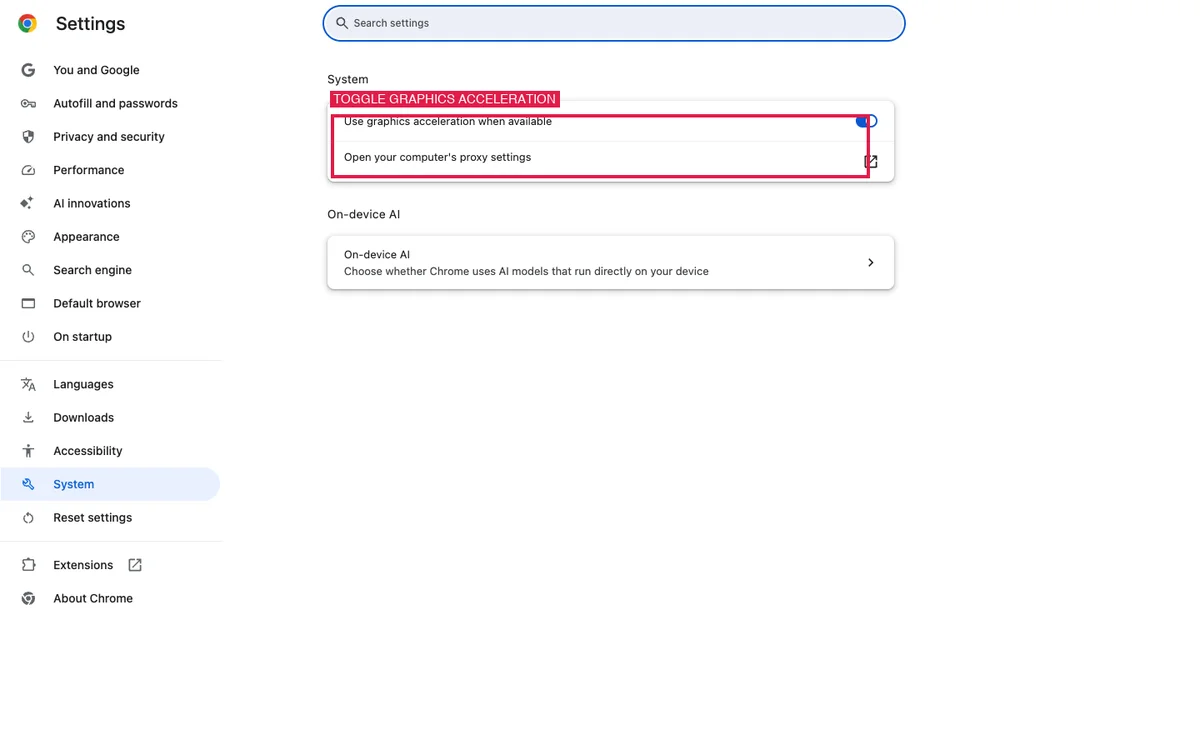
8. Toggle Hardware Graphics Acceleration
When browser hardware acceleration desyncs from your GPU driver, complex DOM text updates drop frames, causing severe visual stutter. Open Chrome settings, navigate to System (or type chrome://settings/system), and toggle “Use graphics acceleration when available” off and on, restarting Chrome after each toggle.
9. Switch Browsers or Use the Official Desktop App
If you experience ChatGPT slow in browser sessions bogged down with dozens of tabs, try switching to a secondary clean browser like Safari or Edge. Even better, download OpenAI’s official desktop application for macOS or Windows, which operates in an isolated runtime without third-party extension overhead.
10. Check Your Network Connection and Turn Off VPNs
Commercial VPNs and strict corporate firewalls introduce routing delays and frequently inspect or throttle continuous WebSocket streams over TCP port 443. Disconnect your VPN client, disable secure DNS tools (like Web Protect), and test whether speed improves immediately.
11. Update the Desktop or Mobile Application
Outdated app versions lack recent performance optimizations and API streaming patches. On iOS and Android, check the Apple App Store or Google Play Store for pending updates. On desktop, open settings and click Check for Updates.
12. Schedule Heavy Tasks Around Peak Demand Hours
If you plan to run large data extraction tasks, multi-document syntheses, or extensive coding jobs, execute them outside of global peak hours. Early morning (before 8:00 AM EST) and late evening (after 8:00 PM EST) provide substantially faster token generation speeds across both free and paid accounts.
Why Long Chats Make ChatGPT Slow: The Context Window Effect
One of the most common user complaints is ChatGPT slow on long chats. A conversation that feels lightning-fast on turn 1 often crawls to a halt by turn 35. This slowdown is caused by two distinct bottlenecks:
- Server Token Re-Evaluation: Large Language Models have no ongoing internal memory between queries. Every single time you type a prompt, your browser packages the entire conversation history and sends it to the server. The model must ingest, tokenize, and compute attention weights across 15,000 to 30,000+ historical tokens before generating its first new word.
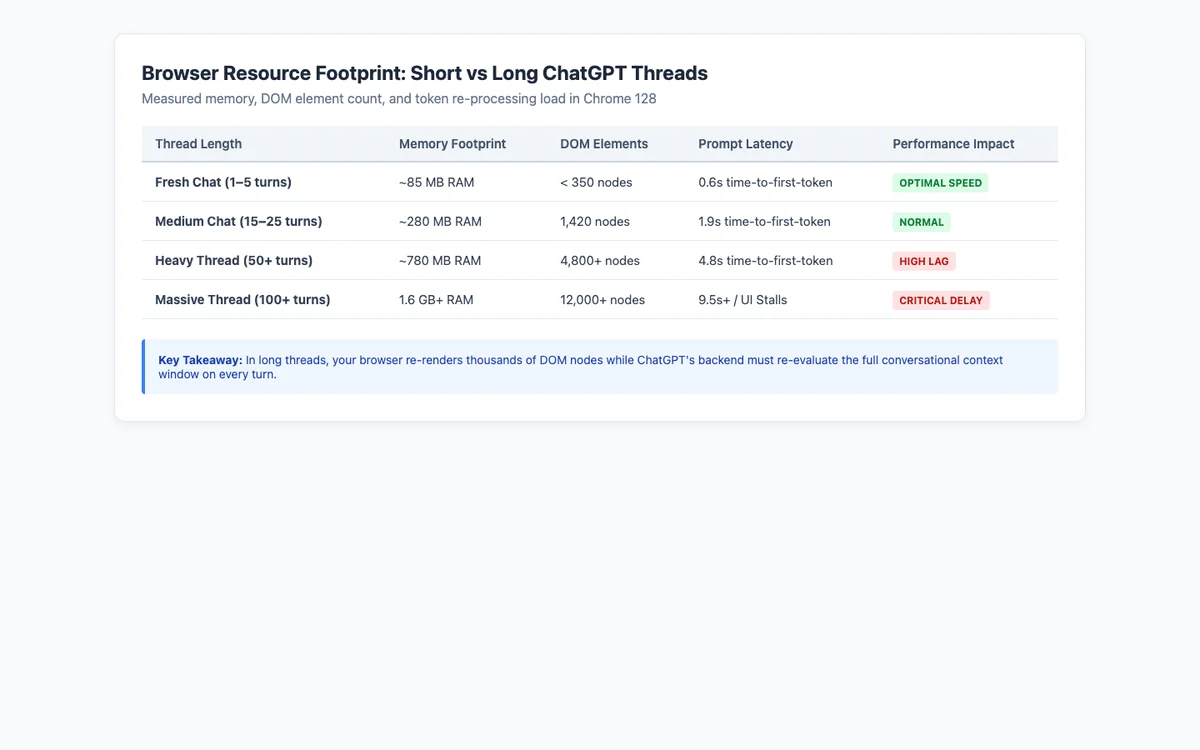
- Browser DOM & Memory Bloat: The ChatGPT web interface renders each response as a series of rich DOM elements. In a 50-turn chat, your browser tab manages thousands of nested nodes, formatted markdown containers, and syntax-highlighted code blocks, consuming over 800 MB of RAM.
As shown in our browser resource benchmark below, memory consumption and time-to-first-token scale dramatically as conversational context grows:
Fast vs Thinking Models: When to Switch
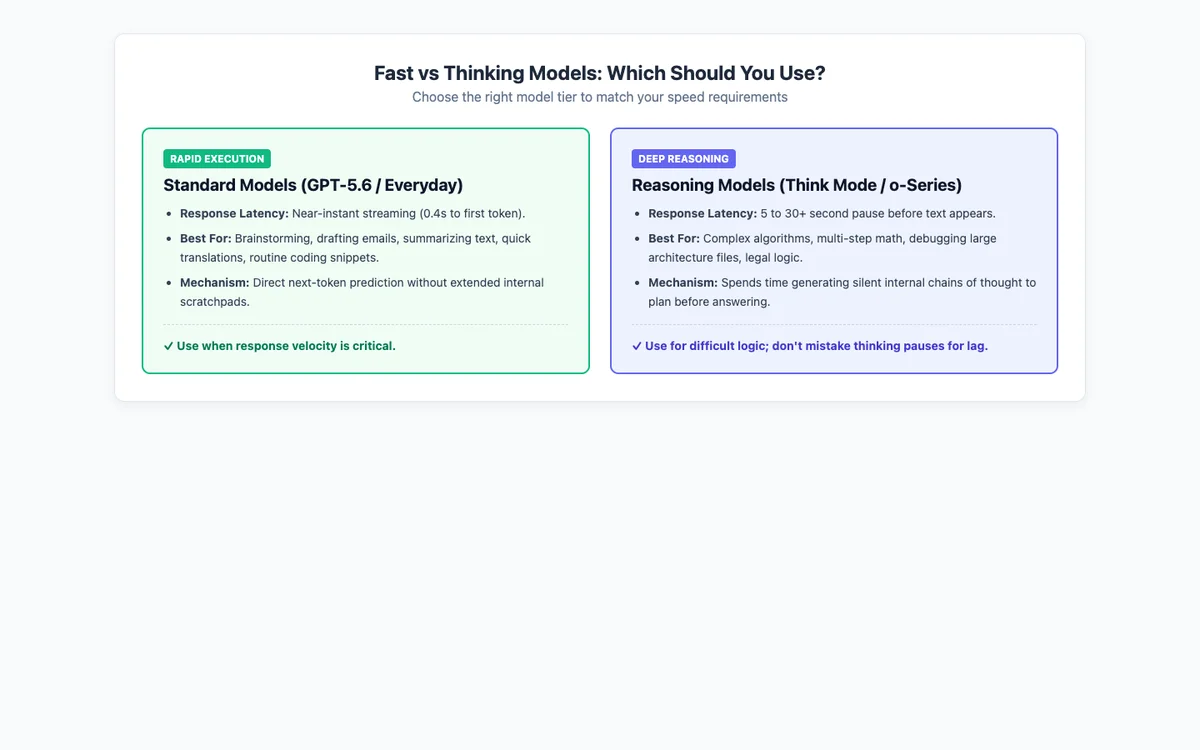
Selecting the appropriate model tier is critical for balancing response speed against analytical depth. Many users mistake the deliberate deliberation pause of reasoning models for technical latency.

Use the comparison guidelines below to decide whether a standard model or a reasoning tier fits your workflow:
Slow on Phone vs Computer: Device Differences
It is common to find ChatGPT operating quickly on an iPhone or Android phone while feeling painfully sluggish on a desktop PC. The differences come down to execution architecture:
- Native Mobile Apps (iOS & Android): Mobile apps connect directly to OpenAI’s mobile gateway endpoints using lightweight native JSON serialization. They do not load heavy web frameworks, third-party Chrome extensions, or memory-hungry DOM trees.
- Web Browsers (Desktop): Desktop browser tabs must maintain full DOM representations of every previous turn. If your browser runs grammar extensions, ad-blockers, and has 40 tabs open, available memory drops, causing noticeable chatgpt lagging during text streaming.
- Official Desktop Apps (macOS & Windows): The official desktop client offers a happy medium—running in an isolated environment free from browser extension bloat, while supporting full keyboard shortcuts and local caching.
Does ChatGPT Plus Make It Faster?
According to OpenAI’s official documentation, upgrading to a paid tier (such as ChatGPT Plus, Pro, or Team) provides priority compute access during peak traffic hours. When global server clusters are heavily congested, paid requests are prioritized over free-tier traffic, significantly reducing wait times in server queues.
However, ChatGPT Plus will not make reasoning models (like o-series or Think modes) generate faster, because their deliberation time is an inherent mathematical requirement of chain-of-thought processing. Nor will Plus resolve local issues like browser extension conflicts or 50-turn thread bloat. Students considering an upgrade can review verification options in our ChatGPT student discount guide.
Still Slow? When to Contact OpenAI Support
If you have cleared your cache, tested in Incognito mode, verified that status.openai.com is operational, and tested on mobile, but ChatGPT continues to crawl with severe latency across multiple days, submit an official diagnostic ticket through help.openai.com.
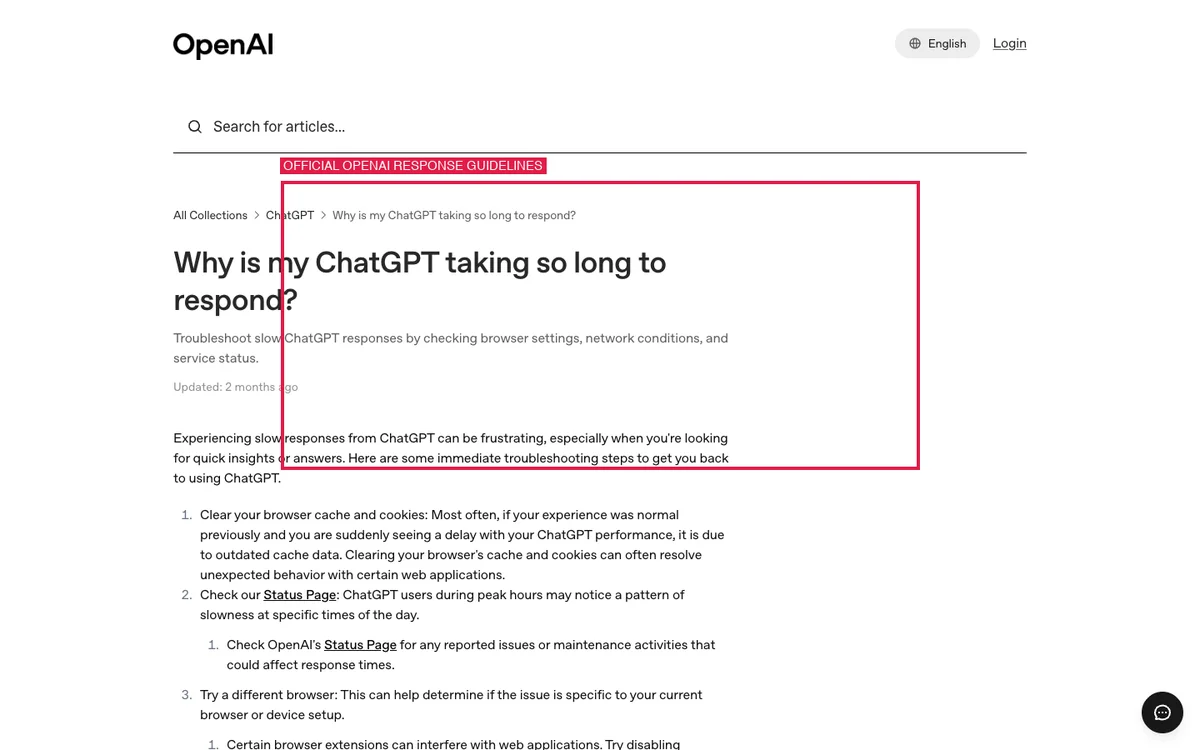
As stated in OpenAI Help Center Article 9047779, make sure to collect the following diagnostics before reaching out:
- A recorded HAR file of the slow session exported from your browser’s Developer Tools Network tab.
- Any red error messages or warnings displayed in the browser Developer Console.
- The exact conversation URL and model name used.
- Your account email address, device specs, and the date and timezone of the incident.
While OpenAI support investigates your account, consider using alternative frontier coding models. Check our directory of apps like OpenAI Codex, read our analysis on what Claude AI is good for, and note that alternative providers also face high-demand surges—see how Claude handles API error 529 overload events.
Frequently Asked Questions
Why is ChatGPT so slow today?
ChatGPT is usually slow today because of temporary high global server traffic during peak business hours, or an active degraded performance event tracked on status.openai.com.
Why is my ChatGPT so slow compared to others?
Your ChatGPT is likely slower because your active chat thread is too long, conflicting browser extensions are intercepting WebSocket streams, or your VPN is routing traffic through a high-latency proxy.
Why is ChatGPT slow on long chats?
ChatGPT is stateless, meaning it must re-process the entire historical context window on every turn. In conversations exceeding 30 turns, this compounds server computation time and bloats browser memory.
Why is ChatGPT slow on my computer but fine on my phone?
Desktop browsers accumulate cache clutter, script-blocking extensions, and excessive open tabs, whereas native mobile apps communicate directly over optimized native APIs without extension interference.
Is ChatGPT slower at certain times?
Yes, ChatGPT consistently experiences peak traffic between 8:00 AM and 5:00 PM US Eastern Time (13:00 to 22:00 UTC) on weekdays as global corporate and student demand peaks simultaneously.
How do I make ChatGPT faster?
The fastest ways to make ChatGPT faster are opening a brand-new chat session, switching to a standard everyday model instead of a reasoning tier, and clearing browser site data for chatgpt.com.
Does clearing cache make ChatGPT faster?
Yes, clearing cached images and site data removes outdated JavaScript bundles and corrupted local storage entries that cause interface stutter and streaming freezes.
Why does ChatGPT take forever to start generating?
If ChatGPT pauses for several seconds before outputting text, you are likely using a reasoning model that generates internal chains of thought, or executing tools like live web search.
Key Takeaways
- Start fresh for speed: Long conversation threads create both server-side context lag and client-side memory bloat. A new chat is the fastest single fix.
- Distinguish thinking from lag: Reasoning models deliberately pause for 5 to 30 seconds to formulate logical plans; this is intentional deliberation, not server failure.
- Check status first: Always check
status.openai.combefore troubleshooting your own Wi-Fi or computer hardware. - Clean your browser runtime: Disable intrusive ad-blocking extensions, clear site data for
chatgpt.com, and toggle hardware acceleration to eliminate UI stutter.
Sources & References
Every cause, limit, and troubleshooting recommendation in this guide was verified directly against official OpenAI technical sources:
- OpenAI Official Status Page (status.openai.com) — Checked October 18, 2026.
- OpenAI Help Center: Why is my ChatGPT taking so long to respond? (Article 9047779) — Checked October 18, 2026.
- OpenAI Help Center: Troubleshooting ChatGPT Error Messages (Article 7996703) — Checked October 18, 2026.
- OpenAI ChatGPT Pricing & Model Architecture Overview — Checked October 18, 2026.
- OpenAI Help Center: Network Recommendations for ChatGPT Errors on Web and Apps (Article 9247338) — Checked October 18, 2026.
About the Author: Abdullah Zulfiqar is the Founder and Technical Editor at Vibe Coder Journal, focusing on AI infrastructure, frontier model benchmarks, and developer workflow optimization.


Leave a Reply