

Vibe Coder Journal · Verified against vendor documentation, 23 September 2026
If you are searching for apps like Codex, there is a decent chance you already hit the thing that sends most people looking: Codex in the terminal is not included on the Free or Go plans. You install the CLI, run it, and discover it wants a ChatGPT Plus subscription at $20 a month or an API key with billing switched on.
That is the practical trigger. But there is a second problem underneath it, and it is the reason most comparison lists of Codex alternatives are useless: Codex is not one app any more. It is a brand covering four separate products, and an alternative to one of them is not an alternative to the others.
This page sorts the alternatives by which part of Codex you are actually trying to replace, using each vendor’s own published plans and limits. Every number below has a source and a date.
What is Codex, exactly?
OpenAI describes Codex as “one agent for everywhere you code.” In practice that means four distinct surfaces, plus a set of integrations on top:
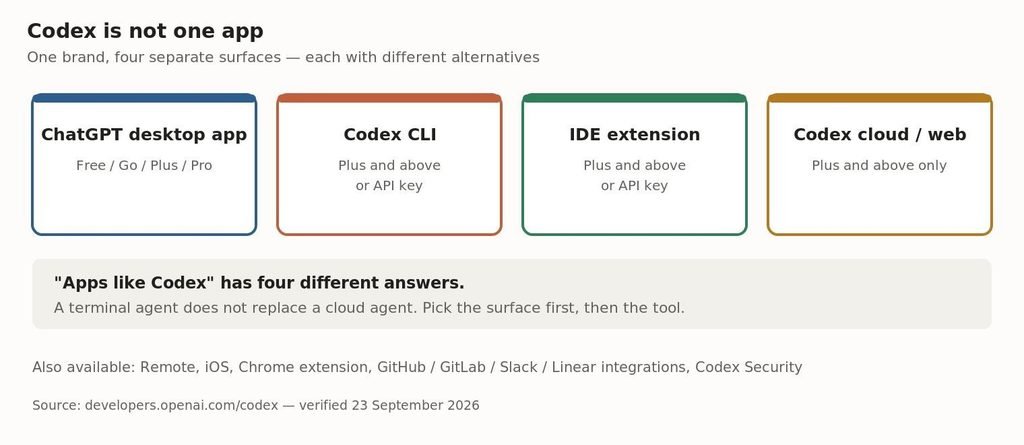
Codex spans four surfaces. An alternative to the CLI is not an alternative to the cloud agent.
This matters because “apps like Codex” has four different correct answers. Aider replaces the CLI and cannot touch the cloud agent. Cursor replaces the IDE extension and is not a terminal tool. Treating them as interchangeable is how you end up installing the wrong thing.
Why people look for alternatives: the free tier does not include a terminal
Here is what each Codex plan unlocks, from OpenAI’s own pricing documentation.
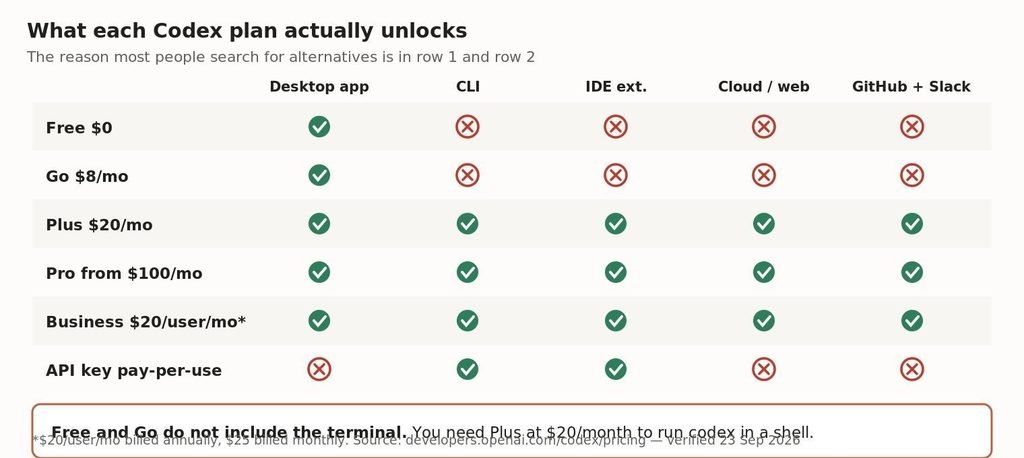
Free and Go give you the desktop app only. The CLI, the IDE extension and the cloud agent all start at Plus.
| Plan | Price | What you get |
|---|---|---|
| Free | $0/mo | GPT-6 Luna at Standard speed in the desktop app, subject to rollout |
| Go | $8/mo | Same as Free — desktop app only |
| Plus | $20/mo | Web, CLI, IDE extension, iOS, cloud integrations. GPT-6 Sol and Luna |
| Pro | from $100/mo | 5x or 20x higher rate limits than Plus |
| Business | $20/user/mo* | ChatGPT and Codex across desktop and mobile |
| API key | pay-per-use | CLI, SDK and IDE only. No GitHub review, no Slack |
*Billed annually with 2+ users; $25 per user per month billed monthly. Source: developers.openai.com/codex/pricing, verified 23 September 2026.
The row that sends people searching: at $0 and at $8/month you get a desktop app and nothing else. There is no free path to running codex in a shell. The API-key route gives you the CLI but removes the cloud features — no automatic GitHub code review, no Slack integration.
If you want an agent in your terminal
This is the largest group of people searching for Codex alternatives, and it is where the free options are genuinely good.
Gemini CLI — the strongest free option on published numbers
Google publishes hard limits rather than vague allowances, which makes it the easiest alternative to verify:
| Sign-in method | Requests / day | Requests / min | Models |
|---|---|---|---|
| Google account | 1,000 | 60 | Full Gemini family |
| Gemini API key (unpaid) | 250 | 10 | Flash only |
| Vertex AI Express | variable | variable | 90 days before billing required |
| Code Assist Standard | 1,500 | 120 | Full Gemini family |
| Code Assist Enterprise | 2,000 | 120 | Full Gemini family |
Source: Gemini CLI docs, quota-and-pricing. Verified 23 September 2026.
A thousand model requests per day, free, in the terminal, is a materially different offer from zero. If your reason for leaving Codex is that the CLI is paywalled, this is the direct answer.
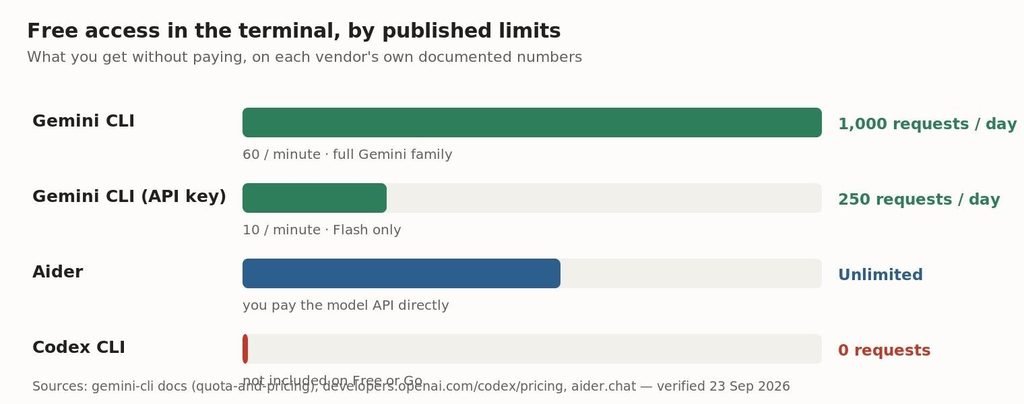
Free terminal access on each vendor’s published numbers. Codex is the only one at zero.
Aider — you bring the model, nothing caps you
Aider is open source and installs with pip install aider-install. It has no subscription and no request ceiling, because it does not host anything: you point it at a model API and pay that provider directly. “Unlimited” here means nobody is throttling you, not that it is free.
Claude Code and OpenCode
Claude Code is the closest like-for-like to the Codex CLI in shape and in pricing model. We cover its plan structure and usage limits separately in our Claude pricing breakdown, and compare the two agents directly in Codex CLI vs Claude Code.
OpenCode is the community option in this category: open source, provider-agnostic, and able to run against a local model if you have the hardware for it.
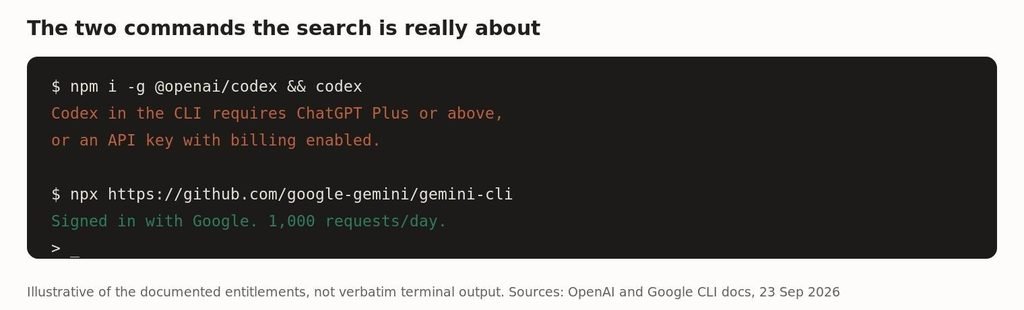
The practical difference, in two commands.
If you want it inside your editor
The Codex IDE extension has a crowded set of alternatives, and unlike the CLI category, none of the serious ones are free without limits.
- Cursor — a full VS Code fork rather than an extension. The most common switch for people who want the editor itself to be agentic.
- Cline — open source, runs as a VS Code extension, bring your own API key. The closest thing to Aider’s model for people who live in an editor.
- Continue — open source, configurable against local or hosted models.
- GitHub Copilot — the incumbent, and worth checking first if your employer already pays for it. See Claude Code vs GitHub Copilot for how the agent modes differ.
If you want the cloud agent
This is the hardest part of Codex to replace and the part most alternative lists ignore entirely. Codex cloud runs tasks asynchronously in a hosted environment, reviews pull requests automatically, and connects to GitHub, GitLab, Slack and Linear. It requires Plus or above — an API key will not get you there.
The genuine equivalents are few: Claude Code’s web and GitHub integrations, Devin, and Google’s Jules. None of them is a drop-in, and all of them are paid. If asynchronous cloud work is what you rely on, switching is a bigger decision than swapping a CLI.
Is the Codex CLI open source, and does that help?
Yes to the first, mostly no to the second, and the distinction is worth understanding before you assume open source means free.
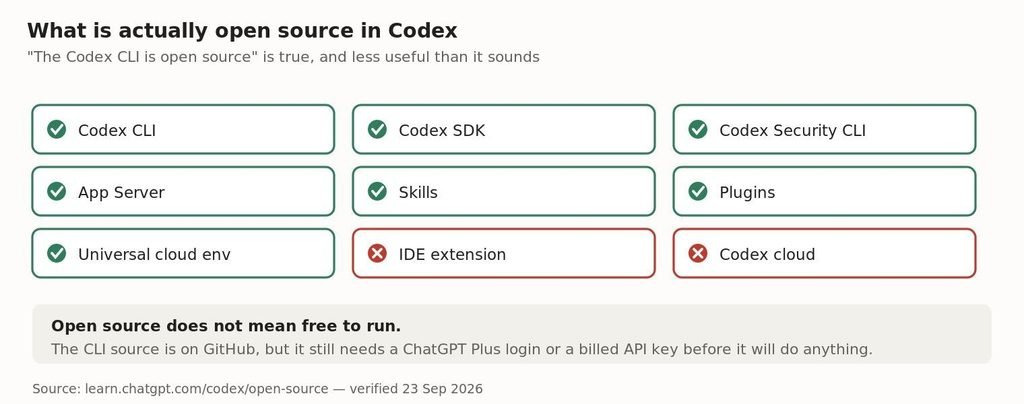
Seven Codex components are open source. The IDE extension and the cloud service are not.
OpenAI publishes the CLI, the SDK, the Security CLI, the App Server, Skills, Plugins and the universal cloud environment on GitHub. The IDE extension and Codex cloud are closed.
Open source does not mean free to run. You can read and fork the Codex CLI source, but the binary still needs a ChatGPT Plus login or a billed API key before it will complete a single task. If your goal is zero cost, the licence is not the thing to look at — the entitlement is.
Which alternative should you actually pick?
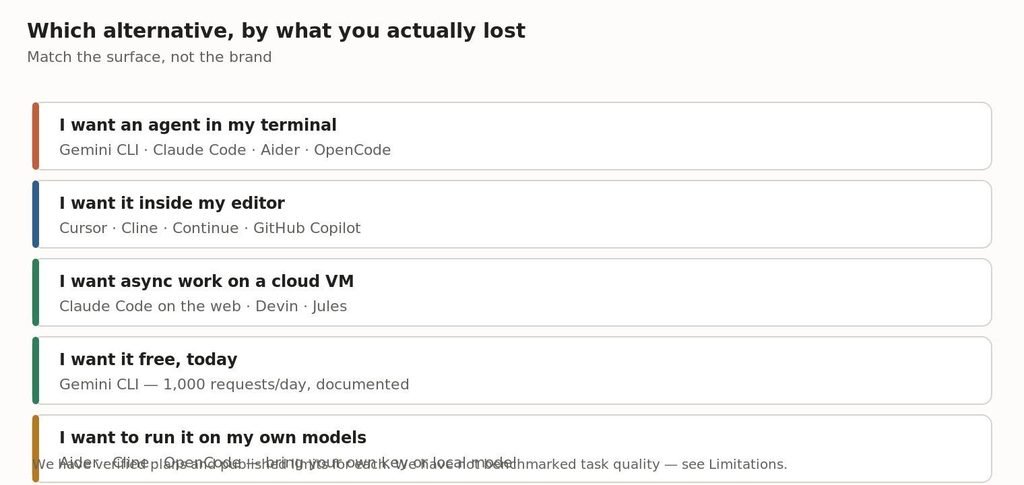
Match the surface you lost, not the brand you left.
Four honest recommendations rather than one winner:
- You hit the CLI paywall and want free — Gemini CLI. A thousand documented requests a day is the best free terminal offer currently published.
- You are already paying OpenAI $20 — stay. Plus already includes the CLI, the IDE extension, the cloud agent and the GitHub and Slack integrations. Leaving costs you the cloud features.
- You want control over the model — Aider or Cline. Both are open source, both let you point at any provider or a local model, and neither adds a subscription on top.
- You want an agentic editor rather than a terminal — Cursor. It is a different working style, not a cheaper Codex.
Limitations
Worth stating plainly, because most lists in this category do not:
- Everything above is verified plan structure, published limits and licence status, taken from vendor documentation on 23 September 2026. It is not a benchmark.
- We have not measured task success rates, code quality or cost per completed task across these tools. Those numbers are the ones that actually decide which is better, and we do not have them yet.
- Plans in this category change monthly. Codex’s Free-tier desktop access is marked “subject to rollout” in OpenAI’s own documentation, which means it may not be live for you.
- Gemini CLI’s free limits are per user per day and Google reserves the right to change them.
Frequently asked questions
Is there a free app like Codex?
Gemini CLI is the closest. Signed in with a Google account it allows 1,000 model requests per day and 60 per minute, free, in the terminal. Codex itself has no free terminal tier — Free and Go cover the desktop app only.
Is the Codex CLI free?
The source code is open and published on GitHub, but running it requires a ChatGPT Plus subscription at $20/month or above, or an API key with billing enabled. Open source and free to use are different things here.
What is the cheapest way to use Codex?
ChatGPT Go at $8/month is the cheapest paid plan, but it only unlocks the desktop app. The cheapest plan that includes the CLI, IDE extension and cloud agent is Plus at $20/month.
Can I use Codex with just an API key?
Yes, for the CLI, SDK and IDE extension. You lose all the cloud-based features, including automatic GitHub code review and the Slack integration, and you pay standard API rates for usage.
What replaces Codex cloud?
There is no drop-in replacement. Claude Code’s web and GitHub integrations, Devin and Jules are the nearest equivalents, and all are paid. This is the hardest Codex surface to leave.
Is Cursor an alternative to Codex?
Only to the IDE extension. Cursor is an editor you work inside; the Codex CLI is a terminal agent. If you wanted the terminal, Cursor does not replace it.
Sources
- Codex overview and surfaces — https://developers.openai.com/codex
- Codex pricing and plan entitlements — https://developers.openai.com/codex/pricing
- Codex open-source components — https://learn.chatgpt.com/codex/open-source
- Gemini CLI quotas and pricing — https://google-gemini.github.io/gemini-cli/docs/quota-and-pricing.html
- Aider — https://aider.chat/
All plan details and limits verified against vendor documentation on 23 September 2026. Pricing in this category changes frequently — check the linked sources before acting on any figure.

Leave a Reply