

If you're a student learning to build software with AI, the GitHub Student Developer Pack is the single highest-value free bundle in tech. Verified students get GitHub Copilot free — plus GitHub Pro, cloud credits, domains, and 80+ other professional tools at no cost. The catch? You have to get approved first, and a small mistake on the form can send your application back. This guide walks you through exactly what the github student developer pack includes in 2026, how to apply so you're approved the first time, how to switch on your free Copilot, and what happens when you graduate. Every fact below was checked against GitHub's and Microsoft's official pages today.
Last checked: 2026-10-24
Quick answers
- Is the GitHub Student Developer Pack free? Yes — every offer in the pack is free for verified students, though some are time-limited (3 months, 1 year, etc.).
- Is GitHub Copilot free for students? Yes. Verified students get the Copilot Student plan free: unlimited code completions plus an allowance of AI credits for chat and agent features.
- Which Copilot plan do students get? Copilot Student — not "Copilot Pro". It's a separate free plan with auto model selection only.
- Who qualifies? Students 13+ enrolled in a degree- or diploma-granting program (high school, college, university, homeschool) who can prove current enrollment.
- How long does approval take? GitHub doesn't publish an official timeline, so anyone quoting you "3 days" is guessing.
WHAT IS THE GITHUB STUDENT DEVELOPER PACK?
The GitHub Student Developer Pack is GitHub's bundle of free professional developer tools for verified students. GitHub describes it as a selection of 80+ resources, spanning cloud hosting, domains, learning platforms, and AI tooling — everything a student needs to build and ship real software without paying for infrastructure.
It's part of GitHub Education, and it's only for students: teachers, researchers, and faculty can get free GitHub access through other programs, but they are explicitly not eligible for the pack itself. You also can't share or transfer offers, and most time-limited offers can't be redeemed twice — so claim them when you need them, not all on day one.
GITHUB STUDENT DEVELOPER PACK BENEFITS IN 2026: WHAT ACTUALLY MATTERS
The full pack lists 80+ offers, but if you're building apps with AI, a dozen of them carry almost all the value. Here's my ranked shortlist — ranked by what saves you real money or unlocks real building power, not by alphabetical order.
| Offer | What you get free | Normal price (official, where public) | Why it matters for vibe coders |
|---|---|---|---|
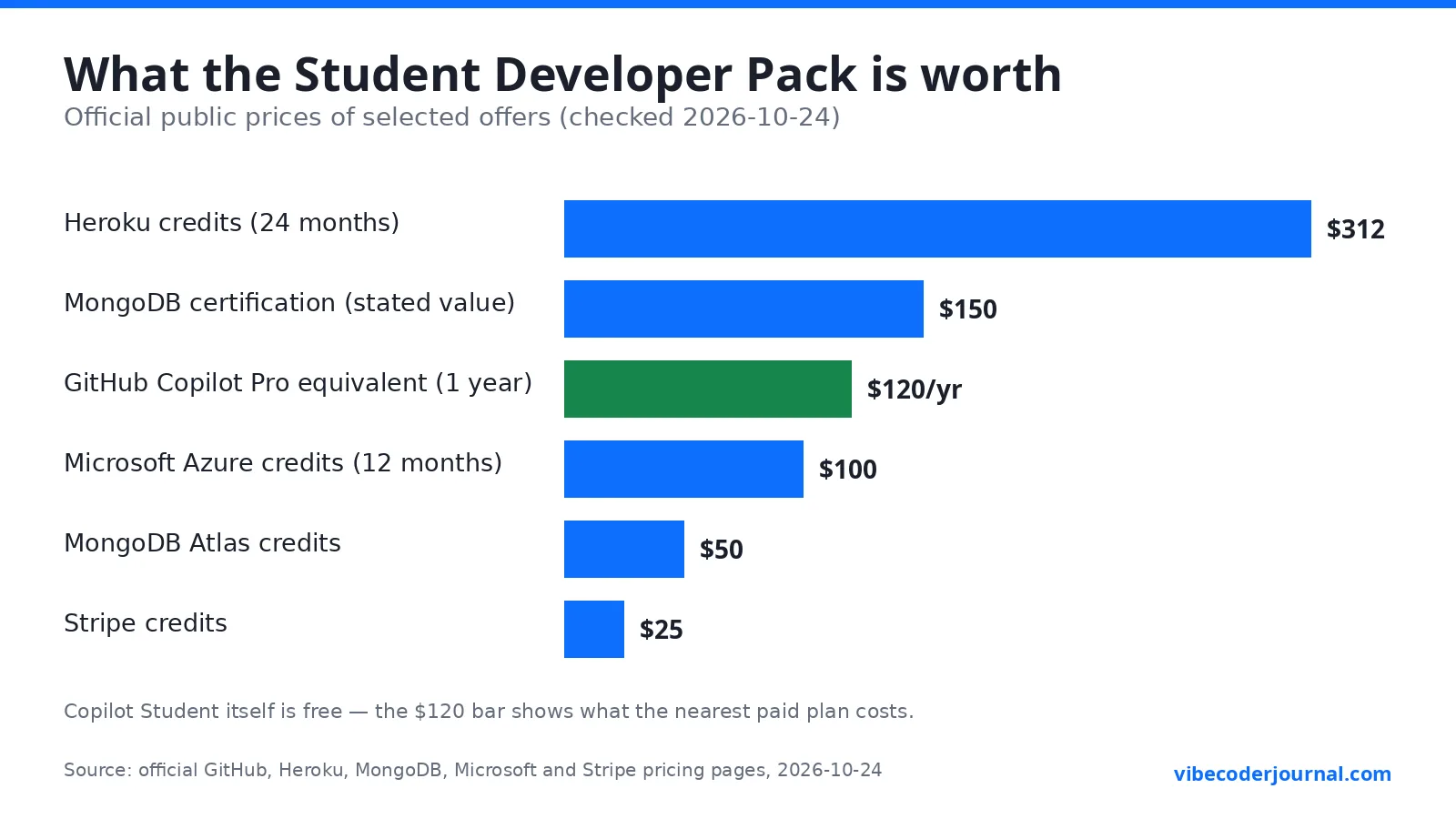
| GitHub Copilot (Copilot Student) | Unlimited code completions + AI credit allowance for chat/agent | $10/mo ($120/yr for Copilot Pro, the nearest paid plan) | Your AI pair programmer in VS Code, JetBrains, CLI |
| GitHub Pro | Pro account while you're a student | — (GitHub doesn't list a standalone Pro price on the pages checked) | Private repos with Pages, wikis, 3,000 Actions minutes/mo, 180 Codespaces core hours/mo |
| GitHub Codespaces | Free Pro-level Codespaces access | Included in Pro above | A full dev environment in the browser — code from a Chromebook |
| Microsoft Azure | $100 credit + 25+ free cloud services for 12 months (18+) | $100 credit | Host your apps, databases, and APIs for free |
| JetBrains | Free subscription, renewed annually | — (price not verified on official pages) | PyCharm, IntelliJ, WebStorm — the best IDEs, free |
| Heroku | $13/month credit for 24 months | $312 over 24 months | Deploy apps without touching a server |
| Namecheap | 1-year .me domain + 1-year SSL certificate | — | Yourname.me for your portfolio |
| MongoDB | $50 Atlas credits + Compass + MongoDB University incl. certification | $150 stated value for the certification | Free database + a cert for your CV |
| DataCamp | 3 months free | — | Learn data skills fast |
| FrontendMasters | 6 months of all courses and workshops free | — | Deep-dive frontend/backend courses |
| Educative | 6 months of 70+ courses free + 30% off subscriptions | — | Hands-on coding courses |
| 1Password | Free for 2 years incl. developer tools | — | Stop reusing passwords across your projects |
A few honest notes on the fine print, straight from GitHub's terms: student validation lasts 2 years, then you must revalidate. Most timed offers start counting when you activate them (not when you're approved), and you can't reset a time-limited offer by making a new account — GitHub explicitly forbids redeeming offers multiple times. Check each offer's own terms before you activate it — a few have extra requirements.
For the complete list of all 80+ offers, GitHub maintains it here: the official Student Developer Pack page.
GITHUB COPILOT FOR STUDENTS: IS IT FREE?
Yes — this is the headline benefit, so let's be precise, because half the internet gets the details wrong.
The plan is called Copilot Student. Not "Copilot Pro free", not "Copilot Individual" (a retired name). GitHub's own plans page lists it as: "Available to verified students. Get access to Copilot's features for free."
What you get:
- Unlimited code completions — the autocomplete-as-you-type feature never runs out.
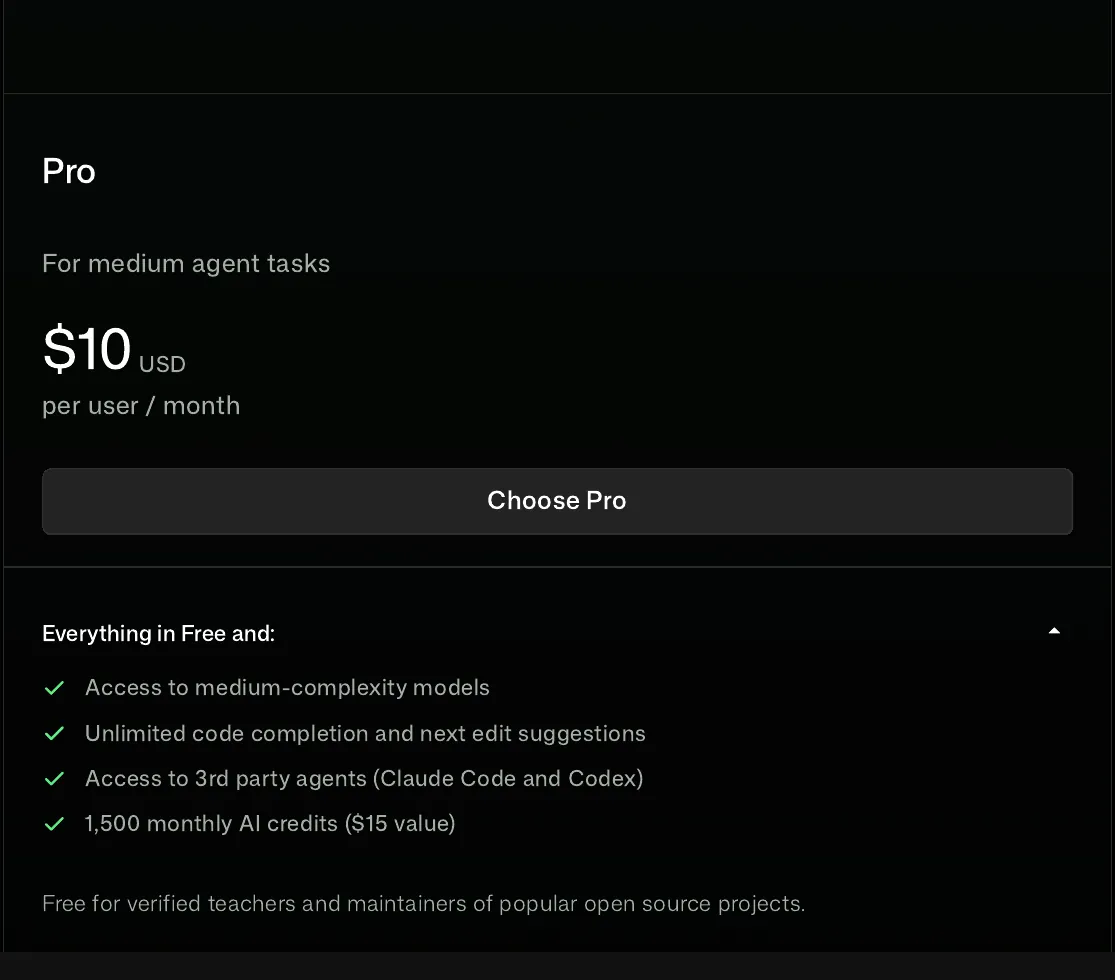
- An allowance of AI credits for chat, agent mode, and other premium features. GitHub does not publish the exact number of credits for the Student plan, so treat any specific number you see quoted online with suspicion. (For reference, paid Copilot Pro includes 1,500 AI credits/month at $10/month, and one credit equals $0.01 of usage. Credits reset on the 1st of each month and don't roll over.)
- Auto model selection only — on the Student plan (and the free tier), GitHub picks the model for you. There's no manual model picker like paid plans have.
What changed recently: in March 2026 GitHub moved students onto this new Copilot Student plan as a long-term structure; in April–June 2026 Copilot moved to usage-based billing across all plans, new sign-ups were briefly paused, and sign-ups reopened on June 17, 2026. As of July 2026, the GitHub Copilot app is available on every plan including Education. I'm mentioning the timeline because older guides (anything written before mid-2026) describe a different system — if a tutorial talks about "premium requests", it's outdated.
HOW TO APPLY FOR THE GITHUB STUDENT DEVELOPER PACK
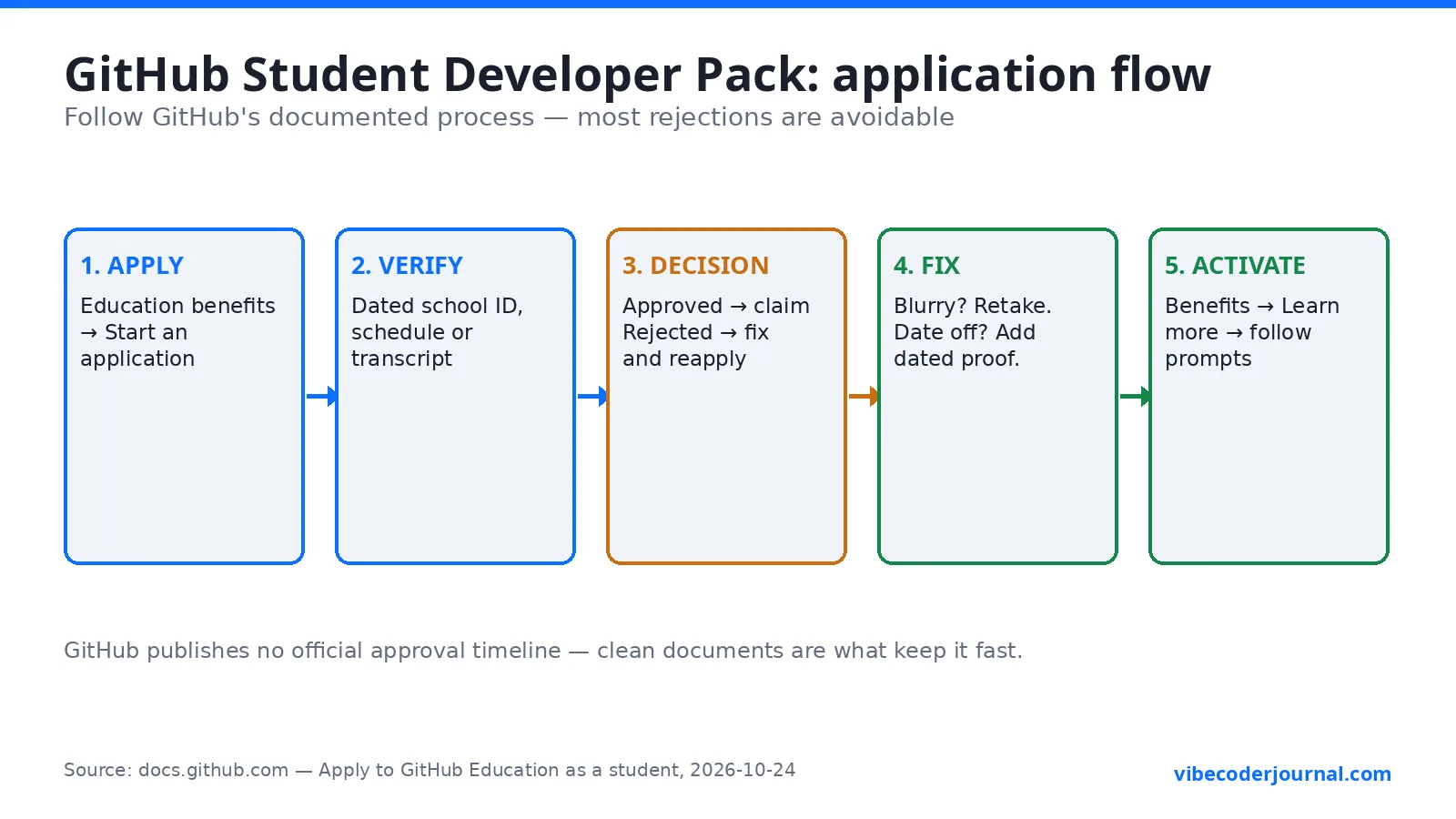
Follow GitHub's documented process exactly — each step below maps to one of GitHub's documented rejection reasons.
- Create (or open) your GitHub personal account. You must apply with a personal account, not an organization.
- Go to your Education benefits settings at github.com/settings/education/benefits and click "Start an application".
- Tell GitHub about your school. Select your school and your role. If your school doesn't issue academic email addresses, you'll need official documentation of that policy (a school webpage or a letter on school letterhead).
- Prove you're currently enrolled. Upload one of: a photo of your school ID showing a current enrollment date, your class schedule, your transcript, or an affiliation/enrollment verification letter. Make sure at least one date is clearly visible and the image isn't blurry.
- Add and verify your academic email if asked. The email must be all lowercase with no plus-addressing (no
you+school@example.com). If your school's domain isn't recognized, contact GitHub Education Support with your school's full name, website, and the email domain. - Submit and wait. Once approved, head to the GitHub Education portal to start claiming benefits.
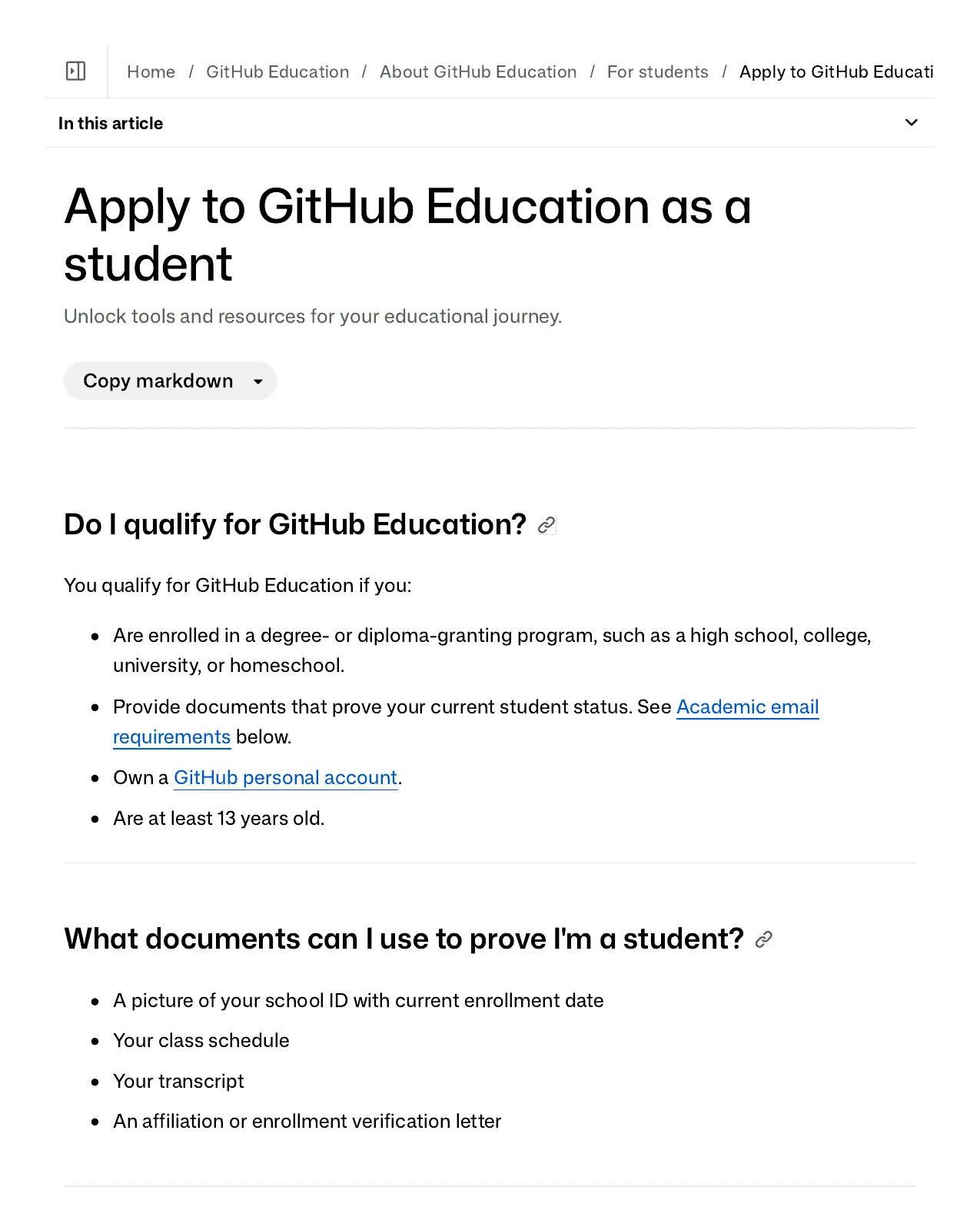
No .edu email? You can still qualify. GitHub's docs explicitly cover students whose schools don't issue academic emails: provide official documentation of that policy and reapply. Homeschooled students and high-school students are eligible too, as long as the program grants a degree or diploma and you can document enrollment. Bootcamp students qualify if their school is part of the GitHub Campus Program — informal courses outside it don't count.
WHY GITHUB REJECTS STUDENT APPLICATIONS (AND HOW TO FIX EACH)
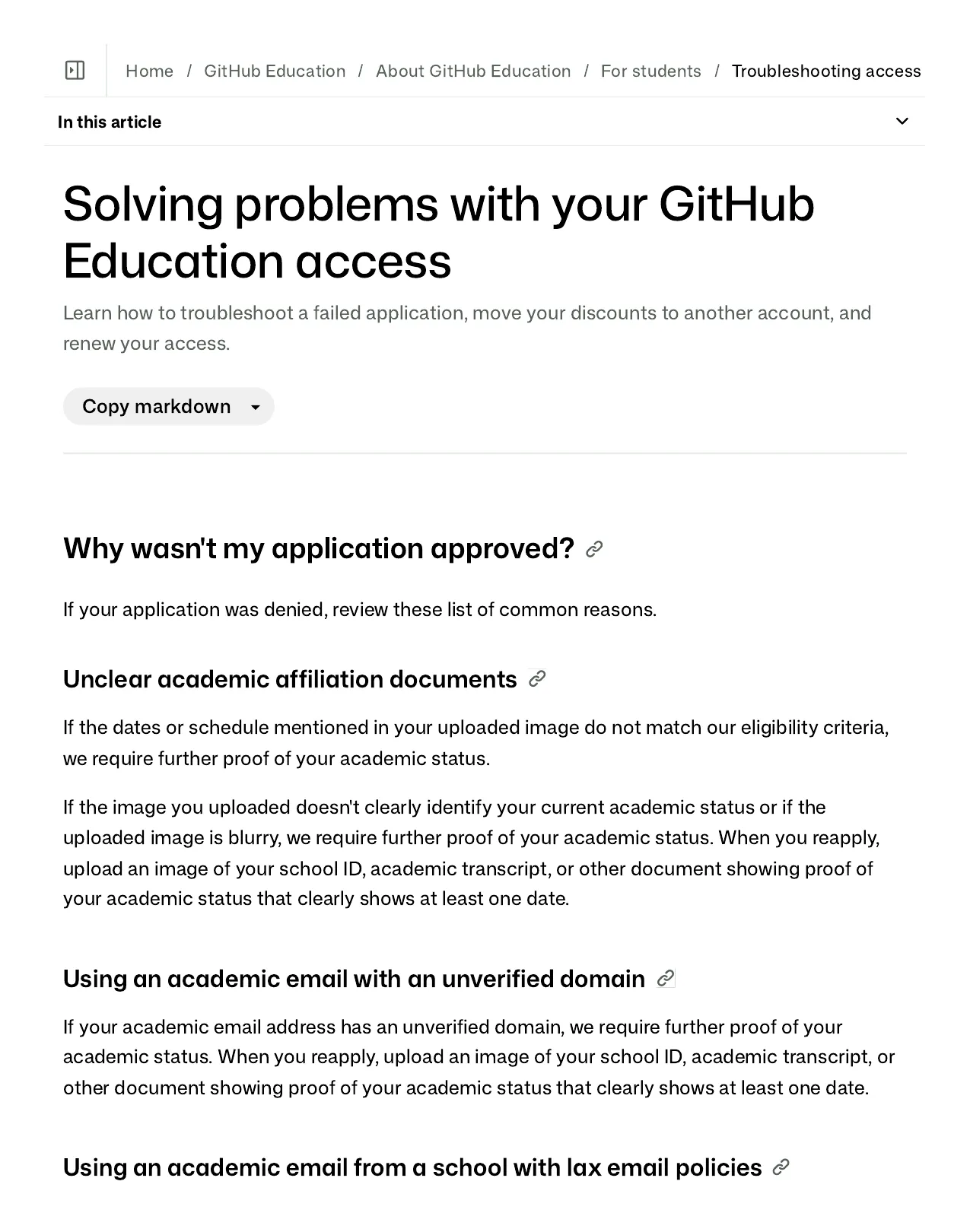
GitHub's troubleshooting page lists four rejection reasons. Here's each one with the fix GitHub itself gives:
| Why you were rejected | How to fix it (per GitHub) |
|---|---|
| The dates or schedule in your uploaded image don't match the eligibility criteria | Provide further proof of your current academic status |
| Your image doesn't clearly identify your current academic status, or it's blurry | Reapply with a school ID, transcript, or document that clearly shows at least one date — retake the photo in good light |
| Your academic email has an unverified domain | Reapply with a dated school ID, transcript, or enrollment document instead |
| Your school issues email addresses before paid enrollment | Reapply with a dated school ID, transcript, or enrollment document instead |
Two more traps from the same docs page: an academic email already used for a Pack on a different GitHub account can't be reused — merge your accounts and keep the one that got the benefit. And maintaining more than one individual GitHub account violates GitHub's Terms of Service, so don't try the "fresh account" workaround.
HOW TO ACTIVATE FREE GITHUB COPILOT AFTER YOU'RE APPROVED
This is the step most guides skip: verification and Copilot activation are two separate steps, and the Copilot benefit can take several days to finish applying after you're verified.
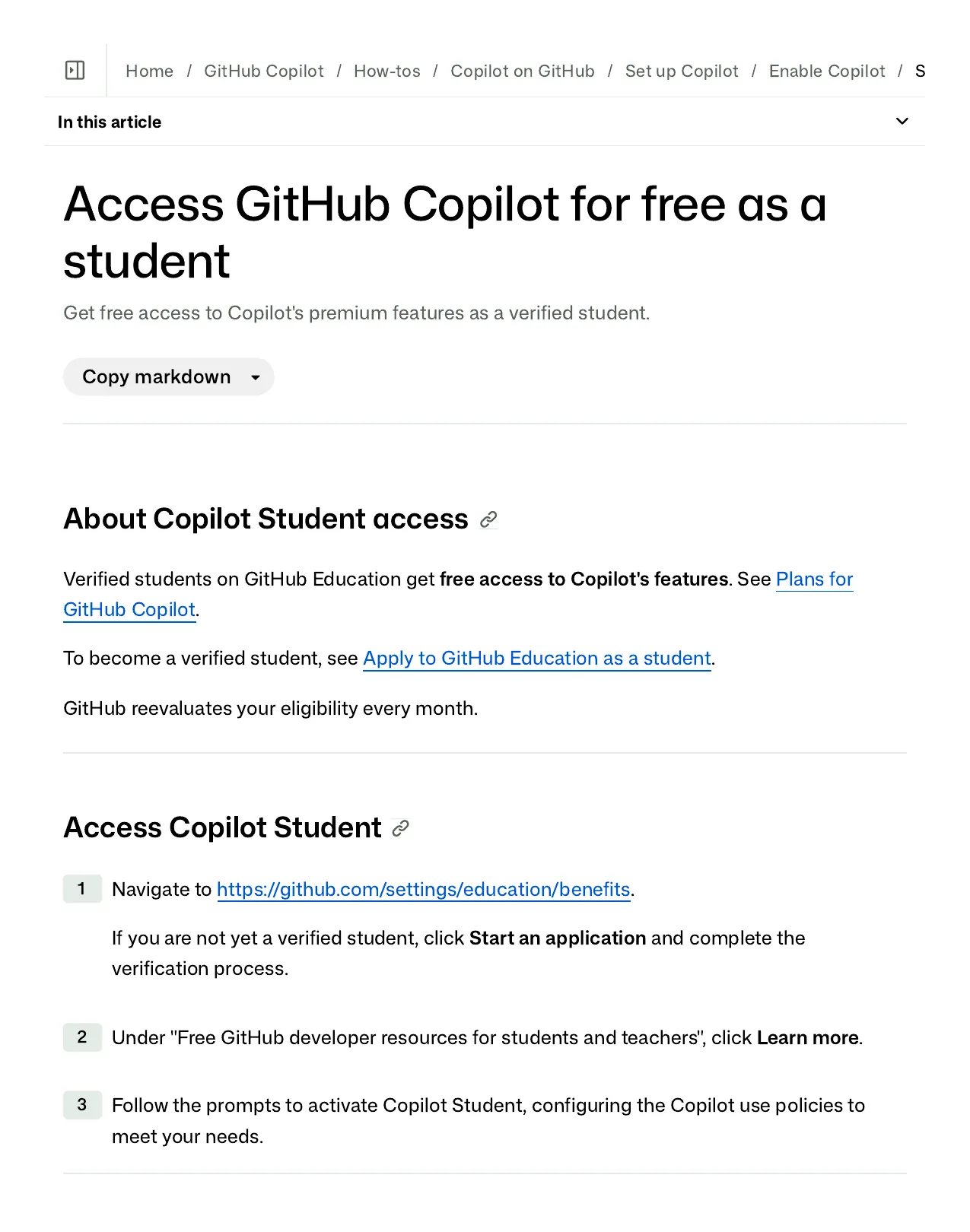
- Go to github.com/settings/education/benefits.
- Under "Free GitHub developer resources for students and teachers", click Learn more.
- Follow the prompts to activate Copilot Student.
- If you only see paid Copilot options, do NOT buy anything. GitHub's docs say this explicitly: wait a few days and try again. If it still doesn't appear, contact GitHub Support.
Then install it where you code:
- VS Code / Visual Studio: install the GitHub Copilot extension from the marketplace and sign in with your GitHub account.
- JetBrains IDEs: install the GitHub Copilot plugin (your JetBrains student subscription from the pack covers the IDE itself).
- CLI: GitHub's CLI supports Copilot — check the official setup docs for the current command.
One more mechanic worth knowing: GitHub re-checks your student eligibility every month for Copilot. If your student status lapses, the free access lapses with it.
GITHUB PRO FOR STUDENTS: WHAT CHANGES ON YOUR ACCOUNT
The pack includes GitHub Pro free while you're a student. In practice this unlocks: required reviewers, protected branches, code owners, GitHub Pages, wikis on private repositories, multiple assignees and reviewers, autolinked references, and standard support — plus usage quotas that matter when you build: 3,000 GitHub Actions minutes per month, 1 GB of Actions storage, 180 Codespaces core hours and 20 GB of Codespaces storage per month, 2 GB of Packages storage, and 10 GB of Git LFS storage with bandwidth. For a student shipping side projects, the Codespaces hours alone mean you can develop from any machine with a browser.
MICROSOFT COPILOT FOR STUDENTS IS A DIFFERENT THING
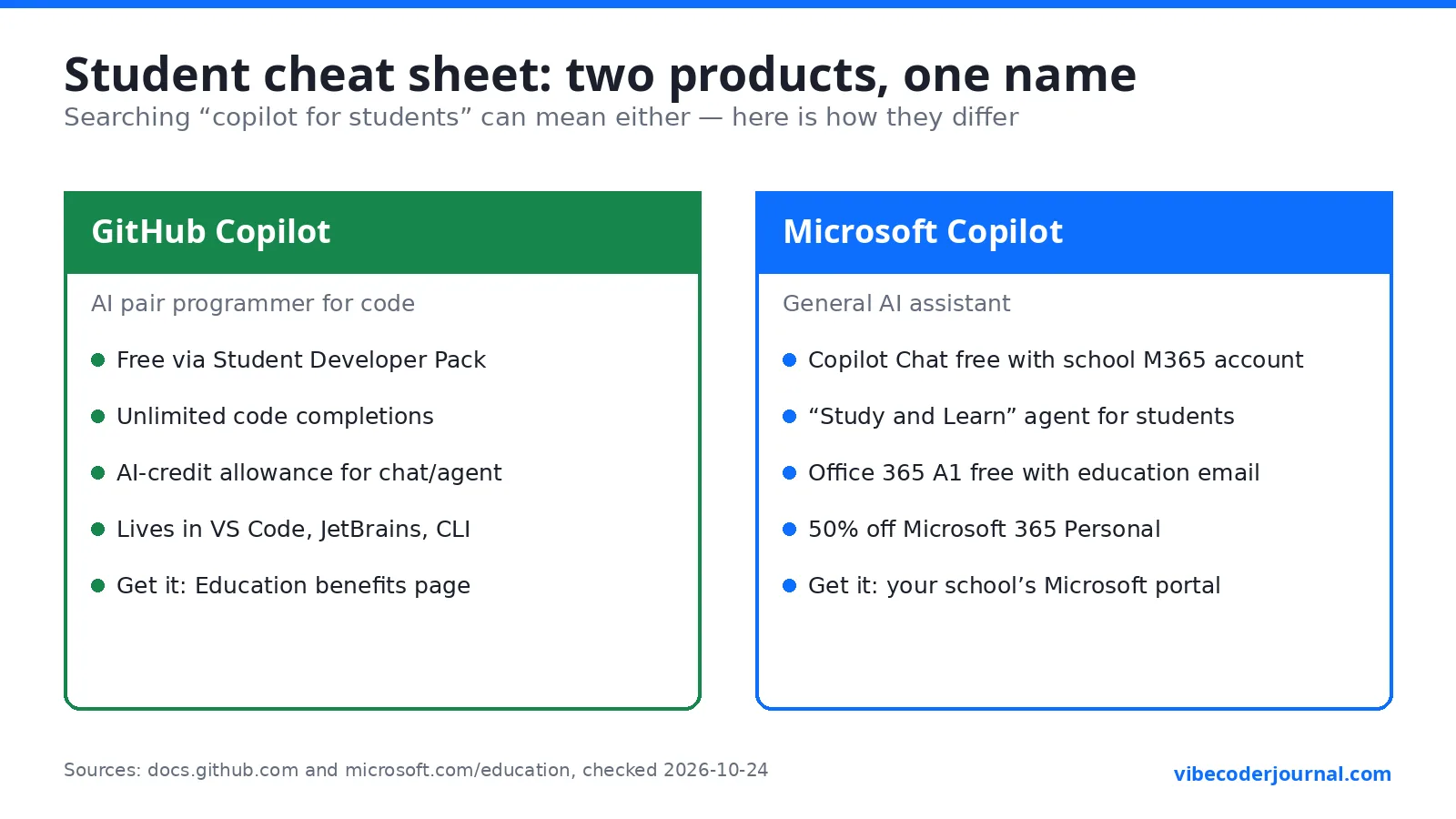
Here's the trap, and it's why this section exists: "Copilot" is two completely different products.
- GitHub Copilot = the AI coding assistant that lives in your editor. This is what the Student Developer Pack gives you free.
- Microsoft Copilot = Microsoft's general AI assistant (in Windows, Edge, and Microsoft 365 apps). It has nothing to do with the Student Developer Pack.
If you searched "is copilot free for students" meaning the Microsoft one, here's what Microsoft actually offers students today:
| GitHub Copilot (for students) | Microsoft Copilot (for students) | |
|---|---|---|
| What it is | AI pair programmer for code | General AI assistant for study, writing, Office apps |
| Student price | Free (Copilot Student plan) | Microsoft 365 Copilot Chat is free for users with Microsoft 365 A1/A3/A5 signed in with a school/work account (faculty, staff, higher-ed students 13+) |
| Also for students | Unlimited completions + AI credit allowance | "Study and Learn" agent at no extra cost for education customers; Office 365 A1 free with eligible education email; 50% off Microsoft 365 Personal (exact discounted price not published); limited-time 12 months of Microsoft 365 Premium free with a college email (no end date published) |
| Where to get it | github.com/settings/education/benefits after pack approval | Your school's Microsoft 365 education portal |
| After graduation | Ends when student status lapses (checked monthly) | Education access ends; personal plans take over |
Bottom line: for coding, you want GitHub Copilot via the Student Developer Pack. For studying and Office work, check what your school already provides through Microsoft 365 Education — many students already have it and don't know.
WHAT HAPPENS WHEN YOU GRADUATE
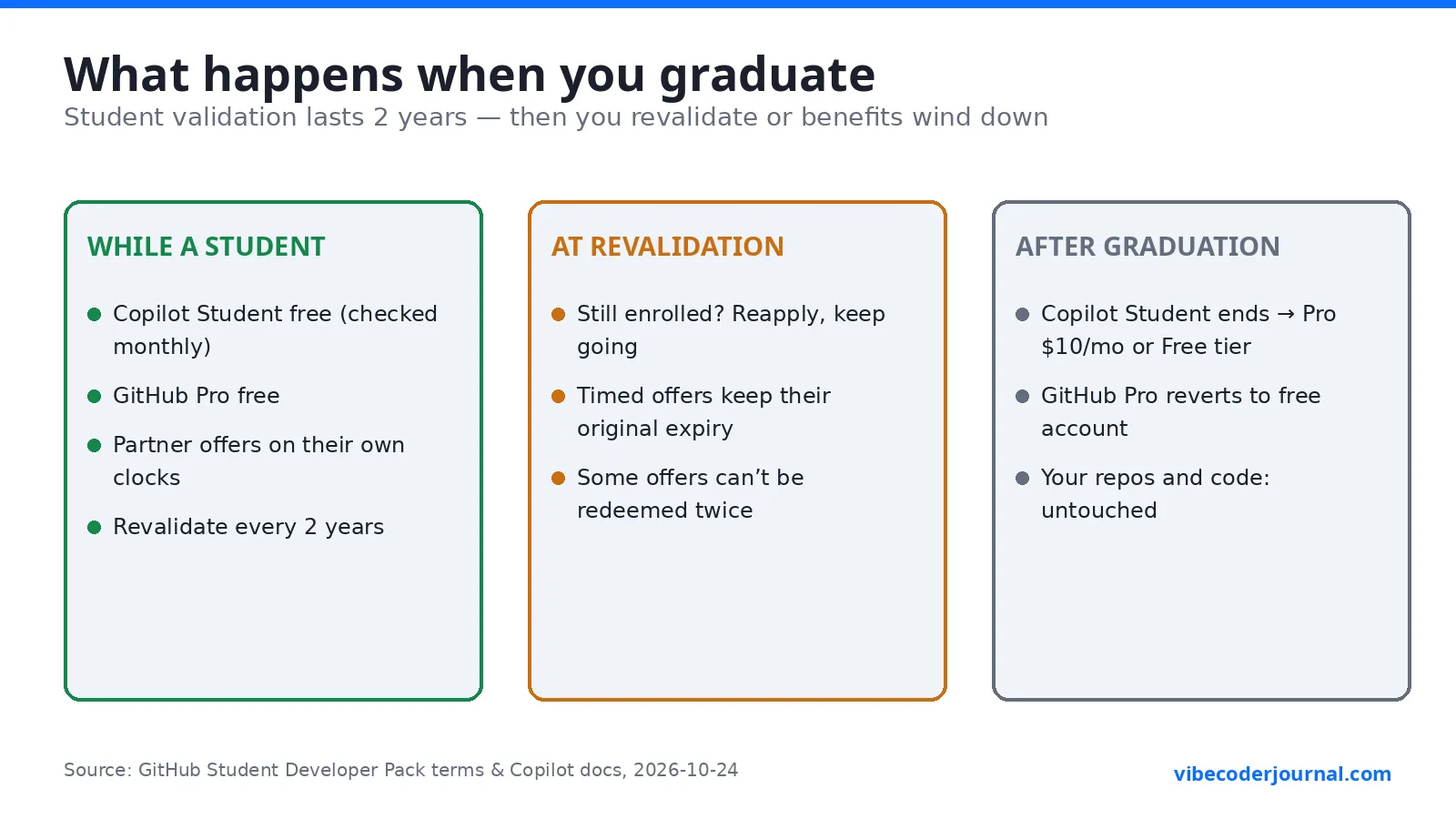
- Your student validation lasts 2 years from approval. After that you must revalidate — if you're still enrolled, you can reapply.
- GitHub re-checks Copilot eligibility monthly. When you stop being a student, Copilot Student ends and you'd move to a paid plan (Copilot Pro is $10/month at today's prices) or the limited free tier.
- GitHub Pro reverts to a free account when student status ends.
- Partner offers: each runs on its own clock. Most timed offers (3 months, 1 year, 2 years) started when you activated them and simply expire. Some "while you're a student" offers end with your status. You cannot renew an expired offer by re-verifying or making a new account — GitHub's terms forbid redeeming offers multiple times.
- What you keep: your repos, your code, your portfolio, and anything you built. Nothing gets deleted.
FREE STUDENT ALTERNATIVES IF YOU DON'T QUALIFY
Not enrolled right now? You still have options while you sort out eligibility:
- Copilot Free tier — $0 with 2,000 completions a month and entry-level models. Enough to try AI-assisted coding.
- Student discounts on other AI tools — check our guides: Claude student discount and ChatGPT student discount.
- No .edu email? Read how to get a free edu email for Cursor — the same verification ideas apply.
- Choosing your AI coding tool — see Claude Code vs GitHub Copilot and Copilot vs ChatGPT, plus our roundup of the best vibe coding tools and rankings.
MY TAKE: WHICH BENEFITS TO CLAIM FIRST
Opinion — clearly marked as ours, not GitHub's. If I were starting today as a student learning to build with AI, I'd claim in this order: (1) GitHub Copilot Student — it's the daily driver, activate it the day you're approved; (2) GitHub Pro + Codespaces — so you can code from anywhere; (3) Azure $100 credit — deploy one real project, because a live URL teaches more than ten tutorials; (4) a Namecheap .me domain — point it at your portfolio before someone else takes your name; (5) JetBrains — once you're past beginner tutorials and want a serious IDE. Don't binge-claim all 80 offers on day one — most timers start at activation, so claim each when you have a real use for it.
FAQ
Is GitHub Copilot free for students?
Yes. Verified students get the Copilot Student plan free through the GitHub Student Developer Pack. It includes unlimited code completions plus an allowance of AI credits for chat and agent features, with models chosen automatically. Apply via GitHub Education, get verified, then activate Copilot separately in your education benefits settings.
Is Copilot Pro free for students?
No — and this is the internet's most common mistake on this topic. Students don't get "Copilot Pro free"; they get a separate plan called Copilot Student free. Copilot Pro is the $10/month paid plan. If a guide promises you "Copilot Pro free for students", it's using the wrong plan name — the student plan is what you actually receive.
How do I get the GitHub Student Developer Pack?
Create a GitHub personal account, go to github.com/settings/education/benefits, click "Start an application", and prove current enrollment with a dated school ID, class schedule, transcript, or enrollment letter (plus a verified academic email if asked). Once approved, claim each partner offer from the GitHub Education portal.
How long does verification take?
GitHub doesn't publish an official approval timeline, so any site quoting "2–3 days" is guessing from anecdotes. Submit clean, clearly-dated proof the first time — blurry images and mismatched dates are the top reasons applications bounce back, which is what actually makes the process slow.
Can I get the pack without a .edu email?
Often, yes. If your school doesn't issue academic emails, GitHub lets you prove enrollment another way: upload a dated school ID, transcript, or schedule, and provide official documentation of your school's no-email policy (a school webpage or letter on letterhead). Homeschool and high-school students are eligible too.
Does Microsoft Copilot have a student plan?
Microsoft Copilot (the general AI assistant — different product from GitHub Copilot) doesn't have a "student plan" with that name. Instead, students 13+ signed in with a school account get Microsoft 365 Copilot Chat at no extra cost on eligible education plans, plus Office 365 A1 free and 50% off Microsoft 365 Personal. Check your school's Microsoft 365 education portal.
Do I lose Copilot when I graduate?
Yes, eventually. GitHub re-checks your student eligibility every month, and student validation itself lasts 2 years before you must revalidate. When you're no longer a student, Copilot Student ends — you'd switch to Copilot Pro ($10/month at current prices), the limited free tier, or another tool. Your code and repos are unaffected.
Is the GitHub Student Developer Pack worth it?
For anyone learning to build software, yes — it's the highest-value free student bundle in tech. The free Copilot Student plan alone replaces a $120/year Copilot Pro subscription, and the Azure credits, Heroku credits, domains, and JetBrains subscription add hundreds more in value. The application itself is one short form — the slow part is only ever a rejection-and-reapply cycle.
What's the difference between GitHub Copilot and Microsoft Copilot?
GitHub Copilot is an AI coding assistant that works inside your code editor (VS Code, JetBrains, CLI) — it's the one free for students via the Student Developer Pack. Microsoft Copilot is a general-purpose AI assistant built into Windows, Edge, and Microsoft 365 apps for writing, studying, and productivity. Same "Copilot" name, completely different products from the same parent company.
SOURCES
Every fact in this post was checked against the official page listed, on 2026-10-24:
- GitHub Student Developer Pack — https://education.github.com/pack
- Pack benefits overview — https://education.github.com/benefits
- Pack terms and conditions — https://docs.github.com/en/education/about-github-education/github-education-for-students/github-terms-and-conditions-for-the-student-developer-pack
- Apply to GitHub Education as a student — https://docs.github.com/en/education/about-github-education/github-education-for-students/apply-to-github-education-as-a-student
- Solving problems with GitHub Education access (rejections, email issues) — https://docs.github.com/en/education/about-github-education/github-education-for-students/solving-problems-with-your-github-education-access
- About GitHub Education for students — https://docs.github.com/en/education/about-github-education/github-education-for-students/about-github-education-for-students
- Copilot plans (Student plan definition) — https://docs.github.com/en/copilot/get-started/plans
- Copilot subscription plans and prices — https://docs.github.com/en/copilot/about-github-copilot/subscription-plans-for-github-copilot
- Set up Copilot for students — https://docs.github.com/en/copilot/how-tos/copilot-on-github/set-up-copilot/enable-copilot/set-up-for-students
- Copilot usage-based billing for individuals — https://docs.github.com/en/enterprise-cloud@latest/copilot/concepts/billing/billing-for-individuals
- Copilot usage-based billing reference — https://docs.github.com/en/enterprise-cloud@latest/copilot/concepts/billing/usage-based-billing-for-individuals
- GitHub plans FAQ (Pro for students) — https://docs.github.com/en/enterprise-cloud@latest/get-started/learning-about-github/faq-about-changes-to-githubs-plans
- Product usage included with GitHub plans — https://docs.github.com/en/billing/reference/product-usage-included
- Copilot plans and prices page — https://github.com/features/copilot/plans
- Changelog: Copilot app available to all plans — https://github.blog/changelog/2026-07-07-github-copilot-app-available-to-all/
- Changelog: Copilot sign-ups reopening — https://github.blog/changelog/2026-06-17-copilot-individual-plan-sign-ups-are-reopening/
- Changelog: Copilot billing and plan updates — https://github.blog/changelog/2026-06-01-updates-to-github-copilot-billing-and-plans/
- News: Copilot moving to usage-based billing — https://github.blog/news-insights/company-news/github-copilot-is-moving-to-usage-based-billing/
- Changelog: GPT-5.3-Codex removed from Student model picker — https://github.blog/changelog/2026-04-27-copilot-student-gpt-5-3-codex-removal-from-model-picker/
- Changelog: Updates to Copilot for students — https://github.blog/changelog/2026-03-13-updates-to-github-copilot-for-students/
- Microsoft Copilot in education — https://www.microsoft.com/en-us/education/products/copilot-in-education
- Study and Learn agent announcement — https://www.microsoft.com/en-us/education/blog/2026/05/study-and-learn-ai-built-for-your-student/
- Microsoft 365 college student pricing — https://www.microsoft.com/en-us/microsoft-365/college-student-pricing
- Microsoft 365 education (Office) — https://www.microsoft.com/en-us/education/products/office
- Azure for Students FAQ — https://azure.microsoft.com/en-us/free/free-account-students-faq/
- Azure students program docs — https://learn.microsoft.com/en-us/azure/education-hub/azure-dev-tools-teaching/azure-students-program

Leave a Reply