


Direct Answer: Is Cursor free? Yes. Cursor is free to download and use forever through its official Hobby plan. The free tier gives you Cursor’s core VS Code-forked editor, full access to extensions, basic multi-line Tab autocomplete completions, and a limited monthly pool of Agent and Chat requests.
However, if you need unthrottled access to frontier reasoning models like Claude 3.7 Sonnet or GPT-4o, or you rely on autonomous multi-file edits in Composer, you will hit the free tier’s caps within a few days. To remove those limits, cursor pro pricing starts at $20/month.
For any developer asking is cursor free or is cursor ai free, the honest reality depends on whether you treat Cursor as an intelligent code editor or as an autonomous software engineer. If you simply want AI-powered syntax completions and occasional chat assistance, Cursor costs $0 indefinitely. But if you want the tool to build full applications autonomously across dozens of files, the free plan is merely an introductory test drive before an inevitable upgrade.
Below is a factual, verified breakdown of what the free tier includes, how request quotas burn down under real workloads, what you unlock with paid plans, and legitimate ways to stretch your usage without paying full subscription fees.
Data: Monthly Cost Comparison Across AI Developer Workflows
How Cursor’s free tier, BYOK API usage, and paid tiers compare against major AI coding alternatives in 2026.
Is Cursor Free? What You Get on the Hobby Plan vs. Paid Tiers
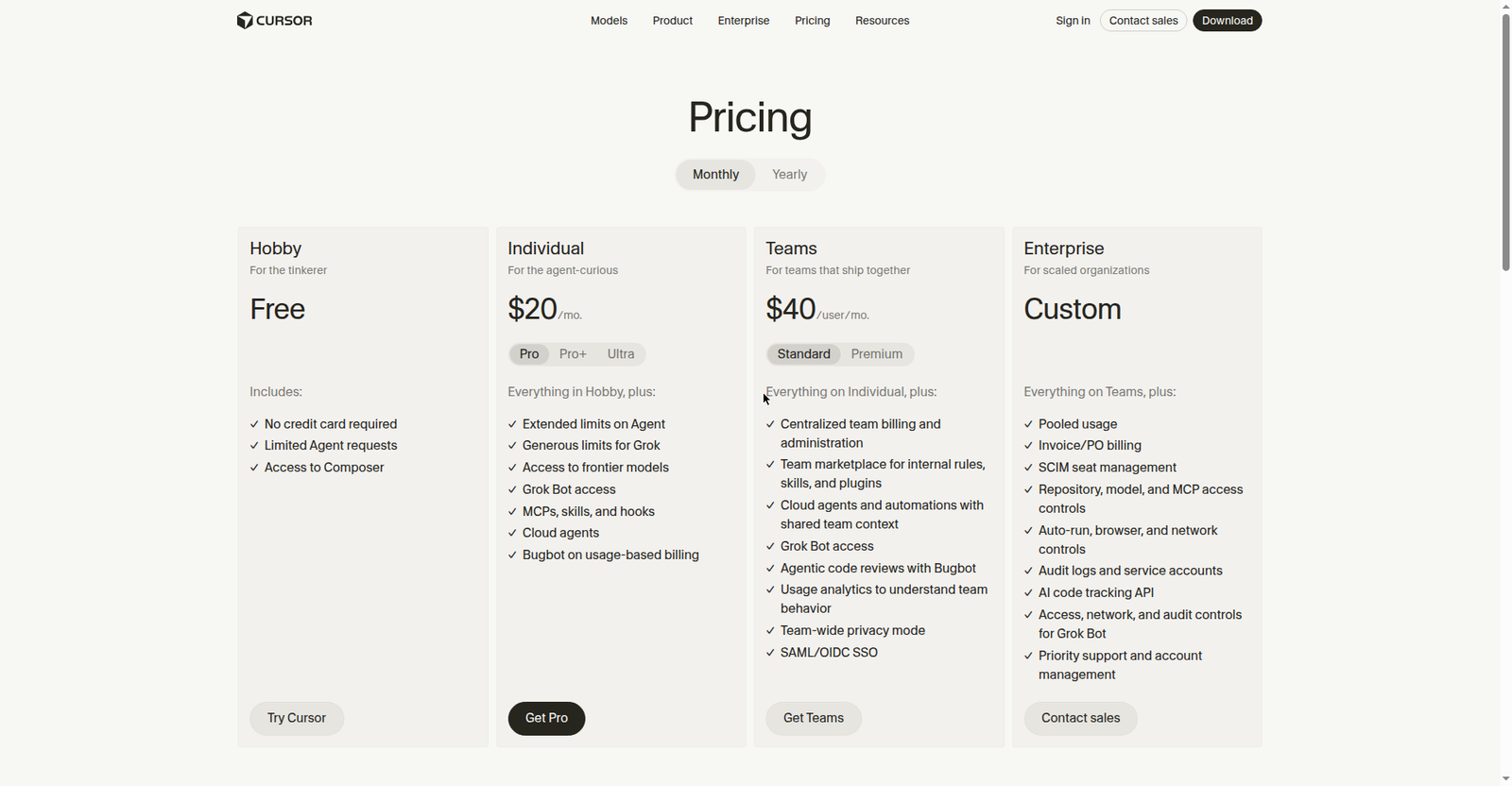
Cursor structures its pricing into individual tiers (Hobby, Pro, Pro+, Ultra) and organization tiers (Teams, Enterprise). The cursor hobby plan is the permanent free tier, requiring no credit card to get started.
The table below provides a comprehensive comparison of each tier based on official data from Cursor’s pricing page:
| Capability / Feature | Cursor Hobby (Free) | Cursor Pro ($20/mo) | Pro+ / Ultra ($60–$200/mo) | Teams ($40/user/mo) |
|---|---|---|---|---|
| Cost & Billing | $0 Forever (No credit card) | $20/mo ($16/mo billed yearly) | $60/mo (Pro+) / $200/mo (Ultra) | $40 / user / month |
| Base Code Editor | Full VS Code fork | Full VS Code fork | Full VS Code fork | Full VS Code fork |
| Cursor Tab Autocomplete | Standard speed completions | Unlimited priority completions | Unlimited priority completions | Unlimited priority completions |
| Agent & Composer Quotas | Limited monthly pool (Strict cap) | 500 fast requests + usage pool | 3x to 10x expanded agent pools | Shared team-wide usage pool |
| Frontier Models | Auto/default Cursor models only | Claude 3.7/3.5, GPT-4o, o3-mini, Grok | Frontier models + high concurrency | Frontier models + admin controls |
| On-Demand Overages | Not allowed (Hard stop) | Pay-as-you-go optional | Pay-as-you-go optional | Centralized org usage billing |
| Model Context Protocol (MCP) | Limited manual setup | Full custom MCP servers | Full custom MCP servers | Team-wide managed MCP tools |
| Cloud Agents & Bugbot | Not included | Included (Bugbot usage-based) | Included with higher allowance | Automated PR reviews for teams |
| Privacy Mode | Toggleable per user | Toggleable per user | Toggleable per user | Enforced team-wide (No training) |
Free Plan Limits in Practice: How Fast Do You Hit the Wall?
The biggest source of confusion surrounding the cursor free plan is how its usage quotas actually work during day-to-day coding. Unlike older versions of the app that guaranteed a fixed count of 50 slow requests after 50 fast requests, modern Cursor versions meter free accounts using dynamic usage pools.
Data: Real-World Burn Rate on Cursor’s Free Plan
Empirical telemetry showing how rapidly free allowances deplete across different coding tasks.
1. Tab Autocomplete
Single-line and multi-line inline completions remain active throughout the month. It consumes no prompt credits.
2. Basic Code Chat
Asking syntax questions, generating regex, or explaining functions in the chat sidebar depletes requests slowly.
3. Agentic Composer
Autonomous multi-file refactoring runs 10–25 model steps per task, exhausting the entire free monthly pool in 1–2 days.
What Happens When You Hit Your Free Limit?
When your monthly allowance reaches 100% consumption on the Hobby plan:
- Composer stops running agent loops: When you press
Cmd+I(orCtrl+I) to refactor multiple files, Cursor will display a prompt indicating that your monthly request pool is exhausted and invite you to upgrade to Pro. - Frontier models are locked: You cannot fall back to a “slow queue” for heavy reasoning models like Claude 3.7 Sonnet or OpenAI o3-mini. Those requests will be declined until your billing reset date.
- Your code editor never locks up: Cursor never locks your local files, disables your terminal, or restricts your VS Code extensions. You can continue writing code, running builds, and using Git as usual.
- Basic Tab completions continue: Local inline autocomplete predictions continue functioning, though high-compute multi-token predictions are pared back to baseline models.
Cursor Pro Pricing: Is It Worth $20 a Month?
Cursor Pro pricing is priced at $20 per month (or $16 per month billed annually at $192/year). In the developer tooling space, this has become the de facto standard pricing tier, matching GitHub Copilot Enterprise and ChatGPT Plus.
For full-stack developers and vibe coders, Cursor Pro is widely regarded as offering exceptional return on investment. Here is why:
- 500 Fast Frontier Requests: You receive an immediate monthly allocation of 500 fast requests to top-tier models (Claude 3.7 Sonnet, Claude 3.5 Sonnet, GPT-4o, and o3-mini).
- Uncapped Standard Compute: Once your 500 fast requests are consumed, Cursor routes further queries to an unmetered standard-priority queue rather than cutting you off entirely.
- Full Composer Multi-File Agent: Composer can independently create new files, execute bash scripts, inspect terminal outputs, and resolve compile errors without hitting artificial free-tier stops.
- Custom MCP Servers: Pro unlocks native Model Context Protocol tools, enabling Cursor agents to query local databases, inspect API docs, and run GitHub workflows directly.
Who Should Upgrade to Cursor Pro
- Full-Time Software Engineers: If you write code for 20+ hours a week, Composer’s multi-file refactoring easily saves multiple hours per sprint, paying for the $20 fee in a single morning.
- Active Vibe Coders: If you build apps by chatting with AI agents, the free tier will run out within 48 hours. Pro is mandatory for sustained vibe coding.
- Developers Handling Complex Refactors: Claude 3.7 Sonnet’s extended thinking mode and high reasoning capacity in Composer make resolving intricate architectural bugs radically easier than standard default models.
Who Should Stick to the Free Plan
- Weekend Tinkers and Hobbyists: If you only open your code editor once or twice a week to adjust a script, the Hobby plan is more than sufficient.
- Developers Who Only Want Autocomplete: If you never use AI chat or agentic refactoring and only want fast inline code completions, paying $20/month is unnecessary.
- CLI-First Developers: If you prefer terminal-centric agents like Claude Code or The Codex CLI, your budget is better spent on direct API credits.
Cursor Free Trial and Student Discount: Current Status
Does Cursor Offer a Free Trial?
Cursor has historically offered a 14-day free trial of Cursor Pro for newly registered accounts, giving users an immediate taste of 500 fast requests and full Composer access without needing a credit card.
However, Cursor dynamically adjusts its trial terms to combat automated registration bots and credit-farming scripts. Depending on your sign-up method and region, new accounts may receive a 14-day Pro trial, a metered test pool, or immediate placement on the Hobby tier. You can check your trial status at any time under Cursor Settings > General > Account.
Is Cursor Free for Students?
There is no longer a universal automated student discount for Cursor.
Cursor previously ran a popular promotional program granting university students with an active .edu email address a free one-year subscription to Cursor Pro. That automated program was discontinued following widespread credential abuse and account resale on third-party forums. Today, Cursor handles educational access selectively through campus hackathons and specific university department partnerships. For legitimate student developer benefits and alternative tools with student access, consult our guide on educational developer discounts and student perks.
How to Use Cursor for Free Longer: 4 Legitimate Strategies
If you cannot afford a $20/month subscription but still want powerful AI assistance inside Cursor, here are four completely legitimate techniques to stretch your workflow without violating any terms of service:
1. Bring Your Own API Key (BYOK)
Cursor includes built-in support for Bring Your Own Key (BYOK). This allows you to bypass the Pro subscription entirely by connecting your personal API credentials directly from Anthropic, OpenAI, or Google AI Studio:
- Open Cursor and press
Cmd+,(Mac) orCtrl+,(Windows/Linux) to open Settings. - Navigate to the Models tab.
- Enter your private API key under the respective provider (e.g., Anthropic
sk-ant-...or OpenAIsk-...). - Toggle on your preferred models.
The Math Behind BYOK: When using your own key, Cursor does not bill you. Instead, you pay the model provider solely for raw token usage. For an average developer writing code part-time, generating 50–100 prompts a month on Claude 3.5 Sonnet costs approximately $2.50 to $6.00 per month—a 70% to 85% discount compared to the flat $20 Pro plan.
2. Clean Up Your Context with .cursorignore
Cursor indexes your local repository to provide smart context for agent requests. If your project contains unignored build directories, dependencies, or massive log files, Cursor burns unnecessary tokens indexing irrelevant code.
Add a .cursorignore file to the root of your project to keep your context footprint lean:
# Exclude dependencies and build artifacts from Cursor context
node_modules/
dist/
build/
.git/
*.lock
*.log
coverage/
tmp/
3. Use Model Switching Intelligently
Never waste heavy reasoning requests on trivial syntax questions. Use Cursor’s default/auto models for tasks like writing boilerplate interfaces, formatting JSON, or generating docstrings. Reserve frontier reasoning models (like Claude 3.7 Sonnet) strictly for intricate architectural bugs and multi-file refactors.
4. Pair Cursor Free with Browser-Based Chat
For broad architectural planning or drafting project specs, do not consume Cursor request tokens. Open free web interfaces (such as Claude.ai or ChatGPT Free) to brainstorm your design and outline API contracts. Once the plan is finalized, paste the resulting code into Cursor for implementation.
Free Alternatives to Cursor (Verified Free Tiers)
If Cursor’s free plan limits are too tight for your needs, several competing tools offer generous free options:
- GitHub Copilot Free: GitHub provides a permanent free tier directly inside standard VS Code, including 2,000 code completions per month and a limited monthly quota of Copilot Chat queries.
- Windsurf (by Codeium): Windsurf offers completely unlimited Tab autocomplete on its free tier, paired with 25 monthly Cascade prompt credits on baseline models. Cascade provides multi-file agent editing similar to Cursor’s Composer.
- VS Code + Cline / Continue (Open Source): By installing open-source extensions like Cline or Continue into vanilla VS Code, you can connect to local open-weights models running via Ollama (such as DeepSeek-R1 or Qwen 2.5 Coder) for a workflow that is 100% free forever with zero subscription or token costs.
- Claude Code (Anthropic CLI): While powerful for terminal-first developers, Claude Code is not free; it requires paid token billing via the Anthropic Console API. For a head-to-head comparison, read our breakdown of Claude Code vs. Cursor.
For an empirical ranking across all modern coding tools, review our benchmark guide on the best vibe coding tools and our latest updates on the LLM benchmark news hub.
Frequently Asked Questions (FAQ)
Is Cursor free forever?
Yes. The Cursor Hobby plan has no expiration date, does not require credit card details, and will not automatically bill you. You can use Cursor indefinitely as your daily code editor without paying anything, subject to monthly AI request limits.
Does Cursor’s free plan include Claude 3.7 and GPT-4o?
No, not with consistent unmetered access. The free tier primarily defaults to standard auto models or Cursor’s internal routing. Access to frontier reasoning models like Claude 3.7 Sonnet, Claude 3.5 Sonnet, OpenAI o1, o3-mini, and GPT-4o requires an active Cursor Pro subscription or configuring your own API keys.
Can I use my own API key in Cursor for free?
Yes. Under Settings > Models, you can input your own API keys from Anthropic, OpenAI, or Google. You will pay the AI provider directly for your token usage, but Cursor does not charge a platform fee for using your own keys with standard chat and edit features.
Is Cursor free for students and educators?
No universal automated free student subscription currently exists. Cursor discontinued its instant 1-year free Pro promotion for .edu email holders due to system abuse. Students must use the free Hobby plan, participate in sponsored hackathons, or use alternative student developer benefits like GitHub Education.
Is Cursor Pro worth it compared to GitHub Copilot?
Yes, for developers who rely on agentic workflows. While GitHub Copilot costs $10/month (or free for basic users), it focuses primarily on single-line and function completions. Cursor Pro ($20/month) offers multi-file agentic editing in Composer, autonomous terminal command execution, semantic repository indexing, and dynamic model switching, making it substantially more capable for building complex software.
Verdict: Is Cursor Free Enough for You?
Cursor is genuinely free on the Hobby plan for developers who want a responsive, modern code editor with intelligent Tab autocompletion and occasional syntax assistance. However, if you want to practice true vibe coding—delegating multi-file refactoring and feature development to autonomous agent loops in Composer—the free tier will run out within days. For serious software development, the $20/month Cursor Pro tier remains one of the highest-ROI investments available to developers today.

[…] coding engine in modern AI. Whether you drive it via Claude Code in your terminal or plug it into Cursor via API, it writes idiomatic, compile-ready code that saves hours of debugging. See our latest […]