

Open WebUI is the interface most people put in front of a local model. It is a self-hosted web app that connects to Ollama, llama.cpp, OpenAI, Anthropic, verified free OpenRouter models, or anything with an OpenAI-compatible endpoint, and gives you a ChatGPT-style window over the top. To evaluate which models perform best before configuring your WebUI model list, cross-reference our LMArena breakdown.
It does not run models itself. That is the first thing worth understanding, and it explains most of the confusion people hit in their first hour.
This guide covers the install, the ports, the environment variables that matter, and every configuration question that sends people to a search engine — reaching it from another device, resetting a lost admin password, wiring up ComfyUI, prompts, pipelines, web search and SSO.
How do you install Open WebUI?
Docker is the recommended route and the one the project tests hardest:
docker run -d -p 3000:8080 \
–add-host=host.docker.internal:host-gateway \
-v open-webui:/app/backend/data \
-e WEBUI_SECRET_KEY=$(openssl rand -hex 32) \
–name open-webui –restart always \
ghcr.io/open-webui/open-webui:main
Three of those flags are doing real work. The volume holds your chats, users and settings and survives updates — never run without it. The add-host line is what lets the container reach Ollama running on your machine. And the secret key is covered below, because getting it wrong is the most common self-inflicted wound in Open WebUI.
If you prefer Python:
pip install open-webui
open-webui serve
Version note: Open WebUI supports Python 3.11 and 3.12. Python 3.13 is not supported — some dependencies have not shipped 3.13-compatible releases, so installs fail or break at runtime. The project recommends 3.11 for production.
Which port is it on, and how do I reach it from another device?
This is the most-searched Open WebUI question, and it has a two-part answer.
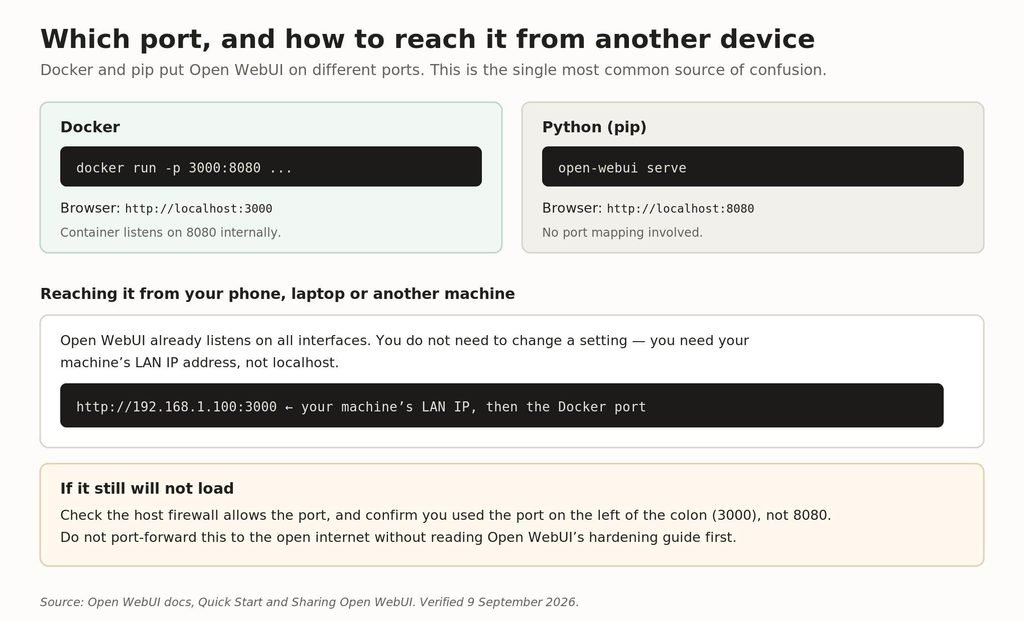
Docker and pip use different ports, and LAN access needs your machine’s IP rather than localhost.
Docker maps port 3000 on your machine to 8080 inside the container, so you open localhost:3000. The pip install has no mapping and serves directly on 8080. People who follow a Docker tutorial and then install with pip spend a long time wondering why localhost:3000 is dead.
Reaching it from your phone or another computer
Open WebUI already listens on all interfaces. You do not need to change a setting. What you need is your machine’s LAN address instead of localhost:
http://192.168.1.100:3000 # your machine’s LAN IP, then the Docker port
Find that address with ipconfig on Windows, or ifconfig or ip addr on macOS and Linux. If it still will not load, check the host firewall allows the port, and confirm you used the number on the left of the colon.
For access beyond your own network, Open WebUI’s documentation recommends Tailscale or a Cloudflare Tunnel rather than port forwarding, and a reverse proxy such as Nginx or Caddy for a real domain. Read the project’s hardening guide before exposing an instance to the internet — it holds your chat history and API keys.
Which environment variables actually matter?
Open WebUI exposes dozens. Most people need about ten.
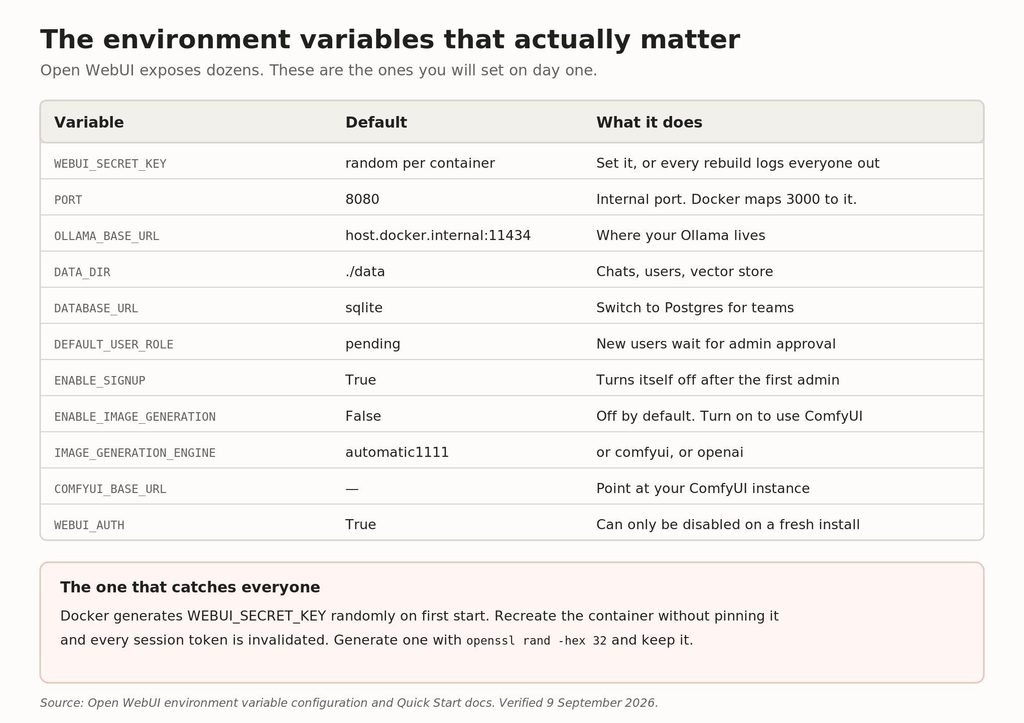
The environment variables worth setting on day one, with their real defaults.
WEBUI_SECRET_KEY, and why it matters more than it looks
This is the string used to sign session tokens. Run Open WebUI in Docker without setting it and the container generates a random one on first start. That works fine until you recreate the container — at which point the key changes, every existing session token becomes invalid, and everyone is logged out.
Set it once and keep it:
openssl rand -hex 32 # generate
-e WEBUI_SECRET_KEY=<the value> # pass it on every run
Connecting to Ollama
From Docker, Ollama is expected at host.docker.internal:11434. From a pip install, localhost:11434. If your model list is empty, the usual cause is that Ollama on the host is only listening on 127.0.0.1 — it needs to listen on 0.0.0.0 for a container to reach it. For Ollama on another machine entirely, set OLLAMA_BASE_URL to that host.
If your Ollama setup is misbehaving more broadly, we covered the common failures separately in Ollama troubleshooting.
Users and sign-up
The first account you create is the administrator. Sign-up then switches itself off. If you turn it back on, new accounts land in a Pending state and cannot use anything until an admin approves them — which is a sensible default, and also the reason a colleague may tell you their new account does nothing.
How do I use prompts in Open WebUI?
Prompts are saved, reusable instructions you can call into any chat. They are the feature most people underuse, and they work at two levels.
A personal prompt is yours alone. A global prompt, created by an admin, appears for everyone on the instance — which is how you give a whole team the same well-tuned starting point without asking anyone to copy and paste.
Create one under Workspace, then Prompts. Give it a command name and you can invoke it in any chat by typing a slash followed by that name. Prompts support variables, so a single prompt can take an input rather than being a fixed block of text.
The community catalogue at openwebui.com carries a large library of prompts you can import rather than write. As with any community content, read one before you run it — a prompt is instructions to your model, and you should know what it says.
How do I turn on web search?
Open WebUI can search the web and feed the results to the model as context. It is off until you configure a search provider under Settings, Admin, then Web Search.
You choose a provider, supply an API key or endpoint, and enable it. Several providers are supported including self-hosted options such as SearXNG, which is the choice to make if you are running Open WebUI specifically to keep queries off other people’s servers.
With native tool calling turned on, the model decides when a question needs a search rather than searching every time — which is both faster and cheaper if your provider bills per query.
If searches return nothing, the usual causes are an invalid key, a provider that is rate limiting you, or an instance that cannot reach the internet at all. Open WebUI publishes a dedicated web search troubleshooting page.
How do I set up image generation and ComfyUI?
Image generation is disabled by default. Three engines are supported: AUTOMATIC1111, ComfyUI and OpenAI’s DALL-E.
ENABLE_IMAGE_GENERATION=True
IMAGE_GENERATION_ENGINE=comfyui
COMFYUI_BASE_URL=http://host.docker.internal:8188
The ComfyUI route is the one worth taking if you already run ComfyUI, because you keep your own workflows and models. Note the port: ComfyUI’s default is 8188, which is a different number from anything Open WebUI uses, and mixing them up is a common mistake.
The same networking rule applies as with Ollama. If Open WebUI is in Docker and ComfyUI is on the host, the container reaches it through host.docker.internal, not localhost — and ComfyUI has to be listening on all interfaces rather than loopback only.
IMAGE_SIZE and IMAGE_STEPS set the defaults for generation, and IMAGE_GENERATION_MODEL picks the model. Everything else stays in ComfyUI where it belongs.
What are pipelines, and do you need them?
Pipelines are Open WebUI’s plugin framework. They let you insert arbitrary Python between the user and the model — to filter requests, add rate limits, route to different backends, log conversations, or call something the built-in features do not cover.
They run as a separate service that Open WebUI connects to as if it were another OpenAI-compatible provider, which is what keeps the main application stable when a plugin misbehaves.
Most people do not need them. If you want a feature Open WebUI lacks, check Tools and Functions in the community catalogue first — those are simpler, run in-process, and cover the majority of cases. Reach for pipelines when you need something genuinely custom, or when you need to enforce policy on every request regardless of which model is being used.
Code interpreter, channels and SSO
Code interpreter
Open WebUI can execute code the model writes and return the result. It is a sandboxed environment rather than your shell, and it is the feature that turns “here is a Python snippet” into “here is the answer”. Enable it in the admin settings; be deliberate about who has access, because code execution is code execution.
Channels
Channels are persistent shared spaces where a team and one or more models work together, closer to a chat room than a private conversation. They are the reason to run one shared instance rather than an install per person, and they only make sense on a multi-user deployment.
SSO
Open WebUI supports OAuth and OIDC against Google, Microsoft, Okta and Keycloak, with group mapping from your identity provider into Open WebUI groups. SCIM 2.0 is supported for automated provisioning and deprovisioning.
There is also WEBUI_AUTH_TRUSTED_EMAIL_HEADER, which lets an authenticating reverse proxy pass the user’s identity through. That is powerful and dangerous in equal measure: if anything can reach Open WebUI without passing through the proxy, that header is a way to log in as anyone. Only use it when the application is unreachable except through the proxy.
How do I reset a lost admin password?
There is no email reset flow. You update the database directly, which is a reasonable trade for an application that may have no mail server.
Generate a bcrypt hash of the new password:
htpasswd -bnBC 10 “” your-new-password | tr -d ‘:\n’
Then, for a Docker install, open a shell against the volume and update the row:
docker run -it –rm -v open-webui:/data alpine
apk add apache2-utils sqlite
sqlite3 /data/webui.db
UPDATE auth SET password=’HASH’ WHERE email=’you@example.com’;
Two gotchas the documentation is explicit about. The single-line version of this command uses the alpine/socat image, which does not include bash in some environments and will fail — the step-by-step version above is the reliable one. And any dollar signs in the bcrypt hash need triple-escaping if you do use the one-liner.
For a pip install the database is at backend/data/webui.db and you can run the same UPDATE against it directly. Deleting webui.db resets everything — accounts, settings and every conversation — so treat that as the last resort it is.
Open WebUI alternatives: what else is there?
The three tools people weigh against each other are built for different jobs, and the comparison is usually framed wrongly.
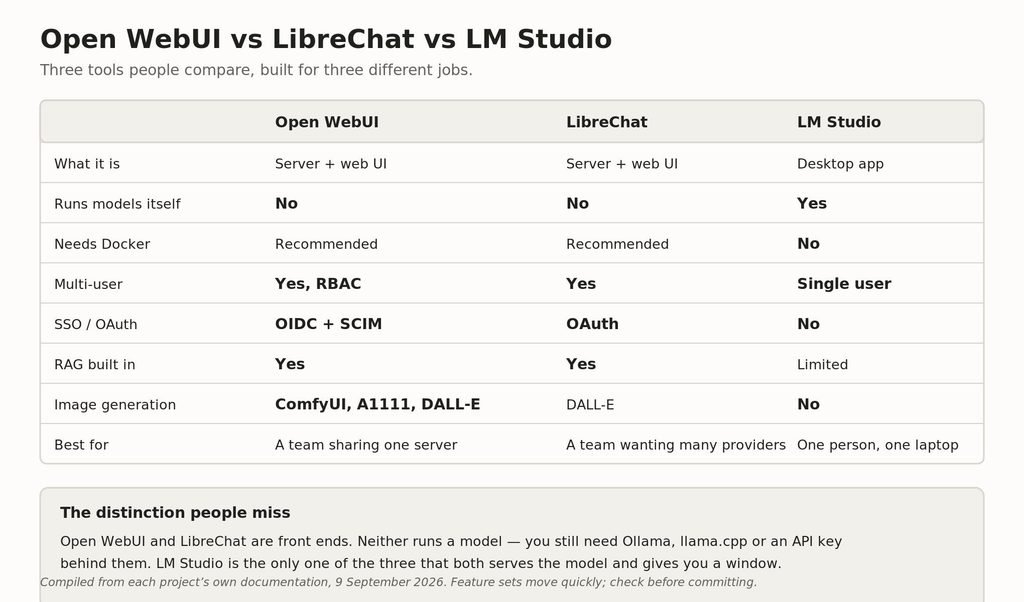
Open WebUI, LibreChat and LM Studio compared on what each is actually for.
LibreChat vs Open WebUI
These are the closest comparison — both are self-hosted, multi-user web front ends with RAG and OAuth. Open WebUI has the larger plugin ecosystem, a community catalogue of prompts, tools and functions, and richer image generation support. LibreChat has historically been stronger on juggling many providers at once and on its conversation forking.
Either is a defensible choice. Pick Open WebUI if you want the ecosystem and the local-model focus; pick LibreChat if your instance is mainly a front door onto several commercial APIs.
LM Studio
Not really a competitor. LM Studio is a desktop application that both runs the model and gives you a window onto it, for one person on one machine. Open WebUI is a server for a team. If you are asking which to use, the question is really whether anyone else needs access.
If you are still deciding what to run behind whichever interface you choose, we worked through the memory arithmetic in which LLMs and quants fit in 32 GB.
What Open WebUI phones home about
Worth knowing if you installed this specifically to keep things private. A stock install makes three outbound calls of its own accord, all documented and all switchable:
| Call | Turn it off with |
|---|---|
| Version check to GitHub | ENABLE_VERSION_UPDATE_CHECK=false |
| Model-list request to the default OpenAI connection | ENABLE_OPENAI_API=false |
| Embedding-model update check on Hugging Face at every start | RAG_EMBEDDING_MODEL_AUTO_UPDATE=false |
None of these send your conversations anywhere. But if you are running this air-gapped, or you want to be able to say precisely what leaves the machine, they are the three to know about. Deleting the default OpenAI connection also removes the second one.
Frequently asked questions
What port does Open WebUI use?
Docker maps your machine’s port 3000 to the container’s 8080, so you open localhost:3000. A pip install serves directly on 8080. The internal PORT default is 8080 either way.
How do I access Open WebUI from another computer?
Use your host machine’s LAN IP with the Docker port, for example http://192.168.1.100:3000. Open WebUI already listens on all interfaces, so no setting change is needed — check your firewall if it does not load.
Does Open WebUI run models itself?
No. It is an interface. You need Ollama, llama.cpp, LM Studio’s server or an API key from a provider behind it.
What is WEBUI_SECRET_KEY and do I need to set it?
It signs session tokens. Docker generates a random one per container, so if you recreate the container without pinning it, everyone gets logged out. Generate one with openssl rand -hex 32 and reuse it.
How do I reset my Open WebUI admin password?
There is no email reset. Generate a bcrypt hash with htpasswd and update the auth table in webui.db directly. The documented Docker one-liner fails in some environments; use the step-by-step alpine container method.
Can Open WebUI generate images?
Yes, with ComfyUI, AUTOMATIC1111 or DALL-E. It is disabled by default — set ENABLE_IMAGE_GENERATION=True and pick an engine.
What is the difference between Open WebUI and LibreChat?
Both are self-hosted multi-user front ends. Open WebUI has a larger plugin and prompt ecosystem and stronger local-model and image-generation support; LibreChat is often preferred for juggling many commercial providers.
Does Open WebUI support SSO?
Yes — OAuth and OIDC with Google, Microsoft, Okta and Keycloak, plus group mapping and SCIM 2.0 provisioning.
Why is my model list empty?
Usually Ollama is listening only on 127.0.0.1 and cannot be reached from the container. Make it listen on 0.0.0.0, or set OLLAMA_BASE_URL to the right host.
Which Python version does Open WebUI need?
3.11 or 3.12. Python 3.13 is not supported yet, and 3.11 is what the project tests most heavily.
Related guides
- How to run LLMs locally
- Ollama troubleshooting
- Which LLMs and quants fit in 32GB
- Local coding models benchmark
- The best Claude model for coding
Sources
- Open WebUI — Quick Start
- Open WebUI — Environment variable configuration
- Open WebUI — Sharing Open WebUI
- Open WebUI — Reset Admin Password
All ports, defaults and commands were read directly from Open WebUI’s documentation on 9 September 2026. The project ships frequently and defaults change; if something here disagrees with the current docs, the docs are right and we want to know. Vibe Coder Journal has no affiliation with Open WebUI and accepts no sponsorship.
If you are automating prompts via webhooks or workflow nodes, review n8n pricing and self-hosted options.
[…] it actually does. For keeping inference off third-party servers entirely, running LLMs locally and the Open WebUI guide cover the setup — with the caveat above that local inference does not solve […]
[…] answer is different again: running models locally removes the vendor from the loop entirely, and the Open WebUI guide covers the interface. You will be working with a smaller window, but as the arithmetic above shows, […]