

- Install Ollama, run one command, and you have a model on your machine. The real question is which model fits your hardware: at 4-bit quantization, expect roughly 0.55–0.62 GB of VRAM per billion parameters, so 8 GB runs a 7B model, 24 GB runs a 30B, and anything above 70B stops being a laptop conversation. Go in knowing the trade: on Terminal-Bench 2.1, an open-weights model scored 58.7% against 83.8% for a frontier model in the same harness. Local is a privacy and cost decision, not a capability one.
Most guides to running models locally are enthusiastic and vague. This one gives you the hardware maths, the one command that actually matters, and an honest measurement of what you are giving up.
Why run an LLM locally?
Three reasons hold up. Two do not.
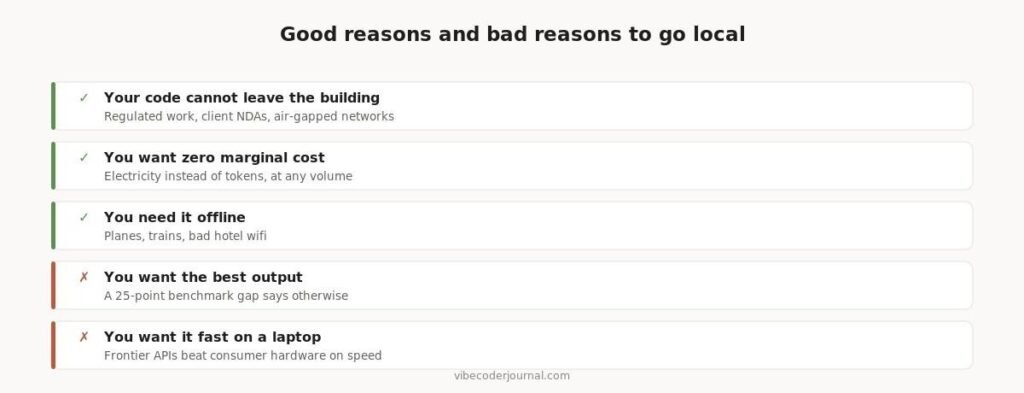
The honest case for and against running models on your own hardware.
Privacy is the strongest reason. If your code cannot legally leave your network — regulated industries, client NDAs, air-gapped environments — no API is an option at any price. This is the case where local is not a compromise, it is the only route.
Cost at volume is the second. Once the hardware is bought, inference is electricity. If you are running high-volume, repetitive work, the maths turns in your favour quickly.
Offline is the third, and it is more practical than it sounds. A model on your disk works on a plane, in a datacentre with no egress, or when a provider has an outage.
What local will not give you is the best output. We will come back to this with numbers, because it is the thing most guides skip.
What hardware do you need to run an LLM locally?
The binding constraint is VRAM, not CPU or system RAM. A model has to fit in your graphics memory to run at usable speed. At 4-bit quantization — the practical default for local use — a model needs roughly 0.55 to 0.62 GB per billion parameters.
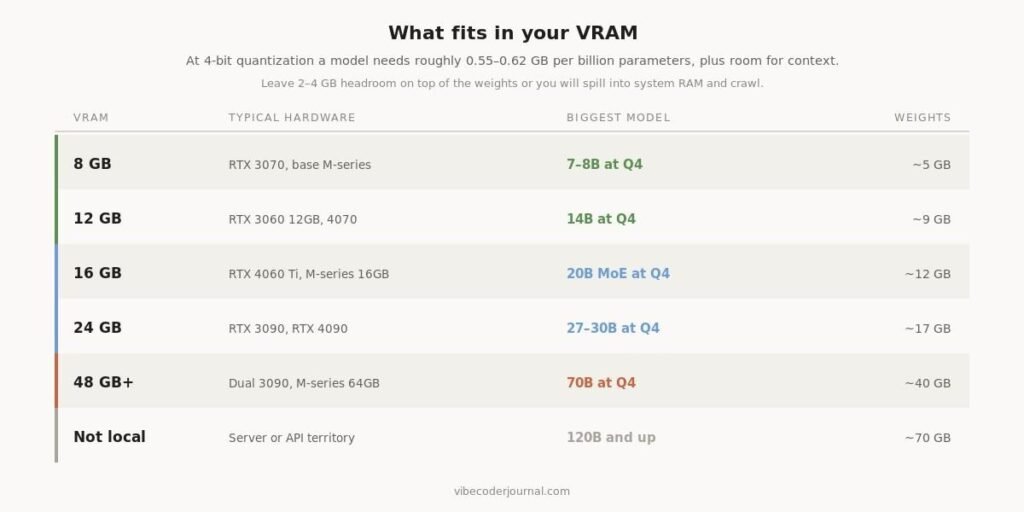
Model size against available VRAM, at 4-bit quantization.
| VRAM | Typical hardware | Biggest model | Roughly what that means |
|---|---|---|---|
| 8 GB | RTX 3070, base M-series | 7–8B at Q4 | Fine for autocomplete and simple edits |
| 12 GB | RTX 3060 12GB, 4070 | 14B at Q4 | The first tier that feels genuinely useful |
| 16 GB | RTX 4060 Ti, M-series 16GB | 20B MoE at Q4 | Sparse models punch above their size here |
| 24 GB | RTX 3090, RTX 4090 | 27–30B at Q4 | The sweet spot for local coding work |
| 48 GB+ | Dual 3090, M-series 64GB | 70B at Q4 | Diminishing returns against API cost |
| Beyond that | Server hardware | 120B and up | You are building infrastructure, not a setup |
Weights are only part of the requirement. Leave 2–4 GB of headroom for the context window and the runtime, or you will spill into system RAM and speed collapses.
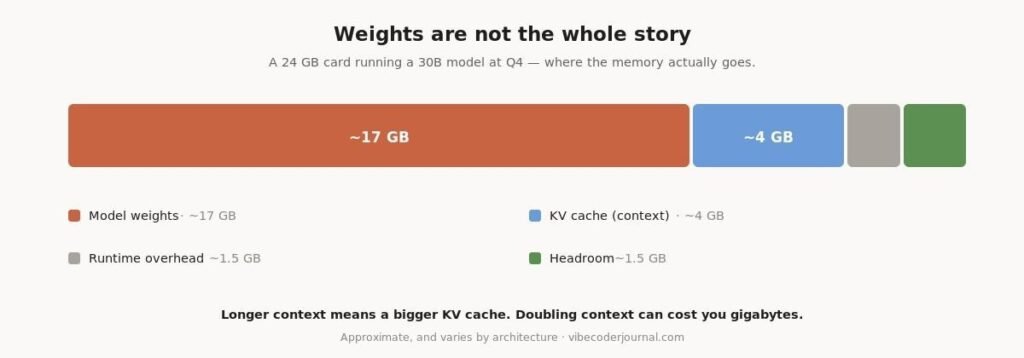
Where 24 GB actually goes when you run a 30B model at Q4.
Context is the cost people forget. The KV cache grows with how much text the model is holding, so doubling your context window can cost gigabytes. A model that loads fine on an empty prompt can fall over halfway through a long session.
On Apple Silicon the rules differ slightly. Unified memory means the GPU can address most of your system RAM, so a 32 GB Mac behaves closer to a 24 GB graphics card than the raw numbers suggest. It is also slower per token than a comparable discrete GPU.
How far can you compress a model?
Quantization reduces the precision of each weight so the model fits in less memory. Every step down costs quality, and the drop is not linear.
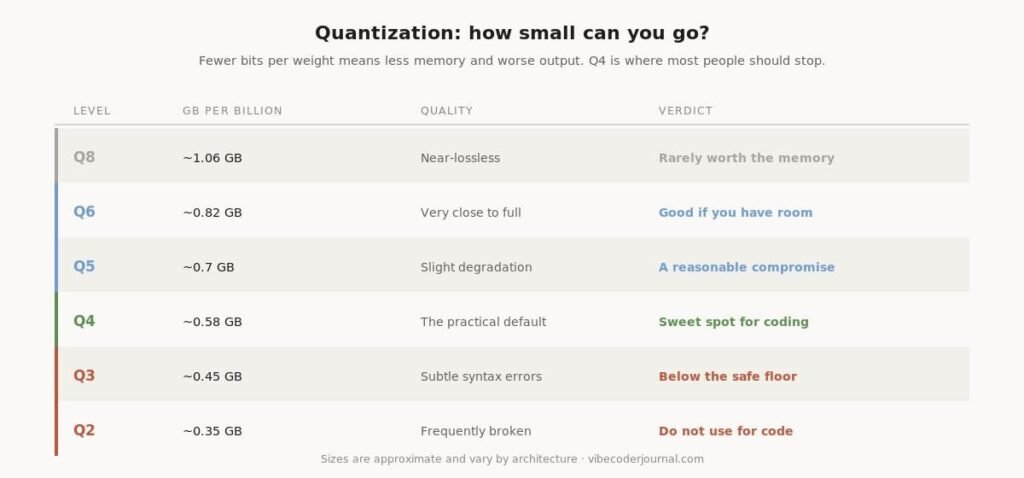
Quantization levels, memory cost and where quality falls off.
Q4 is the practical floor for coding work. Below it — Q3 and lower — models start producing subtly broken syntax rather than obviously wrong answers, which is the worse failure mode because you have to find it yourself. Above Q4 the memory cost rises faster than the quality does.
Which tool should you use to run models locally?
Four tools cover almost every case, and for most people the answer is the first one.
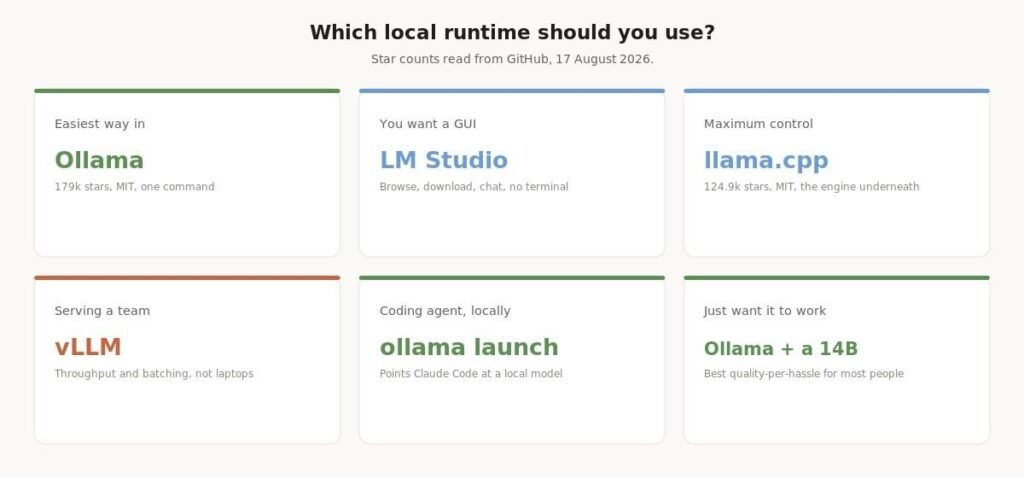
Choosing a local runtime by what you are trying to do.
| Tool | Licence | GitHub stars | Best for |
|---|---|---|---|
| Ollama | MIT | 179k | The default. One command, sensible defaults. |
| llama.cpp | MIT | 124.9k | The engine underneath most of the others. |
| LM Studio | Proprietary | — | A graphical interface, no terminal required. |
| vLLM | Apache-2.0 | — | Serving a team. Throughput, not laptops. |
Star counts read directly from GitHub on 17 August 2026.
Ollama is the default recommendation and deserves it. MIT licensed, 179,000 GitHub stars, and it handles downloading, quantization selection and serving behind one command. Its model library currently covers Kimi-K2.6, GLM-5.2, MiniMax, DeepSeek, gpt-oss, Qwen and Gemma.
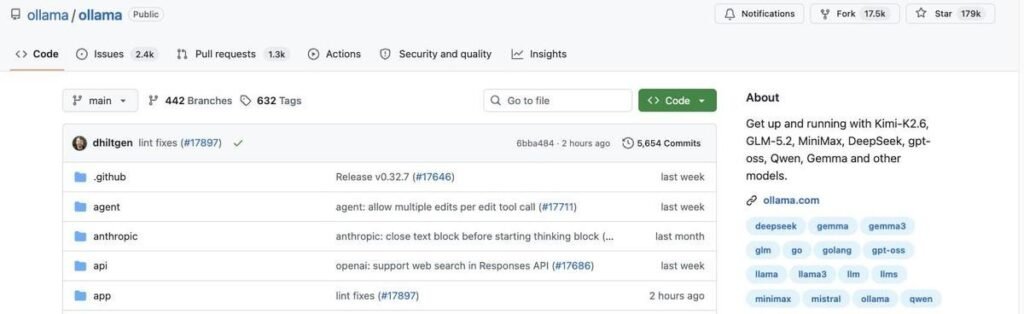
The Ollama repository on 17 August 2026: 179k stars, MIT licence, commits within the hour.
llama.cpp is the inference engine most of the ecosystem is built on — MIT, 124,900 stars. Use it directly when you need control over sampling, threading or unusual hardware.
LM Studio is the pick if you would rather not touch a terminal. It is proprietary, but it browses, downloads and chats in a single window.
vLLM is for serving models to other people. High throughput, batching, and no reason to install it on a laptop.
How do you actually run a model?
Ollama’s library is where you pick a model. Note the pull counts and the update dates — the most-downloaded models are often a year old, because popularity lags capability in this ecosystem.
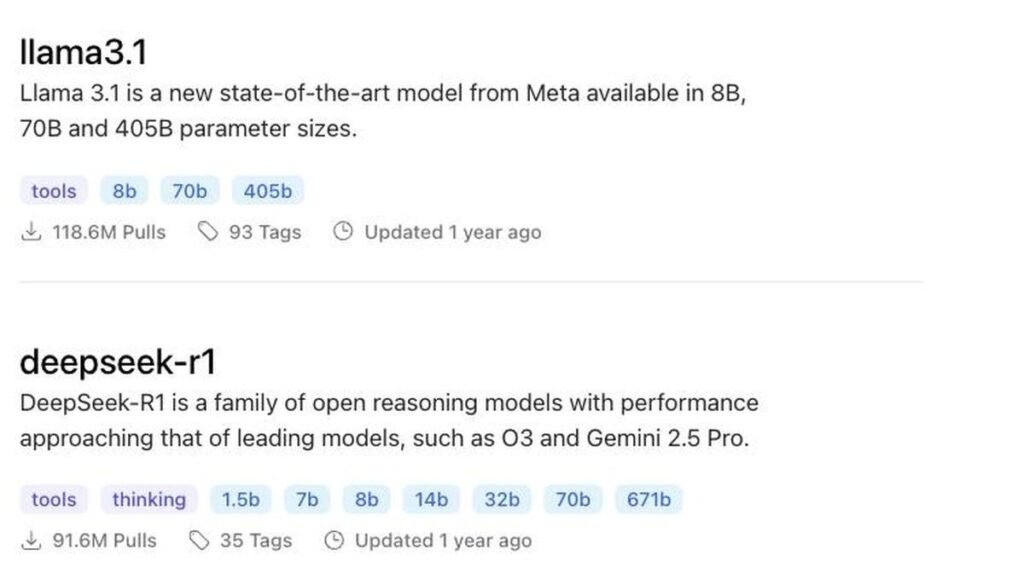
The Ollama model library, sorted by popularity.
Install Ollama, then one command downloads and runs a model:
ollama run gpt-ossThat is genuinely it. The first run downloads the weights; subsequent runs start in seconds. To see what you have installed and remove things later:
ollama list                 # what is on disk
ollama rm gpt-oss:20b       # free the space
ollama serve                # expose an OpenAI-compatible API
That last one matters more than it looks. ollama serve exposes an OpenAI-compatible endpoint on localhost, which means anything that speaks the OpenAI API can point at your local model without modification.
Can you use a local model with a coding agent?
Yes, and this is now a single command. Ollama ships launchers that point coding agents at a local model directly.
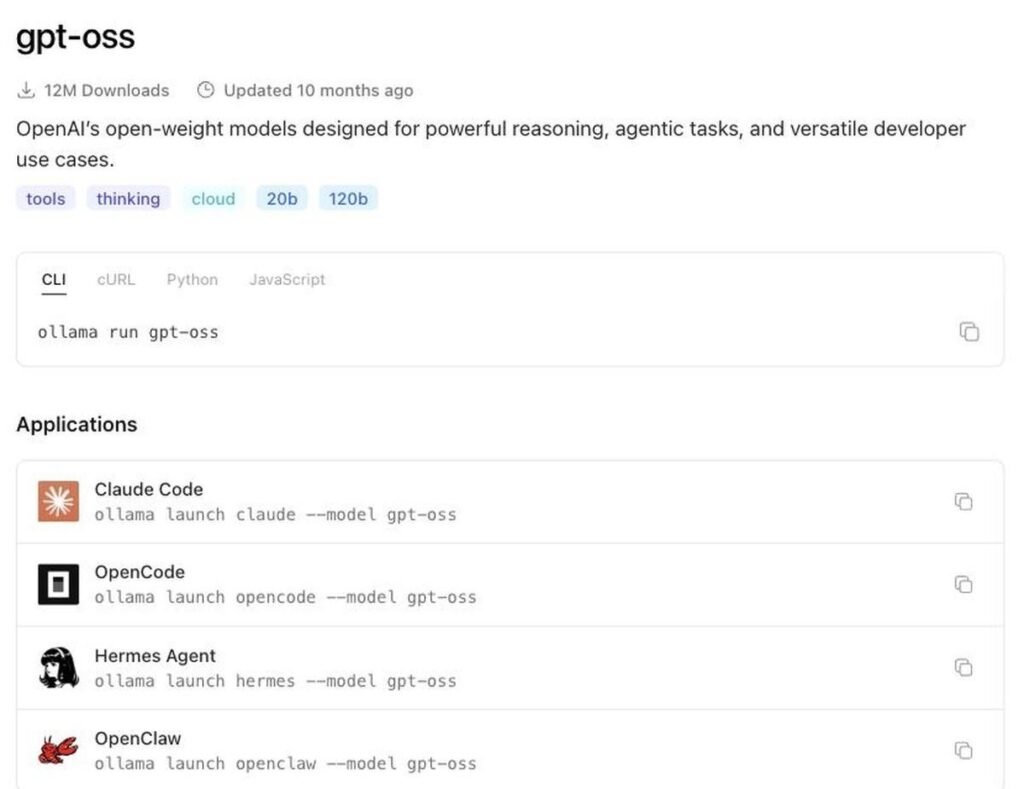
Ollama’s model page showing one-line launchers for Claude Code, OpenCode and other agents.
ollama launch claude --model gpt-oss
ollama launch opencode --model gpt-oss
The first command runs Claude Code against a model on your own machine, with no API key and no data leaving your network. For anyone who wanted an agentic coding workflow but could not send code to a third party, this is the unlock.
It is also the cheapest way to keep working when you have exhausted a subscription — though if that is your reason, it is worth checking what is actually consuming your quota first.
How good are local models really?
This is where most guides go quiet. There is a measurement, and it is not flattering.
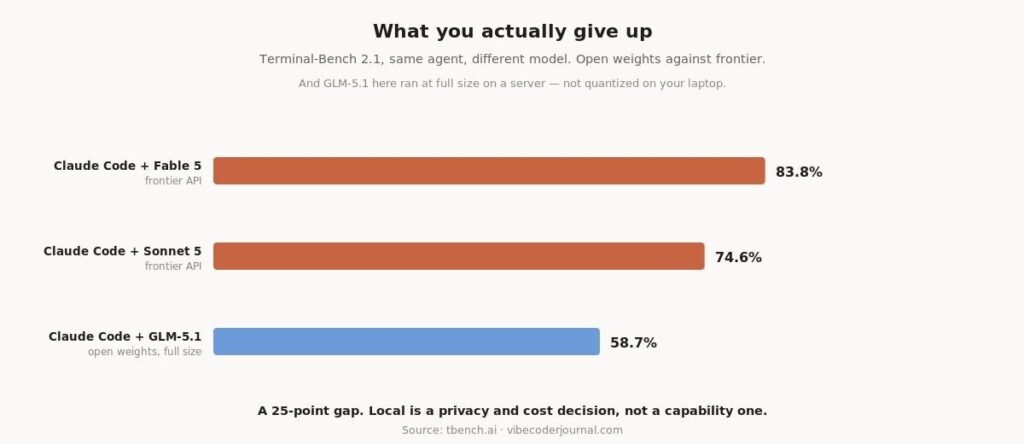
The same coding agent, running a frontier model against an open-weights model.
On Terminal-Bench 2.1, Claude Code scored 83.8% running Fable 5 and 58.7% running GLM-5.1, an open-weights model. Same agent, same tasks, same harness. A 25-point gap attributable entirely to the model.
And that comparison flatters local. GLM-5.1 in that test ran at full size on server hardware. What you run on a laptop is a smaller model, quantized to 4 bits. The gap on your machine is wider than the chart shows.
This does not mean local models are useless. It means you should match them to work where a 25-point capability gap does not matter: boilerplate, formatting, well-specified refactors, documentation, autocomplete. Reserve hard debugging for a frontier model, or accept that it will take longer.
If you are choosing between hosted models on capability, we compared every verified result in the best Claude model for coding.
What model should you start with?
If you have 8–12 GB
Start with a 7B or 14B coding-tuned model at Q4. It will handle autocomplete, small edits and questions about code you paste in. It will not reliably carry a multi-step agentic task.
If you have 16–24 GB
This is the tier where local becomes genuinely useful. A 20B mixture-of-experts model or a 27–30B dense model at Q4 will handle real refactors. Sparse models are worth seeking out here: they activate a fraction of their parameters per token, so they run far faster than their total size suggests.
If you have 48 GB or more
You can run 70B models, and you should also honestly compare the cost. A frontier API subscription is $20 a month. Hardware capable of running a 70B model comfortably is a four-figure purchase that will be superseded. Do it for privacy or independence, not to save money on a single seat.
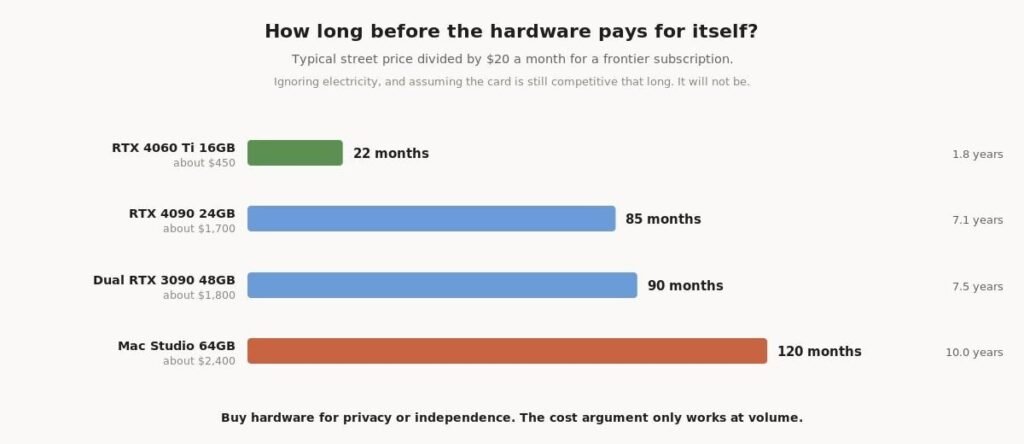
Hardware cost expressed in months of a $20 subscription.
A 4090 is roughly 85 months of a $20 subscription. A 64 GB Mac Studio is about ten years of one. Neither card will still be competitive that far out, so the payback window is shorter than the arithmetic suggests — which is the point. Buy the hardware because you need the privacy or the independence, not to save money on one seat.
A practical starting point: install Ollama, run ollama run gpt-oss, and see whether the quality clears your bar before buying anything.
Frequently asked questions
Can I run an LLM on my laptop?
Yes, if it has around 8 GB of VRAM or 16 GB of unified memory on Apple Silicon. That runs a 7 to 8 billion parameter model at 4-bit quantization, which is adequate for autocomplete and simple edits.
How much VRAM do I need to run an LLM?
Roughly 0.55 to 0.62 GB per billion parameters at 4-bit quantization, plus 2 to 4 GB of headroom for context and the runtime. A 7B model needs about 5 GB, a 30B model about 17 GB, and a 70B model about 40 GB.
Is Ollama safe to use?
It is open source under the MIT licence with 179,000 GitHub stars, and it runs models entirely on your own machine — nothing is sent to a server unless you explicitly use its cloud models. The usual caution applies to the models you download, which come from third parties.
Why run an LLM locally instead of using an API?
Privacy, cost at high volume, and offline availability. Not capability — a frontier API will produce better output, and the measured gap is large.
Can I use a local model with Claude Code?
Yes. Ollama provides a launch command that points Claude Code at a locally running model, so no code leaves your machine and no API key is required.
What is quantization?
Compressing a model’s weights to fewer bits so it fits in less memory. Q4 — four bits per weight — is the practical default for local use. Below Q4, models begin producing subtly incorrect code rather than obviously wrong answers.
Are local models good enough for coding?
For well-specified, mechanical work, yes. For hard multi-step debugging, the measured gap against frontier models is around 25 percentage points on Terminal-Bench 2.1, and that comparison used a full-size open-weights model rather than a quantized local one.
Methodology
Repository statistics were read directly from GitHub on 17 August 2026 rather than taken from secondary sources. Benchmark figures come from the public Terminal-Bench 2.1 leaderboard, comparing runs of the same agent with different models so the comparison isolates model capability. If your local GPU cannot fit 70B+ weights, you can also query verified free OpenRouter models, or check our gpt-oss-120b vs Gemini 3 Pro comparison for frontier open-weights benchmarks. VRAM estimates are derived from the standard relationship between parameter count and 4-bit weight size and are intended as planning guidance, not exact figures — actual requirements vary with architecture, context length and runtime.
We have no commercial relationship with any tool or vendor mentioned, and this page contains no affiliate links.
Sources
- Ollama on GitHub — 179k stars, MIT, current model library
- llama.cpp on GitHub — 124.9k stars, MIT
- Ollama model library — model sizes, tags and launch commands
- Terminal-Bench 2.1 leaderboard — the open-weights versus frontier comparison
Verified against primary sources on 17 August 2026. Local model quality moves quickly — if something here no longer matches what you find, tell us and we will re-verify.

[…] is in how the context is assembled, not in where inference happens. If you are set up for running LLMs locally, you have solved a privacy problem, not this […]
[…] the motivation is privacy rather than capability, the answer is different again: running models locally removes the vendor from the loop entirely, and the Open WebUI guide covers the interface. You will […]
[…] How to run LLMs locally […]
[…] local-model setups generally, see how to run LLMs locally and Ollama troubleshooting. If you are hitting limits because the model does not fit comfortably, […]
[…] you are still setting up your local stack, our guide to running LLMs locally covers the Ollama side end to […]
[…] It picks sensible settings for you; start with our guide to running LLMs locally […]