


By Abdullah Zulfiqar, who runs local-model benchmarks for Vibe Coder Journal · Published 30 September 2026 · Last updated 30 September 2026 · Versions checked: Ollama 0.35.0, llama.cpp b11293
Is llama.cpp faster than Ollama? Yes, by about 10–14% in the best available test, with Ollama on its default settings. In a published test, raw llama.cpp generated 77.0 tokens/sec against Ollama’s 69.1 on an RTX 5060 Ti, and 53.5 against 46.2 on an M3 Max. Ollama runs llama.cpp underneath, so the gap most likely comes from its defaults and server layer rather than an outdated engine: in our own CPU test, the llama.cpp build Ollama ships showed no measurable speed difference from the latest one.
| Question | Winner | Why |
| Faster token generation? | llama.cpp, by ~10–14% | Measured end-to-end with Ollama on defaults (InventiveHQ) |
| Is Ollama’s engine slower? | No real difference | Same llama.cpp code; the build Ollama ships was 7 days old at release, with no measurable difference in our CPU test |
| Faster out of the box for a beginner? | Ollama | It handles model downloads, chat templates and memory fitting for you; with llama.cpp you manage files and flags yourself |
| Biggest cause of a slow Ollama? | Partial CPU offload | ollama ps shows it, and it costs far more than 10% |
| Better for max throughput or benchmarking? | llama.cpp | No daemon, full control of every flag |
| Apple Silicon? | It’s changing | Ollama’s 0.40.0 pre-release runs supported models on Apple’s MLX by default |
Want the full feature comparison (setup, model library, API, who each tool is for)? Read our Ollama vs llama.cpp comparison. This page is only about speed.
Why should llama.cpp and Ollama be almost the same speed?
Because Ollama’s GGUF path is built on llama.cpp and its GGML library, with a server and a model manager on top. Ollama’s README lists llama.cpp under “Supported backends”, and its repository has a file called LLAMA_CPP_VERSION that pins the exact llama.cpp build it compiles against.
When you run a GGUF model in Ollama, the maths happens in the same llama.cpp kernels you’d get from llama-server. Three main things can make Ollama slower:
- An older llama.cpp build. Wrappers can lag behind upstream.
- Different default settings. Context size, flash attention, K/V cache type, and how many layers go on the GPU.
- Its own layer. The Go HTTP server, prompt templating, request scheduling and model lifecycle, plus, for some architectures, Ollama’s own model code running on GGML.
Every “llama.cpp vs Ollama speed” test we found mixes these together. We pulled the first one apart.
How far behind llama.cpp is Ollama right now?
About one week. Ollama 0.35.0, the latest stable release (28 September 2026), pins llama.cpp build b11081, tagged on 21 September 2026.
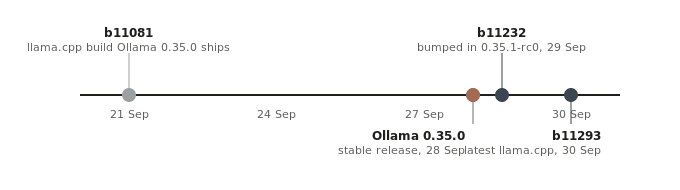
How far behind llama.cpp is Ollama? Dates from the llama.cpp git tags and Ollama’s LLAMA_CPP_VERSION file, checked 30 Sep 2026.
| Date (2026) | Event | Source |
| 21 Sep | llama.cpp build b11081 tagged | llama.cpp git tag |
| 28 Sep | Ollama v0.35.0 released, pinned to b11081 | Ollama LLAMA_CPP_VERSION at tag v0.35.0 |
| 29 Sep | Ollama v0.35.1-rc0 bumps llama.cpp to b11232 | Ollama release notes |
| 30 Sep | Latest llama.cpp build: b11293 | llama.cpp git tags |
By 30 September, upstream llama.cpp had reached b11293, so Ollama’s stable release was 212 builds behind. That sounds worse than it is. llama.cpp tags a new build for almost every merged change, and Ollama’s next release candidate (0.35.1-rc0) already moves the pin to b11232.
So the lag is short. The real question is whether those 212 builds change speed.
Does Ollama’s older llama.cpp build make it slower? (Our test)
Not measurably. In our CPU test the two builds’ results overlapped completely; any real difference was smaller than our run-to-run noise. Median token generation was 25.4 tokens/sec on b11081 and 26.4 on b11293.
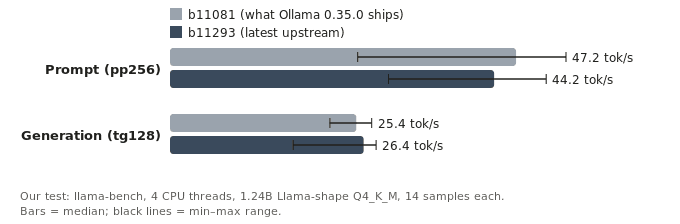
Our test: Ollama’s pinned llama.cpp build vs the latest build, same model file and flags. Vibe Coder Journal, 30 Sep 2026, 4-core ARM64 CPU VM, median of 14 samples.
| Test | b11081 median (min–max) | b11293 median (min–max) | Difference |
| Prompt processing, 256 tokens | 47.2 (25.6–54.0) tok/s | 44.2 (29.8–51.3) tok/s | −6% (inside the noise band) |
| Token generation, 128 tokens | 25.4 (21.8–27.5) tok/s | 26.4 (16.8–28.1) tok/s | +4% (inside the noise band) |
What we did: we compiled both builds from source with identical flags and ran the official llama-bench tool on the same model file. We alternated the builds over two rounds of 7 repetitions, so any drift on the machine hit both equally, and we report the median of all 14 samples.
Prompt processing came out 6% faster on the older build, and token generation 4% faster on the newer one by median. That’s what noise looks like: the ranges overlap, and on generation the newer build wins on the median but loses on the mean (24.9 vs 25.3 tokens/sec). The virtual machine was noisy (prompt processing ranged from 26 to 54 tokens/sec across runs), so this test could not detect a difference smaller than roughly 10%. What it does show is that the week-old build isn’t dramatically slower.
What this test is, and isn’t. It ran on a 4-core ARM64 CPU in a virtual machine, not a GPU. The model had Llama 3.2 1B’s exact shape and Llama 3’s tokenizer but synthetic weights. Speed depends on tensor shapes and quantization, not on what the weights say, so the speed numbers are valid; they say nothing about answer quality. GPU kernels change more often than CPU ones, so a GPU result could differ, and we’ll add one when we rerun this on a GPU machine.
So why is Ollama slower than llama.cpp in practice?
Mostly its defaults and its own server layer, not the engine. InventiveHQ’s end-to-end test found a steady 8–14% gap on every task type, which points to a consistent, structural cost rather than a one-off.
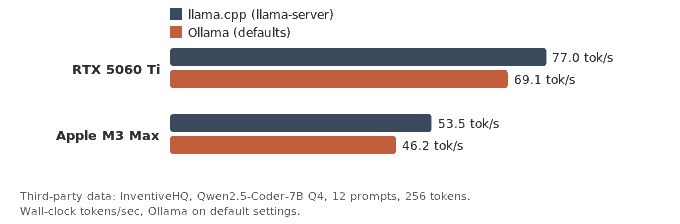
Third-party end-to-end results (InventiveHQ, published 26 Jun 2026, updated 13 Aug 2026). Ollama ran on its default settings. Checked 30 Sep 2026.
| Machine | llama.cpp tok/s | Ollama tok/s | Ollama slower by |
| RTX 5060 Ti 16 GB | 77.0 | 69.1 | 10.3% |
| Apple M3 Max | 53.5 | 46.2 | ≈14% |
That test served the same Qwen2.5-Coder-7B Q4 model through both tools and measured wall-clock tokens/sec over 12 prompts, with Ollama on its defaults. On the RTX card the gap held between 8% and 14% across code, maths, reasoning, summarisation and chat.
Ollama’s defaults are sensible, but they aren’t tuned for peak speed. These are the ones that matter, from the Ollama FAQ:
| Setting | Ollama default | What it does to speed |
| Context window | 4,096 tokens | Bigger contexts need more memory; raise it too far and layers spill to the CPU |
| Flash Attention | On automatically when the backend and device support it | Cuts memory use as context grows; force it with OLLAMA_FLASH_ATTENTION=1 |
| K/V cache type | f16 | q8_0 uses about half the memory, with a very small quality loss |
| Keep-alive | 5 minutes | After that the model unloads, and the next request pays the load time again |
| Parallel requests | 1 | More parallel slots multiply the memory needed for context |
None of these slows down a model that already fits on your GPU by much. The one that does real damage is next.
What makes Ollama really slow, and how do you fix it?
Part of the model running on your CPU. Run ollama ps. If the PROCESSOR column shows a split such as “48%/52% CPU/GPU”, every token waits on system RAM, and you’ll lose far more than 10%.
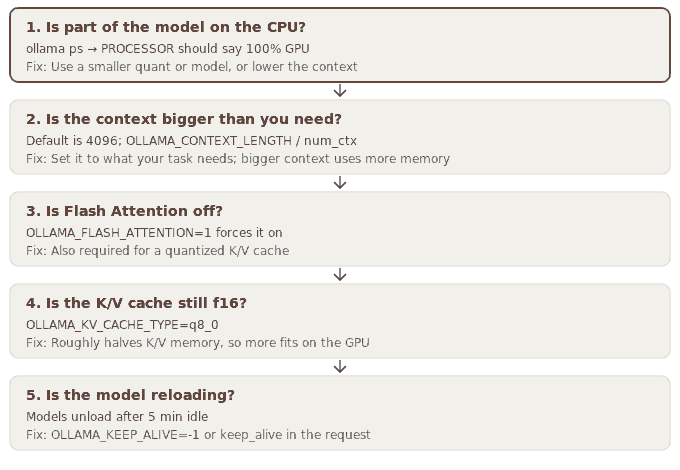
Why Ollama can be slow: work through these in order. Settings from the Ollama FAQ (docs.ollama.com/faq), checked 30 Sep 2026.
| Check | How to check or set it | Fix |
| 1. Is part of the model on the CPU? | ollama ps → PROCESSOR should say 100% GPU | Use a smaller quant or model, or lower the context |
| 2. Is the context bigger than you need? | Default is 4096; OLLAMA_CONTEXT_LENGTH / num_ctx | Set it to what your task needs; bigger context uses more memory |
| 3. Is Flash Attention off? | OLLAMA_FLASH_ATTENTION=1 forces it on | Also required for a quantized K/V cache |
| 4. Is the K/V cache still f16? | OLLAMA_KV_CACHE_TYPE=q8_0 | Roughly halves K/V memory, so more fits on the GPU |
| 5. Is the model reloading? | Models unload after 5 min idle | OLLAMA_KEEP_ALIVE=-1 or keep_alive in the request |
To apply the fixes on Linux with systemd, open an override file:
sudo systemctl edit ollama.service
Paste this into the editor, then save:
[Service]
Environment=”OLLAMA_FLASH_ATTENTION=1″
Environment=”OLLAMA_KV_CACHE_TYPE=q8_0″
Environment=”OLLAMA_KEEP_ALIVE=-1″
Then restart Ollama:
sudo systemctl daemon-reload
sudo systemctl restart ollama
Only raise OLLAMA_CONTEXT_LENGTH if your task really needs more than 4,096 tokens, because a bigger context uses more memory and can push layers off the GPU.
On a Mac running the Ollama app, use launchctl setenv OLLAMA_FLASH_ATTENTION 1 (and the same for each variable), then restart the app. After each change, run ollama run llama3.2 –verbose and read the “eval rate” line to see your tokens per second.
Two cautions. A q4_0 K/V cache saves even more memory, but Ollama’s docs warn the quality loss can become noticeable at larger contexts. And keeping models loaded forever (-1) holds that memory until you run ollama stop.
Is llama.cpp faster than Ollama on a Mac?
It was, by about 14% in InventiveHQ’s M3 Max test, but that comparison is changing. Ollama’s 0.40.0 pre-release (25 September 2026) runs model architectures supported by Apple’s MLX framework on MLX by default on Apple Silicon.
So on a Mac, “Ollama vs llama.cpp” is turning into “MLX vs llama.cpp” for many models, and it’s no longer the same engine underneath. Any Mac benchmark from before this change, including the one above, describes the old setup. Check which runner Ollama uses for your model before you trust a comparison.
How do I measure Ollama tokens per second on my own machine?
Load the same GGUF file into both tools and compare. Import the file into Ollama with a Modelfile, so the weights and quantization are identical:
# Ollama: same file, known context
echo ‘FROM ./model-Q4_K_M.gguf
PARAMETER num_ctx 8192′ > Modelfile
ollama create testmodel -f Modelfile
ollama run testmodel –verbose “Explain how a hash map works.”
# read “eval rate” (generation) and “prompt eval rate”
# llama.cpp: the official benchmark tool
llama-bench -m model-Q4_K_M.gguf -p 512 -n 128 -r 5 -fa on
# pp512 = prompt processing, tg128 = token generation
Run each several times, ignore the first run (it includes loading), and use the middle value. Confirm ollama ps shows 100% GPU before comparing anything. The llama-bench README notes that its figures leave out tokenization and sampling, so expect Ollama’s end-to-end number to be a little lower even with identical settings.
Should you switch from Ollama to llama.cpp?
Only if that last 10% matters more to you than convenience. For chatting with a 7B model, 69 and 77 tokens/sec both feel instant.
| You are… | Use | Why |
| One person chatting or coding on a desktop | Ollama | The gap is invisible at reading speed; check ollama ps first |
| Running batch jobs over thousands of prompts | llama.cpp | 10% more throughput is 10% less wall-clock time |
| Serving several users from one GPU | llama.cpp (llama-server -np) | Direct control over parallel slots and batching |
| On Apple Silicon | Test both | Ollama is moving supported models to MLX |
| New to local models | Ollama | It picks sensible settings for you; start with our guide to running LLMs locally |
Our take: most people who say “Ollama is slow” have a model that doesn’t fit on their GPU. Fix that, and the Ollama-versus-llama.cpp gap becomes the smallest problem you have. If you’re picking a model size, check which models fit in 32 GB first.
How we gathered this data
- Version facts: the LLAMA_CPP_VERSION file at Ollama’s v0.35.0 and v0.35.1-rc0 git tags, and the commit dates of llama.cpp tags b11081, b11232 and b11293, read directly from both GitHub repositories on 30 September 2026.
- Defaults: the Ollama FAQ (docs.ollama.com/faq), checked 30 September 2026.
- Our benchmark: llama.cpp b11081 (commit 161755f) and b11293 (commit 2090f60), both built from source (Release, GGML_NATIVE=ON). We ran llama-bench -p 256 -n 0 -r 7 -t 4 and llama-bench -p 0 -n 128 -r 7 -t 4, alternating builds over two rounds, on a 4-core ARM64 CPU in a Linux virtual machine. The model was a 1.24B-parameter Llama-architecture file (16 layers, 2,048 hidden size, 8,192 feed-forward, 32 attention heads, 8 KV heads, 128,256-token Llama 3 vocabulary) with random weights, quantized to Q4_K_M (800 MB of weights per llama-bench; 808 MB file on disk). The b11081 commit hash was read from the source checkout. The scripts and raw results are published with this article.
- Third-party data: InventiveHQ’s published benchmark, with the settings and hardware stated on that page.
- Limitations: one CPU-only machine, one model shape, two builds. We did not run Ollama itself in this test, so we don’t claim our own Ollama-vs-llama.cpp percentage.
FAQ
Does Ollama use llama.cpp?
Yes. Ollama’s README lists llama.cpp as a supported backend, and each release pins a specific llama.cpp build in a file called LLAMA_CPP_VERSION; Ollama 0.35.0 uses build b11081. On Apple Silicon, Ollama is also adding Apple’s MLX framework, and its 0.40.0 pre-release uses MLX by default for supported models.
Why is Ollama slower than llama.cpp?
Ollama adds its own server, prompt templating, scheduling and model management on top of llama.cpp, and it uses general-purpose defaults. The one published end-to-end test we found (InventiveHQ) put the cost at 10–14% on default settings. A much bigger slowdown usually means part of the model is running on your CPU, which the ollama ps command will show.
How do I make Ollama faster?
First make sure ollama ps shows 100% GPU; if it doesn’t, use a smaller model, a smaller quantization or a smaller context. Flash attention is automatic on supported hardware; you can force it with OLLAMA_FLASH_ATTENTION=1. Then try OLLAMA_KV_CACHE_TYPE=q8_0 to save memory, and keep the model loaded with OLLAMA_KEEP_ALIVE so it doesn’t reload between requests.
Is llama.cpp faster than Ollama on a Mac?
In InventiveHQ’s M3 Max test, raw llama.cpp was about 14% faster than Ollama (53.5 vs 46.2 tokens/sec). That run served a GGUF file through llama.cpp, and it predates Ollama’s move to Apple’s MLX framework for supported models, which its 0.40.0 pre-release makes the default on Apple Silicon. Re-test on your own Mac with your model before deciding.
Does flash attention make Ollama faster?
According to Ollama’s documentation, flash attention mainly reduces memory use as the context grows, and Ollama turns it on automatically when your backend and device support it. Its biggest speed benefit is indirect: the memory it saves can keep all of a model’s layers on the GPU, which avoids the large slowdown of CPU offload.
Is the llama.cpp version inside Ollama out of date?
Only slightly. Ollama 0.35.0 shipped on 28 September 2026 with llama.cpp build b11081 from 21 September, a one-week gap. In our CPU test that build showed no measurable difference from the newest llama.cpp build, so the version lag is unlikely to be what makes Ollama slower.
Should I switch from Ollama to llama.cpp?
Switch if you run large batch jobs, serve several users, or want full control over every flag. Stay with Ollama if you chat or code interactively on one machine: a 10% difference is invisible at reading speed, and Ollama handles model downloads and sensible settings for you.
Sources
- Ollama GitHub repository: README “Supported backends”; LLAMA_CPP_VERSION at tags v0.35.0 and v0.35.1-rc0. Checked 30 Sep 2026.
- Ollama releases: v0.35.0 (28 Sep 2026), v0.35.1-rc0 (29 Sep), v0.40.0-rc0 (25 Sep). Checked 30 Sep 2026.
- Ollama FAQ: context, flash attention, K/V cache, keep-alive and parallel-request defaults. Checked 30 Sep 2026.
- llama.cpp GitHub repository: tags b11081, b11232, b11293. Checked 30 Sep 2026.
- llama-bench README: test types and options. Checked 30 Sep 2026.
- InventiveHQ, “Is llama.cpp Faster Than Ollama? Measured on Two Machines” (third-party benchmark). Checked 30 Sep 2026.
Leave a Reply