

- Quick answer: Almost every Ollama problem shows up in one file. On macOS run cat ~/.ollama/logs/server.log; on Linux run journalctl -u ollama --no-pager --follow --pager-end. If the GPU is not being used, the log will tell you whether the driver failed, discovery timed out, or the model simply did not fit. If your disk is still full after uninstalling, that is because the models live in a separate directory the uninstaller does not touch.
This page covers the problems people actually hit, with the exact commands from Ollama’s own documentation — and one correction, because a line in the official uninstall guide silently does nothing.
Start here: what is your symptom?
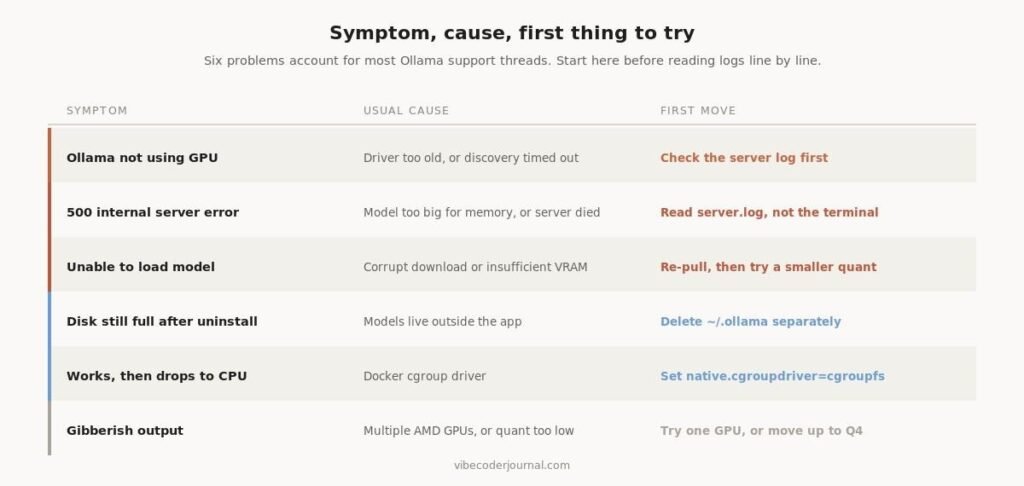
Six problems account for most Ollama support threads.
| Symptom | Usual cause | First thing to try |
|---|---|---|
| Not using the GPU | Driver too old, or discovery timed out | Read the server log before anything else |
| 500 internal server error | Model too big for memory, or the server died | Check server.log, not the terminal output |
| Unable to load model | Corrupt download or not enough VRAM | Re-pull, then drop to a smaller quantization |
| Disk still full after uninstall | Models live outside the application | Delete the model directory separately |
| Works, then drops to CPU | Docker systemd cgroup management | Set native.cgroupdriver=cgroupfs |
| Gibberish output | Multiple AMD GPUs, or quantization too low | Try a single GPU, or move up to Q4 |
Each of these is covered in full below.
How do you read Ollama’s logs?
Before troubleshooting anything, get the server log. Nearly every failure prints a specific reason here that never appears in your terminal.
# macOScat ~/.ollama/logs/server.log
# Linux with systemdjournalctl -u ollama –no-pager –follow –pager-end
# Docker
docker logs <container-name>
On Windows, press Ctrl+R and open explorer %LOCALAPPDATA%\Ollama. You will find server.log for the most recent server run, app.log for the GUI, and upgrade.log for update problems.
For more detail, restart with debug logging on: OLLAMA_DEBUG=1 ollama serve. On Windows, quit the tray app first, then in PowerShell run $env:OLLAMA_DEBUG=”1″ followed by & “ollama app.exe”.
Why is Ollama not using my GPU?
This is the most common complaint and it has four distinct causes. Work down this list and stop at the first step that tells you something.
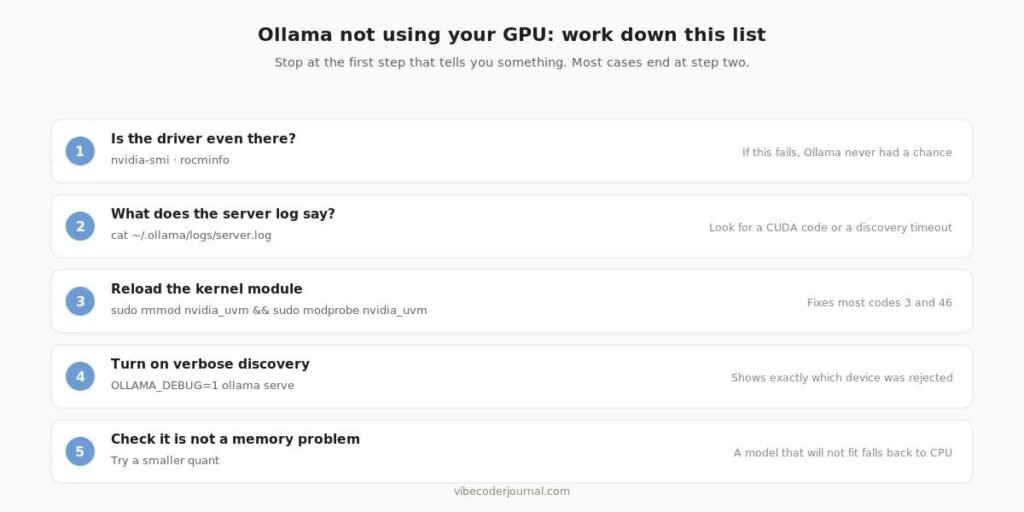
A diagnostic order that finds most GPU problems within two steps.
If you have an NVIDIA card
Ollama reports raw CUDA error codes in the server log. Four of them account for nearly everything you will see.
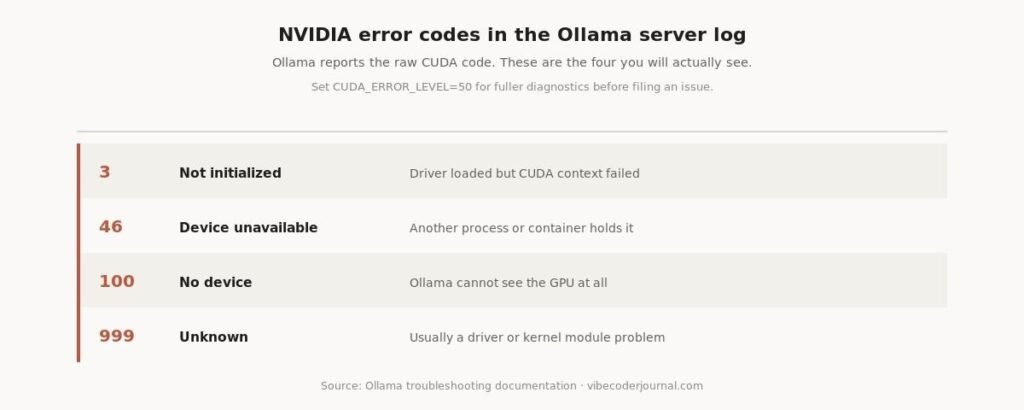
The CUDA error codes Ollama surfaces, and what each one means.
The fixes, in the order worth trying:
sudo nvidia-modprobe -u                    # load the uvm driver
sudo rmmod nvidia_uvm && sudo modprobe nvidia_uvm   # reload it
docker run --gpus all ubuntu nvidia-smi    # if you are in a container
If none of that works, set CUDA_ERROR_LEVEL=50 for fuller diagnostics and check the kernel log with sudo dmesg | grep -i nvrm before filing an issue.
If you have an AMD card
There is one failure mode here that looks like nothing is wrong at all, and it catches a lot of people.
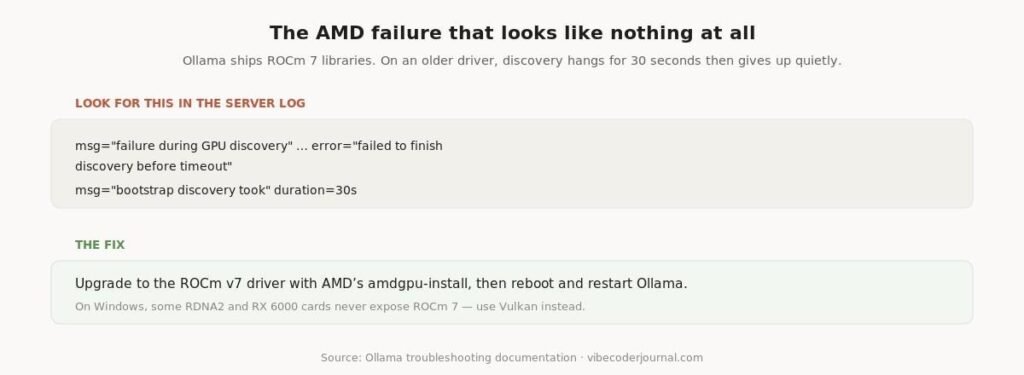
The log signature of an AMD driver version mismatch.
Ollama bundles ROCm 7 libraries, which need a matching ROCm 7 kernel driver. On an older driver, GPU discovery hangs, times out after 30 seconds, and Ollama quietly falls back to CPU. Upgrade with AMD’s amdgpu-install utility, then reboot.
On Linux, AMD access also needs video or render group membership for /dev/kfd. On Windows, some RDNA2 and RX 6000 cards never expose ROCm 7 at all — Vulkan is the supported fallback, and on mixed iGPU/dGPU systems you may need to set GGML_VK_VISIBLE_DEVICES to your discrete GPU’s index.
If it works and then stops
A GPU that works initially and then silently drops to CPU inside Docker is a cgroup problem. Edit /etc/docker/daemon.json and add “exec-opts”: [“native.cgroupdriver=cgroupfs”].
What causes a 500 internal server error in Ollama?
A 500 means the server failed while handling your request — it is not a network problem. In practice it is almost always one of three things: the model did not fit in memory, the runner crashed, or the model files are corrupt.
ollama ps                 # is anything actually loaded?
ollama list               # what is on disk, and how big
ollama rm  <model>        # then re-pull if you suspect corruption
ollama pull <model>
Check the log for the real reason. A 500 in your terminal is the symptom; server.log carries the cause. If it mentions memory, you are trying to run a model that does not fit — drop to a smaller parameter count or a lower quantization.
If it is not memory, force a different runtime. Autodetection occasionally picks a library your CPU cannot handle. Override it with OLLAMA_LLM_LIBRARY=”cpu_avx2″ ollama serve, which is also a quick way to prove whether the GPU path is the problem.
What does “unable to load model” mean?
Either the file is damaged or it will not fit. Distinguish between them by size before you do anything else.
ollama list                       # compare model size to your VRAM
ollama rm  qwen3:30b
ollama pull qwen3:30b             # a clean re-pull fixes corruption
ollama run  qwen3:14b             # or step down a size
If a re-pull does not fix it, the model is too large for the memory you have. As a rule of thumb at 4-bit quantization a model needs roughly 0.55–0.62 GB per billion parameters, plus a few gigabytes for context and overhead.
We covered the full sizing maths in how to run LLMs locally.
One non-obvious cause on Linux: if the filesystem holding Ollama’s temporary files is mounted noexec, model loading fails. Point it somewhere else with OLLAMA_TMPDIR=/usr/share/ollama/.
Where does Ollama store its files?
Knowing this answers two questions at once: how to reclaim disk space, and why uninstalling did not.
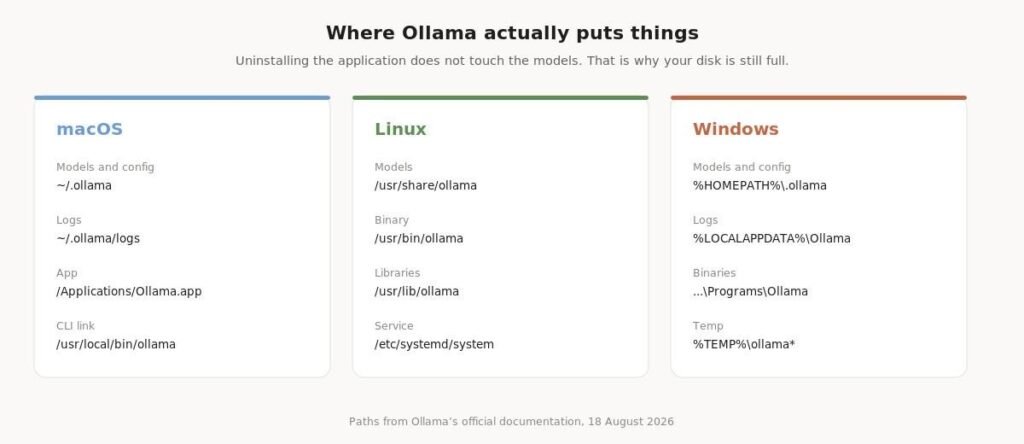
Ollama’s file locations on each operating system.
The models are the large files, and they are not inside the application. Removing Ollama leaves them exactly where they were.
How do you delete Ollama models and free up space?
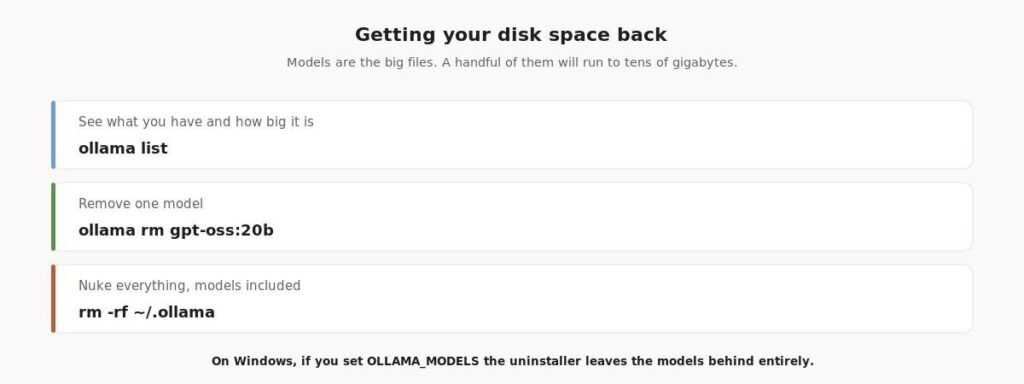
Three commands, in increasing order of finality.
ollama list               # sizes for everything you have pulled
ollama rm gpt-oss:20b     # remove one model
rm -rf ~/.ollama          # remove everything, models included
On Windows there is a trap. If you changed the OLLAMA_MODELS environment variable to store models on another drive, the uninstaller will not remove them. Ollama’s own documentation says so. Delete that directory by hand.
How do you completely uninstall Ollama?
macOS
Ollama’s official uninstall list, with one correction:
sudo rm -rf /Applications/Ollama.app
sudo rm /usr/local/bin/ollama
rm -rf "$HOME/Library/Application Support/Ollama"
rm -rf "$HOME/Library/Saved Application State/com.electron.ollama.savedState"
rm -rf ~/Library/Caches/com.electron.ollama/
rm -rf ~/Library/Caches/ollama
rm -rf ~/Library/WebKit/com.electron.ollama
rm -rf ~/.ollama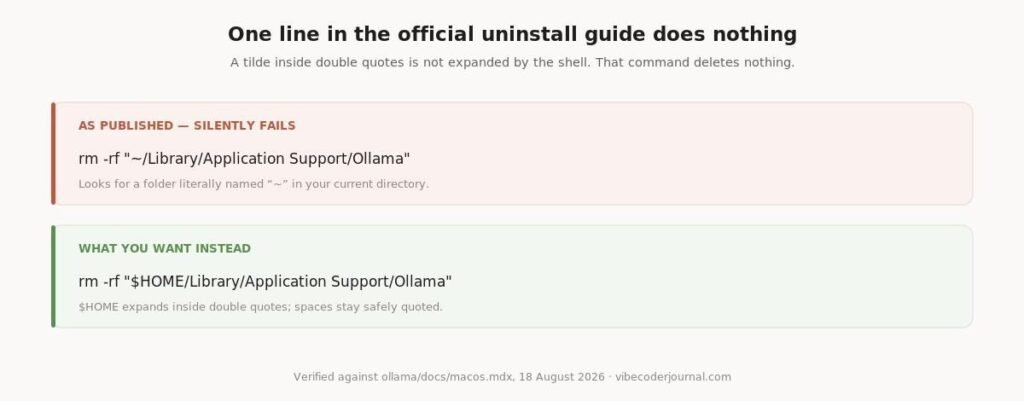
The published command does not do what it looks like it does.
Why the change matters. Ollama’s documentation writes that line as rm -rf “~/Library/Application Support/Ollama”. A tilde inside double quotes is not expanded by the shell, so that command looks for a directory literally named ~ in your current folder, finds nothing, and exits successfully. It leaves the real folder untouched. Using $HOME instead expands correctly while keeping the spaces safely quoted.
Linux
sudo systemctl stop ollama
sudo systemctl disable ollama
sudo rm /etc/systemd/system/ollama.service
sudo rm $(which ollama)
sudo rm -rf /usr/lib/ollama          # or /usr/local/lib/ollama
sudo userdel ollama
sudo groupdel ollama
sudo rm -r /usr/share/ollama         # the models live here
A second correction. The official docs remove the library directory with sudo rm -r $(which ollama | tr ‘bin’ ‘lib’). That works for standard paths, but tr substitutes characters rather than words — it maps b to l, i to i and n to b anywhere they appear. If your install path contains any of those letters elsewhere, it produces the wrong directory. Delete the library folder explicitly instead.
Windows
Use Add or remove programs in Windows Settings. The installer registers a proper uninstaller. Then delete the model directory by hand if you moved it.
Is Ollama safe to use?
Yes, with caveats that are about how you configure it rather than the software itself.
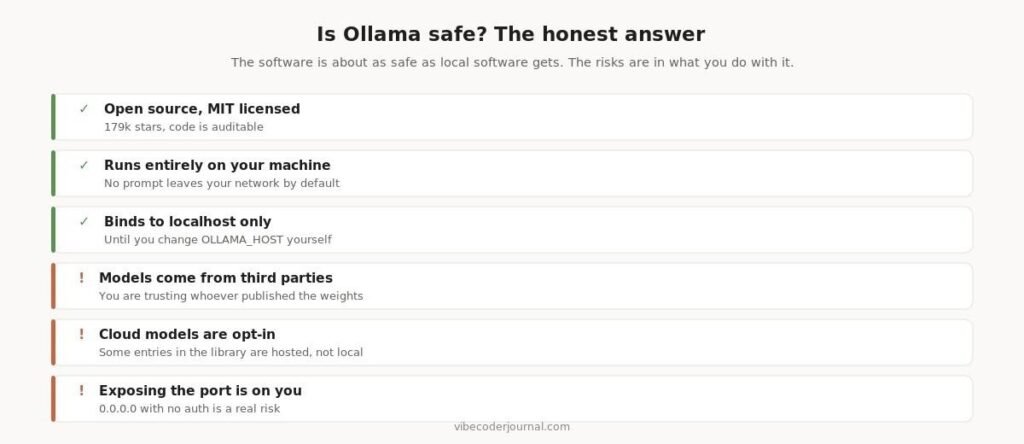
What is reassuring about Ollama’s security model and what is on you.
Ollama is MIT licensed with 179,000 GitHub stars, so the code is auditable and widely reviewed. It runs models on your own hardware and binds to localhost by default — nothing is sent anywhere unless you change that.
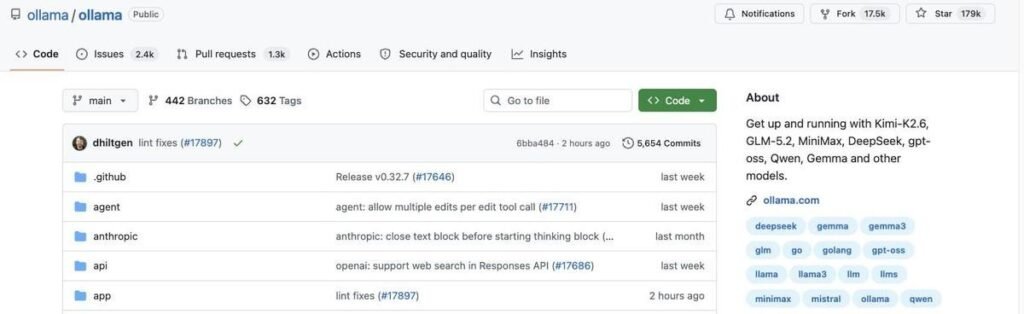
The Ollama repository: MIT licensed, actively maintained.
The three real risks are yours to manage. Model weights come from third parties, so you are trusting whoever published them. Some entries in the model library are cloud-hosted rather than local, which defeats the point if privacy is why you are here — check the tags. And if you set OLLAMA_HOST=0.0.0.0 to reach Ollama from another machine, you have published an unauthenticated inference endpoint on your network.
Frequently asked questions
How do I uninstall Ollama on Mac?
Remove /Applications/Ollama.app and /usr/local/bin/ollama, then delete the Application Support folder, the saved application state, the two cache directories, the WebKit folder and ~/.ollama. The full command list is above. Note that Ollama’s own documentation quotes the tilde in one of those paths, which prevents it expanding — use $HOME instead.
Why is Ollama not using my GPU?
Most often an outdated driver or a failed device discovery. Check the server log first: NVIDIA failures appear as CUDA codes 3, 46, 100 or 999, and AMD failures appear as a discovery timeout after 30 seconds, which usually means a ROCm driver older than version 7.
What is an Ollama 500 internal server error?
The server failed while handling the request, most commonly because the model did not fit in available memory. Check server.log for the underlying reason rather than relying on the terminal message.
How do I delete Ollama models?
Run ollama list to see what is installed and how large each model is, then ollama rm followed by the model name. To remove everything including models, delete the ~/.ollama directory.
Does uninstalling Ollama delete the models?
Not necessarily. The models sit in a separate directory that the uninstaller does not always remove, and on Windows a custom OLLAMA_MODELS location is definitely left behind. Delete it manually if you want the disk space back.
Is Ollama safe?
The software is open source under the MIT licence and runs entirely on your machine, binding to localhost by default. The risks are the models you download, cloud-hosted entries in the library, and exposing the port to your network without authentication.
Where are Ollama logs stored?
On macOS, ~/.ollama/logs/server.log. On Linux with systemd, use journalctl -u ollama. On Windows, %LOCALAPPDATA%\Ollama contains server.log, app.log and upgrade.log.
Methodology
Every command and file path on this page was taken from Ollama’s official documentation on GitHub — the troubleshooting, macOS, Linux and Windows guides — and read on 18 August 2026 rather than copied from other articles. Where we deviate from the official instructions we say so explicitly and explain why, which applies in two places: the quoted tilde in the macOS uninstall list, and the character-substitution command in the Linux library removal step.
We have no commercial relationship with Ollama and this page contains no affiliate links.
Sources
- Ollama troubleshooting guide — logs, GPU discovery, error codes
- Ollama macOS documentation — file locations and the uninstall list
- Ollama Linux documentation — service setup and uninstall steps
- Ollama Windows documentation — file locations, OLLAMA_MODELS, Vulkan fallback
Commands verified against Ollama’s official documentation on 18 August 2026. Ollama ships frequently — if something here no longer matches, tell us and we will re-verify.
For student developers pairing local models with editor completions, see free edu email access for Cursor.
To connect local Ollama instances to self-hosted orchestration workflows, see our analysis of n8n self-hosting costs.


[…] If Ollama is misbehaving more broadly, we covered the common failures separately in Ollama troubleshooting. […]
[…] Ollama itself is giving you trouble, our Ollama troubleshooting guide covers the common […]
[…] Ollama troubleshooting guide […]