

By Abdullah Zulfiqar · Published 7 October 2026 · Checked against Google’s Antigravity documentation on 7 October 2026
Antigravity IDE can test your code automatically in two ways. The agent runs your test commands (like npm test or pytest) in its terminal sandbox. Its browser agent opens your app in Chrome, clicks through it like a user, and saves screenshots and recordings as proof. To make this hands-off, you need to do three things:
- Keep the Default permission preset, so test commands run without asking.
- Allow your local dev server in the browser settings.
- Save your testing steps as a skill, so the agent follows them every time.
| Question | Short answer |
| Can Antigravity test my app automatically? | Yes: unit tests in the terminal, and UI tests through the browser agent |
| What does the browser agent produce? | Screenshots, browser recordings and a “walkthrough” summary |
| Will it ask before running tests? | Not inside the sandbox on the Default preset (macOS and Linux) |
| Does the sandbox have internet? | No, not by default. Installing packages needs approval or an allow rule |
| Which sites can the browser open? | The allowlist starts with only localhost |
| Best way to repeat a test routine | A skill in .agents/skills/. Workflows are being replaced by skills from 1 November 2026 |
What does “auto testing” mean in Antigravity IDE?
It means the agent checks its own work: it writes tests, runs them, and tests the UI in a real browser before it tells you it’s done. Google’s own description of the IDE lists UI testing as one of the browser agent’s main jobs:
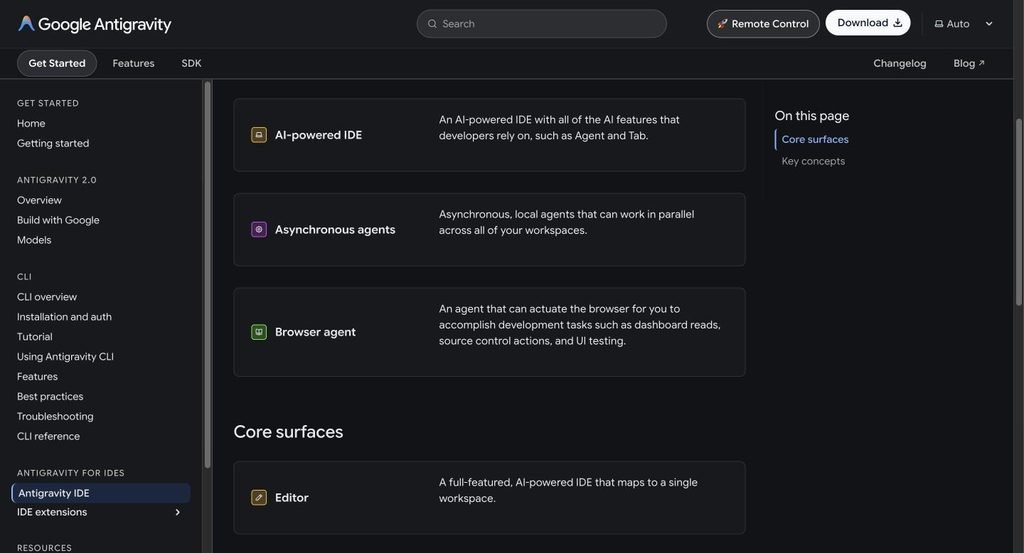
Antigravity IDE docs describing the browser agent for dashboard reads, source control actions and UI testing
Google’s Antigravity IDE overview page. Screenshot taken 7 October 2026.
There are three kinds of testing you can hand to the agent:
| Type | How Antigravity does it | What you get back |
| Unit and integration tests | Writes test files and runs your test command in the terminal | Terminal output, pass/fail, and fixes if something fails |
| UI / end-to-end checks | The browser agent opens your app, clicks, types and reads the console | Screenshots and a recording of every browser session |
| Regression tests you keep | Writes Playwright or Cypress test files into your repo | Real test files your CI can run later |
The third type matters most. Browser-agent checks are great while you build, but they only happen when the agent runs. Committed test files run on every push.
How does the browser agent test your app?
Antigravity uses a “browser subagent” that controls a local Chrome browser. It opens tabs, clicks, scrolls, types and reads console logs, then saves screenshots and videos as artifacts you can review.
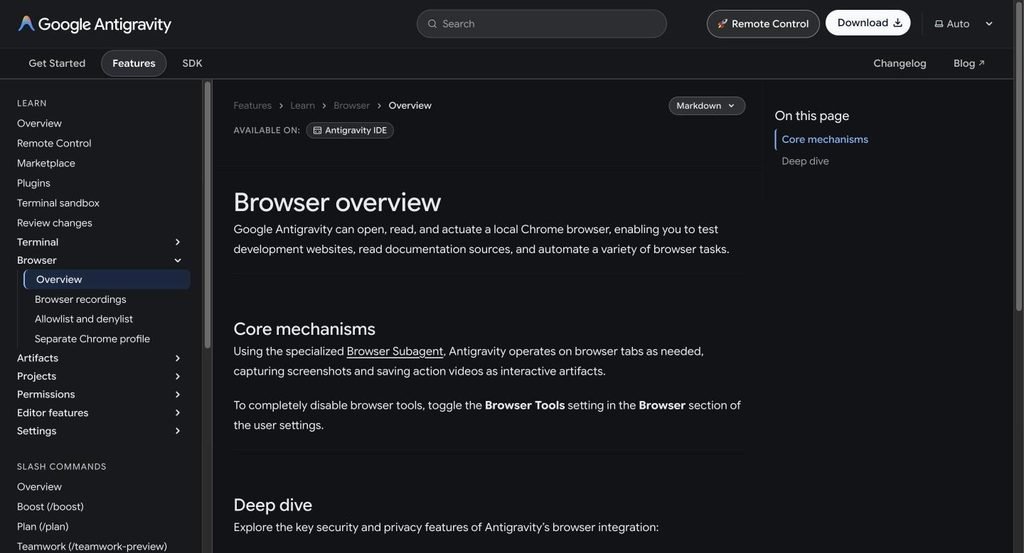
Antigravity browser overview docs explaining the Browser Subagent captures screenshots and saves action videos
Antigravity’s Browser overview docs. Screenshot taken 7 October 2026.
Three things to know before you rely on it:
- It uses a separate Chrome profile. It doesn’t share cookies or logins with your normal Chrome, but any logins you make in it are remembered. Use test accounts, not your real ones.
- Every session can be recorded. Recordings appear at the bottom of each browser step and are saved as artifacts.
- It finishes with a walkthrough. When the task is done, the agent writes a walkthrough artifact: a short summary of what changed, with screenshots and recordings for browser tasks.
Antigravity walkthrough artifact docs showing an example summary of what the agent built
Antigravity’s Walkthrough artifact docs. Screenshot taken 7 October 2026.
You can comment on screenshots and other artifacts to give the agent feedback, for example “the button is cut off on mobile, fix it and re-test”.
Step 1: Set permissions so tests run without constant prompts
On macOS and Linux, keep the Default permission preset. It runs terminal commands inside a sandbox without asking you each time, so npm test or pytest just runs.
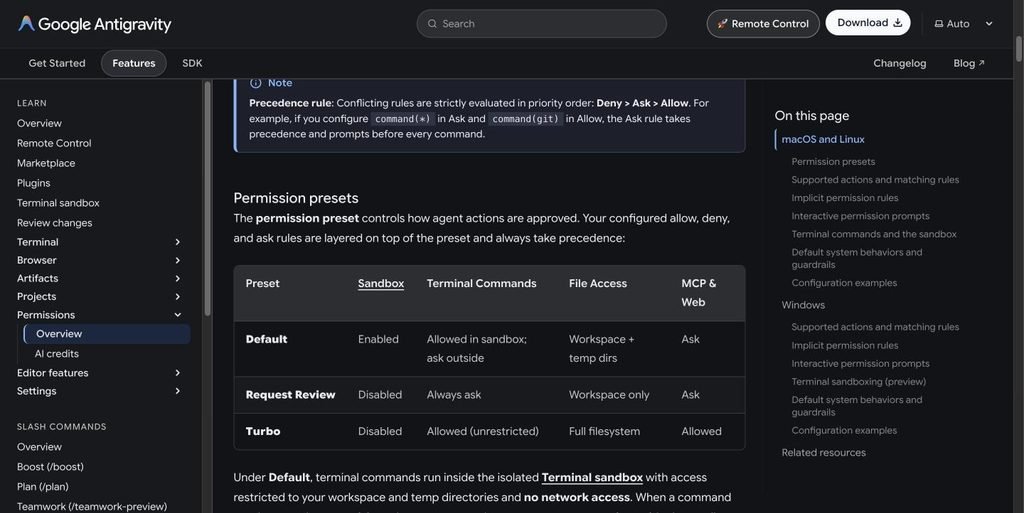
Antigravity permission presets table: Default, Request Review and Turbo
Antigravity’s permission presets, from the Agent permissions docs. Screenshot taken 7 October 2026.
| Preset | Sandbox | Test commands | Good for testing? |
| Default | On | Run without asking inside the sandbox | Yes, the best balance |
| Request Review | Off | Every command asks first | Safe, but slow for test loops |
| Turbo | Off | Everything runs, no limits | Fast, but no protection. Avoid on your main machine |
Set it under Settings → General → Permission Settings, or per project under Settings → Projects.
The catch: the sandbox has no internet by default. Running tests works, but npm install or pip install needs network access. The agent will ask to run those outside the sandbox. To skip that prompt, allow the package registry or the exact commands. Antigravity permission rules use an action(target) format:
# Allow list
command(regex:npm run (build|lint|test)) # let test scripts run anywhere
read_url(registry.npmjs.org) # let the sandbox reach npm
read_url(pypi.org) # let the sandbox reach PyPI
# Deny list
command(rm -rf)
command(sudo)
write_file(.git/)
The first and last groups come straight from Google’s own examples. A domain allowed with read_url is added to the sandbox’s network allowlist, so npm or pip can reach it.
On Windows, Antigravity still uses the older settings. Turn on Enable Sandbox Mode and set Terminal Command Auto Execution to Proceed in Sandbox for the same effect.
Step 2: Let the browser open your local app
The browser allowlist starts with only localhost, so a dev server on http://localhost:3000 works out of the box. Any other site triggers a prompt with an Always allow button.
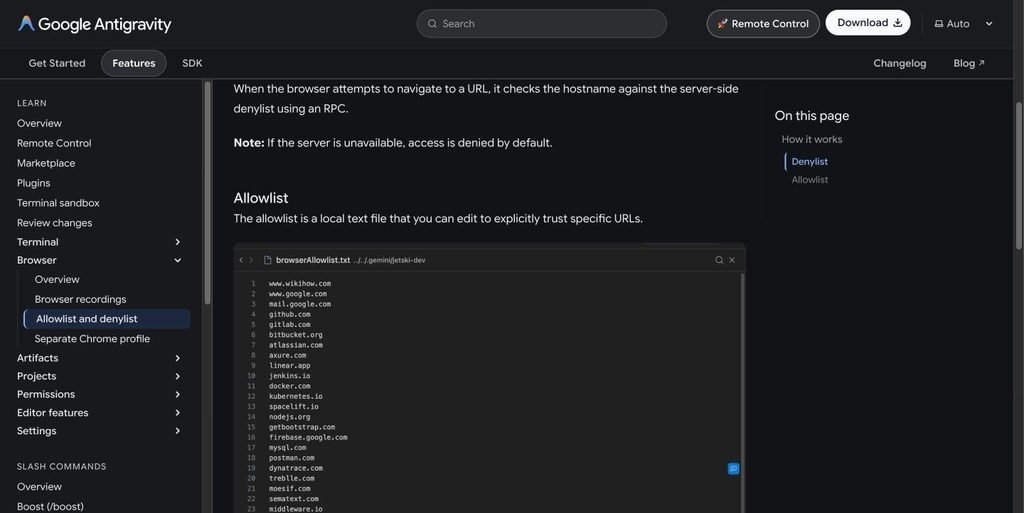
Antigravity browser allowlist file example with trusted domains
The browser allowlist section of Antigravity’s docs. Screenshot taken 7 October 2026.
On macOS and Linux, the permission engine also asks before the agent reads a site (read_url) or clicks and types on it (execute_url). For fully hands-off UI testing of your own app, add allow rules for your dev server, for example:
read_url(localhost)
execute_url(localhost)
Keep everything else on Ask, especially real dashboards and admin panels. Google’s own example puts execute_url(aws.amazon.com) on the Ask list for that reason.
Two security details:
- A server-side denylist blocks known bad URLs, and it always beats your allowlist.
- If the denylist service can’t be reached, browsing is denied by default.
Step 3: Tell the agent how to test (prompt + rule)
Be specific about what “tested” means. Vague prompts like “test it” get vague checks. A prompt that works well:
Start the dev server with npm run dev. Then: 1. Run npm test and fix any failures. 2. Open http://localhost:3000/signup in the browser. 3. Test the signup form: empty fields, an invalid email, a password under 8 characters, and a valid signup. 4. Check the browser console for errors. 5. Write a Playwright test in tests/signup.spec.ts that covers the same four cases, and run it. 6. Finish with a walkthrough that includes screenshots of each case.
To make the agent test every time without being asked, add a rule to AGENTS.md in your project root. Antigravity loads it automatically on every turn:
# Testing rules
– After changing any code, run `npm test` and fix failures before finishing.
– After changing anything in `src/components/` or `src/pages/`, open the
affected page on http://localhost:3000 and check it in the browser.
– Never mark a task done if a test is failing or skipped.
– Add or update a Playwright test for every user-facing change.
Step 4: Save your test routine as a skill
For a full routine you run often, create a skill. Skills are folders with a SKILL.md file. The agent sees each skill’s name and description, and loads the full instructions when a task matches.
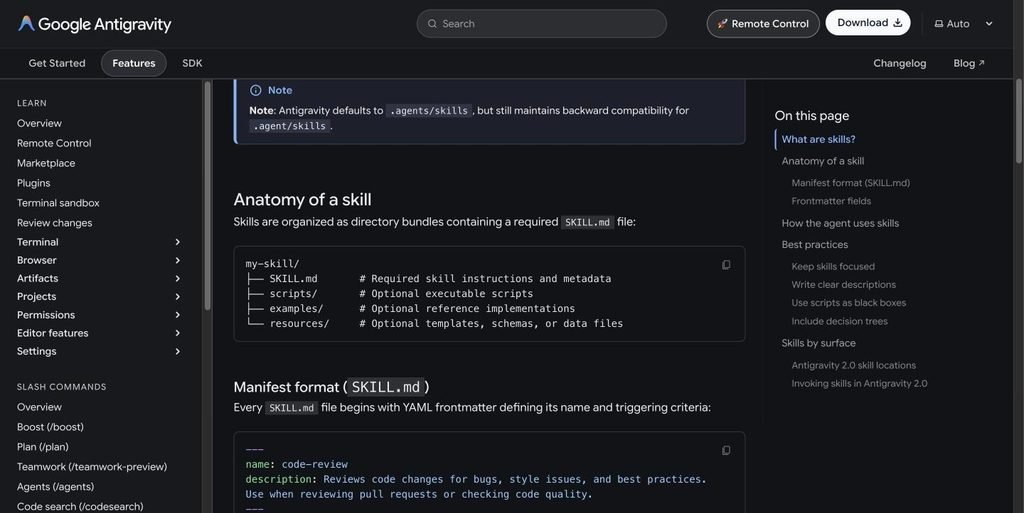
Antigravity docs showing the anatomy of a skill folder and the SKILL.md manifest format
The “Anatomy of a skill” section of Antigravity’s Agent skills docs. Screenshot taken 7 October 2026.
Create .agents/skills/ui-test/SKILL.md in your project:
—
name: ui-test
description: Runs the full test suite and checks changed pages in the browser. Use after any code change, before marking a task done, or when asked to test or QA the app.
—
# UI test routine
1. Run `npm run lint` and `npm test`. Fix failures and re-run until green.
2. Start the app with `npm run dev` if it isn’t running.
3. For each page touched by the change, open it on http://localhost:3000:
– check it loads without console errors
– try the main action (submit a form, click the primary button)
– try one bad input and confirm the error message shows
– resize to 375px wide and check nothing overflows
4. Take a screenshot of each page tested.
5. Add or update a Playwright test for each user-facing change and run `npx playwright test`.
6. Finish with a walkthrough listing what passed, what failed, and screenshots.
Commit .agents/skills/ to Git so your whole team gets the same routine. The agent picks the skill up on its own when a task matches, or you can mention it by name (“use the ui-test skill”). In Antigravity 2.0 and the CLI you can also type /ui-test.
If you used Workflows before: Google is deprecating Workflows in favour of skills by 1 November 2026. Run /migrate-workflows in the agent chat to convert your existing ones.
Common problems with Antigravity auto testing
| Problem | Likely cause | Fix |
| Agent asks before every test run | Request Review preset, or Windows default settings | Use Default (macOS/Linux) or Proceed in Sandbox (Windows) |
| npm install / pip install fails | The sandbox has no network by default | Approve running it outside the sandbox, or add read_url(registry.npmjs.org) / read_url(pypi.org) |
| Browser won’t open your page | URL not on the allowlist, or the denylist service is unreachable | Use localhost, click Always allow, or check your connection |
| Browser agent does nothing | Browser Tools is turned off | Turn it on in Settings → Browser |
| UI tests pass but bugs reach production | Only browser checks, no saved test files | Make the agent write Playwright/Cypress tests and run them in CI |
| Tests logged in as you | Logins persist in the agent’s Chrome profile | Use test accounts. The profile is separate from your normal Chrome |
| Runs out of quota quickly | Long browser sessions use more agent work | Test only the changed pages; complex tasks consume more quota |
Is Antigravity auto testing worth it?
Yes, for checking the agent’s own work while you build. No, as a replacement for a real test suite. The browser agent is good at catching broken buttons, console errors and obvious layout problems before you look. The screenshots and recordings make reviewing fast.
But browser checks only run when the agent runs. The real win is telling the agent to write Playwright or unit tests as it goes. You end up with a test suite that runs in CI on every push, whoever or whatever wrote the code.
Comparing agentic IDEs? See how Antigravity stacks up in our Claude Code alternatives comparison.
FAQ
Is Antigravity IDE free for testing?
Antigravity is available on free and paid Google AI plans. Every plan gets Gemini models and all product features, but limits differ. Free users get a weekly quota, while Google AI Pro and Ultra refresh every five hours with higher weekly limits. Long browser testing sessions use more quota than quick edits.
Can Antigravity run Playwright or Cypress tests?
Yes. They are normal terminal commands, so the agent can write the test files and run npx playwright test or npx cypress run. If the test needs to download a browser or reach the internet, approve running it outside the sandbox or allow those domains with read_url.
Does the Antigravity browser agent use my Chrome logins?
No. It runs in a separate Chrome profile with its own cookies. Any logins you make there are remembered for next time, so use test accounts.
Can Antigravity test sites other than localhost?
Yes, but only after you allow them. The allowlist starts with only localhost. Other sites prompt you with Always allow. Sites on Google’s denylist can’t be allowed at all.
Does auto testing work on Windows?
Yes, but Windows still uses Antigravity’s older permission settings. Turn on Enable Sandbox Mode and set Terminal Command Auto Execution to Proceed in Sandbox so tests run without a prompt each time.
Can I use Antigravity IDE at work?
Google’s docs say the Antigravity IDE is not supported for enterprise customers. Teams on enterprise setups should use Antigravity 2.0 or the Antigravity CLI, which support the same skills and permission rules.
Sources
- Google Antigravity: Antigravity IDE overview, checked 7 October 2026
- Google Antigravity: Browser overview, Browser recordings, Allowlist and denylist and Separate Chrome profile
- Google Antigravity: Agent permissions, Agent settings and Terminal sandbox
- Google Antigravity: Walkthrough and Screenshots
- Google Antigravity: Rules, Agent skills and Workflows
- Google Antigravity: Plans
Related reading
- Claude Code alternatives
- Codex CLI vs Claude Code
- Hermes Agent full install guide
- Claude dangerously-skip-permissions explained


Leave a Reply