


By Abdullah Zulfiqar · Published 7 October 2026 · Steps checked against the official Hermes Agent docs on 7 October 2026
To install Hermes Agent, run one command in your terminal: curl -fsSL https://hermes-agent.nousresearch.com/install.sh | bash on macOS, Linux or WSL2, or iex (irm https://hermes-agent.nousresearch.com/install.ps1) in PowerShell on Windows. Then reload your shell, run hermes setup to pick an AI provider, and type hermes to start chatting. The installer handles Python, Node.js, ripgrep and FFmpeg for you. On macOS and Linux you only need Git, curl and tar installed first.
| Question | Short answer |
| What is Hermes Agent? | An open-source AI agent from Nous Research (MIT license) that learns skills as you use it |
| Install command (Mac/Linux/WSL2) | curl -fsSL https://hermes-agent.nousresearch.com/install.sh \| bash |
| Install command (Windows) | iex (irm https://hermes-agent.nousresearch.com/install.ps1) in PowerShell |
| Desktop app? | Yes, for macOS (Apple Silicon only) and Windows |
| What do I need first? | Git, curl, tar and SHA-256 tools on macOS/Linux; nothing extra on Windows |
| Minimum model context | 64,000 tokens |
| Latest release (when checked) | v0.21.5 (v2026.9.24), released 24 September 2026 |
| How long does it take? | The docs say “under two minutes” for the install itself |
What is Hermes Agent?
Hermes Agent is a free, open-source AI agent made by Nous Research. It runs in your terminal, a desktop app, or messaging apps like Telegram and Discord. It can run commands, read and edit files, browse the web and use tools for you. Its main selling point is that it creates reusable “skills” from your tasks and remembers what it learns across sessions. The project’s tagline is “the agent that grows with you”.
It’s one of the most popular agent projects on GitHub. When we checked on 7 October 2026, the repository had about 252,000 stars and 54,200 forks.
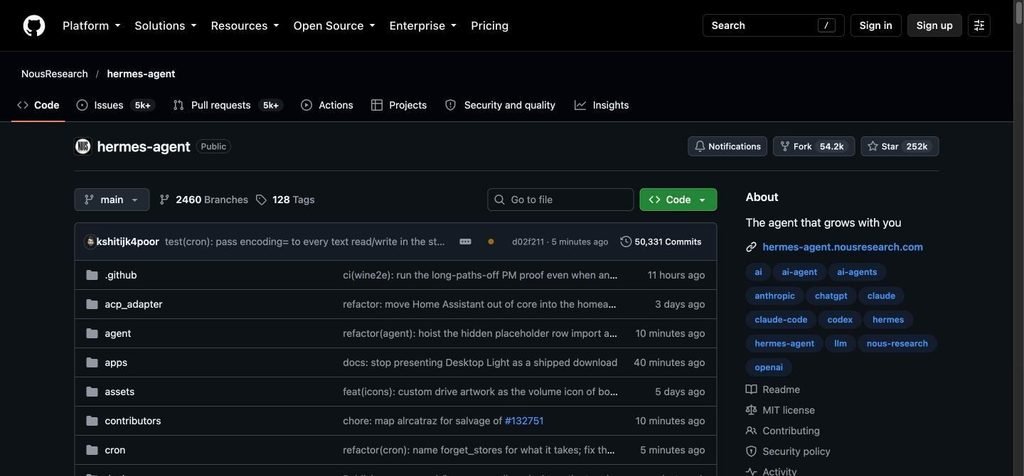
The NousResearch/hermes-agent GitHub repository showing 252k stars, 54.2k forks and MIT license
The official GitHub repository, NousResearch/hermes-agent. Screenshot taken 7 October 2026.
Hermes itself is free. You pay for the AI model it uses, unless you run a local model. You can sign in with a subscription you already have (ChatGPT/Codex, Claude Max, GitHub Copilot, SuperGrok), use an API key, or point it at Ollama, LM Studio or any OpenAI-compatible server.
Which install method should you use?
Use the one-line installer for a terminal setup, or the Desktop app if you want a graphical app on macOS or Windows. Here are all the supported options:
| Your system | Best method | Notes |
| macOS (Apple Silicon) | Desktop app (DMG) or install.sh | Intel Macs are not supported |
| Linux (x86_64 or ARM) | install.sh | Tested on the latest Ubuntu; most glibc + systemd distros work |
| Windows 10/11 | install.ps1 in PowerShell, or the Desktop app | The Desktop app (MSIX) needs Windows 11 22H2 or later |
| Windows with WSL2 | install.sh inside WSL2 | Same as Linux |
| Server or cloud | Docker image | Docker installs update by pulling a new image, not hermes update |
| Android (ARM) | Termux APT package | Best effort; Android may kill background processes |
Avoid these: Nous Research lists Homebrew (brew install hermes-agent), pip or uv tool install, and the AUR as unsupported. They may break, so use the official installer.
What do you need before installing?
On macOS and Linux you need Git, curl, tar and SHA-256 utilities. On Windows you need nothing extra. The installer downloads everything else itself:
- Python (current installs run on Python 3.14, managed by Hermes, not your system Python)
- Node.js and npm
- ripgrep (fast file search)
- FFmpeg (audio for voice features)
- A browser tool with its own Chromium, and a computer-use driver
Check Git first:
git –version
If that fails on Ubuntu or Debian, install the basics:
sudo apt update && sudo apt install -y git curl tar
On minimal Linux images, Hermes’s Node.js needs libatomic. If it’s missing, the installer installs it for you and asks for your sudo password once.
Step 1: Run the installer
macOS, Linux and WSL2
Open a terminal and run:
curl -fsSL https://hermes-agent.nousresearch.com/install.sh | bash
This is the same command shown on the official Hermes website:

Official Hermes Agent website showing the install via terminal command for macOS, Linux and Windows
The “Install via terminal” box on hermes-agent.nousresearch.com, with tabs for macOS, Linux and Windows. Screenshot taken 7 October 2026.
Windows (native)
Open PowerShell (not Command Prompt) and run:
iex (irm https://hermes-agent.nousresearch.com/install.ps1)
Both commands are listed in the official installation guide:
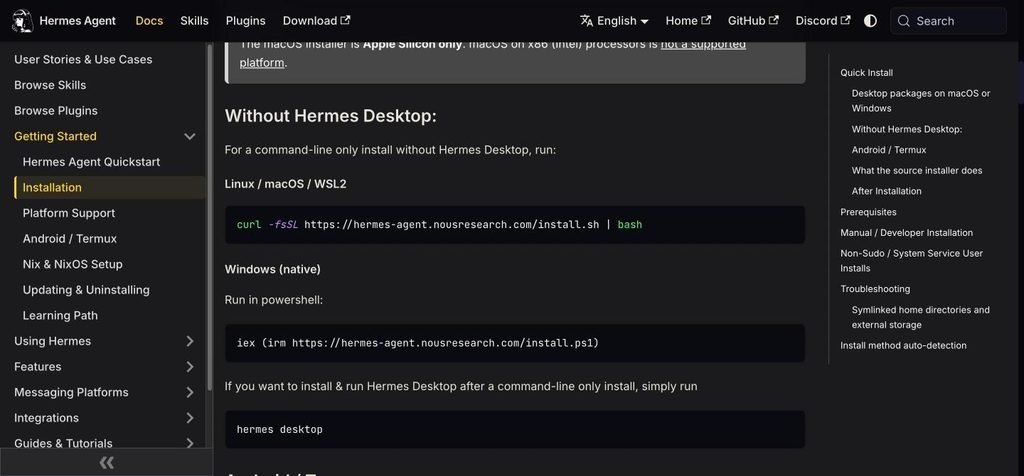
Hermes Agent docs installation page showing the Linux, macOS, WSL2 and Windows install commands
Official Hermes Agent installation docs, “Without Hermes Desktop” section. Screenshot taken 7 October 2026.
What the installer does
The script clones the Hermes source code, sets up the uv package manager, and installs the pinned tools listed above. On a normal terminal it shows one status line per step. Full logs go to logs/install.log inside the Hermes data folder. If a download fails, the install still finishes and prints the command to retry.
Useful installer options (add them after bash -s –):
| Option (Mac/Linux) | Windows equivalent | What it does |
| –skip-browser | -SkipBrowser | Don’t install the browser tools and Chromium |
| –skip-computer-use | -SkipComputerUse | Don’t install the computer-use driver |
| –non-interactive | -NonInteractive | Skip all questions (good for servers and scripts) |
| –include-desktop | -IncludeDesktop | Also build the Desktop app from source |
| –verbose | -Verbose | Show all output instead of one line per step |
Example of a server install without the browser:
curl -fsSL https://hermes-agent.nousresearch.com/install.sh | bash -s — –skip-browser
Where Hermes installs
| Install type | Code | hermes command | Your data |
| macOS / Linux / WSL2 script | ~/.hermes/hermes-agent/ | ~/.local/bin/hermes | ~/.hermes/ |
| Windows script | %LOCALAPPDATA%\hermes\hermes-agent\ | %LOCALAPPDATA%\hermes\bin\ | %LOCALAPPDATA%\hermes\ |
| Docker | /opt/hermes/ | Image entrypoint | Mounted /opt/data/ |
Optional: install the Hermes Desktop app
For a graphical app on macOS or Windows, download the package from the Hermes website.
- macOS: open the DMG and drag Hermes.app to Applications. Apple Silicon only.
- Windows: open the .appinstaller file. It installs a signed MSIX package that updates itself.
Already installed the terminal version? Run this to install and open the Desktop app:
hermes desktop
Step 2: Reload your shell and run setup
After the installer finishes, reload your shell so the hermes command is found, then run the setup wizard.
source ~/.bashrc # or: source ~/.zshrc on macOS
hermes setup
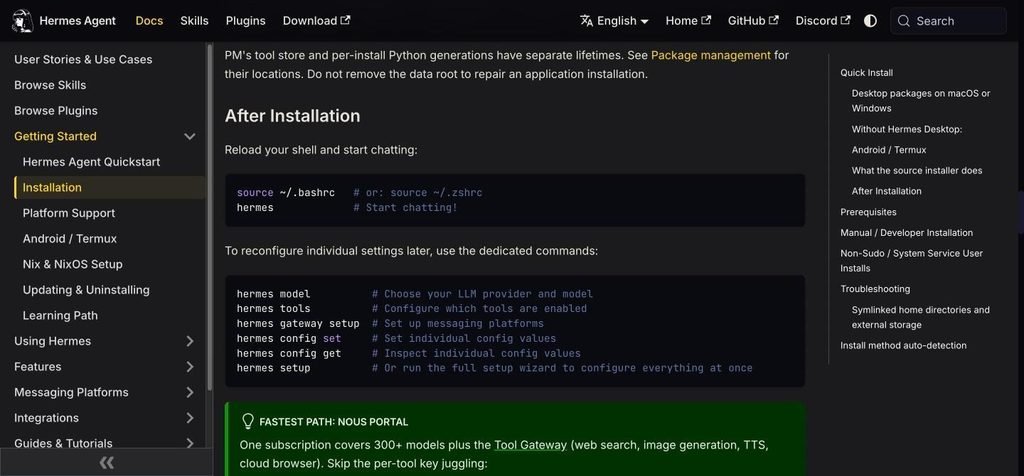
Hermes Agent docs After Installation section listing hermes model, tools, gateway setup, config and setup commands
The “After Installation” commands from the official docs. Screenshot taken 7 October 2026.
hermes setup offers three modes on a fresh install:
| Mode | Best for | What happens |
| Quick Setup (Nous Portal) | Fastest start | Log in with OAuth, no API keys. Turns on a model plus web search, image generation, voice and a cloud browser, billed to your Nous Portal subscription |
| Full Setup | Using your own keys | Walks you through every provider, tool and option |
| Blank Slate | Minimal, locked-down agent | Only the model, file tools and terminal tools are on. Everything else is off until you enable it |
The one-command shortcut for Quick Setup is:
hermes setup –portal
Choosing a provider
If you’d rather bring your own model, run:
hermes model
Popular choices from the official provider list:
| Provider | How to connect |
| OpenAI Codex / ChatGPT subscription | hermes model, then device-code login |
| Anthropic (Claude) | OAuth with Max plan plus extra usage credits, or an Anthropic API key |
| OpenRouter | Paste your OpenRouter API key |
| GitHub Copilot | OAuth through hermes model |
| Google AI Studio (Gemini) | Set GEMINI_API_KEY |
| DeepSeek, Kimi, Z.AI (GLM), Qwen | Set that provider’s API key |
| Ollama, LM Studio, vLLM (local) | hermes model, then custom endpoint, with your local URL |
You can switch provider any time with hermes model. Hermes keeps API keys in ~/.hermes/.env and other settings in ~/.hermes/config.yaml.
The 64K context rule (important for local models)
Hermes needs a model with at least 64,000 tokens of context, and it refuses to start with anything smaller. Hosted models like Claude, GPT, Gemini, Qwen and DeepSeek already meet this. If you run a local model, raise its context size:
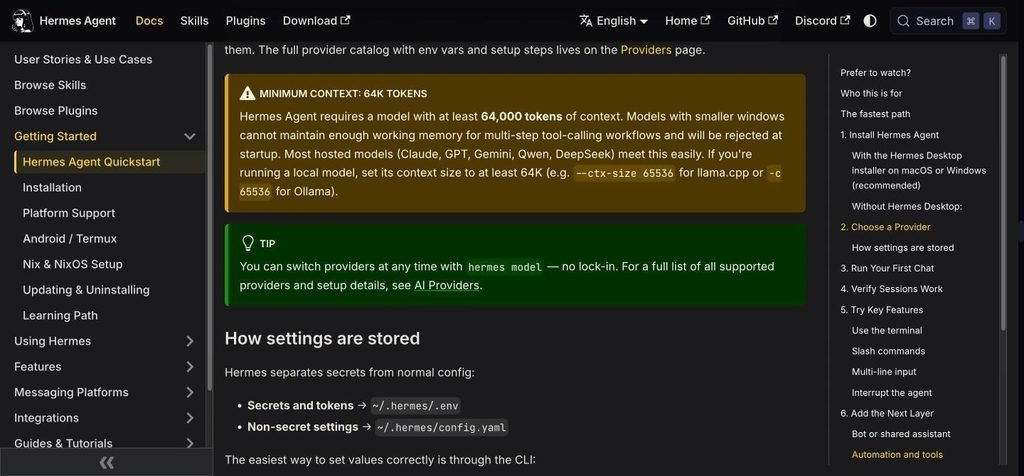
Hermes Agent docs warning that models need at least 64,000 tokens of context
The minimum context warning in the official quickstart. Screenshot taken 7 October 2026.
# llama.cpp
llama-server -m your-model.gguf –ctx-size 65536
# Ollama (inside an interactive session)
/set parameter num_ctx 65536
A bigger context uses more memory. Check what your machine can handle in our guide to what fits in 32 GB of memory.
Step 3: Start your first chat and check it works
hermes # classic terminal interface
hermes –tui # newer interface (recommended by the docs)
You’ll see a welcome banner with your model, tools and skills. Give it a simple task you can check, such as:
Check my current directory and tell me what looks like the main project file.
The setup is working when:
- the banner shows the model and provider you chose
- Hermes replies without an error
- it can use a tool (for example, run a terminal command or read a file)
- the conversation keeps going for more than one turn
Then check that sessions save and resume:
hermes -c # resume your most recent session
Step 4 (optional): Finish the “full” setup
Once a basic chat works, add the extras. The docs advise adding one at a time, after the base chat works.
Connect messaging apps:
hermes gateway setup
This connects Telegram, Discord, Slack, WhatsApp, Signal, Email, Microsoft Teams or Home Assistant. Check it with hermes gateway status.
Run commands in a sandbox (recommended):
hermes config set terminal.backend docker
Hermes then runs terminal commands inside a Docker container instead of directly on your computer. This is the safer setup for an agent that can run commands.
Add tools and skills:
hermes tools # turn tools on or off
hermes skills browse # see the skills catalog
hermes skills install <slug> # install a skill (runs a security scan first)
Connect your code editor:
hermes acp
How do you fix common Hermes install errors?
Run hermes doctor first. It checks your config, dependencies and services, and tells you what’s missing.
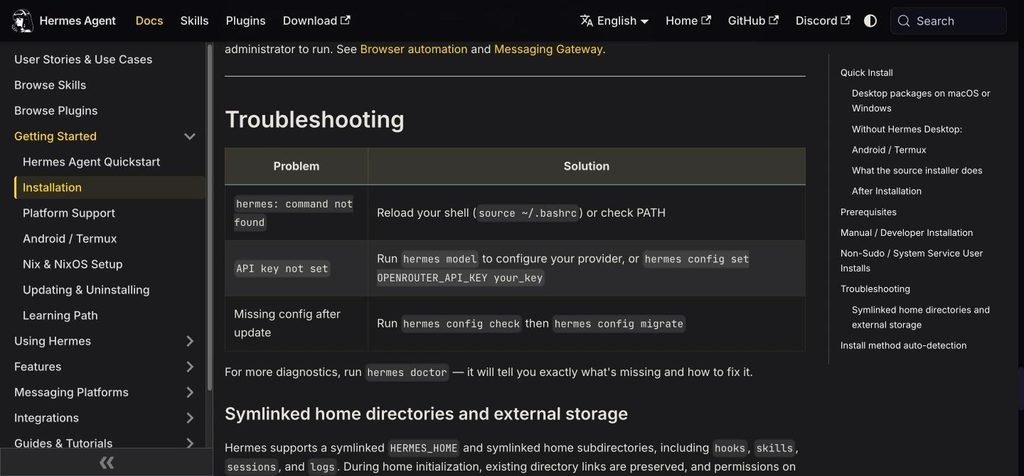
Hermes Agent docs troubleshooting table for command not found, API key not set and missing config after update
The troubleshooting table from the official installation docs. Screenshot taken 7 October 2026.
| Problem | Fix |
| hermes: command not found | Reload your shell (source ~/.bashrc or source ~/.zshrc), or add ~/.local/bin to your PATH: export PATH=”$HOME/.local/bin:$PATH” |
| API key not set | Run hermes model, or hermes config set OPENROUTER_API_KEY your_key |
| Missing config after an update | hermes config check, then hermes config migrate |
| Model is rejected at startup | Context is under 64K. Raise –ctx-size / num_ctx to 65536 or more |
| Empty or broken replies | Wrong provider, model or login. Run hermes model again |
| Custom endpoint returns garbage | Wrong base URL or model name, or the server isn’t OpenAI-compatible. Test it in another client first |
| Bot connected but nobody can message it | Re-run hermes gateway setup and check hermes gateway status |
| hermes -c can’t find old sessions | You’re in a different profile. Check hermes sessions list |
If Hermes’s answers keep getting cut off, see our fix for the “response remained truncated” error.
The docs’ recovery order when something feels wrong: hermes doctor → hermes model → hermes setup → hermes sessions list → hermes -c → hermes gateway status.
How do you update Hermes Agent?
hermes update # update to the latest version
hermes update –check # just check if an update is available
hermes –version # confirm the version
hermes update saves a quick snapshot of your settings, pulls the latest code, updates dependencies, asks about new config options, and restarts any running messaging gateways. If you installed with Docker, pull a new image instead. Desktop app installs update through the app.
How do you uninstall Hermes Agent?
hermes uninstall –dry-run # preview what will be removed
hermes uninstall # remove Hermes; can keep your settings
hermes uninstall –full # also delete your data
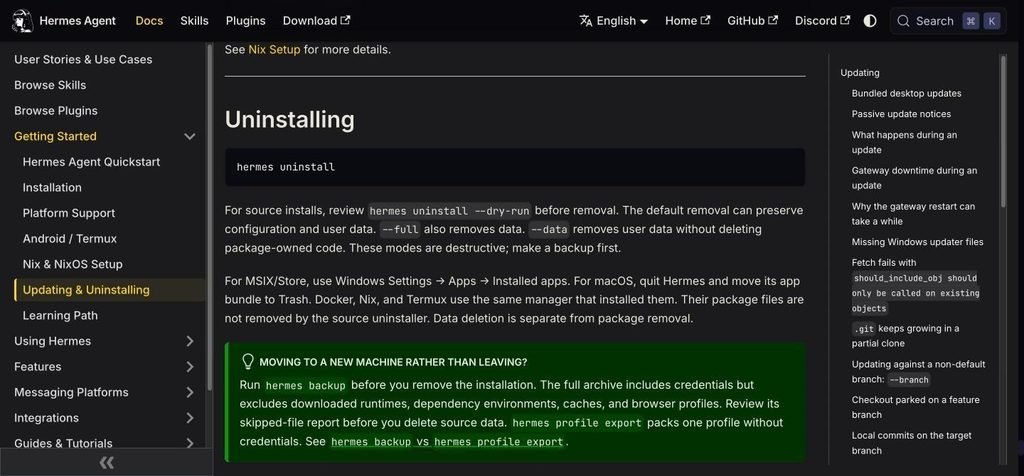
Hermes Agent docs uninstalling section showing hermes uninstall and the dry-run, full and data options
The uninstall section of the official “Updating & Uninstalling” docs. Screenshot taken 7 October 2026.
Moving to a new computer rather than removing it? Run hermes backup first. It saves your whole setup, including credentials, so you can restore it with hermes import.
On Windows Desktop installs, remove Hermes from Settings → Apps → Installed apps. On macOS, quit Hermes and move the app to the Trash.
FAQ
Is Hermes Agent free?
Yes. Hermes Agent is open source under the MIT license. You only pay for the AI model, through a subscription, API key or Nous Portal. It costs nothing extra if you run a local model with Ollama, LM Studio or llama.cpp.
Can I install Hermes Agent with Homebrew or pip?
No. Nous Research lists brew install, pip install, uv tool install and the AUR as unsupported. Use the official install.sh or install.ps1 script, the Desktop app, or Docker.
Does Hermes Agent work on Intel Macs?
The macOS Desktop installer is Apple Silicon only, and Intel Macs are not a supported platform. Use an Apple Silicon Mac, Linux, Windows or a cloud server.
Can Hermes Agent use local models?
Yes. Choose a custom endpoint in hermes model and point it at Ollama, LM Studio, vLLM or llama.cpp’s server. The model needs at least 64K tokens of context. Our guide to running LLMs locally covers the setup.
Where are Hermes settings stored?
API keys and tokens are in ~/.hermes/.env, and other settings are in ~/.hermes/config.yaml. On Windows, the data folder is %LOCALAPPDATA%\hermes\.
Is it safe to let Hermes run commands?
It runs real commands on your computer by default. For safety, switch the terminal to Docker with hermes config set terminal.backend docker, review what you enable with hermes tools, and avoid giving it access to accounts or files it doesn’t need.
Sources
- Hermes Agent official website, checked 7 October 2026
- Hermes Agent docs: Installation, checked 7 October 2026
- Hermes Agent docs: Quickstart, checked 7 October 2026
- Hermes Agent docs: Platform Support, checked 7 October 2026
- Hermes Agent docs: Updating & Uninstalling, checked 7 October 2026
- NousResearch/hermes-agent on GitHub and latest release v2026.9.24
Related reading
- Fix: Hermes “response remained truncated”
- How to run LLMs locally
- Ollama troubleshooting guide
- Claude Code alternatives



[…] Hermes Agent full install guide […]