

Quick answer: “Gemini restrictions” describes six different things, and most people are diagnosing the wrong one. Rate limits, spend limits and regional availability all have documented, legitimate fixes. The API’s four safety filters are adjustable — but on Gemini 2.5 and 3 models they already default to Off, so turning them off changes nothing. If Gemini is declining your request, you are almost certainly hitting the model’s own built-in safety, which is not a setting and cannot be configured. And core harm protections, such as child safety, are hard-blocked by design.
This guide covers the documented, supported ways to work within Gemini’s limits — raising rate limits, using the official safety settings API, and diagnosing what actually blocked a request. If you are looking at open-weight alternatives without proprietary guardrails, check our head-to-head gpt-oss-120b vs Gemini 3 Pro comparison. It does not cover circumventing safety systems, and the reason is in the last section: for the categories people usually mean, there is no configuration to change.
What do people mean by “Gemini restrictions”?
Six distinct things, with very different answers. Working out which one you have hit is most of the job.
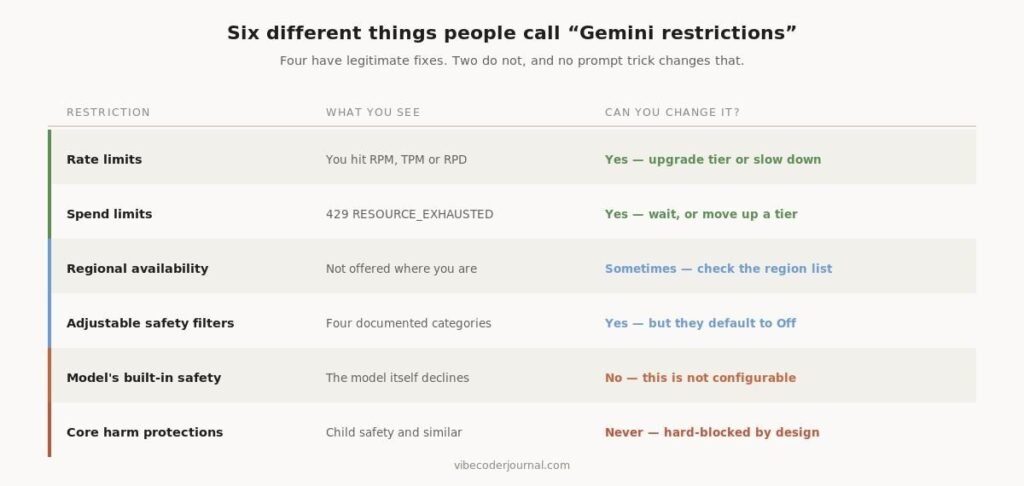
Six kinds of restriction and whether each can be changed.
| Restriction | What you see | Can you change it? |
|---|---|---|
| Rate limits | You hit RPM, TPM or RPD | Yes — upgrade tier or slow down |
| Spend limits | 429 RESOURCE_EXHAUSTED | Yes — wait, or move up a tier |
| Regional availability | Not offered where you are | Sometimes — check the region list |
| Adjustable safety filters | Four documented categories | Yes — but they default to Off |
| The model’s own safety | The model declines | No — not configurable |
| Core harm protections | Child safety and similar | Never — hard-blocked by design |
Source: Gemini API documentation, read 20 August 2026.
How do you tell which one you hit?
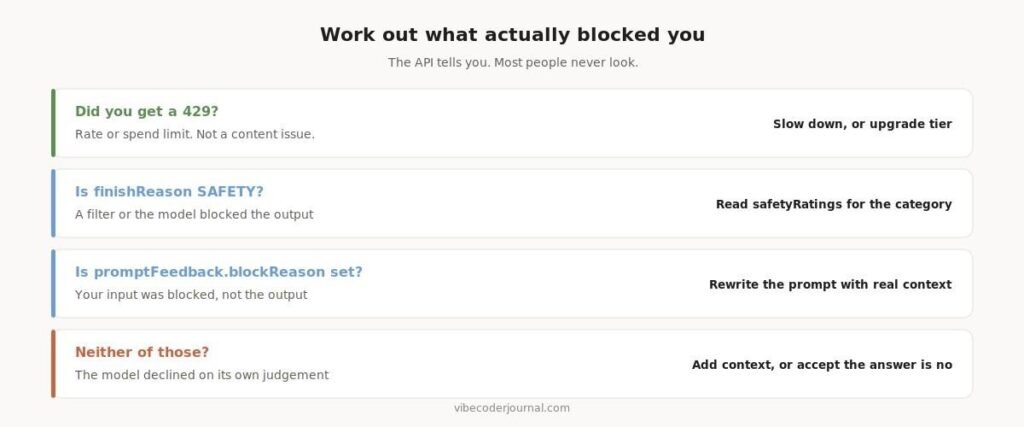
The API tells you, in the response. Most people never look at it.
Four checks that identify what actually blocked the request.
A 429 RESOURCE_EXHAUSTED is a quota problem, not a content problem. It has nothing to do with what you asked.
If promptFeedback.blockReason is set, your input was blocked before the model ever saw it. If Candidate.finishReason is SAFETY, the output was blocked — and Candidate.safetyRatings tells you which category and at what probability. Blocked content is not returned.
If none of those are set and the model simply answered with a refusal, that is the model’s own judgement. There is no flag for it.
How do you raise Gemini’s rate limits?
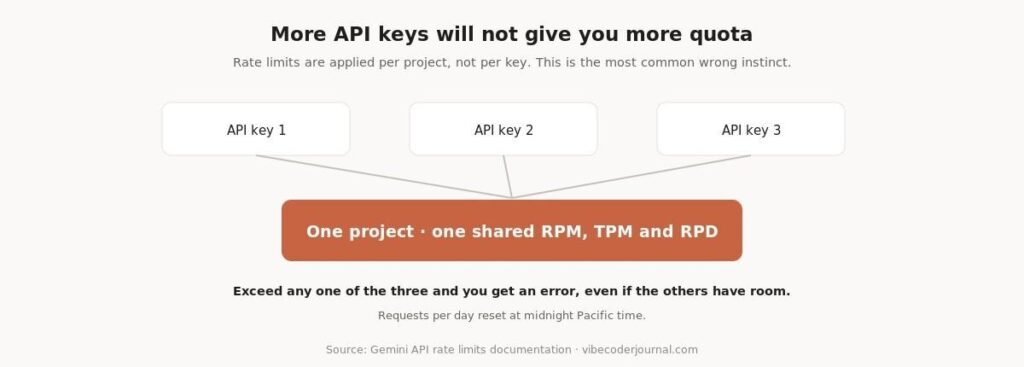
Rate limits are measured on three dimensions at once: requests per minute, input tokens per minute, and requests per day. Exceeding any one of them triggers an error, even if you have room on the others.
This is a different model from the subscription agents. Claude Code, for instance, uses a rolling five-hour window shared across every Anthropic surface rather than per-minute request counts — we broke that down in how to see your Claude Code usage. If you are moving between the two, the mental model does not transfer.
Quota is shared across the whole project.
The most common wrong instinct. Rate limits are applied per project, not per API key. Generating more keys inside the same project gives you nothing. Requests-per-day quotas reset at midnight Pacific time.
The documented way to get more headroom is to move up a usage tier. Tiers upgrade automatically once you qualify.
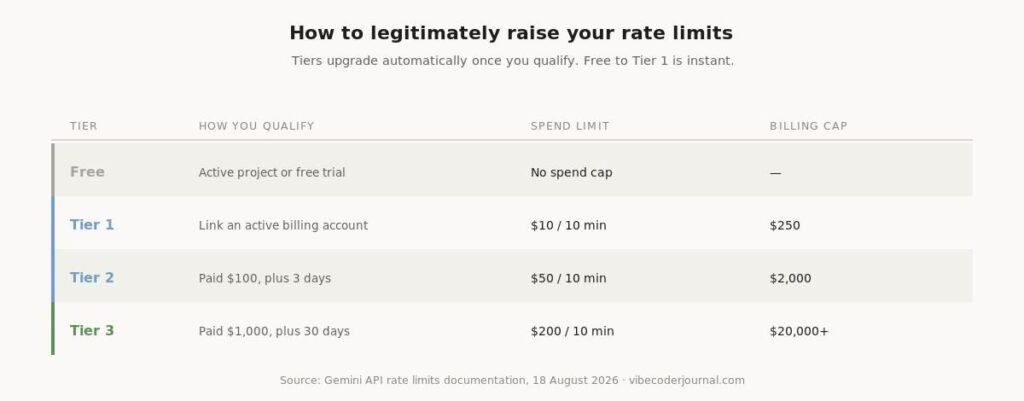
Google’s published usage tiers and what qualifies you for each.
| Tier | How you qualify | Spend limit | Billing cap |
|---|---|---|---|
| Free | Active project or free trial | No spend cap | — |
| Tier 1 | Link an active billing account | $10 / 10 min | $250 |
| Tier 2 | Paid $100, plus 3 days | $50 / 10 min | $2,000 |
| Tier 3 | Paid $1,000, plus 30 days | $200 / 10 min | $20,000+ |
Free to Tier 1 takes effect instantly; later upgrades within about ten minutes. Tier 2 and 3 qualification is based on cumulative Google Cloud spend on the linked billing account, not Gemini alone.
Three things that also help, without changing tier: use the Batch API, which has entirely separate limits (100 concurrent requests, 2 GB input files); avoid experimental and preview models, which are more restricted; and remember Priority inference runs at 0.3x the standard rate limit for its own traffic.
If you consistently hit limits during normal usage, Google provides a rate limit increase request form. There are no guarantees.
Can you change Gemini’s safety settings?
Yes, for four documented categories, and this is an officially supported developer feature rather than a workaround. The categories are Harassment, Hate speech, Sexually explicit, and Dangerous.
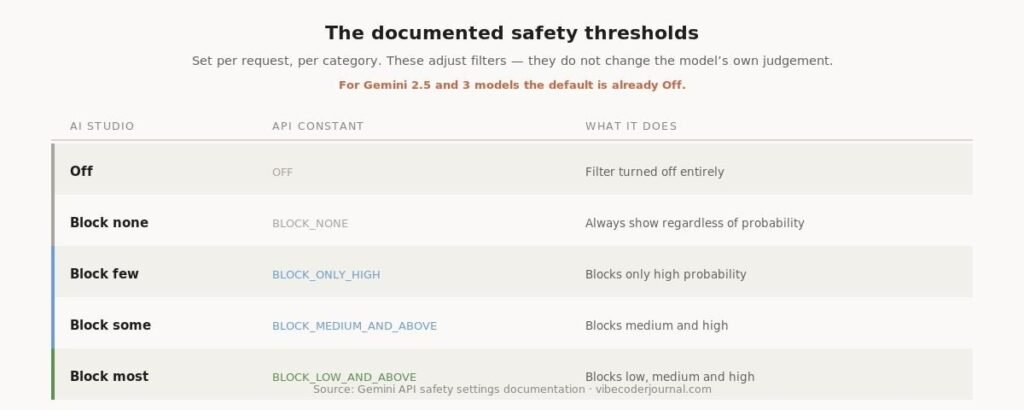
The documented threshold values, in AI Studio and in the API.
| AI Studio | API constant | What it does |
|---|---|---|
| Off | OFF | Turns the filter off entirely |
| Block none | BLOCK_NONE | Always show, regardless of probability |
| Block few | BLOCK_ONLY_HIGH | Blocks only high probability |
| Block some | BLOCK_MEDIUM_AND_ABOVE | Blocks medium and high |
| Block most | BLOCK_LOW_AND_ABOVE | Blocks low, medium and high |
You set them per request, per category. Here is the documented example:
from google import genai
from google.genai import types
client = genai.Client()
response = client.models.generate_content(
model=”gemini-3.7-flash”,
contents=”Some prompt”,
config=types.GenerateContentConfig(
safety_settings=[
types.SafetySetting(
category=types.HarmCategory.HARM_CATEGORY_HATE_SPEECH,
threshold=types.HarmBlockThreshold.BLOCK_LOW_AND_ABOVE,
),
]
)
)
The counterintuitive part, and the reason most people are wasting their time. Google’s documentation states that these additional filters are Off by default, and that for Gemini 2.5 and 3 models the default block threshold is Off. Setting them to BLOCK_NONE or OFF therefore changes nothing — they were already off. If you are getting refusals, they are not coming from these filters.
Note also which direction this feature is really for. Most legitimate uses are tightening the filters, not loosening them — a customer-facing product might set BLOCK_LOW_AND_ABOVE to be conservative. Google adds that applications using less restrictive settings may be subject to review under its Terms of Service.
Why does Gemini block based on probability, not severity?
This is a real quirk worth understanding, because it explains refusals that feel arbitrary.
Gemini rates content as HIGH, MEDIUM, LOW or NEGLIGIBLE probability of being unsafe — and blocks on that probability, not on how severe the potential harm is. Google’s own example compares two sentences: “The robot punched me” and “The robot slashed me up.” The first may score a higher probability of being unsafe, even though most people would judge the second more severe.
The practical consequence: a mild but oddly-phrased request can be blocked while a more serious one passes. If a refusal seems nonsensical, this is often why — and rephrasing plainly, with context, genuinely helps.
What cannot be changed at all
Two things, and no amount of configuration or prompt engineering alters either.
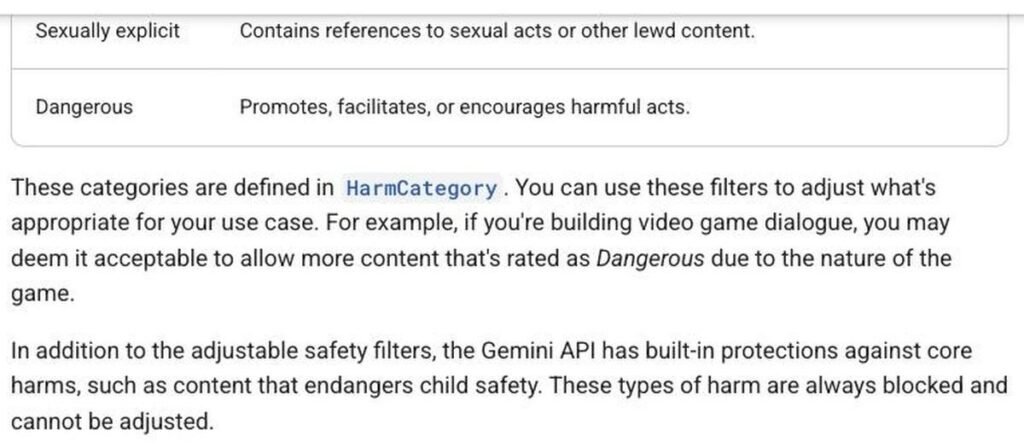
Google’s documentation on protections that cannot be adjusted.
Core harm protections. In Google’s words, the API “has built-in protections against core harms, such as content that endangers child safety. These types of harm are always blocked and cannot be adjusted.” There is no setting, no threshold, and no tier that changes this.
The model’s own training. Separately from the filters, the model itself declines certain requests. That behaviour is trained in, not configured. This is what most people are actually hitting when they go looking for a setting to flip, which is why they never find one.
If you are being refused for legitimate work, the productive move is context rather than circumvention. A security question phrased as an abstract request often reads as suspicious; the same question with the actual scenario — you are auditing your own system, you are writing a detection rule, you are teaching a class — frequently does not. That is not a trick. It is giving the model the information it needs to judge correctly.
And if the answer is still no, it is worth taking seriously that the answer is no. Attempting to defeat safety systems is a Terms of Service problem and, for the categories that matter most, a legal one.
Where is Gemini available?
Regional availability is a genuine restriction and it is documented. Google publishes a list of supported regions for the Gemini API, and availability differs between the API, the consumer Gemini app, and Google AI Studio.
A caution worth stating plainly. Using a VPN to access a service in a region where it is not offered generally violates the Terms of Service, and can cost you the account rather than just the session. If you are blocked by region, the supported routes are Google Cloud’s Vertex AI, which has its own regional footprint, or a provider that operates where you are.
There is a third option that sidesteps the question entirely: run an open-weights model on your own hardware. No region gate, no rate limit, no account to lose. The trade is capability — see how to run LLMs locally for the hardware requirements and an honest measurement of the quality gap.
A restriction Google added in 2026
One access change is worth knowing about because it caught a lot of developers, and because most articles still have it wrong.
Google announced on 19 May 2026 that Gemini CLI would stop serving free, Google AI Pro and Ultra accounts, and switched it off on 18 June with no grace period. The open-source project itself is still shipping — this was a change to hosted access, not a shutdown, and the distinction matters. We covered it in full in Gemini CLI vs Claude Code.
The replacement, Antigravity CLI, draws every surface from one weekly pool tied to your account, so running several agents in parallel drains it faster than you would expect. If you are weighing it against the alternatives, we compared twelve agents on verified benchmark data in Claude Code alternatives.
Frequently asked questions
Can you turn off Gemini’s safety filters?
The four adjustable filter categories can be set to Off or BLOCK_NONE through the API or in Google AI Studio. However, Google’s documentation states these filters already default to Off for Gemini 2.5 and 3 models, so doing this usually changes nothing. Core harm protections cannot be turned off at all.
Why does Gemini refuse my request?
Check the response first. A 429 error is a quota problem. A SAFETY finish reason means a filter blocked the output and safetyRatings names the category. If neither is set, the model declined on its own judgement, which is trained behaviour rather than a configurable setting.
How do I increase Gemini API rate limits?
Move up a usage tier. Linking an active billing account takes you to Tier 1 instantly. Tier 2 requires $100 of cumulative spend plus three days, Tier 3 requires $1,000 plus thirty days. You can also use the Batch API, which has separate limits, or submit Google’s rate limit increase request form.
Do more API keys give me more quota?
No. Rate limits are applied per project, not per API key. Additional keys in the same project share the same RPM, TPM and RPD.
What does 429 RESOURCE_EXHAUSTED mean?
You have exceeded a rate limit or a spend-based limit. Spend limits are evaluated on a rolling ten-minute window — $10 at Tier 1, $50 at Tier 2, $200 at Tier 3. Wait and retry, reduce expensive requests, or move up a tier.
Can I use a VPN to access Gemini where it is not available?
This generally breaches Google’s Terms of Service and risks your account, not just the request. The supported alternatives are Vertex AI through Google Cloud, or a different provider that operates in your region.
What are Gemini’s safety categories?
Four adjustable categories: Harassment, Hate speech, Sexually explicit, and Dangerous. Beyond these, built-in protections against core harms — child safety among them — are always applied and cannot be adjusted.
Methodology and scope
Every threshold value, tier requirement, error code and quoted sentence on this page comes from Google’s official Gemini API documentation — the safety settings and rate limits pages — read on 20 August 2026, rather than from secondary sources.
This guide deliberately covers only documented, supported configuration. We do not publish techniques for circumventing model safety systems. That is partly a Terms of Service issue and partly a practical one: for the restrictions people most often ask about, there is no setting to change, and the useful answer is understanding why rather than looking for a workaround.
We have no commercial relationship with Google and this page contains no affiliate links.
Sources
- Gemini API safety settings — categories, thresholds, defaults and what cannot be adjusted
- Gemini API rate limits — RPM, TPM, RPD, usage tiers and spend limits
- Gemini API available regions — where the API is offered
- Gemini API terms of service — use restrictions
Verified against Google’s documentation on 20 August 2026. Google updates these pages frequently — both source pages were last revised within the last three days — so check the originals if a figure here looks stale.
Leave a Reply