

By Abdullah Zulfiqar , Lead editor at vibecoderjournal· Last updated: October 16, 2026 · Screenshots taken on a live Claude Pro account on October 16, 2026 · Steps checked against Claude’s official help center
Quick answer: To cancel a Claude Pro or Max subscription, go to claude.ai, click your name in the lower-left corner, open Settings > Billing, scroll to the Cancellation section and click Cancel. If you subscribed on iPhone or Android, cancel in the app under Billing > Manage subscription instead. You keep paid access until the end of your current billing period, and you should cancel at least 24 hours before your next billing date to avoid another charge.
Cancel Claude on the web in 3 steps:
- Click your name or initials in the lower-left corner of claude.ai.
- Select Settings, then open the Billing tab.
- Scroll to the Cancellation section at the bottom, click Cancel and confirm.
Before you start: where did you subscribe?
You have to cancel in the same place you paid. Check your payment receipt if you are not sure.
| Where you subscribed | Where to cancel | Refunds handled by |
|---|---|---|
| claude.ai or Claude Desktop | Settings > Billing > Cancellation > Cancel | Anthropic |
| Claude iPhone/iPad app | App > Billing > Manage subscription (Apple) | Apple |
| Claude Android app | App > Billing > Manage subscription (Google Play) | Claude Support for active subscriptions; Google for past payments |
| Team plan | Organization settings > Billing | Anthropic (Owners only) |
Tip: if you get charged twice, you may have a second subscription under another email, Apple ID or Google account. Check each one.
How to cancel Claude Pro or Max on the web or desktop app
This works on claude.ai in any browser and in the Claude Desktop app for Mac, Windows and Linux.
Step 1: Open Claude and sign in
Go to claude.ai or open the Claude Desktop app, and sign in with the email you used to subscribe.
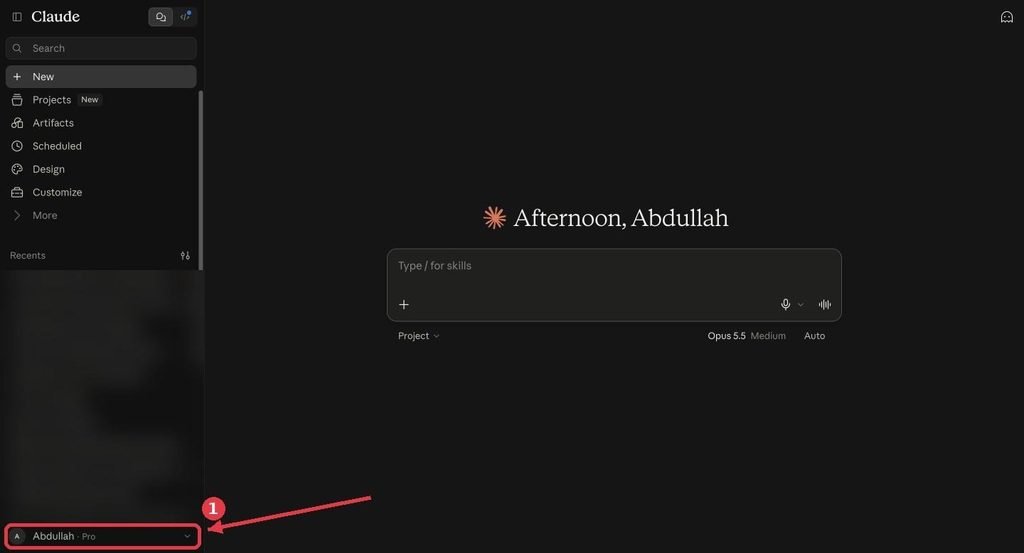
Claude home screen with the account name in the lower-left corner highlighted
Step 2: Click your name and open Settings
Click your initials or name in the lower-left corner. A menu opens with your email at the top. Select Settings.
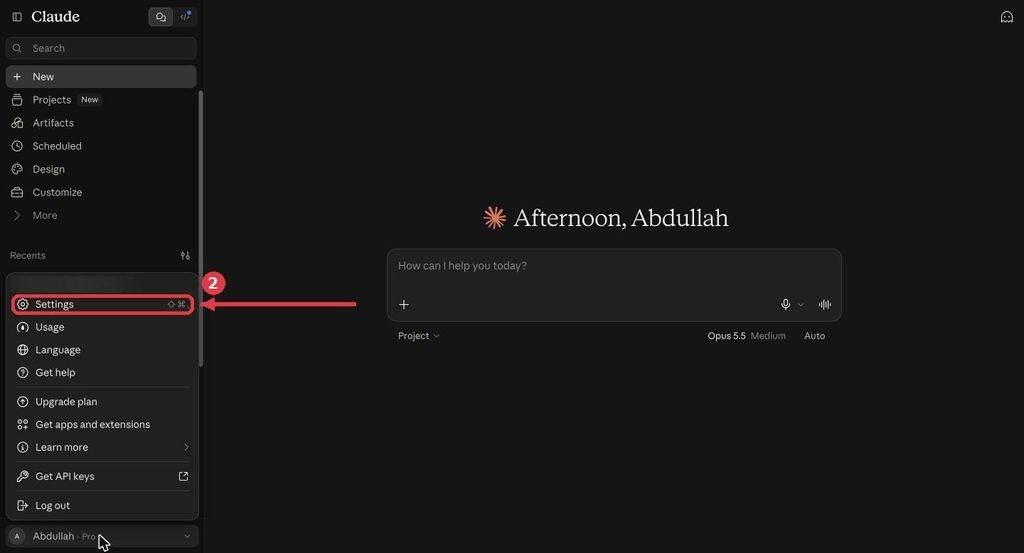
Claude account menu open with Settings highlighted
Step 3: Go to the Billing tab
Settings opens as a pop-up window. Click Billing in the left menu. The top of the page shows your plan (for example “Pro plan, Monthly”) and the date your subscription will auto-renew. Note that date: you need to cancel at least 24 hours before it.
Don’t click Adjust plan at the top. That button is for changing plans, not cancelling.
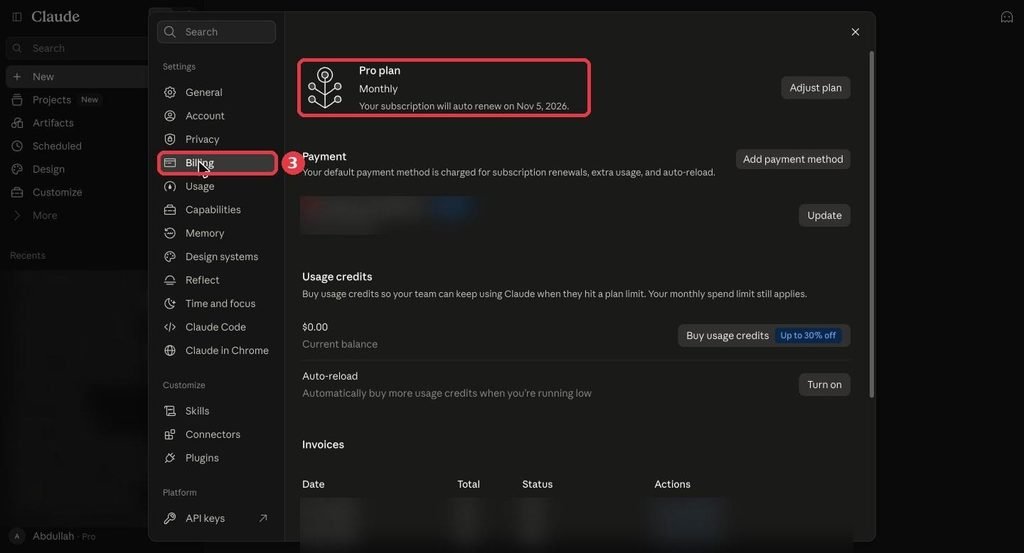
Claude Settings Billing page showing the Pro plan and auto-renew date
Step 4: Scroll down and click Cancel
Scroll to the bottom of the Billing page, past Payment, Usage credits and Invoices. Under Cancellation, next to Cancel plan, click the red Cancel button. Then follow the on-screen prompts to confirm.
That’s it. You keep Pro or Max until the end of the period you already paid for, then your account moves to the Free plan.
How to cancel Claude on iPhone or iPad
If you subscribed through the Claude iOS app, Apple bills you, so you cancel through Apple.
- Open the Claude app and tap your initials in the top-right corner.
- Tap Billing.
- Tap Manage subscription and follow Apple’s cancellation prompts.
Already deleted the app? Cancel from your iPhone’s Settings > [your name] > Subscriptions, or follow Apple’s guide: Cancel a subscription from Apple.
How to cancel Claude on Android
If you subscribed through the Claude Android app, Google Play bills you.
- Open the Claude app and tap your initials in the top-right corner.
- Tap Billing.
- Tap Manage subscription and follow the Google Play prompts.
Already removed the app? Open the Google Play Store, tap your profile icon, go to Payments & subscriptions > Subscriptions, choose Claude and tap Cancel subscription. Google’s guide: Cancel a subscription on Google Play.
How to cancel a Claude Team plan
Only an Owner or Primary Owner of the organization can cancel a Team plan.
- Go to Organization settings > Billing (claude.ai/admin-settings/billing).
- Choose the option to cancel the subscription and confirm.
What to know before you cancel a Team plan:
- Your team keeps access until the end of the current billing cycle and is not charged for the next one.
- After you cancel, you can no longer remove members in Organization settings > Members. If you want to resubscribe with fewer seats, contact Claude Support to remove members.
- Because members can’t be removed after you cancel, remove any seats you no longer need first.
What happens after you cancel Claude
- You keep paid access until the period ends. Cancelling stops the next renewal; it does not cut you off immediately.
- Cancel 24+ hours before renewal. Cancelling closer to your billing date may not stop that charge.
- Your account stays. Cancelling ends the paid plan, not your account. You drop to the Free plan with Free usage limits.
- Monthly API credits stop. On Max and Team plans, new monthly API credits stop after you cancel. Credits you already have still work until they expire at the end of the cycle. These included credits can’t be refunded.
- You can resubscribe any time from Settings > Billing.
Want to compare what you will lose? See our breakdown of Claude pricing plans.
Does cancelling Claude Pro or Max stop Claude Code?
Yes, once your paid period ends. Claude’s help center lists Claude Code as included with the Pro and Max plans (Team and Enterprise have their own setup). Until your billing period runs out, Claude Code keeps working as normal.
After that, you have two ways to keep using Claude Code without a Pro or Max plan:
- Pay as you go: sign in to Claude Code with a Claude Console account and pay API rates for what you use.
- API key: if the ANTHROPIC_API_KEY environment variable is set, Claude Code bills your API account instead of a subscription.
Check how much you actually use before deciding. Our guide shows how to see your Claude Code usage, which tells you whether pay-as-you-go would cost more or less than your plan.
Can you get a refund for Claude Pro or Max?
Claude payments are generally non-refundable, except where the Consumer Terms or local law say otherwise. You can still check if you qualify:
- Click your initials or name in the lower-left corner.
- Select Get help, then Send us a message.
- Click Accept and choose Claude Refund Request.
- Pick your reason and follow the prompts. If you are eligible, the messenger cancels and refunds your plan.
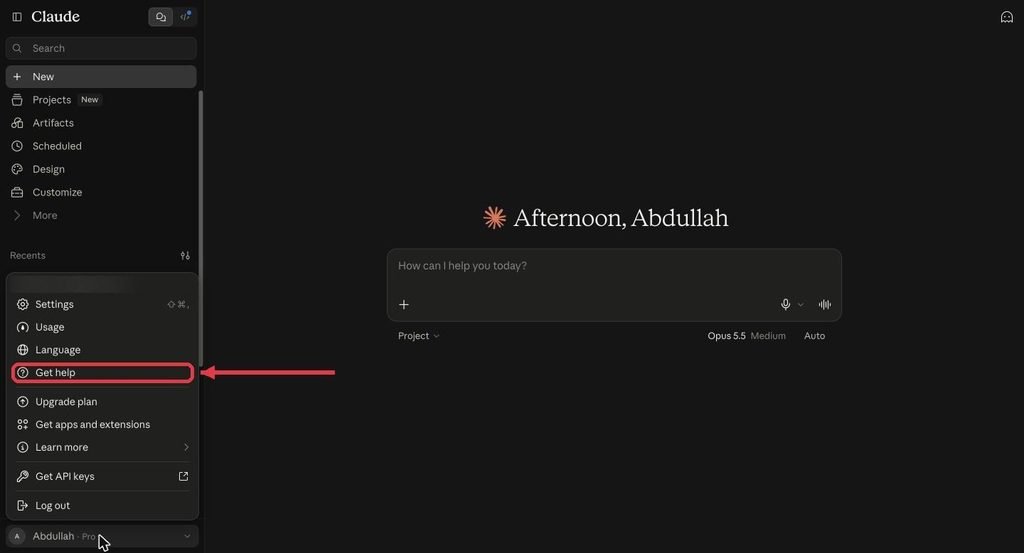
Claude account menu with Get help highlighted
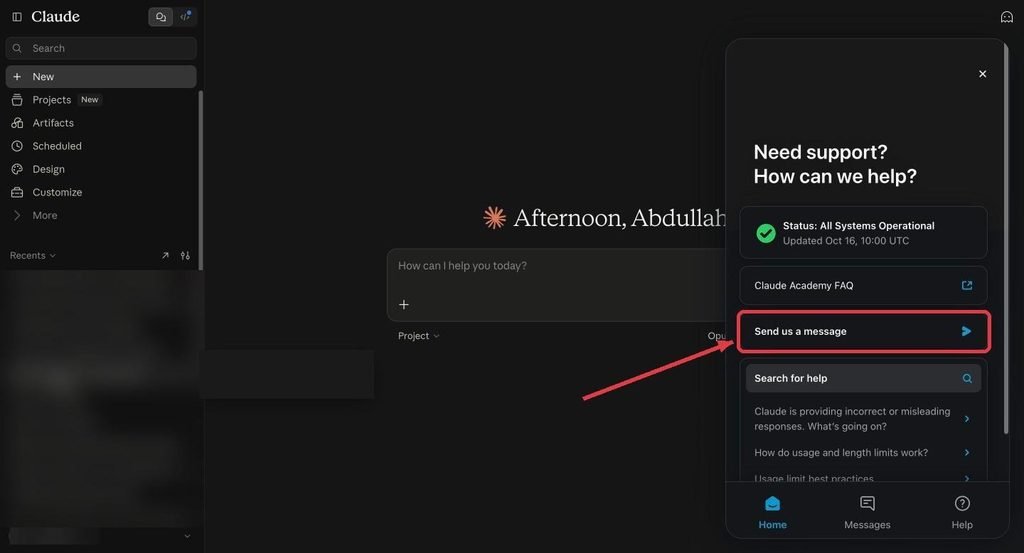
Claude support panel with Send us a message highlighted
Special cases:
- UK and EU (EEA) customers can request a refund within 14 days of purchase. The refund is prorated based on how much you used.
- Paid through Apple? Anthropic didn’t process the payment, so only Apple Support can refund it (Apple’s refund page is reportaproblem.apple.com). A refund request is separate from cancelling, so cancel the subscription as well.
- Paid through Google Play? For an active subscription, Claude Support checks eligibility. For past, inactive Play payments, contact Google.
- Filed a chargeback? Support can’t refund while a bank dispute is open. Either continue with your bank or withdraw the dispute.
- Can’t log in? Email Support from another address, CC the email on the locked account, and ask them to cancel and refund.
Save your chats before your plan ends
Before your paid period runs out, export a copy of your conversations:
- On the web or desktop app, go to Settings > Privacy.
- Click Export data.
- Check your email for the download link. You must be signed in to download it, and the link expires after 24 hours.
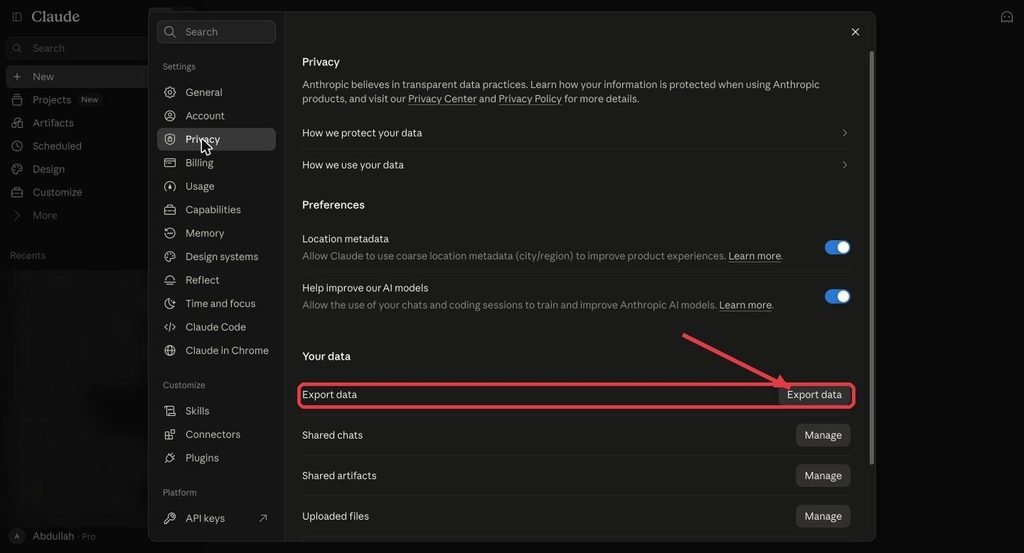
Claude Settings Privacy page with the Export data button highlighted
You can’t export from the iPhone or Android apps. On Team plans, members can only export if an Owner allows it.
Cancel subscription vs delete your Claude account
These are different:
- Cancel stops future payments. Your account and chats stay, on the Free plan.
- Delete account (Settings > Account > Delete account) permanently removes your account. Claude’s help center says paid users should cancel in Billing first, wait until the subscription period ends, and only then delete the account. Export your data first if you want to keep it.
Still being charged after cancelling? Troubleshooting
- Charged right after cancelling: you probably cancelled within 24 hours of your billing date.
- Charged again next month: look for a second subscription on another email, Apple ID or Google account. Each one must be cancelled separately.
- Can’t see the Cancel button: it’s at the very bottom of the Billing page, so scroll down. If there’s no Cancellation section, you likely subscribed on iPhone or Android. Cancel through Apple or Google Play instead.
- Paid but the account shows Free: you may be signed in with a different email than the one you paid with.
- Can’t cancel a Team plan: only Owners and Primary Owners can. Ask your Owner.
Frequently asked questions
How do I cancel my Claude subscription?
On claude.ai or the desktop app, click your name in the lower-left corner, then go to Settings > Billing, scroll to the Cancellation section and click Cancel. On iPhone or Android, tap your initials, then Billing > Manage subscription.
Do I lose access immediately when I cancel Claude Pro?
No. You keep Pro or Max until the end of your current billing period. After that, your account switches to the Free plan.
Will I get a refund if I cancel Claude?
Usually not. Payments are generally non-refundable, but you can check eligibility through Get help > Claude Refund Request. UK and EU customers can request a prorated refund within 14 days of purchase.
When should I cancel to avoid the next charge?
At least 24 hours before your next billing date. Your billing date is shown in Settings > Billing.
Can I cancel Claude Max and switch to Pro?
Yes. The Billing page has an Adjust plan button at the top. Use it to see which plan changes are offered to you. Or cancel Max, let the paid period end, then subscribe to Pro from Settings > Billing.
Does cancelling Claude stop Claude Code?
Yes, after your paid period ends. Claude Code is included with Pro and Max. To keep using it without a plan, sign in with a Claude Console account and pay API rates.
Does cancelling Claude delete my chats?
No. Cancelling only stops payments. Your chats stay in your account. Only deleting your account removes them.
Why can’t I find the Cancel button on claude.ai?
The Cancel button is at the very bottom of Settings > Billing, under Cancellation, so scroll down. If it’s not there and you subscribed through the iPhone or Android app, Apple or Google manages the subscription. Cancel it in the app under Billing > Manage subscription, or in your Apple or Google Play subscription settings.
Who can cancel a Claude Team plan?
Only the organization’s Owner or Primary Owner, from Organization settings > Billing.
Bottom line
Cancelling Claude takes under a minute: Settings > Billing > Cancellation > Cancel on the web, or Billing > Manage subscription in the mobile app. Do it at least a day before renewal, export your chats first, and use the refund request in Get help if you think you qualify.
Thinking about a cheaper option instead? See Claude student discounts, how to track your Claude Code usage, or our list of Claude Code alternatives.
About the author: [Author name] writes about Claude, Claude Code and AI coding tools at Vibe Coder Journal and tests each guide on a live account before publishing. [Link to author page]
Sources
- Cancel your Pro or Max subscription – Claude Help Center
- Cancel your organization’s Team plan subscription – Claude Help Center
- Request a refund for a paid Claude plan – Claude Help Center
- Export your Claude data – Claude Help Center
- Delete your Claude account – Claude Help Center
- Using Claude Code with your Pro or Max plan – Claude Help Center
- Cancel a subscription from Apple
- Cancel a subscription on Google Play
Publishing notes (delete before publishing)
- SEO title: How to Cancel Claude Subscription (Pro, Max, Team) in 2026
- Meta description: How to cancel your Claude subscription (Pro, Max or Team) on web, desktop, iPhone or Android. Screenshots, refund rules and what happens after.
- Slug: /how-to-cancel-claude-subscription/
- Primary keyword: how to cancel claude subscription
- Secondary keywords: cancel claude subscription, cancel claude pro, cancel claude max, claude refund, cancel claude team plan
- Schema: paste schema.html into a Custom HTML block.
Leave a Reply