

- The short answer claude --dangerously-skip-permissions starts a session in bypassPermissions mode. Tool calls execute immediately, with no prompt and no safety check. The flag is exactly equivalent to --permission-mode bypassPermissions.It is not a complete bypass. A documented set of actions still stops and asks you — including any rm targeting a critical path, and anything matched by a deny rule.It does remove the protection on your shell startup files, your .git directory and your .claude config. And Anthropic states plainly that it offers no protection against prompt injection.If what you want is fewer prompts rather than no prompts, auto mode is the supported answer and it is what Anthropic's own documentation points you to.
Verified against Anthropic’s permission-modes, sandboxing and settings documentation on 17 September 2026.
What the flag does
Claude Code has six permission modes. The flag selects the last one.
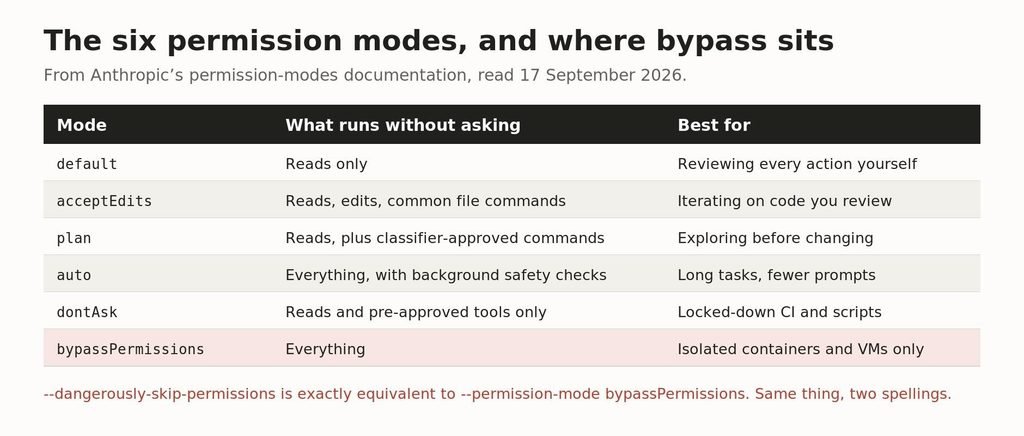
The six modes and what each runs without asking.
There is no difference between the two spellings. Anthropic’s documentation says the flag is equivalent to –permission-mode bypassPermissions, and a session started either way lands in the same state. The long, alarming name is deliberate: it is a speed bump made of words.
You cannot switch into it mid-session. Bypass has to be enabled at launch, either with the flag or with a defaultMode setting, which is why people end up typing it into their terminal history over and over.
The one-time warning
The first time you start an interactive session with bypass enabled, Claude Code shows a dialog asking you to accept responsibility for actions taken without permission checks. Decline and it exits. Accept and the acceptance is saved to your user settings, so you never see it again.
Two consequences worth knowing. In non-interactive mode there is no dialog at all. And a background session started with –bg is refused outright until you have accepted the dialog in an interactive session first.
What it does not skip
This is the part almost every article on this flag gets wrong. Anthropic documents a specific list of actions that no mode auto-approves, bypass included.
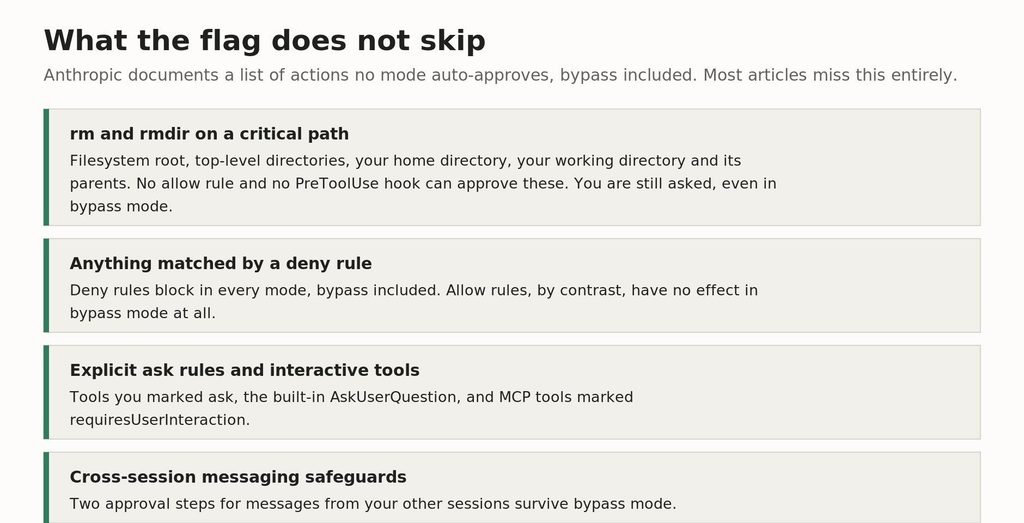
Four categories survive bypass mode. They are circuit breakers against model error.
The critical-path rule is the most important one. Claude Code never lets an allow rule or a PreToolUse hook approve an rm or rmdir that targets a critical path, and in bypass mode it still asks you. A critical path means the filesystem root, any direct child of it such as /usr or /etc, your home directory, Windows drive roots, and your working directory and its parents.
It also catches rm -rf “$DIR”/* — a glob directly under a shell variable — because that command becomes a removal from the filesystem root if the variable happens to be empty. That is a thoughtful piece of engineering and it is the reason the horror story you were probably worried about is harder to trigger than you think.
The asymmetry between rule types is worth memorising: deny rules apply in every mode, bypass included. Allow rules have no effect in bypass mode whatsoever. If you have spent an afternoon curating an allowlist and then start passing this flag, that afternoon is wasted.
What it genuinely does remove
Bypass mode allows writes to protected paths. These are files and directories that every other mode either prompts on, routes to a classifier, or denies outright.
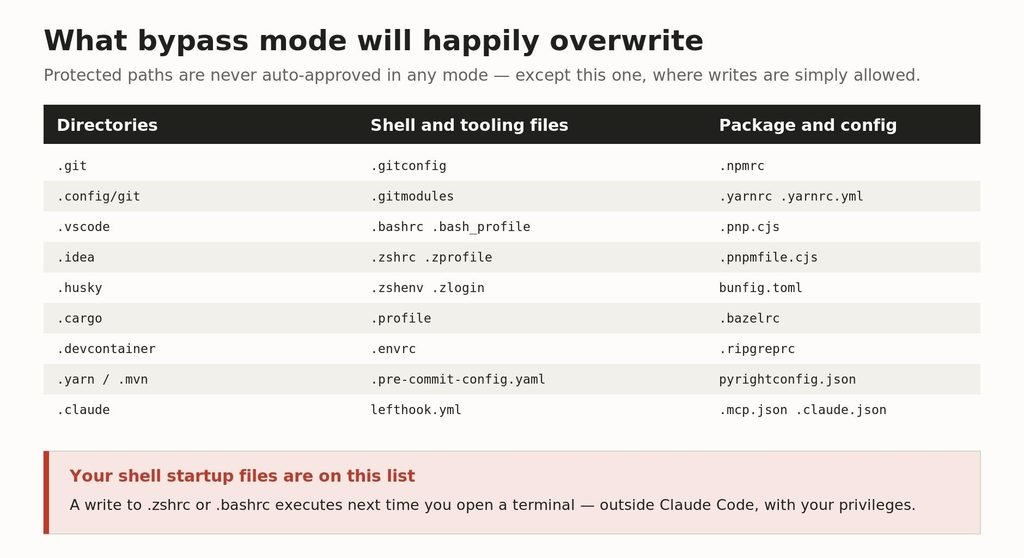
The full protected-path list. In bypass mode, writes to all of it are simply allowed.
Read that list again with an attacker’s eye rather than a developer’s. Your shell startup files are on it. A write to .zshrc or .bashrc does not need Claude Code to do anything further — it executes the next time you open a terminal, outside the agent, with your privileges, for as long as the line survives.
So is .mcp.json, which controls which MCP servers your sessions load. So is .git, including hooks. So is .pre-commit-config.yaml, which runs on your next commit. These are the paths that turn a bad agent turn into a persistent one, and they are exactly what this mode stops defending.
It is worth being clear that settings cannot claw this back. Allow rules in a settings file do not pre-approve protected-path writes in the modes that prompt, because the safety check runs before allow rules are evaluated. The only thing that changes the outcome is the mode itself.
Why it refuses to run with sudo
A very common search, and the answer is that this is intended behaviour rather than a bug.
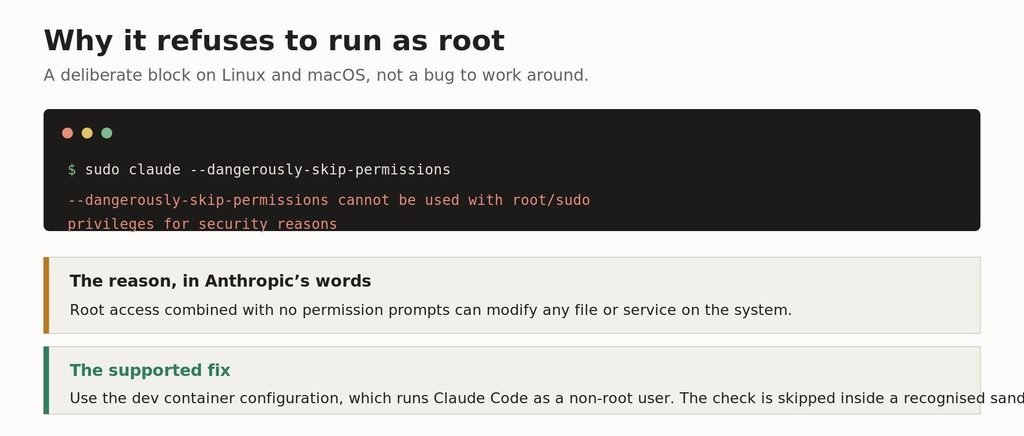
The refusal message, and the supported way around it.
On Linux and macOS, Claude Code refuses to start in bypass mode as root or under sudo. The stated reasoning is that root access combined with no permission prompts can modify any file or service on the system.
The check is skipped automatically inside a recognised sandbox. So the supported path for autonomous work in a container is the devcontainer configuration, which runs Claude Code as a non-root user. If you find yourself searching for how to force the flag under sudo, the honest answer is that the thing you are trying to do has a different, safer tool.
The risk that no flag protects against
Anthropic’s warning on this mode names prompt injection specifically, and it is worth spelling out why that matters more than the obvious fear of a bad rm.
Claude Code reads things. Issue text, pull request descriptions, dependency README files, error output from a package you just installed, web pages it fetches during a task. Any of that can contain text addressed to the agent rather than to you. In a mode with prompts, an injected instruction has to survive you glancing at a confirmation dialog. In bypass mode it does not.
The combination that should worry you is an injected instruction plus an allowed protected-path write. That is not a hypothetical chain; it is two documented behaviours of this mode stacked together. Which is why the recommendation below is not “be careful” — it is to use a mode that keeps a reviewer in the loop, or an environment where the blast radius is bounded.
What to use instead
Most people reaching for this flag want one specific thing: to stop approving the same twelve commands all day. There are better tools for that, and they are all supported configurations rather than workarounds.
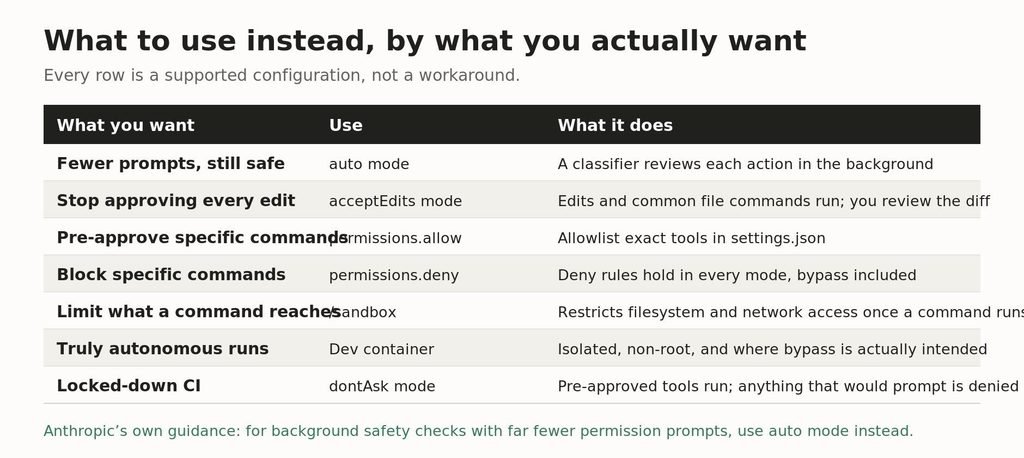
Match the row to what you actually want. None of these require the flag.
Auto mode
This is Anthropic’s own recommendation in place of the flag: for background safety checks with far fewer permission prompts, use auto mode. A classifier reviews each action rather than a human, so the prompts largely disappear but something is still looking. It handles critical-path removals too, reviewing and approving or blocking them, including when the removal is hidden inside command substitution.
One detail that shows the design intent: on entering auto mode, broad allow rules that grant arbitrary code execution are dropped — blanket Bash wildcards, wildcarded interpreters, package-manager run commands. Auto mode deliberately narrows what you had pre-approved. Anthropic is still explicit that it reduces prompts without guaranteeing safety.
A settings file that does most of the work
Before reaching for any mode, try naming the commands you keep approving.
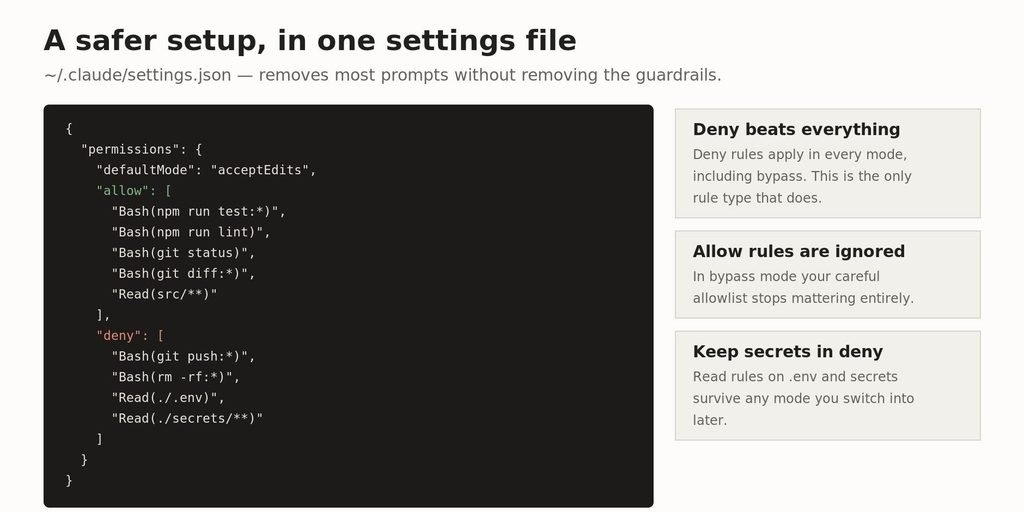
Allow the commands you approve daily; deny the ones you never want, in any mode.
# where this lives
~/.claude/settings.json # every session on this machine
.claude/settings.json # every session in this project
Put the deny rules in even if you never plan to use bypass mode. They are the only rule type that survives a mode change, so a Read(./.env) deny is protection you keep no matter what you or a teammate switches on later.
The flag you probably actually want
–allow-dangerously-skip-permissions adds bypass to the mode cycle without activating it. You start in a normal mode, and Shift+Tab can reach bypass if you decide you need it for one stretch of work. It is barely known and it is the right shape for most of the people who currently alias the full flag in their shell profile.
When bypass mode is the right call
There is a legitimate use, and Anthropic names it: isolated environments like containers, VMs, or dev containers without internet access, where Claude Code cannot damage your host system.
That is a real workflow. A throwaway container, a checked-out branch, a long refactor you intend to review as a diff at the end, no credentials mounted, no network. In that setting the prompts are pure friction and the blast radius is a container you delete afterwards.
The failure is running it on your laptop, in your real home directory, with your SSH keys and cloud credentials present, because approving commands got annoying. Those two situations share a flag and nothing else.
For teams
Administrators can remove the option entirely by setting permissions.disableBypassPermissionsMode to “disable” in managed settings. Auto mode can be turned off separately with permissions.disableAutoMode.
Two behaviours are useful to know before someone raises them as a concern. A repository’s checked-in settings cannot start a cloud session in bypass mode — cloud sessions ignore that value silently. And in a project’s own settings file, a bypassPermissions default does not take effect either; the session starts in Manual mode instead. Someone committing a permissive settings file to your repo cannot force it on everyone who clones it.
Frequently asked questions
What does claude –dangerously-skip-permissions do?
It starts Claude Code in bypassPermissions mode, where tool calls run immediately without permission prompts or safety checks. It is equivalent to –permission-mode bypassPermissions.
Is –dangerously-skip-permissions safe?
Not on a machine you care about. Anthropic states it offers no protection against prompt injection or unintended actions, and recommends it only in isolated containers, VMs or dev containers without internet access.
Why does it say it cannot be used with root/sudo privileges?
It is deliberately blocked on Linux and macOS, because root access with no permission prompts can modify any file or service on the system. Use the dev container configuration instead, which runs Claude Code as a non-root user.
Does it skip absolutely everything?
No. Deny rules, explicit ask rules, interactive tools, cross-session messaging safeguards, and rm or rmdir targeting a critical path all still stop and ask, even in this mode.
What is Claude Code YOLO mode?
An informal name for this flag. There is no mode called YOLO in the documentation; the mode is bypassPermissions.
How do I give Claude Code all permissions safely?
Use permissions.allow in settings.json to pre-approve the specific commands you keep approving, and set defaultMode to acceptEdits or use auto mode. That removes most prompts while keeping deny rules and protected paths intact.
Can I turn it on partway through a session?
No. Bypass has to be enabled at launch. Use –allow-dangerously-skip-permissions to add it to the Shift+Tab mode cycle without starting in it.
Can an administrator block it?
Yes. Set permissions.disableBypassPermissionsMode to “disable” in managed settings.
Related reading
If you are setting up Claude Code from scratch, start with our install guide. To see what a session is actually costing you, how to see Claude Code usage covers the built-in reporting, and Claude pricing plans explains which plan the limits come from.
For configuration beyond permissions, see Claude Code templates and the best Claude model for coding. If isolation is what you are really after, running models locally removes the network from the equation entirely.
Primary sources, fetched 17 September 2026: code.claude.com/docs/en/permission-modes · code.claude.com/docs/en/sandboxing · code.claude.com/docs/en/cli-reference · code.claude.com/docs/en/devcontainer · code.claude.com/docs/en/settings-reference. Behaviour varies by Claude Code version; several items noted above require v2.1.248 or later.
If you use Cursor for code review alongside terminal agents, see our guide to claiming Cursor student discounts with edu email.

Leave a Reply