

- The one-line native installer is the recommended method on every platform. It is the only method that auto-updates in the background by default.
- The Windows CMD command has three parts joined by &&. Running only the download half saves a file and installs nothing.
- -fsSL and -fssl are not the same curl flags. The lowercase version does not follow redirects and hides the error message.
- Claude Code requires a paid plan. Pro, Max, Team, Enterprise or Console. The free Claude.ai tier does not include it.
- You do not need Node.js, WSL, or administrator rights for the native install.
- Most 'command not found' reports are a PATH problem, not a failed install. The binary lands at ~/.local/bin/claude.
Around 2,900 people every month type this into Google:
curl -fssl https://claude.ai/install.cmd -o install.cmdThey are not searching for documentation. They are searching for the command they just ran, because running it appeared to do nothing at all. No progress bar, no error, no Claude Code. Just a prompt again.
There is a reason for that, and it is not a bug. That string is roughly the first third of a command, and the part that actually installs anything was left behind. This guide covers every supported way to install Claude Code, what each command actually does, and how to read the error you got instead of guessing.
What do you need before you install Claude Code?
Claude Code is Anthropic’s terminal-based coding agent. It reads and edits files in your project, runs commands, and works through multi-step tasks from your shell rather than a chat window.
The requirements are modest, but two of them catch people out: the account requirement and the country restriction.
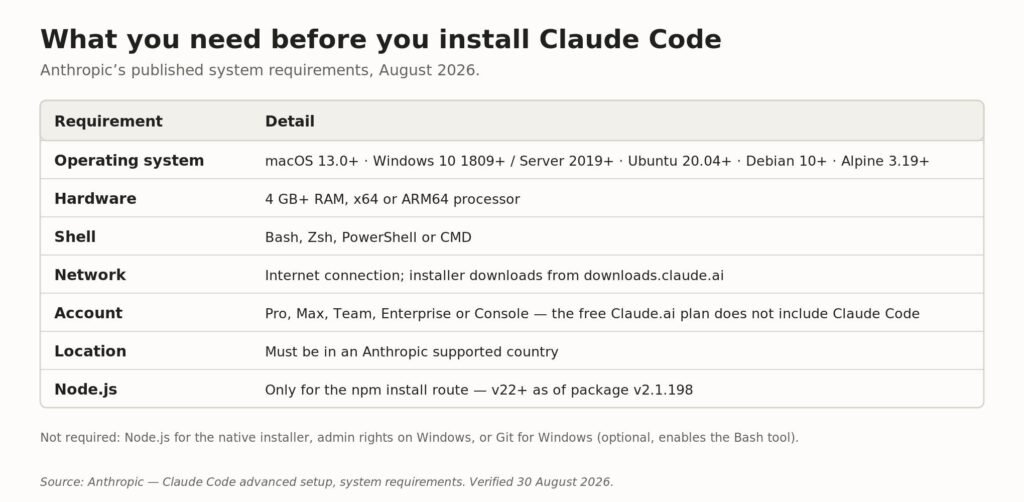
Claude Code system requirements as published by Anthropic, August 2026.
The account line matters most. Claude Code is not available on the free Claude.ai plan, so if you have never paid for Claude, the installer will succeed and then the login will fail. If you are deciding between tiers first, we compared them in Claude Pro vs Max.
Note what is not on that list. The native installer does not need Node.js, does not need administrator rights on Windows, and does not need WSL. Those three assumptions come from older guides and cause more problems than they solve.
Which Claude Code install command should you run?
There are three native install commands, and which one you need depends on your shell rather than your operating system. Windows has two shells that look almost identical and reject each other’s syntax.
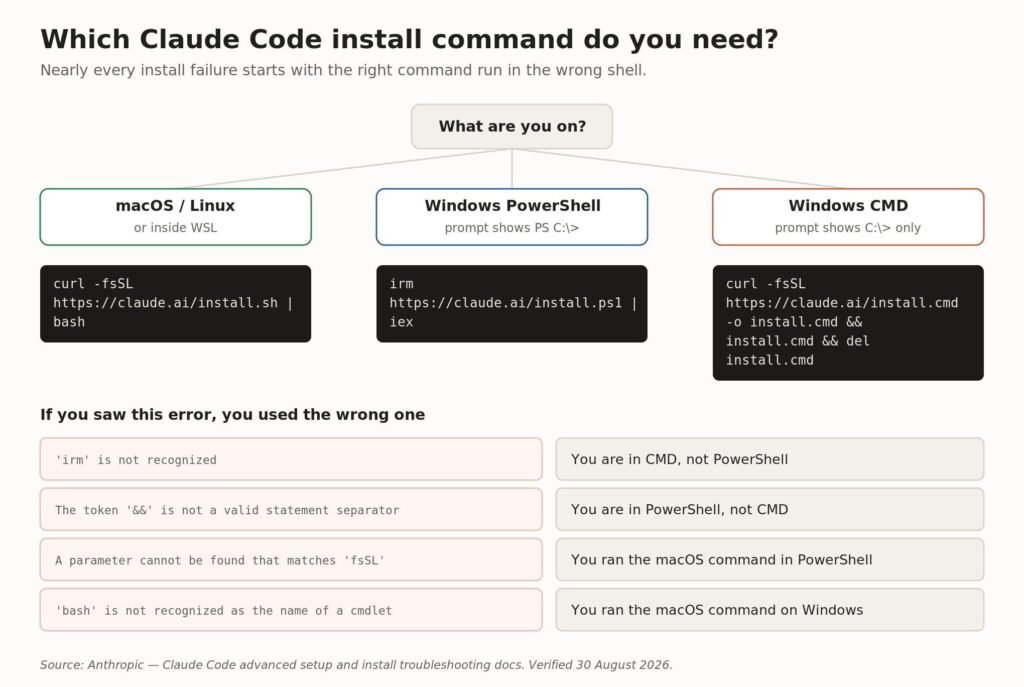
The three native install commands, and the error each mismatch produces.
The fastest way to tell your Windows shells apart is the prompt. PowerShell shows PS C:\Users\YourName>. Command Prompt shows the same path without the PS. That single detail decides which of the two Windows commands will work.
Why does curl -fssl https://claude.ai/install.cmd -o install.cmd do nothing?
Because it is one third of a command. The complete version documented by Anthropic has three stages joined by &&, and each one does a different job.
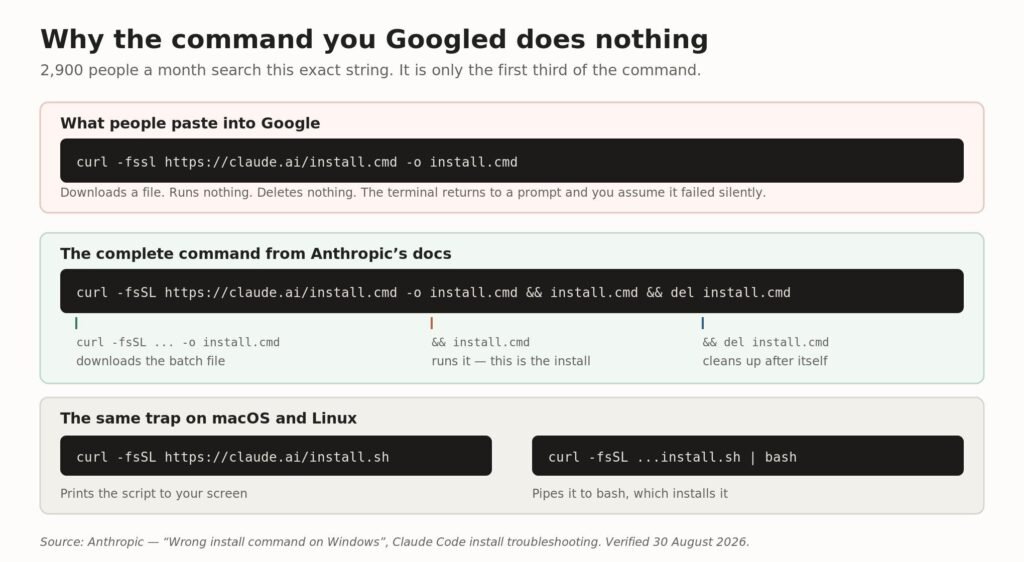
The full CMD install command, broken into the three stages people usually lose.
Run the truncated version and curl does exactly what you asked: it downloads a batch file called install.cmd into your current directory and stops. Nothing executes it. Nothing removes it. The terminal returns to a prompt, and unless you happen to list the directory you will never know the file is sitting there.
Here is the complete command for Windows Command Prompt:
curl -fsSL https://claude.ai/install.cmd -o install.cmd && install.cmd && del install.cmdThe same trap exists on macOS and Linux in a slightly different shape. The keyword curl -fssl https://claude.ai/install.sh gets searched too, and it fails for the same reason: without | bash on the end, curl prints the install script to your screen instead of running it. Anthropic’s own troubleshooting page lists this under “The command prints script text instead of installing”.
Are -fsSL and -fssl the same flags?
No, and this is worth understanding because it changes what you see when something goes wrong. curl options are case sensitive, and the two strings request different behaviour.
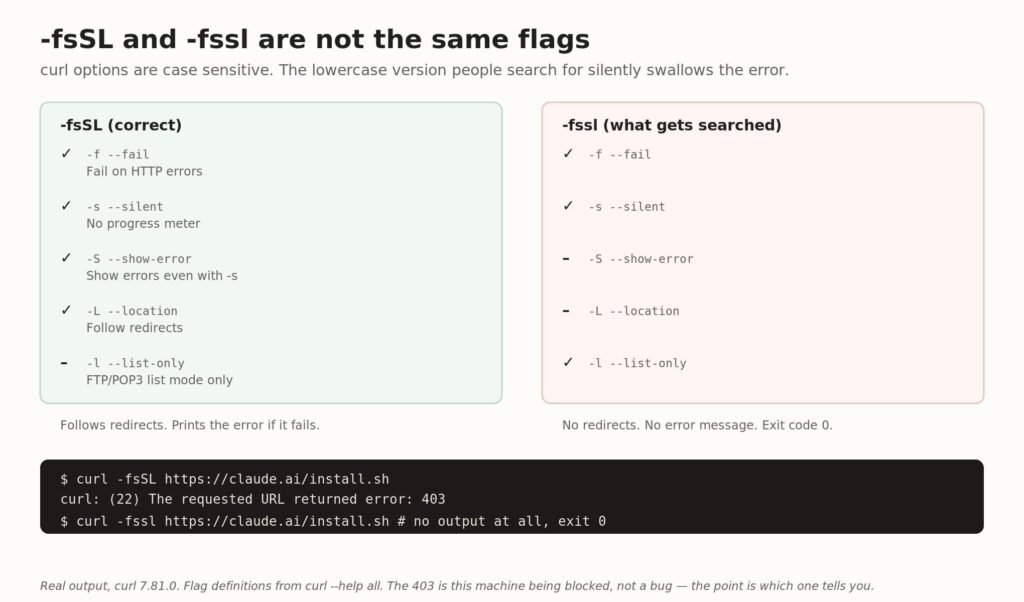
What each letter actually requests, and why the lowercase version fails quietly.
The uppercase -S is –show-error, which forces curl to print the error even though -s silenced it. The uppercase -L is –location, which follows redirects. The lowercase -l is –list-only, an FTP and POP3 option that does nothing useful here.
So a command written with -fssl will not follow a redirect and will not tell you it failed. It exits with status 0 and prints nothing. That is precisely the “it did nothing” experience people describe. Use the flags exactly as documented:
# correct — follows redirects, reports failures
curl -fsSL https://claude.ai/install.sh | bash
# silently wrong — no redirects, no error output
curl -fssl https://claude.ai/install.sh | bash
How do you install Claude Code on macOS and Linux?
One command, no dependencies, no sudo:
curl -fsSL https://claude.ai/install.sh | bashThe same command works inside WSL. The installer places a launcher at ~/.local/bin/claude and the versioned binaries under ~/.local/share/claude/versions/, then keeps itself updated in the background.
Alpine Linux and other musl distributions
Alpine ships without bash and curl, so the documented command fails with a not found error before it starts. Install the prerequisites first, then disable the bundled ripgrep:
apk add bash curl libgcc libstdc++ ripgrepThen set USE_BUILTIN_RIPGREP to “0” in the env block of your settings.json. If apk reports that ripgrep is missing, it lives in the community repository, which you may need to add for your Alpine version.
How do you install Claude Code on Windows?
Natively, in either shell. You no longer need WSL, and you do not need to run the terminal as Administrator.
# PowerShell
irm https://claude.ai/install.ps1 | iex
# Command Prompt
curl -fsSL https://claude.ai/install.cmd -o install.cmd && install.cmd && del install.cmd
WSL is still worth choosing for one specific reason, and it is not compatibility.
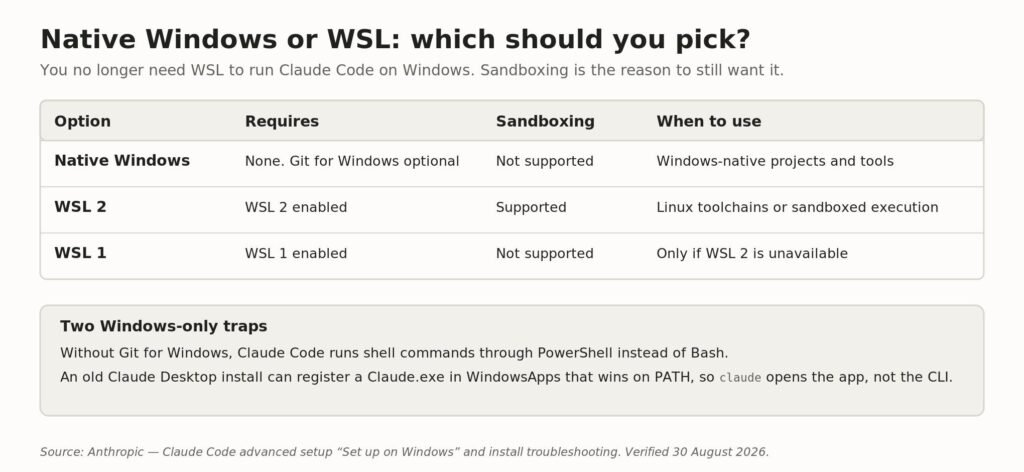
Native Windows, WSL 2 and WSL 1 compared. Sandboxing is the deciding factor.
Sandboxed command execution is supported on WSL 2 only. If you want Claude Code to run shell commands inside a boundary rather than directly against your machine, WSL 2 is the reason to use it. For everything else, native Windows is simpler.
Git for Windows is optional but recommended. With it installed, Claude Code uses Git Bash for its Bash tool. Without it, it falls back to running shell commands through PowerShell. If Claude Code cannot find Git Bash, set CLAUDE_CODE_GIT_BASH_PATH in your settings.json.
Should you use the native installer, Homebrew, WinGet, apt or npm?
All five install the same native binary. They differ in exactly one thing that matters day to day: whether updates happen without you.
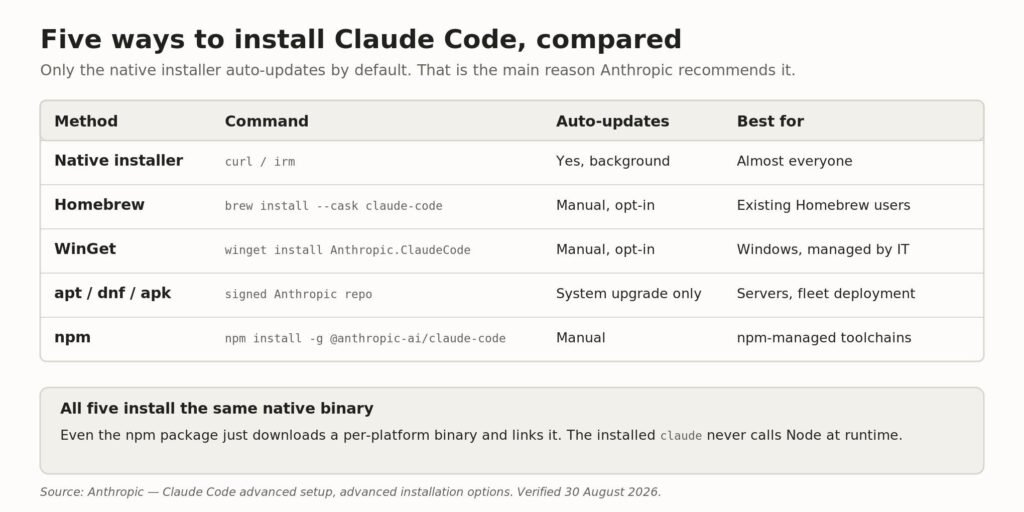
Five install methods compared. Only one auto-updates by default.
The npm route is the most misunderstood. It does not run Claude Code on Node. The package pulls in a per-platform binary as an optional dependency, then a postinstall step links it into place. As of package version 2.1.198 it requires Node.js 22 or later, though an older Node prints a warning rather than failing, because the installed binary never calls Node at runtime.
Two npm rules worth remembering. Never use sudo npm install -g, which creates permission problems and security risks. And when upgrading, use the explicit @latest tag rather than npm update -g, which respects the semver range from your original install and may leave you behind.
npm install -g @anthropic-ai/claude-code
npm install -g @anthropic-ai/claude-code@latest   # to upgrade
How do you install a specific version of Claude Code?
The native installer accepts either a version number or a release channel as an argument, and whichever you choose becomes your default for future auto-updates:
curl -fsSL https://claude.ai/install.sh | bash            # latest
curl -fsSL https://claude.ai/install.sh | bash -s stable  # stable channel
curl -fsSL https://claude.ai/install.sh | bash -s 2.1.89  # exact version
This is the cleanest way to pin a build for a team, and it pairs with the minimumVersion setting if you need a floor that auto-updates cannot cross.
How do you check the installation worked?
Open a new terminal window first. The session you installed from is still carrying the PATH it started with, which is the single most common reason a successful install looks like a failed one.
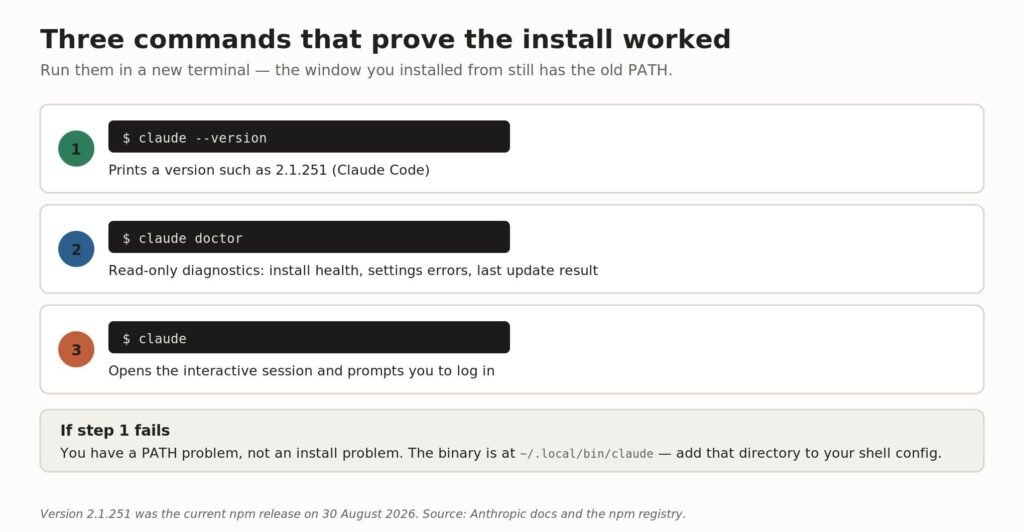
The three verification commands, in order.
A working install prints a version number in the form 2.1.251 (Claude Code). If you want a fuller picture, claude doctor prints read-only diagnostics — install health, settings file validation errors, and the result of the last update attempt — without starting a session.
Once you are in, it is worth learning to read your consumption early, because the limits are the part people hit first. We covered that in how to see Claude Code usage.
Where does Claude Code install its files?
Four paths explain almost every install problem people run into.
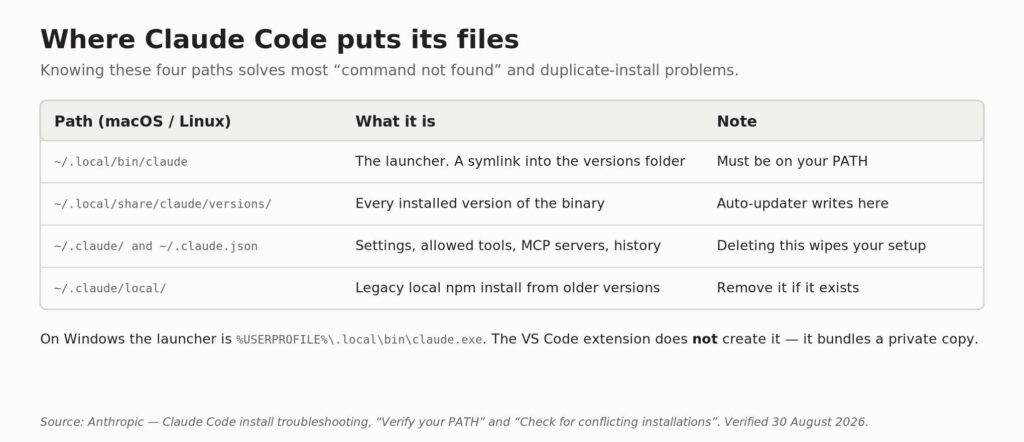
The four locations that matter, and what happens if you delete each one.
The one to watch is ~/.claude/local/. That is a legacy local npm install created by older versions of Claude Code, and if it survives alongside a native install you get two binaries fighting over the same command name. Anthropic’s guidance is to keep one installation and remove the extras.
Why does claude say command not found after installing?
Because the install directory is not in your shell’s PATH. The install itself almost certainly worked. The error text varies by platform but the cause is identical:
| Platform | Error message |
|---|---|
| macOS | zsh: command not found: claude |
| Linux | bash: claude: command not found |
| Windows CMD | ‘claude’ is not recognized as an internal or external command |
| PowerShell | claude : The term ‘claude’ is not recognized as the name of a cmdlet |
Check whether the directory is on your PATH, and add it if not:
echo $PATH | tr ':' '\n' | grep -Fx "$HOME/.local/bin"
# Zsh (default on macOS)
echo 'export PATH="$HOME/.local/bin:$PATH"' >> ~/.zshrc && source ~/.zshrc
# Bash (default on most Linux distributions)
echo 'export PATH="$HOME/.local/bin:$PATH"' >> ~/.bashrc && source ~/.bashrc
One trap that catches VS Code users: the Claude Code extension does not create ~/.local/bin/claude. It bundles a private copy of the CLI for its own chat panel and never adds it to PATH. If the extension is all you have installed, that file will not exist and you need the standalone install as well.
On Windows there is a second cause. An older Claude Desktop install can register a Claude.exe in the WindowsApps directory that takes PATH priority, so typing claude opens the desktop app instead of the CLI. Updating Claude Desktop to the current version fixes it.
What if the installer fails outright?
Match the message rather than working through fixes at random. These ten cover the overwhelming majority of reported failures.
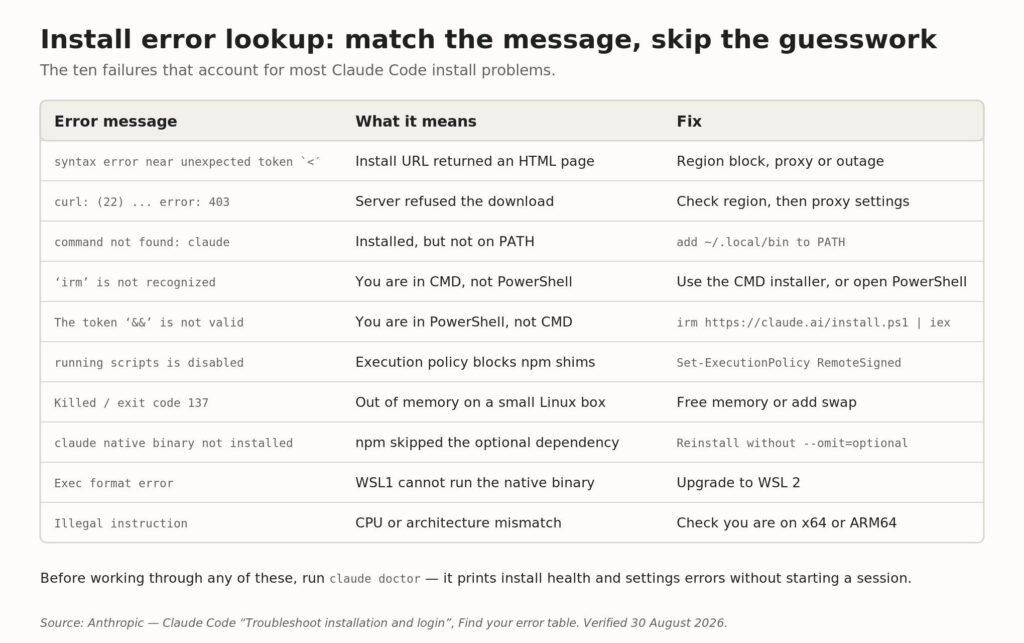
Install error lookup: message, cause and fix.
The HTML error is worth explaining
If bash reports syntax error near unexpected token ‘<‘, the install URL returned a web page instead of a shell script, and bash is trying to execute <!DOCTYPE html> as code. In PowerShell the same failure appears as parse errors quoting HTML tags or CSS.
There are three causes. The page may say the app is unavailable in your region, in which case Claude Code is not offered in your country. A corporate proxy or firewall may be blocking downloads.claude.ai. Or it is a temporary routing issue, in which case waiting a few minutes and retrying genuinely works. Homebrew and WinGet are the documented fallbacks, though they reach the same hosts.
You can test the connection directly before drawing conclusions:
curl -sI https://downloads.claude.ai/claude-code-releases/latestA 200 in the first line means you reached the server. A 403 usually means a proxy, a network filter, or an unsupported region. Behind a corporate proxy, set HTTPS_PROXY and HTTP_PROXY before running the installer.
How do you keep Claude Code updated?
Native installs update themselves in the background and apply the new version the next time you start. You choose how aggressively.
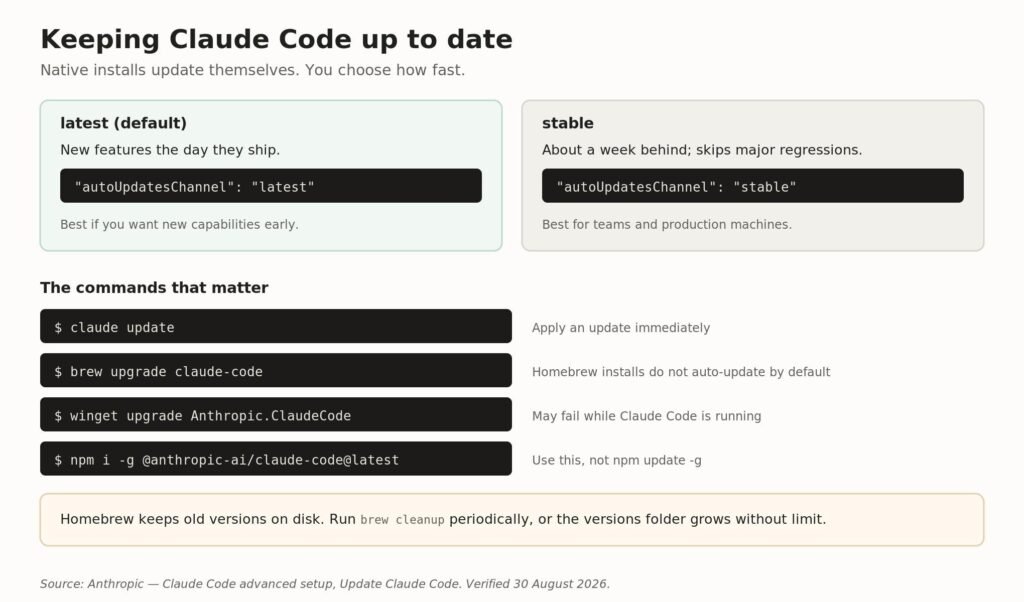
Release channels and the manual upgrade commands for each install method.
The stable channel runs about a week behind latest and skips releases with major regressions, which is the right default for a shared machine. Package-manager installs do not auto-update at all unless you opt in with CLAUDE_CODE_PACKAGE_MANAGER_AUTO_UPDATE, and apt, dnf and apk always require a manual upgrade because those commands need elevated privileges.
How do you uninstall Claude Code?
Remove it using the same method you installed with, then decide separately whether to delete your configuration:
# native install (macOS, Linux, WSL)
rm -f ~/.local/bin/claude
rm -rf ~/.local/share/claude
# Homebrew
brew uninstall --cask claude-code
# WinGet
winget uninstall Anthropic.ClaudeCode
# npm
npm uninstall -g @anthropic-ai/claude-code
Your settings, allowed tools, MCP server configuration and session history live in ~/.claude and ~/.claude.json. Deleting those wipes all of it. It is also worth knowing that the VS Code extension, the JetBrains plugin and the Claude Desktop app all write to ~/.claude, so the directory will reappear if any of them is still installed.
If claude still runs after uninstalling, you had more than one installation. Run which -a claude to find the survivor.
Frequently asked questions
Is Claude Code free?
No. It requires a Pro, Max, Team, Enterprise or Console account, or a third-party API provider such as Amazon Bedrock, Google Cloud’s Agent Platform or Microsoft Foundry. The free Claude.ai plan does not include Claude Code.
Do I need Node.js to install Claude Code?
Not for the native installer, Homebrew, WinGet or the Linux package managers. Only the npm route needs Node, and as of package v2.1.198 it wants Node 22 or later.
Do I need WSL to run Claude Code on Windows?
No. Native Windows is fully supported in both PowerShell and Command Prompt. WSL 2 is worth using if you want sandboxed command execution, which native Windows does not support.
Why did the install command print a script instead of installing?
You ran the download half without the part that executes it. On macOS and Linux add | bash. In PowerShell pipe to iex. In CMD run the full command including && install.cmd && del install.cmd.
How do I know which version I have?
Run claude –version. It prints a version number such as 2.1.251 (Claude Code). For a fuller diagnostic, run claude doctor.
Can I install Claude Code without admin rights?
Yes. The installer writes to your user profile on every platform and does not require elevation.
Is the npm package different from the standalone installer?
No. The npm package downloads the same per-platform native binary and links it into place. The installed command does not invoke Node at runtime.
Related guides
- Claude Code alternatives: 12 tools compared
- Codex CLI vs Claude Code
- Gemini CLI vs Claude Code
- How to install Codex CLI
- The best Claude model for coding
- How to see Claude Code usage
- How to run LLMs locally
- How to download a Claude chat session
Sources
- Anthropic — Claude Code advanced setup
- Anthropic — Troubleshoot installation and login
- npm — @anthropic-ai/claude-code
- curl manual — command line options
All commands, version numbers and error messages in this guide were checked against Anthropic’s published documentation and the npm registry on 30 August 2026. curl flag behaviour was verified against curl 7.81.0.
Related guides: For students setting up their IDE alongside terminal assistants, see our guide to claiming a free edu email for Cursor and our breakdown of Claude pricing plans.
Vibe Coder Journal has no affiliate relationship with Anthropic.

[…] up for the first time? Our guides to installing Claude Code and checking your Claude Code usage cover the parts that are in your control. Usage causes 429s, […]
[…] our test application cost approximately $2.40 in raw tokens. Check our step-by-step guide on how to install Claude Code, our security breakdown of claude –dangerously-skip-permissions, and our recommended Claude […]
[…] New to Claude Code? Start with our guide on how to install Claude Code. […]