

Vibe Coder Journal · Verified against AnythingLLM v1.16.2 and Ollama documentation, 23 September 2026
Short answer: in most cases it is not censorship at all. It is a retrieval setting. AnythingLLM ships workspaces with a chat mode that deliberately refuses to answer anything outside your uploaded documents, and the refusal it produces reads exactly like a safety refusal.
There are four separate places a refusal can come from in an AnythingLLM plus Ollama setup, and they need completely different fixes. Three of them are settings you can change in under a minute. Only the fourth is actually the model’s safety training, and it is the least common cause — despite being the one everyone assumes.
This page walks the layers in order, gives you a two-minute test that isolates which one you have hit, and tells you what each refusal wording means.
The four layers a prompt passes through
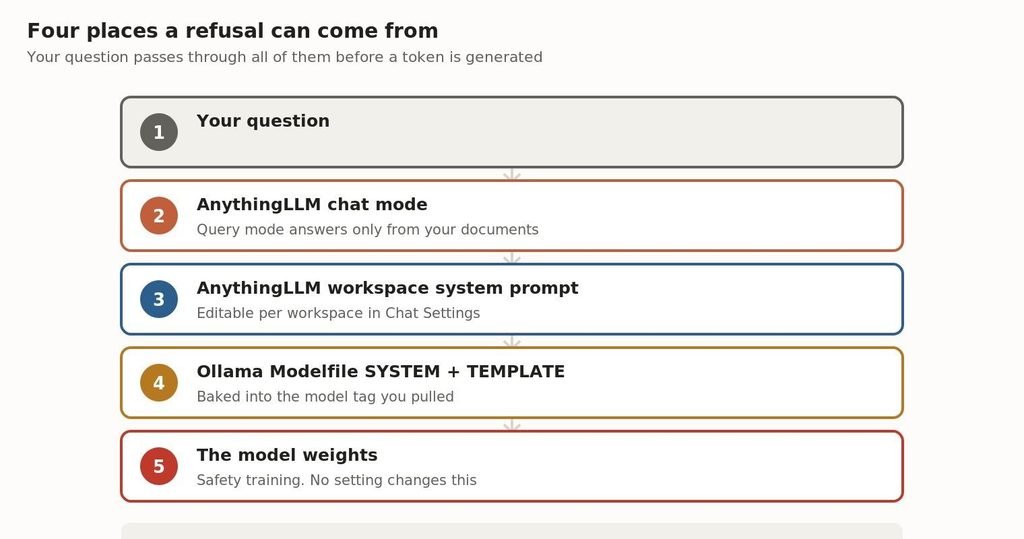
Your question travels through every layer before a token is generated. Any one of them can stop it.
Understanding this stack is the whole article. A refusal at layer 2 and a refusal at layer 5 look identical in the chat window and have nothing in common underneath.
Layer 2: Query mode is refusing on purpose
This is the single most common cause, and AnythingLLM’s own documentation describes the behaviour plainly. Each workspace has a chat mode, and Query mode is defined as:
Query Mode:
– Only uses information from your uploaded documents
– Will tell you if it can’t find relevant information
– Best for when you need accurate, document-based answers
and nothing else
If your workspace is in Query mode and you ask anything the documents do not cover, the model is instructed to decline. That is the feature working correctly. It is also indistinguishable, from the user’s side, from a model that has been told not to discuss the topic.
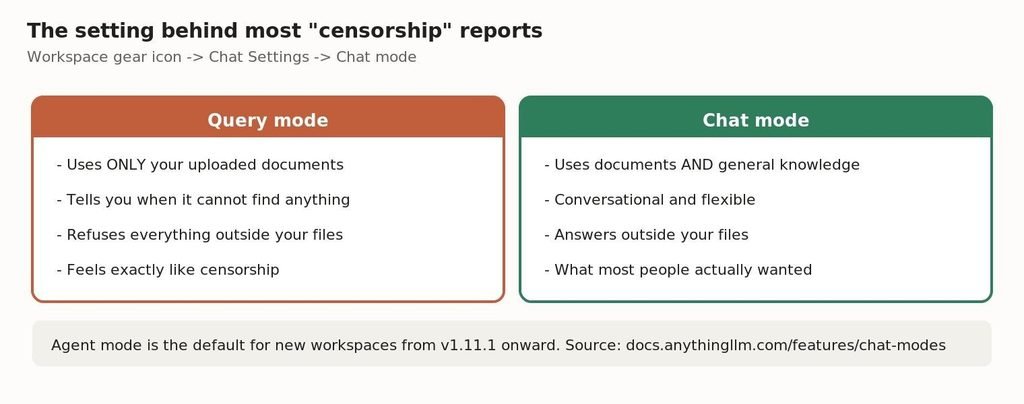
Query mode versus Chat mode. Most people who report censorship wanted Chat mode.
The fix: open the workspace, click the gear icon, go to Chat Settings, and change the chat mode from Query to Chat. Chat mode uses both your documents and the model’s general knowledge.
Worth knowing: from v1.11.1 onward, new workspaces default to Agent mode rather than Query mode. If your install is older, or the workspace was created before you updated, it may still be sitting in a mode you never chose.
Layer 2b: the similarity threshold is throwing your documents away
The second setting is quieter and catches people who have already switched to Chat mode. AnythingLLM scores each retrieved chunk against your question and discards anything below a threshold you set.
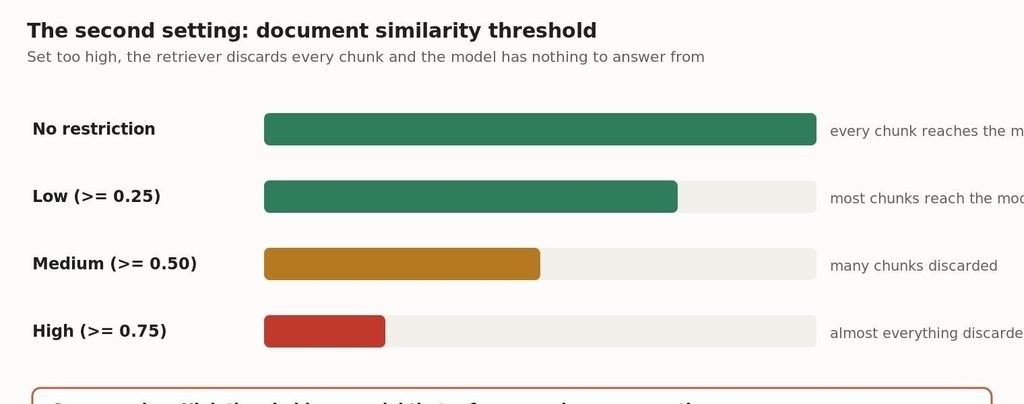
At High, the retriever discards nearly every chunk and the model has nothing to work from.
| Threshold | Score required | Practical effect |
|---|---|---|
| No restriction | none | Every retrieved chunk reaches the model |
| Low | greater than or equal to 0.25 | Most chunks reach the model |
| Medium | greater than or equal to 0.50 | Many chunks discarded |
| High | greater than or equal to 0.75 | Almost everything discarded |
Source: docs.anythingllm.com/features/chat-modes, verified 23 September 2026.
Set it to No restriction under workspace settings, Vector Database Settings. The combination of Query mode and a High threshold produces a model that refuses essentially every question — which is precisely what gets reported as censorship.
Layer 3: something is in your workspace system prompt
Each AnythingLLM workspace has its own system prompt, editable in Chat Settings. It is easy to forget what is in there, particularly if you imported a workspace from the Community Hub or copied a configuration from a tutorial.
A system prompt that says “only answer questions about the provided documentation” or “decline anything unrelated to this project” will produce refusals that have nothing to do with the model. Clear it to empty and retest before you blame anything downstream.
Layer 4: the Modelfile has a SYSTEM line you never wrote
Ollama model tags can ship with a system message baked in. The Modelfile SYSTEM instruction sets a system message that is inserted into the template on every request, and you will never see it in the AnythingLLM interface because it is applied on the Ollama side.
One command shows you the full Modelfile for any tag you have pulled, including its SYSTEM and TEMPLATE blocks:
ollama show –modelfile llama3.2
This matters most if you pulled a community tag rather than an official one. Anyone can publish a model to Ollama with a system prompt attached, and a tag that looks like a plain base model may carry instructions you did not ask for.
The two-minute test that isolates the layer
Rather than guessing, take AnythingLLM out of the path entirely and ask Ollama the same question directly.
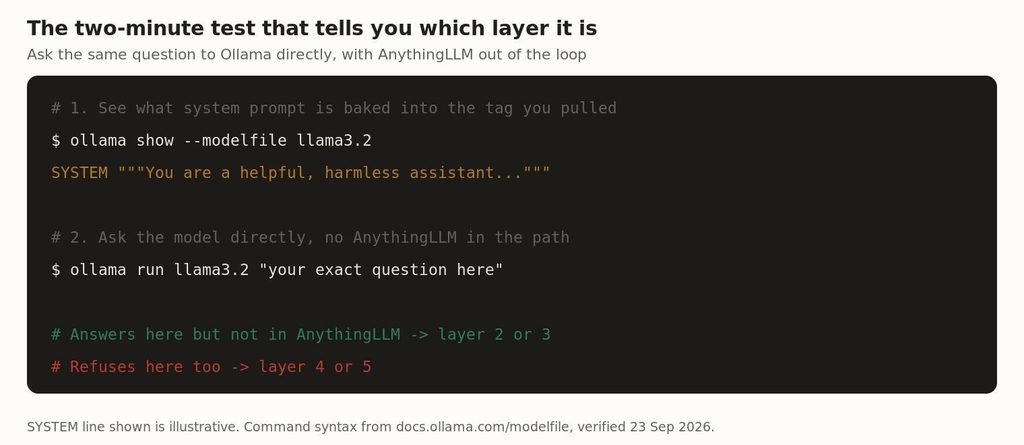
Ask Ollama directly. Where the behaviour differs tells you which layer is responsible.
# 1. See what is baked into the tag
ollama show –modelfile <your-model>
# 2. Ask the model directly, no AnythingLLM in the path
ollama run <your-model> “your exact question here”
Interpreting the result:
- It answers in the terminal but refuses in AnythingLLM — the cause is layer 2 or 3. A setting in AnythingLLM, not the model.
- It refuses in the terminal too, and ollama show reveals a SYSTEM line — the cause is layer 4. Pull an official tag or build your own Modelfile without that line.
- It refuses in the terminal and there is no SYSTEM line — the cause is layer 5, the model’s own training. No configuration reaches this.
What the wording of the refusal tells you
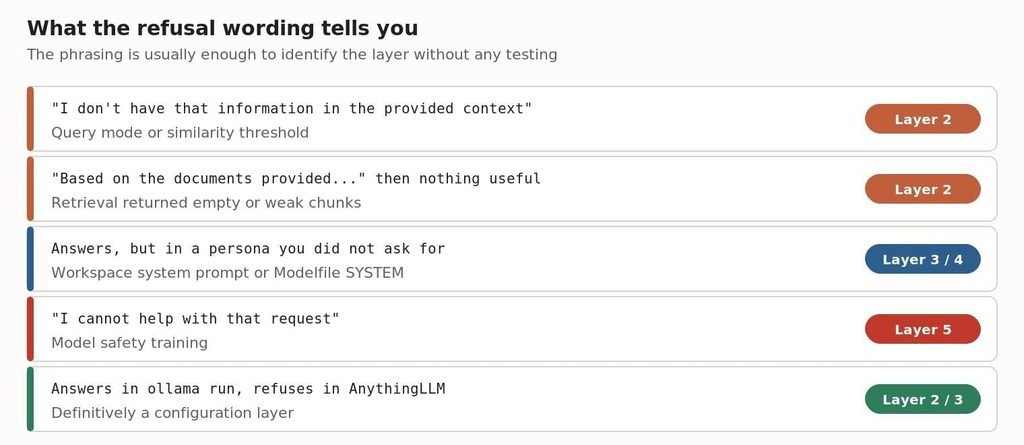
The phrasing usually identifies the layer before you test anything.
Refusals from retrieval settings and refusals from safety training do not sound the same once you know what to listen for. Retrieval refusals mention context, documents or provided information. Safety refusals talk about the request itself.
Layer 5: when it really is the model
If the isolation test points here, the honest answer is that no setting in AnythingLLM or Ollama will change it. Refusal behaviour in an instruction-tuned model is a property of the weights, produced during alignment training. It is not a filter sitting in front of the model that can be switched off, and it is not something the Modelfile can override.
Two legitimate paths from here:
1. Check whether your question is actually being misread. Models frequently refuse security, medical or legal questions that are entirely reasonable, because the phrasing pattern-matches to something else. Rephrasing to make the context explicit — that you are auditing your own system, or asking about a documented CVE — often resolves it without any circumvention.
2. Choose a model whose training suits your work. Different models on Ollama’s library are tuned differently, and research and evaluation-focused fine-tunes generally refuse less on technical subject matter. Model selection is the correct lever here.
What this article does not cover: techniques for getting an aligned model to bypass its own safety training. That is a different thing from configuring your stack correctly, and it is not what most people searching this question actually need — as the layers above should make clear.
Fix it in this order
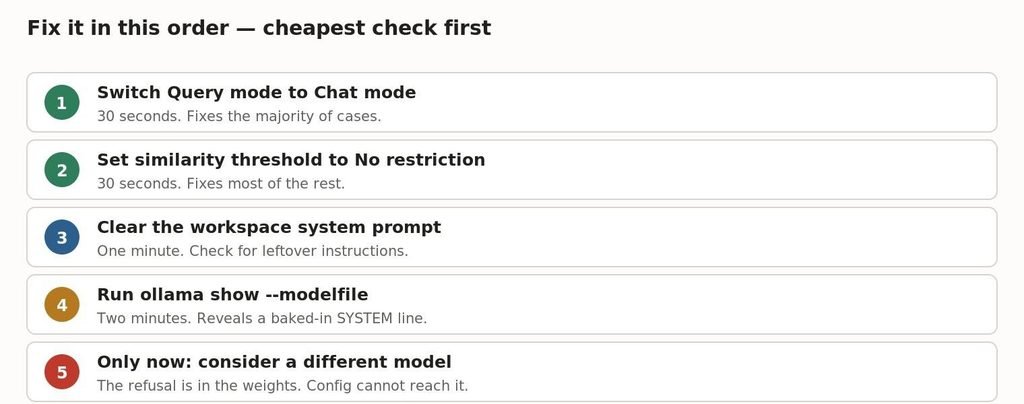
Cheapest check first. Most people never get past step two.
Frequently asked questions
Why does AnythingLLM refuse questions that Ollama answers fine?
Almost always the workspace chat mode. Query mode restricts answers to your uploaded documents by design, and the refusal it generates reads like a safety refusal. Switch to Chat mode in Chat Settings.
Is Ollama censoring my model?
Ollama itself does not filter output. It can, however, apply a SYSTEM message baked into the model tag you pulled. Run ollama show –modelfile to see exactly what is being sent with every request.
How do I see AnythingLLM’s system prompt?
Open the workspace, click the gear icon, and look under Chat Settings. The system prompt is per workspace, so a prompt you set on one workspace does not apply to another.
Why does it say “I don’t have that information in the provided context”?
That is a retrieval refusal, not a safety refusal. Either the workspace is in Query mode, or the document similarity threshold is set high enough that the retriever discarded every chunk. Set the threshold to No restriction and retest.
Can I turn off safety filtering in a local model?
There is no filter to turn off. Refusal behaviour in an instruction-tuned model comes from the weights, not from a switch in Ollama or AnythingLLM. If the refusal genuinely originates there, model selection is the only lever.
Does the model I pulled matter?
Yes, considerably. Official tags and community tags can carry different system prompts, and different models are tuned with different levels of caution on technical subjects. Check the Modelfile before assuming behaviour is inherent.
Related reading
If you are still setting up your local stack, our guide to running LLMs locally covers the Ollama side end to end.
Connection problems rather than refusals are a separate diagnosis — see Ollama troubleshooting.
If you are choosing hardware or a model size to run, what actually fits in 32GB has the measured numbers.
For the front-end side of a local setup, our Open WebUI complete guide covers the alternative interface.
Sources
- AnythingLLM chat modes — https://docs.anythingllm.com/features/chat-modes
- AnythingLLM Ollama LLM setup — https://docs.anythingllm.com/setup/llm-configuration/local/ollama
- Ollama Modelfile reference — https://docs.ollama.com/modelfile
Verified against AnythingLLM v1.16.2 documentation and the Ollama Modelfile reference on 23 September 2026. Menu locations change between releases — if a setting is not where described, check your version’s changelog.
Leave a Reply