Cursor Pro vs ChatGPT Plus: Which Is Better for Coding in 2026?
Cursor Pro vs ChatGPT Plus is the $20-a-month question for developers in 2026. Cursor Pro is the better buy if you write code every day inside an editor. ChatGPT Plus is the better value if you want one subscription for everything — chat, research, images — and you’re happy coding through Codex in the terminal or an IDE extension. Both cost $20 a month, and the real difference isn’t the price. It’s where you code and how much agentic work you do. Every price and limit below was checked against the official pages on October 9, 2026.
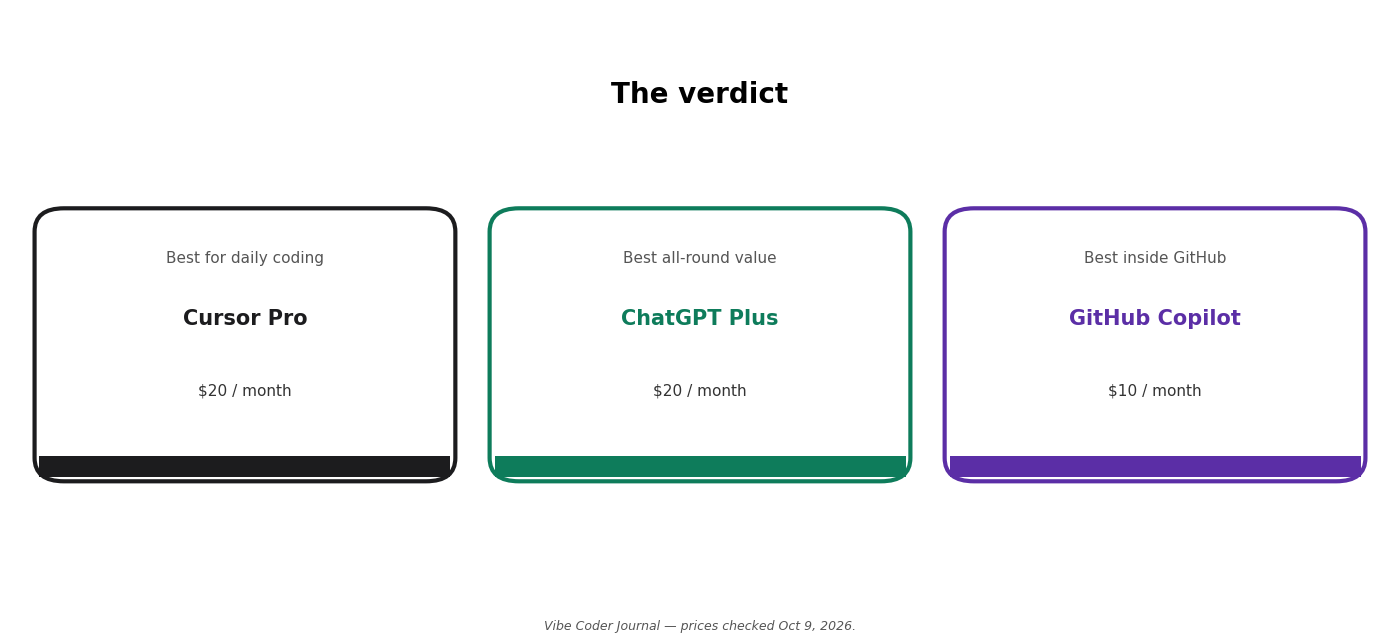
The verdict at a glance. Prices checked October 9, 2026. Graphic: Vibe Coder Journal.
Cursor Pro vs ChatGPT Plus at a glance
| Cursor Pro | ChatGPT Plus | |
|---|---|---|
| Price per month | $20 | $20 |
| Annual price | Yearly billing toggle exists; annual figure not shown in page text | No annual plan (monthly only) |
| Free tier | Hobby: free, limited agent requests | Free: limited Codex access |
| Models | 10+ incl. Grok 4.7, Composer 2.5, Claude Sonnet 5.5, GPT-5.6 | GPT-5.6 Sol in chat; Sol/Terra/Luna + GPT-6 family in Codex |
| Coding surfaces | Editor (Cursor) + cloud agents | CLI, IDE extension, desktop app, cloud tasks, web chat |
| Usage limits | Extended agent limits; on-demand overage at API rates | Chat limits + separate Codex allowance (5-hour estimates; weekly cap not published) |
| Context window | Not published on official pages | Not published on official pages |
| Best for | Daily coding inside an editor | One subscription for coding + everything else |
Prices and limits checked on October 9, 2026. Sources: cursor.com/pricing, chatgpt.com/pricing, chatgpt.com/codex/pricing/.
A quick note on the “context window” row: that’s how much text and code the model can hold in mind at once. Neither vendor publishes the number on its official pages, so any article quoting one for these plans is guessing — we aren’t.
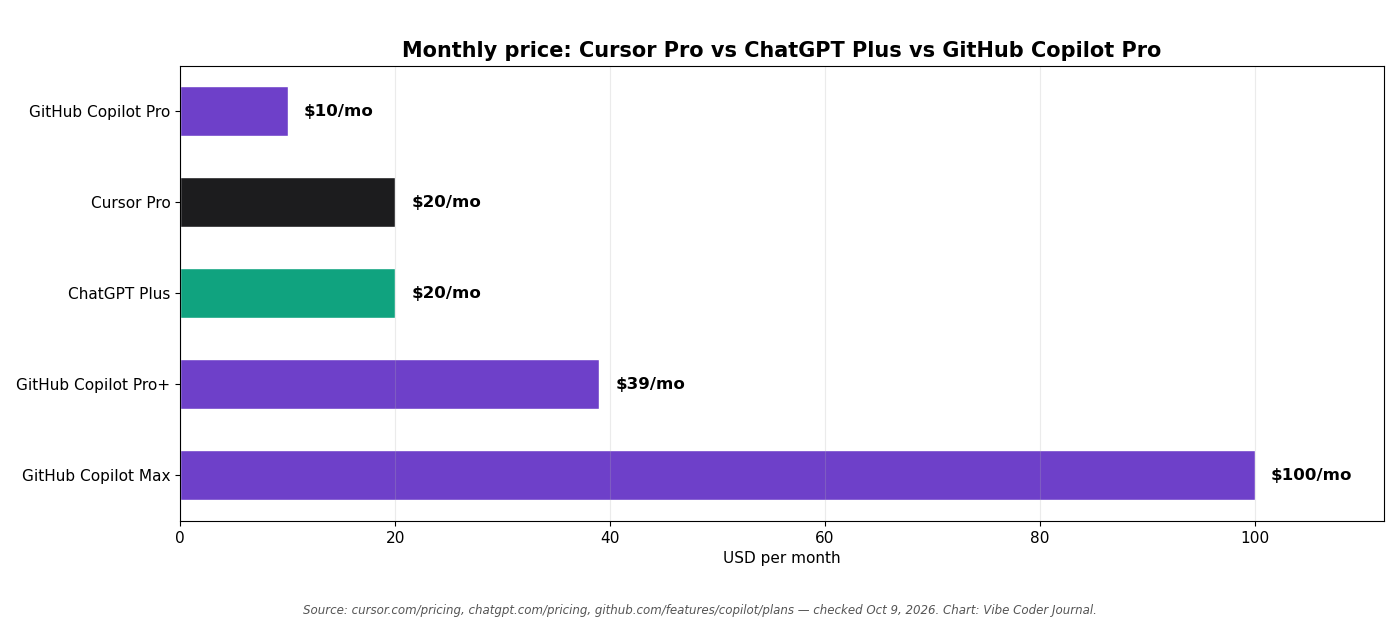
Monthly prices, checked October 9, 2026. Cursor Pro and ChatGPT Plus cost the same $20 — Copilot Pro is the cheapest paid tier at $10. Source: cursor.com/pricing, chatgpt.com/pricing, github.com/features/copilot/plans. Chart: Vibe Coder Journal.
What do you get with Cursor Pro?
Cursor Pro ($20/month) is an AI-first code editor subscription: unlimited Tab completions, extended agent limits across 10+ models, cloud agents, and MCP support.
Cursor is a fork of VS Code with the AI built in. The Pro plan is the entry paid tier, and Cursor itself recommends Pro+ ($60/month) for daily agent users and Ultra ($200/month) for power users — a hint that $20 doesn’t stretch as far as the headline suggests.
Here’s what Pro includes, from cursor.com/pricing and the Cursor docs:
| Feature | Included on Pro? | Limit / notes |
|---|---|---|
| Tab completions | ✅ Yes | Unlimited on Pro |
| Agent (in-editor AI that edits files and runs commands) | ✅ Yes | Extended limits; two usage pools (see below) |
| Models | ✅ Yes | 10+: Grok 4.7/4.6/4.5, Composer 2.5 (Cursor pool); Claude Sonnet 5.5/Opus 5.5/Haiku 5.5/Fable 5.1, GPT-5.6 Sol/Luna/Terra, Gemini 3.1 Pro/3.8 Flash (third-party pool, billed at API rates) |
| Cloud agents | ✅ Yes | Run agents on Cursor’s cloud |
| Bugbot (AI code review) | ✅ Yes | Usage-based billing on Individual plans |
| MCP support (connect external tools) | ✅ Yes | MCPs, skills and hooks included |
| Background / cloud automations | ✅ Yes | Cloud agents included |
| Privacy mode | ✅ Yes | Code not used for training when enabled |
Checked on October 9, 2026. Source: cursor.com/pricing, cursor.com/docs/models-and-pricing.
Two things matter most about Pro’s limits. First, usage resets monthly and doesn’t roll over. When your included usage runs out, Cursor notifies you in the editor and you either turn on on-demand usage (pay-as-you-go at API rates, billed in arrears) or upgrade. There is no hard stop as long as you pick one of those options — if you decline both, agent requests pause until your next billing cycle. And Cursor says requests are “never downgraded in quality or speed.”
Second, Cursor’s own guidance says daily agent users typically spend $60–100 a month in total usage, and power users $200 or more. Read that carefully: if you use the agent heavily every day, the $20 Pro plan alone often won’t cover you — you’ll pay overage or need Pro+. Light users who mostly Tab-complete will stay comfortably inside Pro.
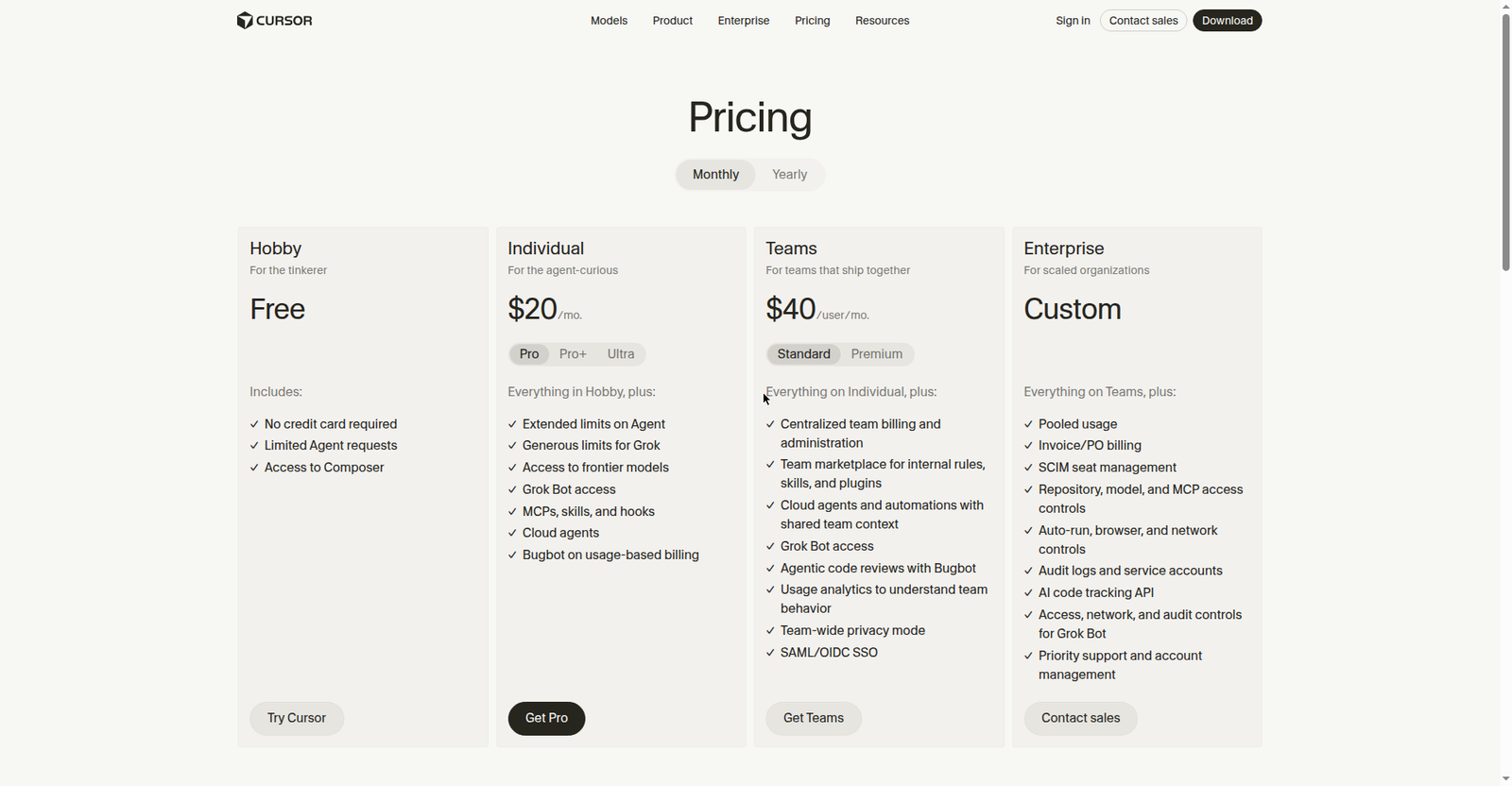
Source: cursor.com/pricing. Screenshot taken October 9, 2026.
What do you get with ChatGPT Plus for coding?
ChatGPT Plus ($20/month) is a general AI subscription whose coding value comes almost entirely from Codex: the CLI, IDE extension, desktop app mode, and cloud tasks are all included with expanded usage.
This is the part most comparison pages get wrong. They describe Plus as “chatbot that can write code.” Since Codex shipped inside Plus, the plan is really two products: ChatGPT for chat, and Codex for agentic coding.
Codex in ChatGPT Plus
Codex is included in Plus with “expanded usage,” per chatgpt.com/pricing. You get it on four surfaces: the Codex CLI in your terminal, an IDE extension that works with most VS Code forks, a Codex mode in the ChatGPT desktop app, and cloud tasks on the web. If you want the terminal workflow without leaving your editor, our Codex CLI install guide walks through setup, and Codex yolo mode explains the approvals model.
Crucially, Codex has its own metered allowance, separate from your chat message limits. OpenAI publishes estimates per 5-hour window, and they vary wildly by model (chatgpt.com/codex/pricing/):
| Feature | Included on Plus? | Limit / notes |
|---|---|---|
| Codex CLI | ✅ Yes | 5-hour estimates, e.g. GPT-5.6 Sol 10–100 local messages; GPT-6 Luna 350–3,000 |
| Codex IDE extension | ✅ Yes | Shares the Codex allowance |
| Codex cloud tasks (web) | ✅ Yes | Shares the allowance; cloud chats may consume more |
| Codex desktop app mode | ✅ Yes | Shares the allowance |
| Chat models (GPT-5.6 Sol) | ✅ Yes | Medium and High reasoning included; Extra High and Pro reasoning are not |
| Projects, custom GPTs, scheduled tasks | ✅ Yes | Included |
| Deep research, image generation | ✅ Yes | Expanded quotas (exact numbers not published) |
| Context window | — | Not published on official pages |
Checked on October 9, 2026. Sources: chatgpt.com/pricing, chatgpt.com/codex/pricing/, help.openai.com (Codex and ChatGPT plan usage limits).
Three gotchas to know. First, the Codex allowance is shared with ChatGPT Work, Excel, and Workspace Agents — heavy agentic use in chat eats the same bucket your CLI uses. Second, OpenAI says weekly limits “may also apply” but doesn’t publish the number. Third, eligible Plus users can buy extra credits without changing plans, but prices are shown only at checkout.
Also note: Plus is monthly-only. OpenAI’s FAQ says annual plans exist only for Business and Enterprise, so there’s no discounted yearly Plus.

Source: chatgpt.com/pricing. Screenshot taken October 9, 2026. Prices shown in PKR (Plus ≈ Rs 5,700/month); the article uses US pricing.
Cursor Pro vs ChatGPT Plus: price and usage limits
Both plans cost $20 a month with no annual discount — so the decision comes down to usage limits, not sticker price.
The full price ladder
| Vendor | Tier | Monthly price | What changes at this tier |
|---|---|---|---|
| Cursor | Hobby | $0 | Limited agent requests; Composer access |
| Cursor | Pro | $20 | Unlimited Tab; extended agent limits; cloud agents; Bugbot (usage-based); MCP |
| Cursor | Pro+ | $60 | More included agent usage (Cursor recommends it for daily agent users) |
| Cursor | Ultra | $200 | For agent power users |
| Cursor | Teams Standard | $40/user | Central billing, shared context, Bugbot reviews, SSO |
| ChatGPT | Free | $0 | GPT-5.6 Luna; limited Codex and deep research |
| ChatGPT | Go | $8 | More messages, uploads, images; may include ads |
| ChatGPT | Plus | $20 | GPT-5.6 Sol; expanded Codex usage; projects; deep research |
| ChatGPT | Pro | From $100 | 5x or 20x more usage; maximum Codex tasks |
| GitHub Copilot | Free | $0 | 2,000 completions/mo; limited chat and agent use |
| GitHub Copilot | Pro | $10 | 1,500 AI credits/mo; unlimited completions; model picker |
| GitHub Copilot | Pro+ | $39 | 7,000 AI credits/mo |
| GitHub Copilot | Max | $100 | 20,000 AI credits/mo; built for sustained agent workflows |
Prices checked on October 9, 2026. Sources: cursor.com/pricing, cursor.com/docs/models-and-pricing, chatgpt.com/pricing, github.com/features/copilot/plans, GitHub Docs (usage-based billing). 1 AI credit = $0.01; credits reset monthly and don’t roll over.
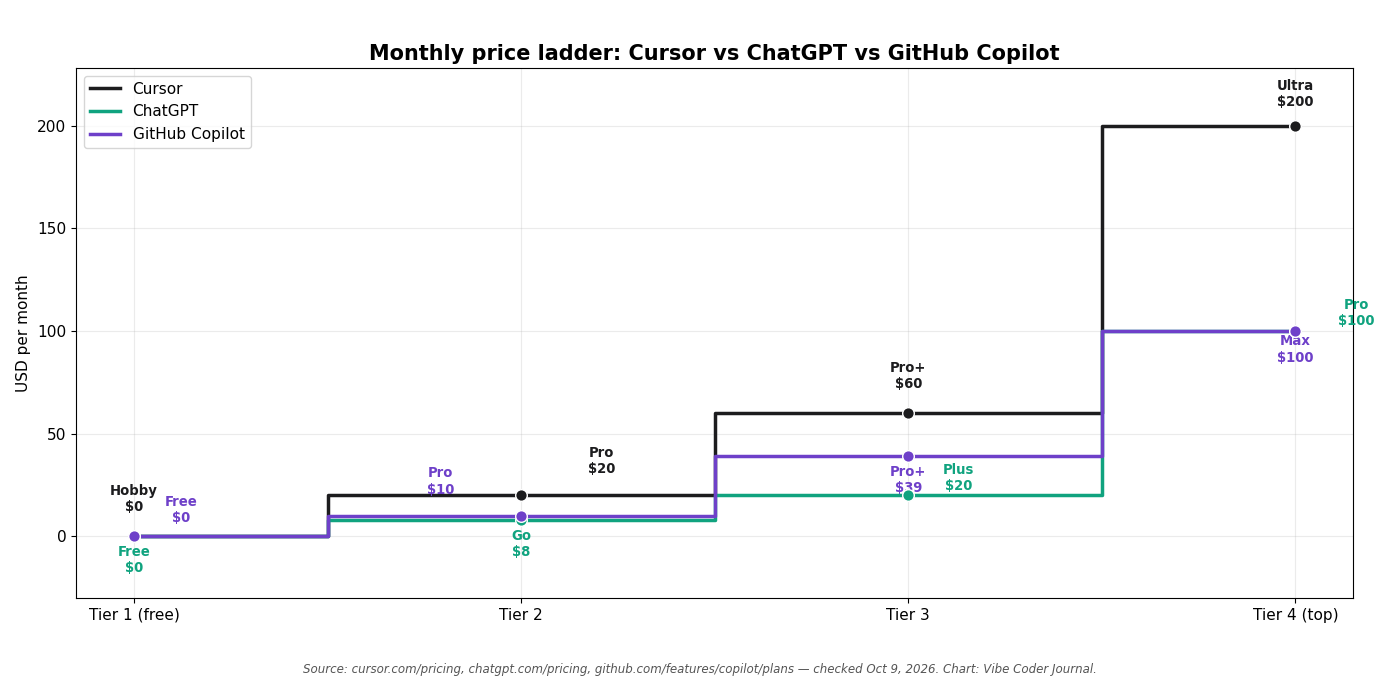
The full price ladder per vendor, checked October 9, 2026. Cursor and ChatGPT both anchor at $20; only Copilot publishes hard monthly usage numbers (AI credits) at each tier. Source: official pricing pages. Chart: Vibe Coder Journal.
Cost by usage level
This table uses only published limits. Where a vendor doesn’t publish a number, we say so instead of guessing.
| Usage level | What it looks like | Cursor | ChatGPT Plus | GitHub Copilot |
|---|---|---|---|---|
| Light (a few sessions a week, mostly autocomplete) | Hobby-tier coding | Hobby ($0) covers it; Pro ($20) is comfortable | Plus ($20) — well within Codex estimates | Free ($0) or Pro ($10) |
| Medium (daily coding, regular agent use) | A working developer’s week | Pro ($20) fits; overage at API rates if you push it | Plus ($20) fits for most; watch the unpublished weekly cap | Pro ($10) — 1,500 credits |
| Heavy (all-day agent use, big refactors) | Agent running for hours daily | Pro+ ($60) or Ultra ($200); Cursor’s own guidance puts daily agent users at $60–100/mo total | Plus ($20) + extra credits (prices at checkout); Pro (from $100) for maximum Codex | Pro+ ($39) or Max ($100) — 7,000 / 20,000 credits |
Based on published limits checked October 9, 2026. Cursor’s usage guidance and Codex’s 5-hour estimates come from cursor.com/docs and chatgpt.com/codex/pricing/.
The honest summary: at light and medium use, all three cost you $0–20 and the choice is about workflow, not money. At heavy use, Cursor is the most explicit that $20 won’t be enough, Copilot gives you the clearest numbers (credits), and Plus leaves the weekly Codex cap unpublished — which is itself useful information.
Which is better for coding?
Cursor Pro wins for in-editor daily coding; ChatGPT Plus (via Codex) wins for terminal-first and multi-surface coding — the “better” one is the one that matches where you already work.
Head to head, feature by feature:
| Feature | Cursor Pro | ChatGPT Plus (Codex) | GitHub Copilot Pro |
|---|---|---|---|
| Inline autocomplete | ✅ Unlimited Tab completions | ❌ No autocomplete product | ✅ Unlimited completions + Next Edit |
| Agent mode in editor | ✅ Cursor Agent | ✅ Codex IDE extension | ✅ Agent mode (VS Code, JetBrains, Visual Studio, Eclipse, Xcode) |
| Terminal / CLI agent | ⚠️ Terminal inside the editor | ✅ Codex CLI (its home turf) | ✅ Copilot CLI |
| Cloud / background agents | ✅ Cloud agents | ✅ Codex cloud tasks | ✅ Cloud agent (assign work, opens a PR) |
| Multi-file edits | ✅ | ✅ | ✅ |
| Model choice | ✅ 10+ models, two pools | ⚠️ Sol/Terra/Luna in Codex; Sol in chat | ✅ Large picker on paid plans |
| MCP / external tools | ✅ MCPs, skills, hooks | ⚠️ Not documented for Codex | ✅ MCP integration on all plans |
| Code review | ✅ Bugbot (usage-based) | ⚠️ On-demand via Codex, no PR bot | ✅ Code review (credits + Actions minutes) |
| Free tier | ✅ Hobby (limited agent requests) | ✅ Free (limited Codex) | ✅ Free (2,000 completions) |
| Works across many editors | ⚠️ Cursor editor + cloud | ✅ CLI/extension/desktop/web | ✅ Most editors, CLI, web, mobile |
| Pay-as-you-go overage | ✅ On-demand at API rates | ✅ Extra credits at checkout | ✅ Extra credits / budget |
| Privacy mode | ✅ Code not used for training | ⚠️ Consumer data controls | ⚠️ Opt-out available (training use unless opted out) |
Feature status checked against official docs on October 9, 2026. ✅ = included, ⚠️ = partial or limited, ❌ = not offered.
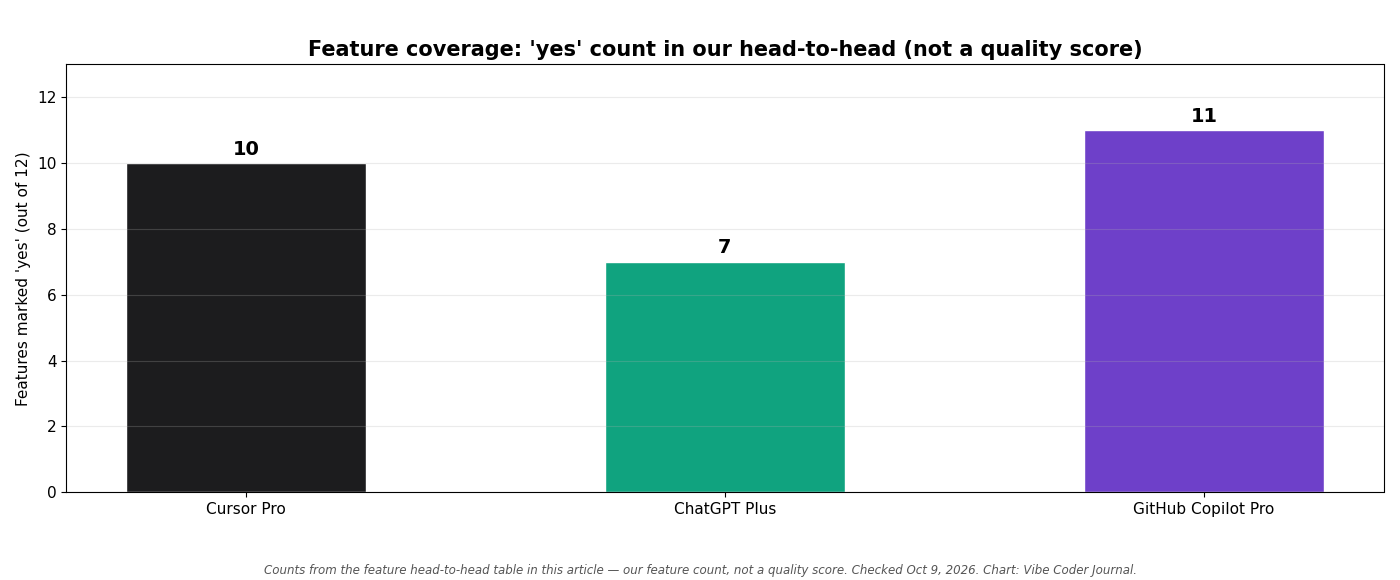
Count of ✅ features per product from the table above — our feature count, not a quality score. Checked October 9, 2026. Chart: Vibe Coder Journal.
A note on models and benchmarks, because they matter less than vendors imply. On the public Terminal-Bench 2.0 leaderboard (agentic coding, agent+model combos), Codex CLI paired with GPT-5.5 scores about 82% — the top of the board — while Claude Code with Opus 4.6 sits near 58% (official leaderboard via third-party compilations, August–October 2026). Cursor’s own Composer 2.5 is reported at 65.9 on the same bench via a third-party summary of Cursor’s blog post (we did not verify the figure on Cursor’s blog directly) — vendor-reported, in other words, rather than an independent leaderboard run. These are useful context, not a verdict: the harness, the model, and your workflow change results more than the brand name.
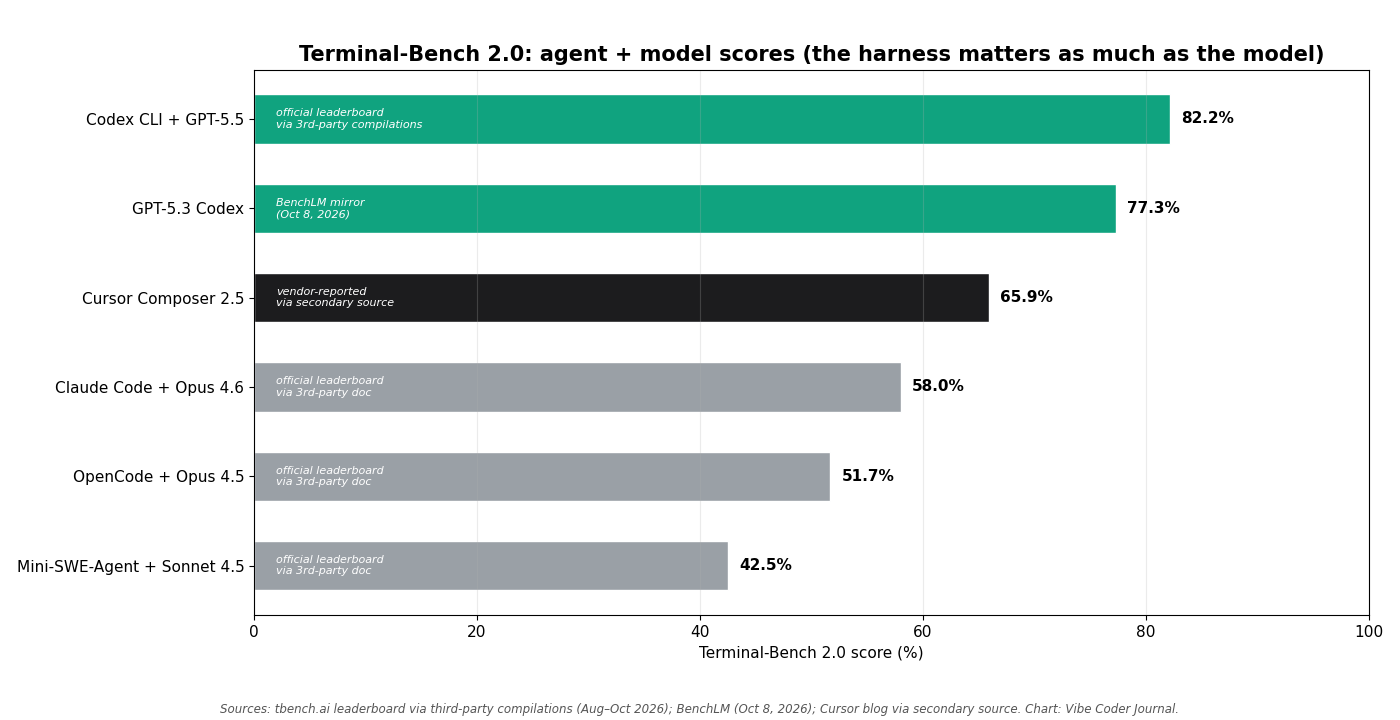
Terminal-Bench 2.0 scores are agent+model specific — the harness matters as much as the model. Codex CLI figures via third-party compilations of the official leaderboard (Aug–Oct 2026); Cursor’s Composer 2.5 figure is vendor-reported. Chart: Vibe Coder Journal.
What we didn’t test (yet)
We did not run a controlled side-by-side test for this article — no timed tasks, no prompt counts — so this page presents none. The protocol is ready (fix a failing test, build a landing page, explain an unfamiliar codebase, recording time, prompts, and success), and results will be added when run. Treat any comparison page that shows “test results” without a protocol with suspicion, including ours until then.
Cursor vs Codex: what’s the difference?
Cursor is an AI-native editor; Codex is an AI agent that lives in your terminal, your existing editor, or the cloud — choose the interface, not just the company.
This is the section most pages skip, and it’s the actual decision inside “ChatGPT Plus for coding.” If you’re searching “codex vs cursor,” you’re really asking whether to code inside an AI editor or in the terminal with an agent. When you pay for Plus, your coding tool is Codex, not the chatbot. Here’s how it differs from Cursor:
| Cursor | Codex (in ChatGPT Plus) | |
|---|---|---|
| Interface | A full editor (VS Code fork) | CLI, IDE extension, desktop app mode, web cloud tasks |
| Where it runs | In the Cursor editor + Cursor cloud | Your terminal, your existing editor, or OpenAI’s cloud |
| Sandbox & approvals | In-editor permissions model | Sandboxed execution with approval modes (including yolo mode) |
| Models | 10+ incl. Grok, Claude, GPT, Gemini | GPT-6 and GPT-5.6 families (Sol/Terra/Luna) |
| Pricing access | Cursor Pro $20/mo (usage pools + overage) | Included in ChatGPT Plus $20/mo (separate Codex allowance) |
| Best for | Living inside one AI editor all day | Terminal-first devs and anyone who won’t switch editors |
Checked on October 9, 2026. Sources: cursor.com/docs, chatgpt.com/codex/pricing/, help.openai.com.
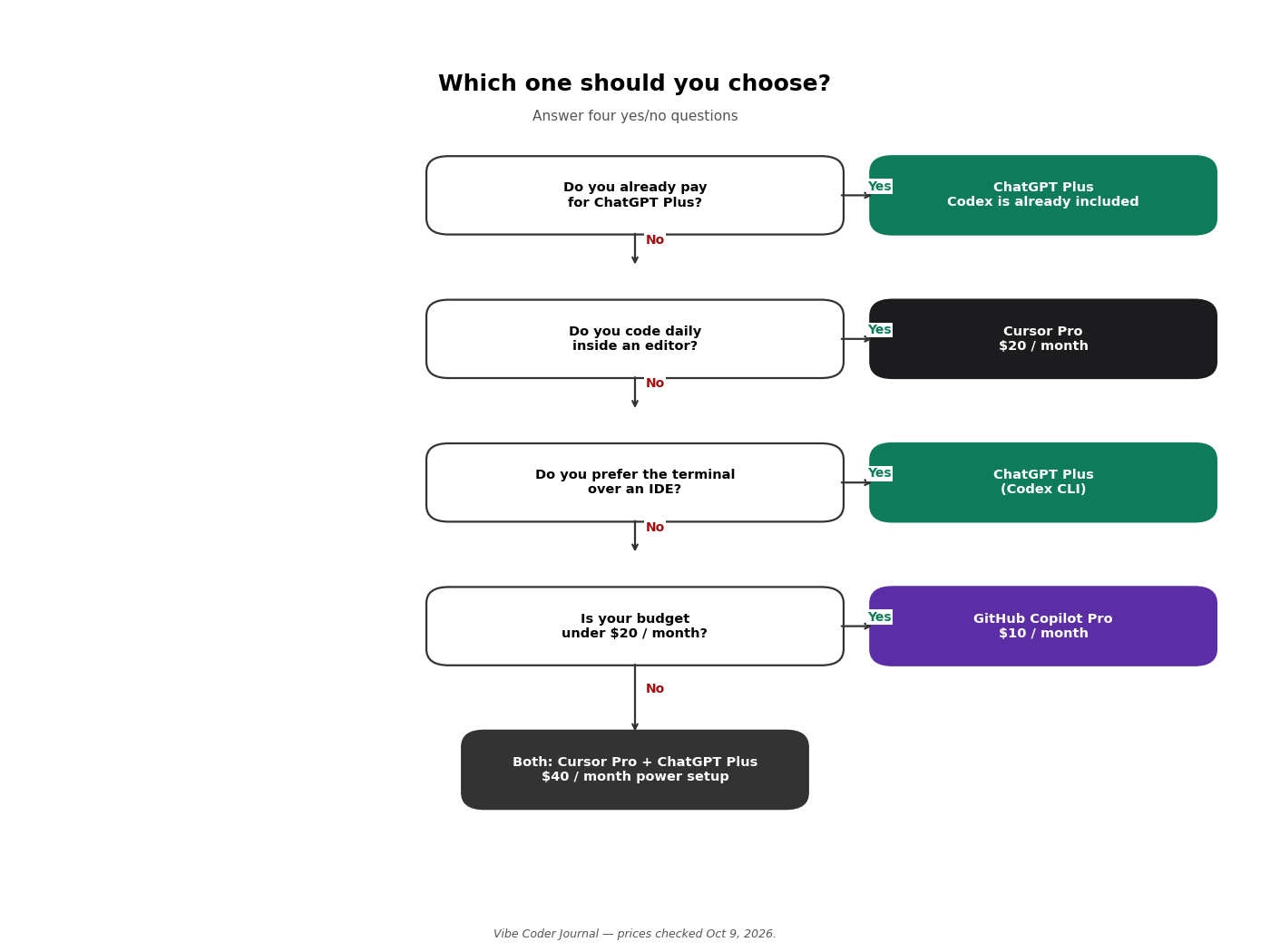
Four questions, one answer. If you already pay for ChatGPT and code in the terminal, Plus with Codex is the obvious pick; if you live in an editor, it’s Cursor. Chart: Vibe Coder Journal.
The community has settled on a pattern worth knowing: Cursor as the “chef” for messy multi-file refactors, Codex as the “sous-chef” for tests and chores running in its sandbox while you keep typing (community sentiment from developer forums, September 2026). You don’t have to pick a religion. For a deeper Codex-vs-Claude-Code take, see our Codex CLI vs Claude Code comparison, and if you’re weighing the broader field, apps like Codex covers the alternatives.
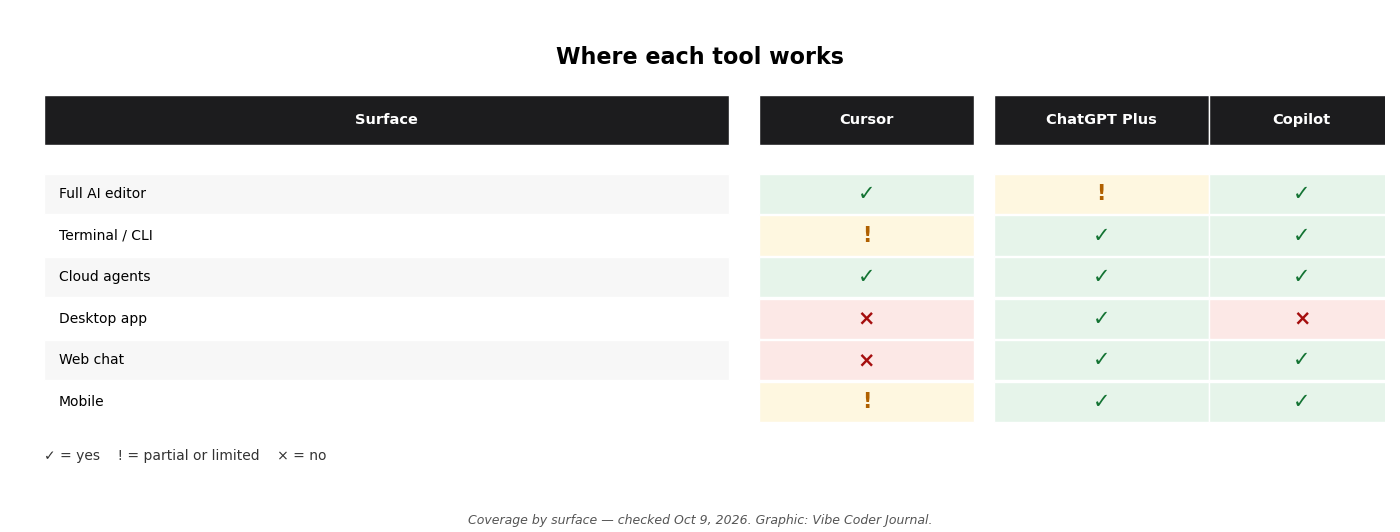
Where each tool works. Cursor owns the editor; Codex covers terminal, editor extension, desktop and cloud; Copilot is everywhere GitHub is. Checked October 9, 2026. Graphic: Vibe Coder Journal.
What about GitHub Copilot?
GitHub Copilot Pro ($10/month) is the cheapest serious option and the natural pick if you live in GitHub — but first, make sure you mean GitHub Copilot, not Microsoft Copilot.
Quick disambiguation: Microsoft Copilot is the AI assistant in Windows, Edge, and Microsoft 365. GitHub Copilot is the coding assistant from GitHub. Same family, different product — and the “chatgpt vs copilot” search is really ChatGPT Plus vs GitHub Copilot, so that’s what this section compares.
Since June 2026, Copilot bills in GitHub AI Credits (1 credit = $0.01), replacing the old premium-request system. Completions and Next Edit suggestions are unlimited on paid plans and never touch your credits; chat, agent mode, the CLI, the cloud agent, and code review do. Allowances reset monthly and don’t roll over.
| ChatGPT Plus | GitHub Copilot Pro | |
|---|---|---|
| Price | $20/mo | $10/mo |
| Where it works | Terminal, IDE extension, desktop app, web, mobile | VS Code, Visual Studio, JetBrains, Neovim, Eclipse, Xcode, CLI, github.com, mobile |
| Models | GPT-5.6/6 families | Large picker: GPT, Claude, Gemini, Grok, Kimi and more |
| Agent features | Codex cloud tasks | Cloud agent (opens PRs), agent mode, code review |
| Published usage number | 5-hour Codex estimates; weekly cap not published | 1,500 credits/mo (hard number) |
| Best for | One subscription for coding + chat + research | GitHub-native devs who want the cheapest paid tier |
Prices checked on October 9, 2026. Sources: chatgpt.com/pricing, github.com/features/copilot/plans.
Copilot’s honest advantage is transparency: it’s the only one of the three that publishes a hard monthly number at every tier. Its honest weakness for this comparison is that it’s a third $10–39 decision, not a $20 one — it belongs here because it’s the same buyer, not the same price. We compare it against Claude Code separately in Claude Code vs GitHub Copilot.
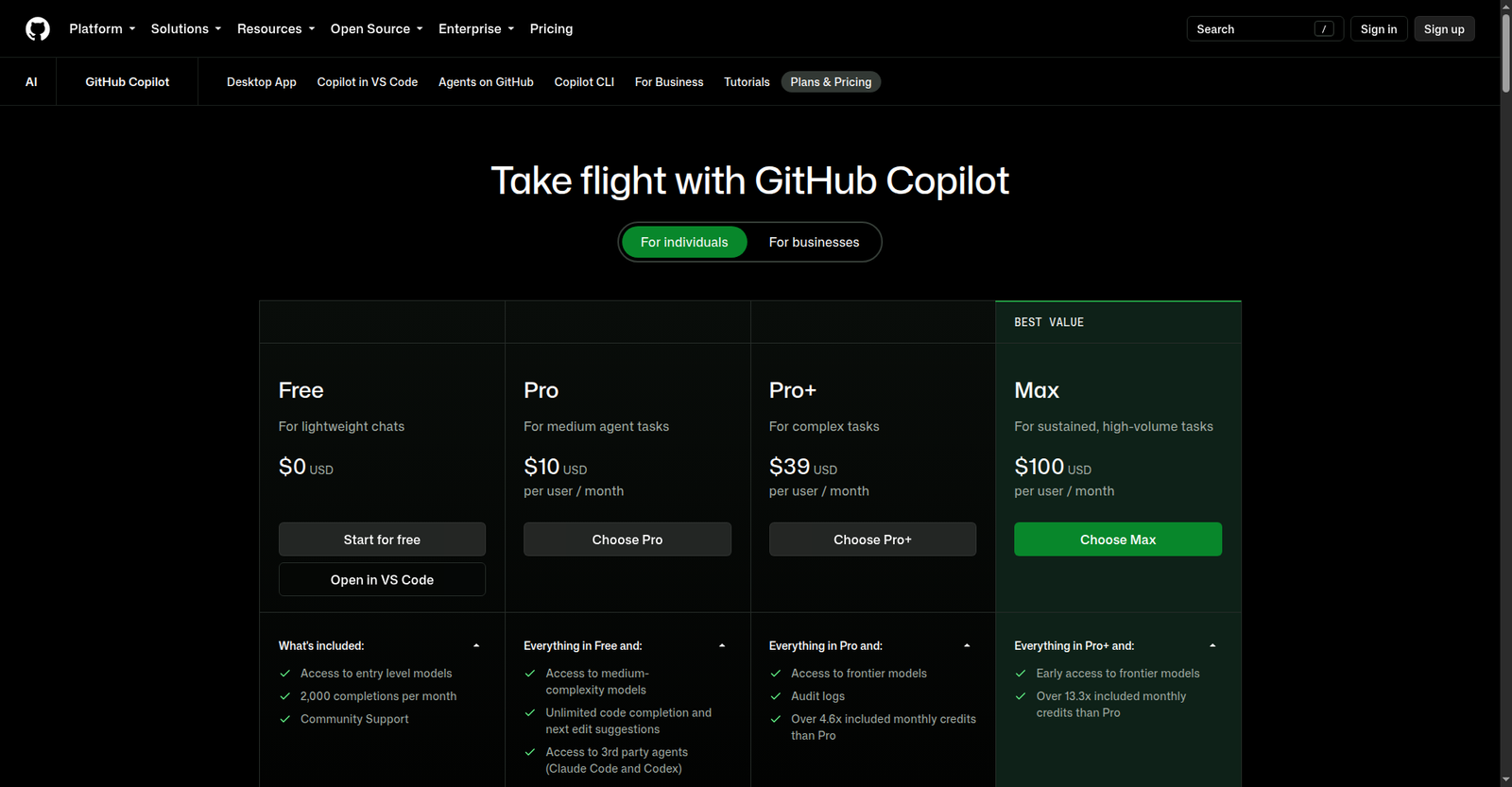
Source: github.com/features/copilot/plans. Screenshot taken October 9, 2026.
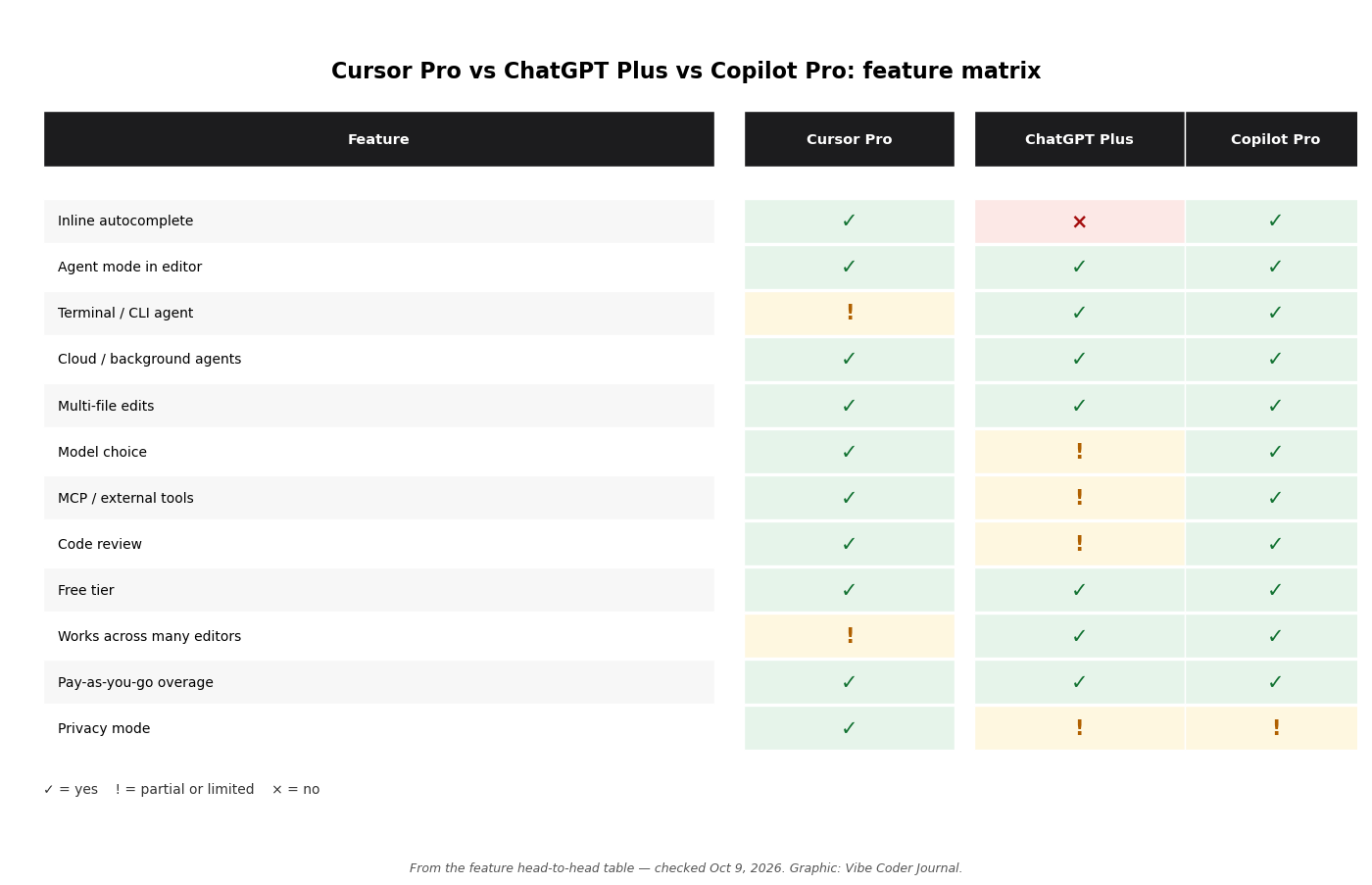
The head-to-head as a scannable grid. ✅ included, ⚠️ partial or limited, ❌ not offered. Checked October 9, 2026. Graphic: Vibe Coder Journal.
Which should you buy?
Match the tool to how you actually work — most people only need one $20 subscription, and the wrong one is the one you’ll fight against your own habits.
| User type | Recommendation | Why |
|---|---|---|
| Beginner vibe coder | ChatGPT Plus | ChatGPT explains things in plain language, Codex runs the terminal for you, and you keep one subscription for everything else |
| Professional developer in VS Code | Cursor Pro | The editor is where you live; unlimited Tab + agent with codebase context beats switching tools |
| Terminal-first developer | ChatGPT Plus (Codex) | Codex CLI is the best terminal agent in the roundup, and you never leave your shell |
| ChatGPT power user who codes occasionally | ChatGPT Plus | You already pay for it — Codex is included, so your coding tool is free |
| Student on a budget | GitHub Copilot Free / Pro | Free tier is generous; Pro is $10 and students can get it free via GitHub Education |
| Team lead | Cursor Teams ($40/user) or Copilot Business ($19/seat) | Cursor for shared context and Bugbot reviews; Copilot for GitHub-native workflow and clearer per-seat costs |
If you code daily and want the single strongest in-editor setup, that’s Cursor Pro. If you want the most value per dollar across your whole life, that’s ChatGPT Plus. If you’re picking purely on coding and you’re GitHub-native, Copilot Pro at $10 deserves a serious look — see our Claude Code alternatives roundup for the wider field.
Can you use both?
Yes — Cursor Pro for editing plus ChatGPT Plus for planning and Codex cloud tasks is a legitimate $40/month power setup, but try one first.
The combo that makes sense: do your daily editing in Cursor, where Tab completions and the agent live in your workflow. Use ChatGPT Plus alongside it for the things Cursor doesn’t do — planning a feature in chat, deep research on a library, generating images or docs, and firing off Codex cloud tasks that work while you keep coding. The two don’t conflict; Codex’s allowance is separate from chat, and Cursor’s usage is its own pool.
Don’t start with both, though. Pick the one that matches your habits, use it for a month, and add the second only when you can name the specific limit you’re hitting. For most people, one $20 subscription is plenty.
FAQ
Is Cursor Pro worth it? Yes, if you write code daily inside an editor. Unlimited Tab completions, extended agent limits across 10+ models, cloud agents, and MCP support for $20 a month is fair value. If you only code occasionally, the free Hobby tier covers most of it — and heavy daily agent users should know Cursor itself points them at the $60 Pro+ tier.
Does ChatGPT Plus include Codex? Yes. Plus includes Codex with expanded usage across the CLI, IDE extension, desktop app mode, and cloud tasks. Codex draws from its own metered allowance, separate from your chat message limits, with per-model estimates published per 5-hour window.
Can Cursor use GPT models? Yes. Cursor Pro offers GPT-5.6 Sol, Luna, and Terra alongside Claude, Gemini, and Cursor’s own Grok and Composer models. GPT models sit in the “Other Models” pool and consume your included usage at OpenAI’s API rates.
Is ChatGPT Plus enough for coding? For light to medium coding, yes. Codex handles terminal work, multi-file edits, and cloud tasks, and you get ChatGPT for planning and research in the same subscription. Heavy daily agent users may hit Codex’s unpublished weekly cap and need extra credits.
Which is cheaper, Cursor Pro or ChatGPT Plus? Neither — both are $20 a month. Plus has no annual plan at all (OpenAI’s FAQ lists annual billing only for Business and Enterprise); Cursor shows a yearly billing toggle, but the annual figure isn’t displayed as page text. The cost difference only appears at heavy usage: Cursor sells $60 and $200 tiers for agent power users, while Plus users buy extra Codex credits at checkout.
Is there a free version of each? Yes. Cursor’s Hobby tier is free with limited agent requests. ChatGPT Free includes limited Codex access. GitHub Copilot Free gives 2,000 completions a month plus limited chat and agent use.
Should I get both Cursor Pro and ChatGPT Plus? Only if $40 a month fits your budget and you code a lot. Cursor for daily editing plus Plus for planning, research, and Codex cloud tasks is a strong combo — but start with one and add the second when you hit a specific limit.
How we compared
We read the official pricing and docs pages for Cursor, ChatGPT/Codex, and GitHub Copilot on October 9, 2026, and used only numbers published there — where a vendor doesn’t publish a figure (context windows, Codex’s weekly cap, Cursor’s included-usage dollars), we say so instead of guessing. Benchmark scores are labeled by provenance (vendor-reported vs. third-party compilations of public leaderboards). We did not run hands-on timed tests for this article, so none are presented.
Sources
- Cursor pricing — cursor.com/pricing — checked October 9, 2026
- Cursor models and pricing docs — cursor.com/docs/models-and-pricing — checked October 9, 2026
- ChatGPT pricing — chatgpt.com/pricing — checked October 9, 2026
- Codex pricing and usage — chatgpt.com/codex/pricing/ — checked October 9, 2026
- Codex and ChatGPT plan usage limits — help.openai.com — checked October 9, 2026
- GPT-5.6 and GPT-6 Pro in ChatGPT — help.openai.com — checked October 9, 2026
- GitHub Copilot plans — github.com/features/copilot/plans — checked October 9, 2026
- GitHub Docs: usage-based billing for individuals — docs.github.com — checked October 9, 2026
- GitHub Docs: Copilot plans overview — docs.github.com — checked October 9, 2026
- SWE-bench Verified leaderboard (third-party aggregate of vendor-reported runs) — benchlm.ai — updated October 9, 2026
- Terminal-Bench 2.0 leaderboard via third-party compilations — benchlm.ai (updated October 8, 2026); summary doc (August 13, 2026)
- Stack Overflow developer survey retrospective — stackoverflow.blog — published October 1, 2026
Related reading
- Codex CLI vs Claude Code: which terminal agent should you use?
- How to install Codex CLI
- Codex CLI yolo mode, explained
- Apps like Codex: the best alternatives
- Claude Code vs GitHub Copilot
- Claude pricing plans, explained