

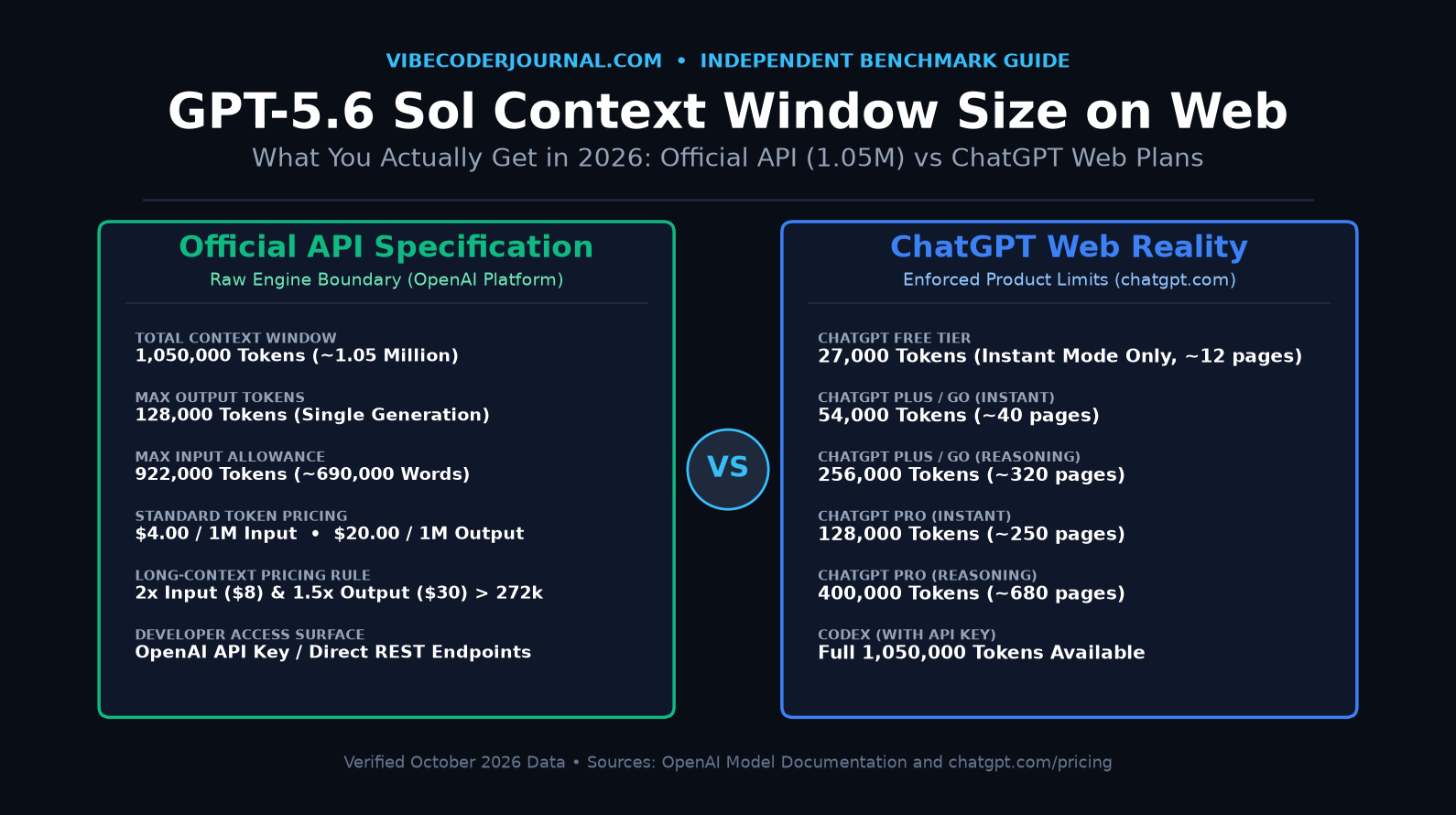
Official API Window: 1,050,000 tokens (~1.05M) with a 128,000-token output limit.
Actual Web Window (chatgpt.com): You do not get 1.05M tokens in your browser. You get 256K tokens on ChatGPT Plus (reasoning mode) or 400K on ChatGPT Pro. Fast instant mode gives only 27K on Free, 54K on Plus, and 128K on Pro.
Advice for Long Coding Sessions: Never let a web chat exceed 25 turns without taking a checkpoint. Summarize your code state, start a fresh chat, and re-upload only active files.
Understanding the real gpt-5.6 sol context window size on web is critical if you build software with ChatGPT in 2026. Marketing headlines proudly announce a 1-million-token context window. But when you paste a full repository into your browser, the model starts forgetting files after twenty turns.
Why does this happen? Because the API limit and the web limit are completely different numbers. The official engine spec is 1,050,000 tokens. But OpenAI enforces strict plan-based product ceilings on the web interface to balance latency, GPU costs, and system stability. This guide breaks down what you actually get, what fills up your memory, and how to keep long vibe coding sessions sharp and bug-free.
1. What is a Context Window, in Plain Words?
Before evaluating specific token counts, developers must understand what a context window actually is. In simple words, a context window is an AI model’s active working memory for one single conversation.
To avoid confusion, here is what a context window is not:
- It is NOT training data: Training data is the massive historical library the model studied during its initial training run. Context window memory is temporary data passed into the active prompt.
- It is NOT saved ChatGPT memory: ChatGPT’s “Memory” feature stores short text snippets across sessions (such as “user prefers Python over TypeScript”). It does not remember past file contents.
- It is NOT chat history on your sidebar: The list of past conversations saved in your ChatGPT account is an external database archive. The model cannot read older chats unless they are active in the current session.
Every time you press Enter in a chat session, your browser sends the entire conversation history back to the server: your original prompt, previous replies, uploaded code, and hidden reasoning traces. The context window is the hard ceiling on how much text can be re-read in that single pass.
2. GPT-5.6 Sol Context Window Size: The Official API Number
On OpenAI’s official developer platform, the flagship model carries the system identifier gpt-5.6-sol (with default routing alias gpt-5.6).
According to official OpenAI documentation verified in October 2026, the gpt-5.6 sol context window carries the following raw API specifications:
- Total Context Window: 1,050,000 tokens (~1.05 million tokens).
- Maximum Output Tokens: 128,000 tokens for a single generated response.
- Maximum Input Allowance: 922,000 tokens (1,050,000 total minus 128,000 reserved output buffer).
Translating 1,050,000 Tokens into Words and Pages
In English text and software code, one token averages roughly 0.75 words. Alternatively, 1,000 words requires approximately 1,333 tokens. Based on these verified ratios:
- 922,000 input tokens equals roughly 690,000 words.
- At a standard paperback density of 300 words per page, 690,000 words represents approximately 2,300 book pages.
- In software engineering terms, 922,000 tokens can hold roughly 25,000 to 35,000 lines of dense code, including imports, comments, and boilerplate.
The 272K Pricing Trap in the API
While the API permits you to send up to 922,000 input tokens, OpenAI enforces a steep cost escalation known as the 272K pricing trap:
- Prompts below 272,000 input tokens: Standard pricing is $4.00 per 1 million input tokens and $20.00 per 1 million output tokens ($0.40 for cached input).
- Prompts exceeding 272,000 input tokens: The moment a prompt crosses 272K tokens, OpenAI doubles the input rate to $8.00 per 1 million and increases the output rate by 50% to $30.00 per 1 million for the entire request.
A developer querying a 300,000-token codebase pays double the base rate on every single token in that run.
3. What You Actually Get on the Web: ChatGPT Web vs Codex vs API
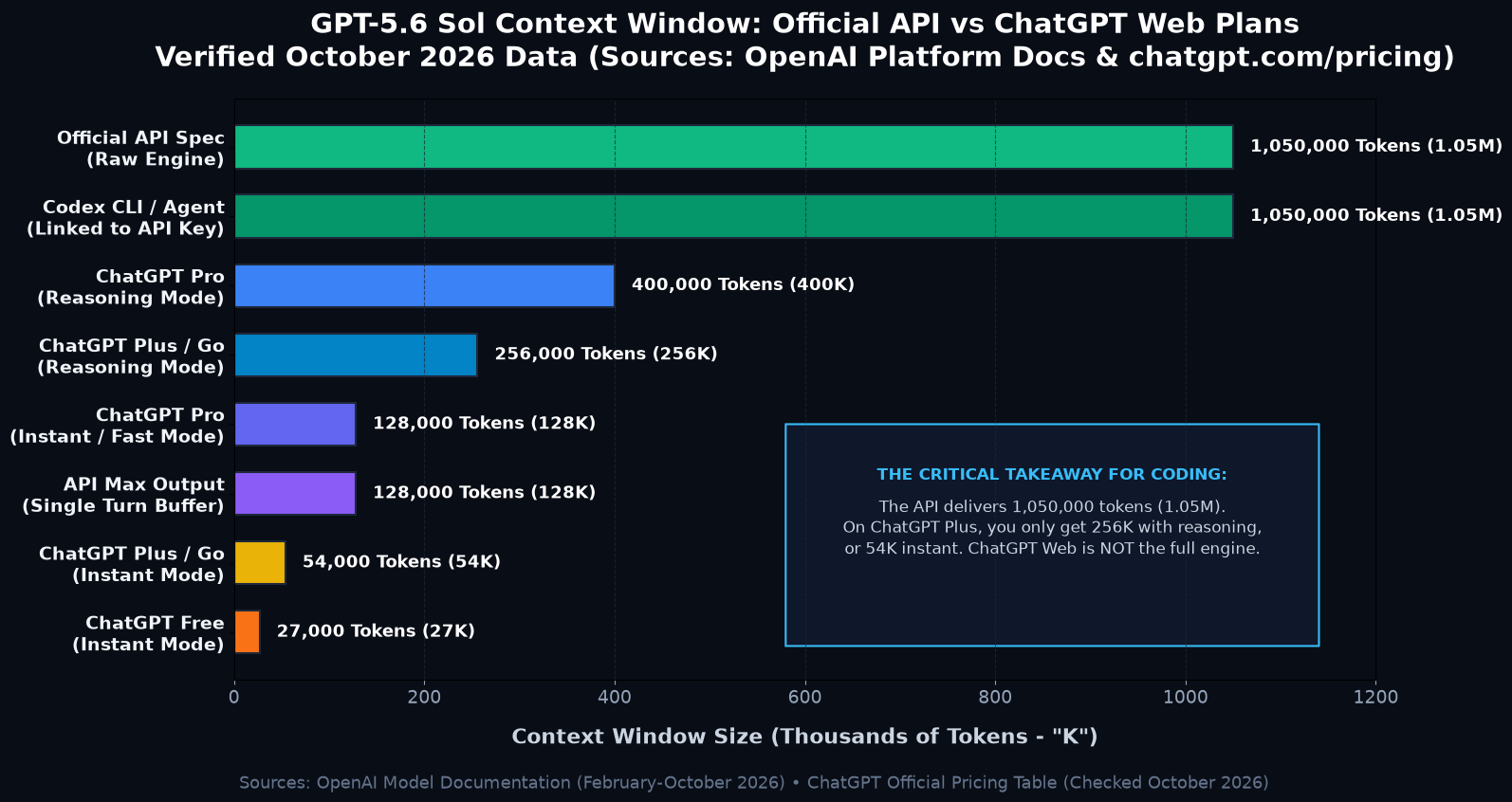
Here is the core truth that surprises most vibe coders: you almost never get 1,050,000 tokens on the ChatGPT website.
When you log into chatgpt.com, OpenAI caps your session inside product-level boundaries defined by your subscription plan and active execution mode.
| Platform / Plan | Execution Mode | Context Window Limit | Input Capacity (Estimate) |
|---|---|---|---|
| OpenAI API (Direct Key) | Developer Endpoints | 1,050,000 tokens | ~690,000 words (~2,300 pages) |
| Codex CLI / Extension | Linked to API Key | 1,050,000 tokens | Full repository ingestion |
| ChatGPT Pro ($200/mo) | Reasoning Mode | 400,000 tokens | ~680 pages of text/code |
| ChatGPT Plus ($20/mo) & Go | Reasoning Mode | 256,000 tokens | ~320 pages of text/code |
| ChatGPT Pro ($200/mo) | Instant / Fast Mode | 128,000 tokens | ~250 pages of text/code |
| ChatGPT Plus ($20/mo) & Go | Instant / Fast Mode | 54,000 tokens | ~40 pages of text/code |
| ChatGPT Free Tier | Instant Mode Only | 27,000 tokens | ~12 pages of text/code |
Key Realities Behind Web Plan Limits
- ChatGPT Plus does NOT get more context than ChatGPT Go: Both plans share identical context caps: 54K instant and 256K reasoning. The $20/month Plus subscription grants access to frontier model checkpoints and higher hourly rate limits, but it does not expand your working memory.
- ChatGPT Pro ($200/month) is the only web upgrade that expands context: Pro increases your reasoning context from 256K to 400K tokens (and instant mode from 54K to 128K). However, even on the $200 plan, you still receive less than 40% of the raw 1.05M API ceiling.
- Codex context depends on authentication method: If you use OpenAI’s agentic coding tool, Codex, with an enterprise or developer API key, you unlock the full 1,050,000-token window. If you log in using your standard ChatGPT Plus web account, Codex operates under the 256K plan constraint and triggers automated context compaction.
4. What Fills the Window? A Real Coding Breakdown
Why does a 256,000-token window feel like it fills up so quickly? Because developers assume that the context window is reserved exclusively for the code they paste into the prompt.
In reality, the context window is a single shared budget. Every element of the session consumes space:
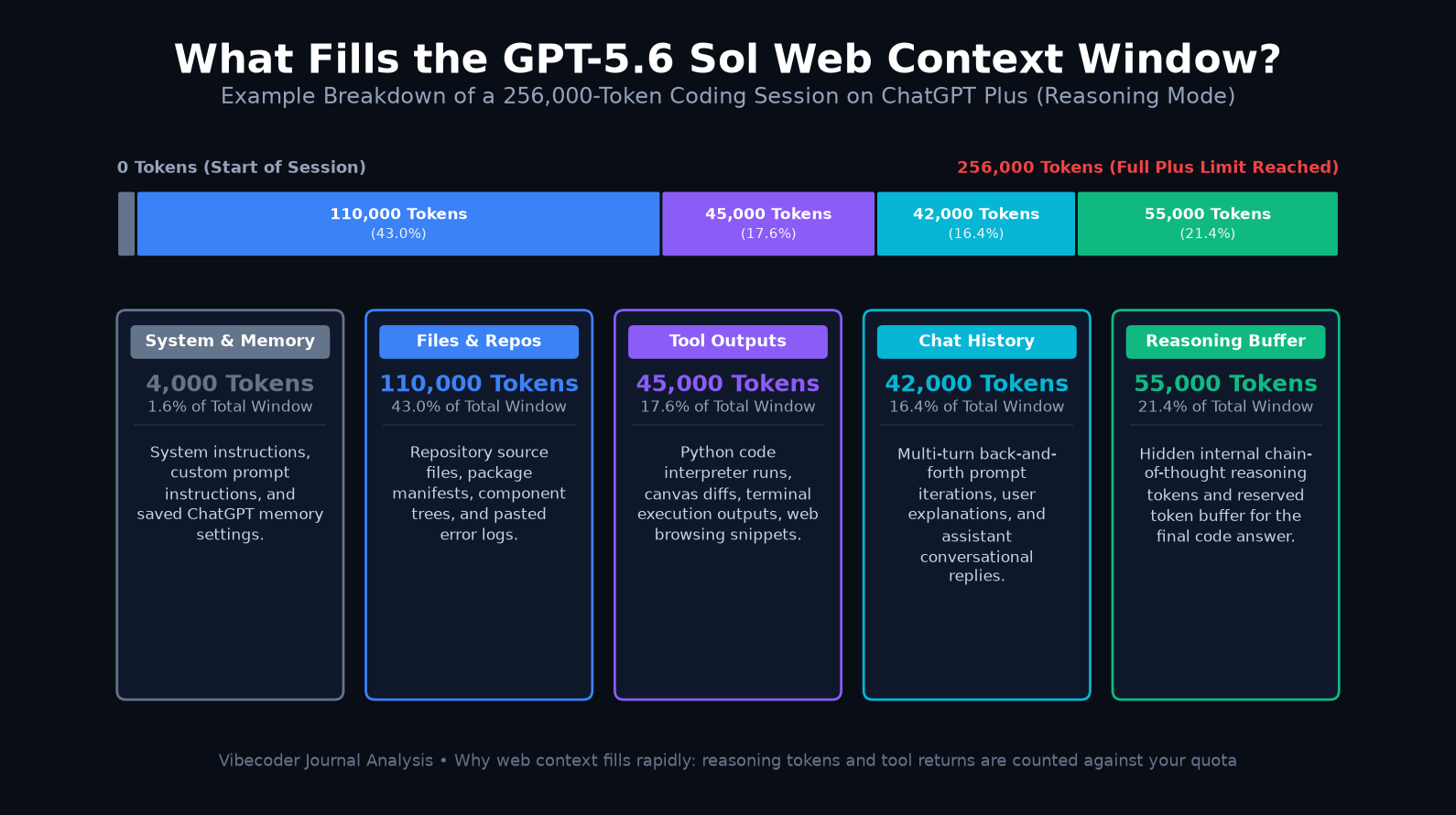
Example Developer Session Breakdown (256,000 Tokens on ChatGPT Plus)
- System Instructions & Custom Memory (4,000 Tokens / 1.6%): OpenAI’s base developer system prompt, safety guardrails, custom user instructions, and persistent memories stored in your profile.
- Uploaded Source Code & Files (110,000 Tokens / 43.0%): Three React components, a state management slice, database schema files, and a package manifest uploaded into the chat.
- Tool Outputs & Terminal Execution (45,000 Tokens / 17.6%): Intermediate stdout logs from the Python code interpreter, automated canvas code diffs, terminal test suite outputs, and web browsing snippets.
- Multi-Turn Conversation History (42,000 Tokens / 16.4%): Twelve conversational turns where you ask for modifications, paste error messages, and receive explanations.
- Reasoning Tokens & Output Reservation (55,000 Tokens / 21.4%): Hidden chain-of-thought tokens generated while Sol reasons through your problem, plus the reserved token buffer for the final code response.
Total Consumed: 256,000 Tokens (100% of the ChatGPT Plus Reasoning Window).
Notice that your actual codebase represents less than half of the total consumption. Intermediate tool outputs, conversational turns, and internal reasoning eat up over 55% of the available memory.
5. What Happens When the Window Fills Up?
When your session reaches its plan limit, ChatGPT does not simply halt and display a warning banner. Instead, it employs automated memory management strategies that degrade coding accuracy:
1. Silent Truncation (FIFO Drop-Off)
In standard instant mode, ChatGPT uses a First-In, First-Out (FIFO) sliding window. As new messages arrive, the oldest messages from the beginning of the chat are silently dropped from attention. If you established critical architectural rules in Message 1 (such as “never mutate state directly” or “use PostgreSQL syntax”), the model forgets them entirely because those tokens no longer exist in its active prompt.
2. Lossy Compaction and Summarization
In reasoning mode on ChatGPT Plus and Pro, OpenAI triggers background compaction. An internal routine compresses earlier turns into a brief summary paragraph. While this prevents hard crashes, code compression is inherently lossy. Subtle type definitions, variable names, and edge-case exceptions are frequently lost during compaction.
How to Spot Context Window Degradation in Practice
If you experience any of these four symptoms, your session context is saturated:
- Rule Amnesia: The assistant re-introduces libraries or syntax patterns you explicitly told it to avoid in earlier messages.
- Hallucinated Imports: Sol starts guessing internal module paths or inventing non-existent utility functions because it can no longer see the project directory map you pasted at the start.
- Repetitive Bug Loops: You report that a proposed fix failed with a specific error, and the model apologizes and generates the exact same broken code block it suggested two turns ago.
- Premature Truncation: Code blocks stop generating mid-file with an unexpected cutoff or an error reading: “This conversation is too long. Please start a new chat to continue.”
6. How to Check and Manage Context on the Web: Step-by-Step How-To
Managing your context window manually is the single most effective way to improve code quality when working with GPT-5.6 Sol on the web. Follow this four-step engineering workflow:
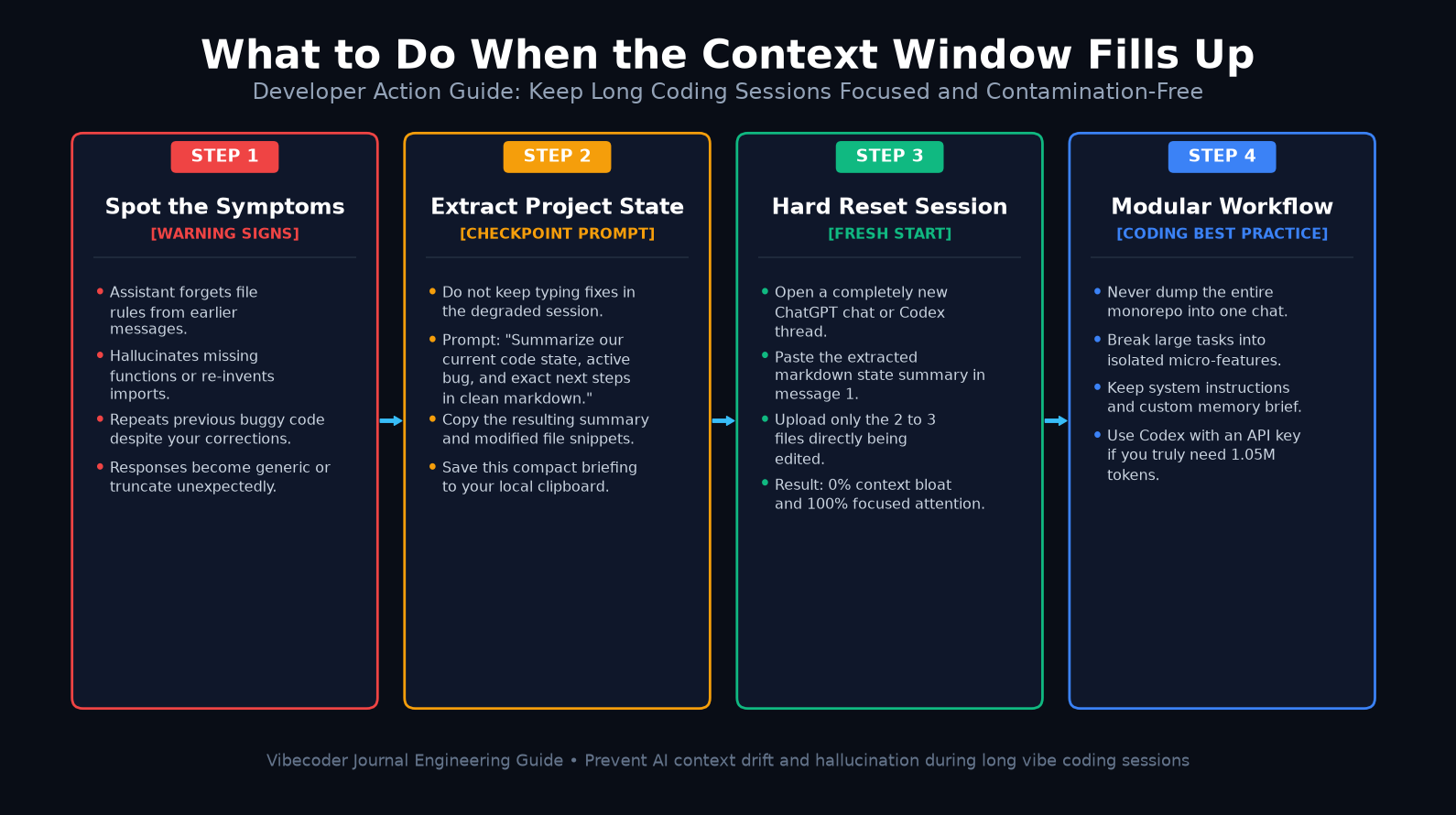
Treat 20 to 25 turns as your hard session boundary on ChatGPT Plus (or 35 turns on Pro). Do not wait for the assistant to hallucinate. When you reach this threshold, pause your active debugging.
Before leaving the chat, force the model to distill the active session into a clean briefing. Paste this exact prompt:
“We are concluding this session. Generate a concise markdown checkpoint summarizing: 1) Current architectural decisions made, 2) The exact file structure modified, 3) Unresolved bugs and stack traces, and 4) Precise next steps for implementation.”
Copy this markdown output and save it to your local clipboard or scratchpad.
Open a completely fresh chat session. Paste the markdown checkpoint into your initial prompt. Then, upload only the 2 or 3 source files immediately required for the next task. Your new session starts with 0% context bloat, zero hallucinated baggage, and 100% focused attention.
Never drag-and-drop an entire 40-file repository into ChatGPT on the web. Upload only the interface contracts, type declarations, and the active component being edited. If you genuinely need repository-wide search, use tools like Cursor Pro or connect Codex directly to an OpenAI API key.
7. Context Window vs Context Quality: Why Bigger Isn’t Always Better
Many vibe coders assume that having a 1-million-token context window automatically makes an AI smarter. Empirical benchmarks prove the opposite: context quantity does not equal context quality.
The “Lost in the Middle” Retrieval Trap
All large language models, including GPT-5.6 Sol, suffer from attention degradation across long token sequences. In academic needle-in-a-haystack tests, models demonstrate near-perfect recall for instructions placed at the very beginning (primacy effect) or the very end (recency effect) of a prompt. However, when critical code constraints are buried in the middle of a 200,000-token prompt, retrieval accuracy noticeably declines.
When you feed an AI 300 pages of code, its attention heads must distribute probability weights across millions of semantic relationships. Noise accumulates. The model is far more likely to hallucinate a method signature when searching through 200,000 tokens than when inspecting a focused 15,000-token prompt.
The Golden Rule for Coding: A clean, focused session with 25,000 tokens of targeted code consistently generates cleaner, faster, bug-free output than a bloated 250,000-token session loaded with irrelevant files.
8. GPT-5.6 Sol vs Terra vs Luna on Context Window
How does Sol compare to the other models in the GPT-5.6 family? As detailed in our comprehensive analysis of GPT-5.6 Sol vs Terra vs Luna: Context Window, Price and Benchmarks, all three models share the exact same structural context boundaries:
- API Context Parity: Sol, Terra, and Luna all feature an identical 1,050,000-token API context window and 128,000-token max output limit.
- The 272K Threshold Applies to All: Every model in the GPT-5.6 family triggers long-context price escalation once input tokens exceed 272,000.
Where the Models Differ in Practice
While the raw token limits are identical, their behavior across long contexts varies significantly:
- Retrieval Fidelity: Sol features the highest parameter density and reasoning depth. In dense codebases exceeding 150K tokens, Sol maintains cross-file coherence and respects subtle architectural rules. Terra (the balanced tier at $2/$12 per 1M) is faster and cheaper, but occasionally drops complex interface types. Luna (the budget tier at $0.20/$1.20) is intended for classification and summarization, not repository-level code navigation.
- Web Availability: On
chatgpt.com, Sol powers flagship reasoning responses, while Terra often handles lightweight routing and instant queries.
9. Who Needs the Full Window, and Who Does Not?
Depending on your daily engineering role, your context needs vary:
- Solo Vibe Coders & Frontend Developers: You do NOT need the 1.05M window. The 256K reasoning window on ChatGPT Plus is more than sufficient to build full-stack web applications, provided you restart chats every 20–25 turns.
- Monorepo Refactoring & Enterprise Audits: You DO need the 1.05M window. If you are conducting automated security audits or migrating a legacy enterprise backend across hundreds of files, web chat will fail. You must use the OpenAI API directly or an agent harness like OpenHands or Codex linked to an API key.
- Technical Writers & Documentation Teams: ChatGPT Pro (400K) or API. Ingesting entire API reference manuals and architectural RFCs simultaneously requires the larger 400K window available on Pro.
- Everyday Scripting & Quick Fixes: ChatGPT Free or Plus Instant (27K–54K). For writing standalone utility scripts, regex patterns, or single-file bug fixes, even the smallest instant context window handles the workload effortlessly.
10. Final Verdict Table
Here is the complete summary of how the gpt-5.6 sol context window size on web compares across every major surface in 2026:
| Execution Surface | Context Window | Max Output | Price / Subscription | Best Coding Use Case |
|---|---|---|---|---|
| OpenAI API (Sol) | 1,050,000 tokens | 128,000 tokens | $4.00 / $20.00 per 1M (Doubles >272k) | Large monorepo audits, automated CI/CD agents, full codebase migration. |
| Codex (with API Key) | 1,050,000 tokens | 128,000 tokens | Pay-as-you-go API consumption | Agentic terminal coding, deep multi-file refactoring, sandbox execution. |
| ChatGPT Pro (Web) | 400,000 tokens | Plan dependent | $200 / month flat subscription | Heavy day-to-day coding, large architecture documents, multi-file vibe coding. |
| ChatGPT Plus (Web) | 256,000 tokens (Reasoning) | Plan dependent | $20 / month flat subscription | Standard developer prototyping, component building, targeted debugging. |
| ChatGPT Plus (Instant) | 54,000 tokens | Plan dependent | $20 / month flat subscription | Fast code explanations, syntax lookups, quick single-file script editing. |
| ChatGPT Free (Web) | 27,000 tokens | Plan dependent | Free tier | Beginner learning, small code snippets, basic algorithm questions. |
11. Frequently Asked Questions
On the web, GPT-5.6 Sol does not get its full 1,050,000-token API window. ChatGPT limits you based on your plan: 27K on Free, 54K on Plus instant, 256K on Plus reasoning, and 400K on Pro reasoning. Web context is always smaller than the raw API specification.
No, they are completely different. The API offers a raw ceiling of 1,050,000 tokens for direct programmatic calls. The ChatGPT web interface caps sessions between 27,000 and 400,000 tokens to protect server capacity, prevent runaway costs, and manage latency across millions of active browser sessions.
In standard English text, 1 million tokens equals approximately 750,000 words. That translates to around 2,500 book pages or 1,500 pages of dense code. In GPT-5.6 Sol, the 922,000 maximum input token allowance holds roughly 690,000 words of source code and prompt instructions.
When a web chat exceeds its context limit, ChatGPT silently drops older messages or applies lossy background compaction. The assistant begins forgetting architectural rules set in message one, hallucinates missing imports, repeats failed code patches, or displays an error requesting you to start a fresh chat.
Never let a web coding chat run beyond 25 turns. When you finish a feature, ask the model to summarize project decisions and file structures into markdown. Copy that summary, open a fresh chat, paste the briefing, and upload only the next files being modified.
Both Sol and Terra share the exact same 1,050,000-token context capacity in the API. However, Sol provides noticeably higher retrieval accuracy on complex code logic. It avoids hallucinating subtle cross-file imports that the smaller, cheaper Terra model occasionally misses during dense multi-package repository scans.
Leave a Reply