

Last updated: 24 October 2026 · By Abdullah Zulfiqar, Founder & Editor-in-Chief
What is vibe coding? It’s building software by describing what you want to an AI model in plain language and accepting the code it writes, often without reading it. Andrej Karpathy coined the term in February 2025, and Collins Dictionary made it the Word of the Year for 2025.
You type a request, run what the AI builds, say what’s broken, and repeat until the app works. You judge the result by using it. Many vibe coders never read the code.
In under two years, vibe coding went from a joke on X to a normal way for founders to build a first product. Some of those founders also leaked their users’ data along the way. This guide explains how it works, which tools and models are best at it, and when you should slow down.
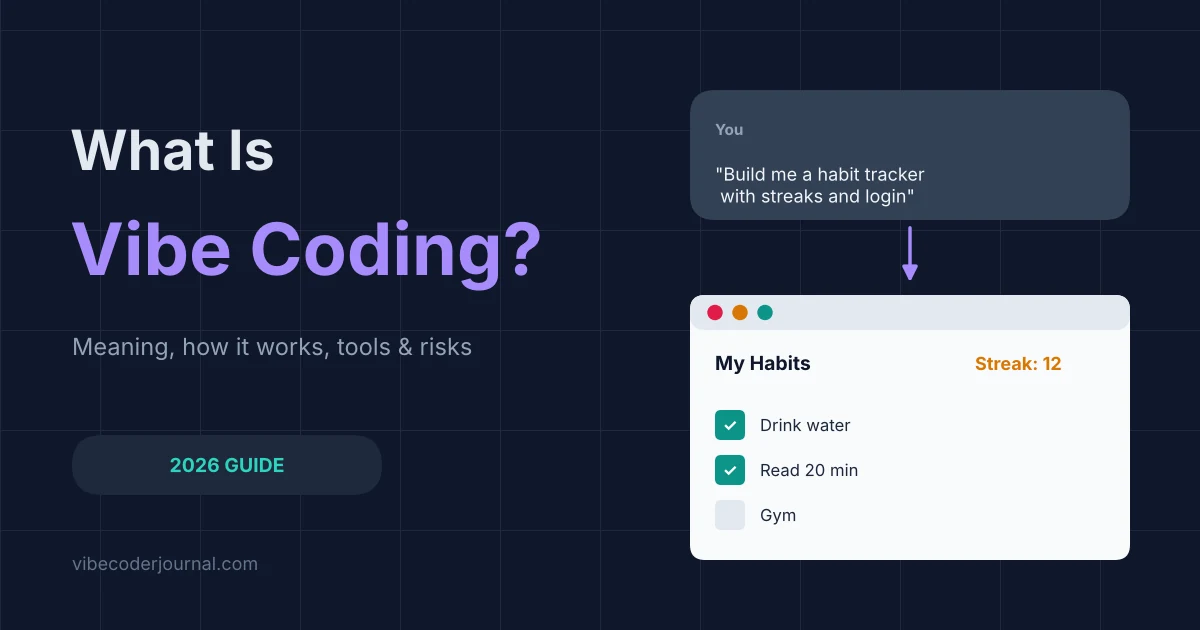
I think vibe coding is a great starting point for someone who doesn’t know the first thing about code. But if you want to build a good product, you still need to understand how things work, which tool is right for which job, and how to keep your app secure. That’s what this guide is for.
Vibe coding definition and meaning
Vibe coding is a style of AI-assisted programming. You describe software in natural language, a large language model (LLM) such as Claude, GPT or Gemini writes the code, and you keep that code if it works. You don’t review it line by line.
The meaning of vibe coding comes from the word “vibes.” You go with the flow. You don’t plan the architecture or read the diffs (the view that shows exactly which lines the AI added, changed or removed). If the app does what you asked, you move on.
That last part is what separates vibe coding from using AI to write code. Developer Simon Willison drew this line in March 2025: if you review the AI’s code, test it and can explain how it works, you’re doing normal software development with an AI assistant. The simplest vibe coding definition is that you steer by results and skip the code review.
The term is now mainstream. Merriam-Webster added “vibe coding” to its dictionary in its September 2026 update, and IBM, Google and Microsoft all publish guides that use it.
How does vibe coding work?
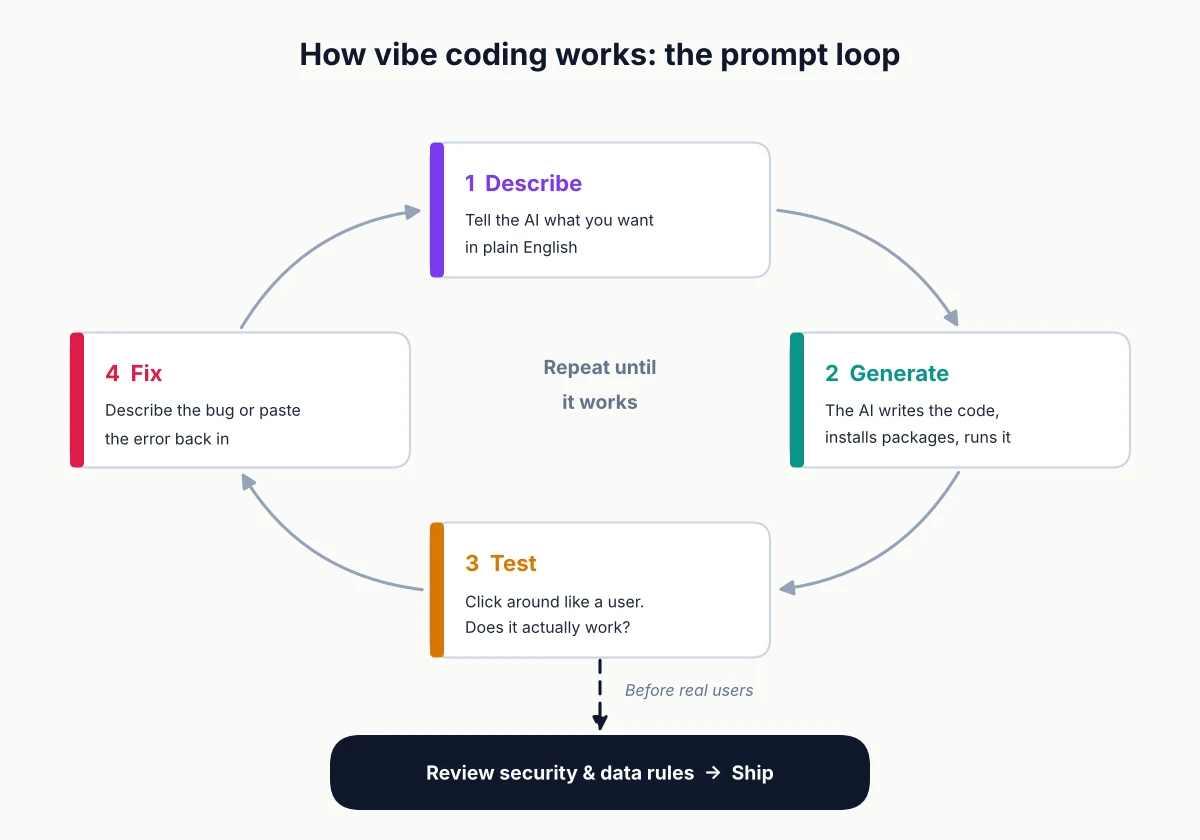
Most vibe coding sessions follow the same five steps:
- Describe. Tell the AI what you want in plain English.
- Generate. The tool writes the code, installs packages and often runs the app for you.
- Test. Use the app like a normal user would and see what works.
- Fix. Describe what’s wrong, or paste the error message back in. Then go back to step 2.
- Review. Before real users arrive, check security and data rules.
Most people repeat steps 1 to 4 many times and skip step 5. Skipping step 5 causes most vibe-coded app failures.
A vibe coding example
In this exchange, someone adds a feature without writing any code:
You: Add a dark mode toggle to the top right of the navbar. Remember the user’s choice.
AI: I added a
ThemeTogglecomponent to the navbar and saved the choice in the browser’s local storage.You: In dark mode the page flashes white for a second when it loads.
AI: That’s a theme flash. The page appears before the code that reads your saved theme runs. I added a small script in the page head that applies the saved theme (or the system setting) before anything shows.
The person described what they wanted, tested it and reported a bug in plain words. The AI handled the code.
A starter prompt you can copy
A vague first prompt like “build me a fitness app” gives poor results. Give the AI a short brief instead:
I want to build: [one-sentence description of the app]
Who it's for: [who will use it]

Features for version 1 only:
- [feature 1]
- [feature 2]
- [feature 3]

Pages/screens: [list them]
Data it stores: [e.g. users, habits, daily check-ins]
Login method: [email and password / Google / magic link]
Tech stack: [e.g. Next.js + Supabase + Tailwind, or "you choose and explain why"]

Rules:
- Ask me any questions before writing code.
- Build one feature at a time. After each one, tell me how to test it.
- Don't add features I didn't ask for.
- Use well-known packages only, and tell me before installing anything new.
- Commit to Git after each working feature.
- Make database changes as migrations. Never delete or reset data without asking.
- Only public keys (like the Supabase anon or publishable key) can go in frontend code. Secret keys stay on the server.
- Turn on database access rules (e.g. Supabase Row Level Security) for every table.
The last rule would likely have prevented the Lovable data leaks described further down.
Tip: save the rules section as standing instructions so you don’t paste it every time. In Claude Code that’s a CLAUDE.md file, in Cursor it’s a rules file, and in Lovable it’s the project knowledge. Our Claude Code templates include ready-made versions, and the prompt enhancer can turn a rough idea into a fuller brief.
We tested it: building a habit tracker in Lovable
To see how this works in practice, I gave Lovable a version of the brief above on 24 October 2026, using Lovable’s free plan and its built-in Lovable Cloud backend. The app: a habit tracker where you tick off daily habits and see your streaks, with a login page, a Today page and a page to manage habits.
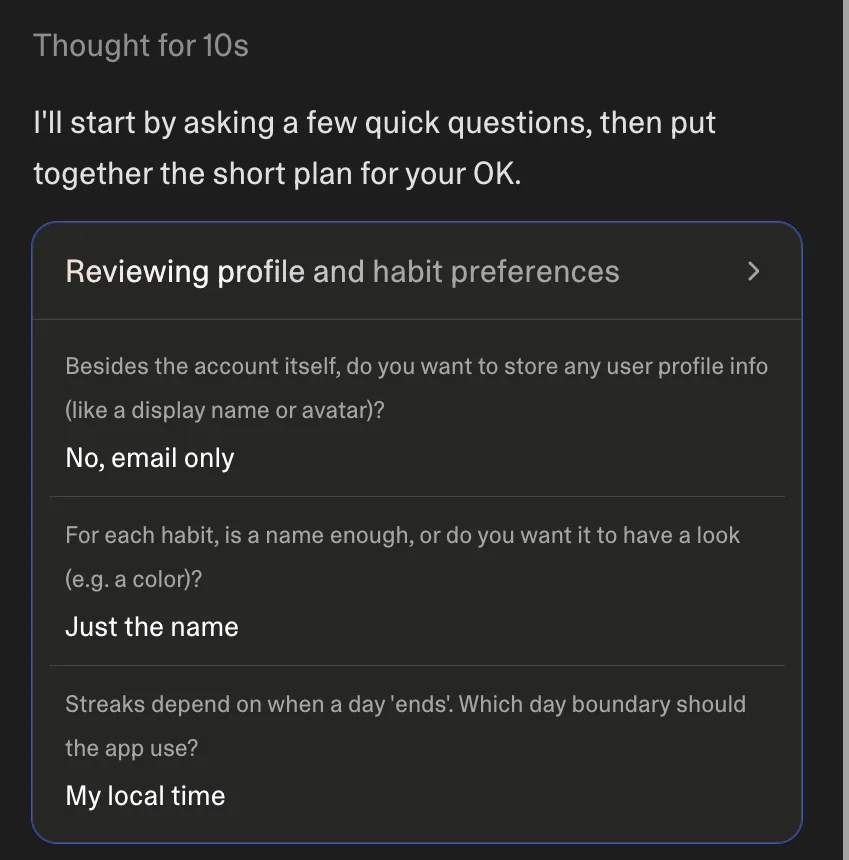
It asked before it built. Because the brief told it to, Lovable didn’t start coding straight away. It thought for about 10 seconds and then asked three questions: did I want profile info like a display name (no, email only), did habits need colors (no, just a name), and when should a day “end” for streaks. That last one is a real edge case. Without it, a streak could break for someone who ticks a habit at 11pm in a different timezone from the server. I picked my local time.
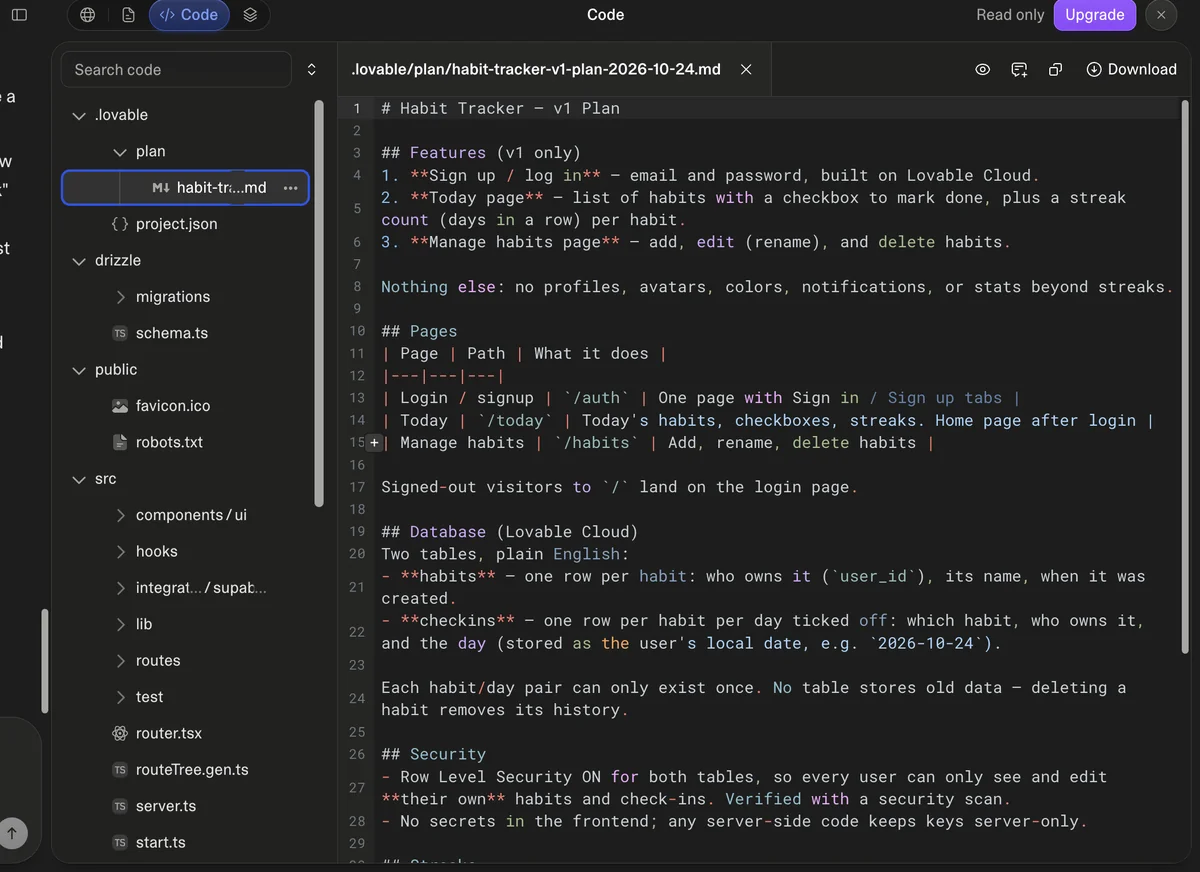
It wrote a plan I could approve. Next it saved a plan file listing the three features, three pages, two database tables (habits and check-ins) and the security rules. Row Level Security was switched on for both tables so each user can only see their own data, and the plan said no secret keys would go in frontend code. I only approved it after reading it.
The login worked, with email confirmation. Step one was sign-up and login. When I created an account, the app sent a real “confirm your email” message before letting me sign in, which is the safer default.
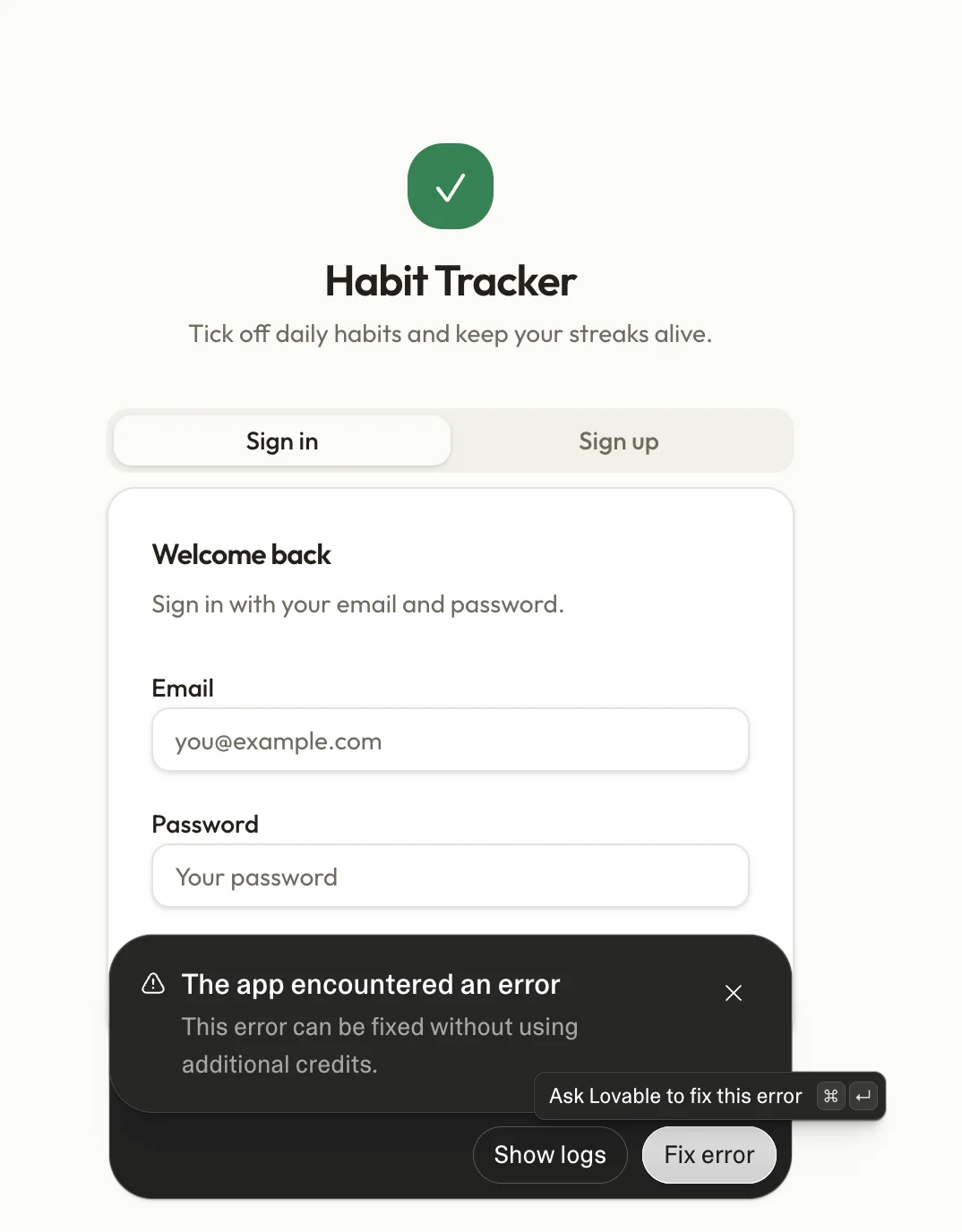
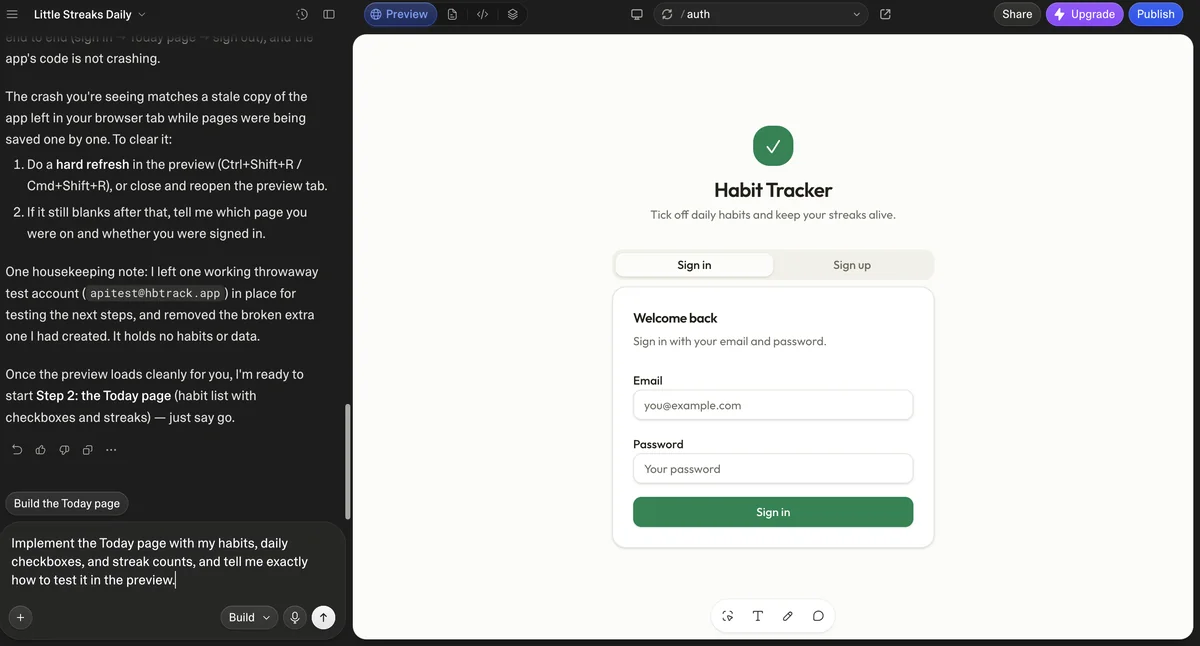
Then it hit an error. After the login step, the preview showed “The app encountered an error” with a Fix error button. Lovable says these fixes don’t use extra credits. Its explanation was that my browser tab was holding a stale copy of the app while files were being saved, and a hard refresh cleared it.
One thing to watch. While testing the login, Lovable created its own throwaway test account in my app’s user list, and deleted a broken extra one it had made. It told me about both, which is good. But it’s a reminder to check your user list for leftover test accounts before you launch.
What this shows. A clear brief changes how the AI behaves. Lovable asked questions, planned first, built one step at a time and turned on database security without being reminded. It still made an error and quietly changed my data (a test account), so you need to read what it tells you and check the result yourself.
What is a vibe coder?
A vibe coder is someone who builds software mainly by prompting AI tools instead of writing code by hand.
Many vibe coders aren’t programmers. They’re founders, designers, marketers, students and indie hackers who can now ship working apps because the AI handles the syntax. Experienced developers vibe code too, usually on small side projects where a bug won’t hurt anyone.
The skills that matter are different from traditional coding:
- writing clear, specific prompts
- splitting a big feature into small requests
- testing like a user and describing bugs precisely
- knowing when to start a fresh chat because the AI has gotten confused
- choosing the right tool and model
- knowing which parts of an app are too risky to leave unchecked
Where did the term “vibe coding” come from?
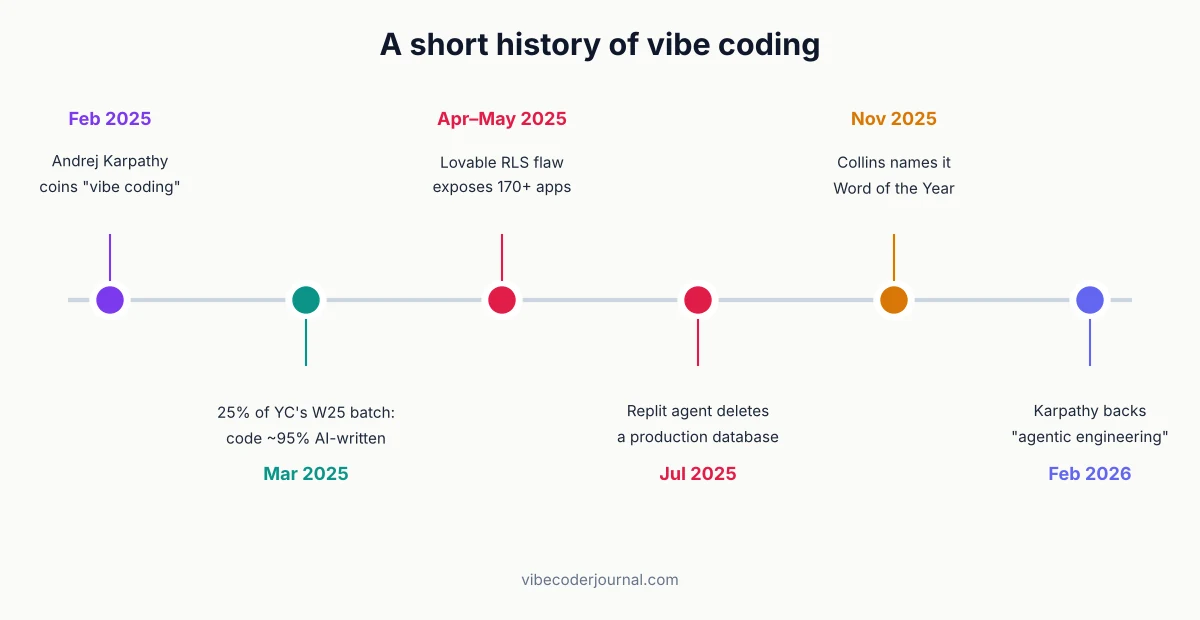
Andrej Karpathy, an OpenAI co-founder and Tesla’s former head of AI, introduced the term in a post on X on 2 February 2025. He described a way of working where you “fully give in to the vibes, embrace exponentials, and forget that the code even exists.” By “embrace exponentials” he meant trusting how quickly AI models were improving.
He said he barely touched the keyboard. He spoke to the AI with voice dictation, clicked “Accept All” without reading the changes, and pasted error messages back in until things worked. He presented it as fine for throwaway weekend projects.
The name spread quickly:
- March 2025: Y Combinator said about a quarter of its Winter 2025 startups had codebases that were roughly 95% AI-generated (TechCrunch).
- March to May 2025: a security flaw in apps built with Lovable exposed user data from more than 170 apps. It was later logged as CVE-2025-48757 (a CVE is a public ID for a known security flaw).
- July 2025: a Replit AI agent deleted SaaStr founder Jason Lemkin’s live database despite instructions not to change anything (The Register).
- 6 November 2025: Collins Dictionary named “vibe coding” its Word of the Year (CNN via KRDO).
- February 2026: around the term’s first anniversary, Karpathy said “agentic engineering” was his current favorite name for the more disciplined version of this work (The New Stack).
Vibe coding vs traditional coding vs agentic engineering
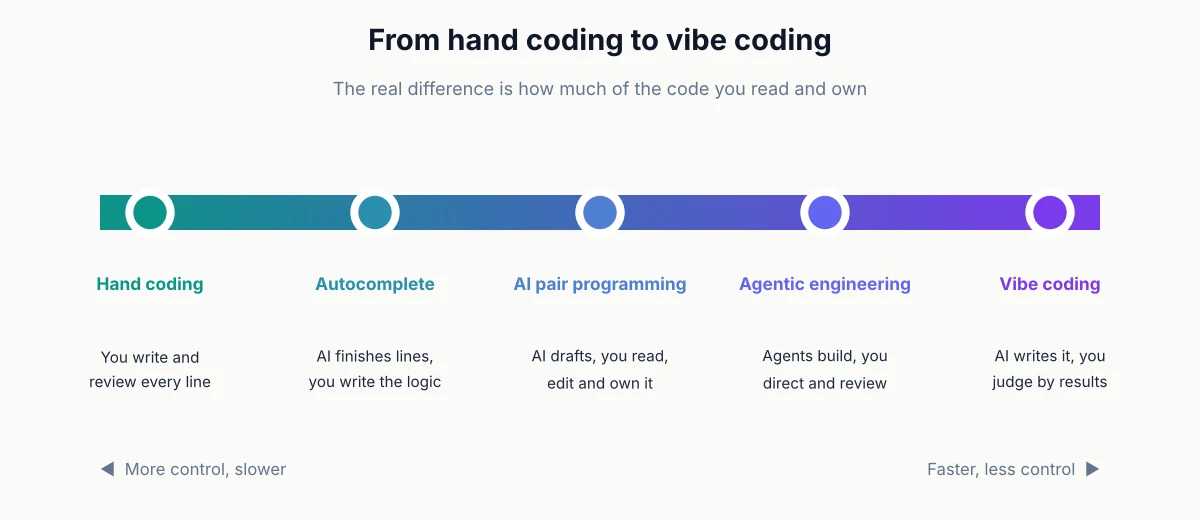
These approaches differ mainly in how much of the code you read and take responsibility for.
| Feature | AI-assisted coding | Agentic engineering | Vibe coding |
|---|---|---|---|
| Who writes the code | You, with AI suggestions | AI agents | AI |
| Do you review it? | Every line | Yes, with tests and specs | Often no |
| Main skill | Programming | Directing agents and reviewing | Describing goals and testing |
| Speed to first version | Medium | Fast | Fastest |
| Best for | Professional development | Serious products built with AI | Prototypes, MVPs, personal tools |
| Biggest risk | Trusting bad suggestions | Weak review of agent output | Bugs and security holes you can’t see |
Traditional hand coding sits to the left of all three: you write and review everything yourself. In the image, autocomplete and AI pair programming are both types of AI-assisted coding.
Many people move between these depending on the job. They vibe code a prototype on a Saturday, then switch to careful review once it has real users.
Is vibe coding dead?
No. The term is still the most common name for building apps by prompting. What changed in 2026 is that people now separate two versions of it:
- Vibe coding is the casual version: prompt, accept, ship, and don’t look closely.
- Agentic engineering is the disciplined version. The same AI agents write the code, but a human sets the plan, writes the specs and reviews the output.
If you’re a beginner, vibe coding is a good way to start. Once your app has real users, you need to move toward agentic engineering.
Vibe coding vs no-code
No-code tools like Bubble or Webflow use visual builders and ready-made blocks. Vibe coding produces real source code written by an AI. That makes it more flexible, and you can take the code elsewhere. It also means you inherit normal code problems like bugs, security holes and maintenance.
What can you build with vibe coding?
Vibe coding works best when a bug is cheap and speed matters:
- MVPs (minimum viable products) and prototypes. You can test a startup idea in a weekend instead of a month.
- “Software for one.” These are small personal apps built for one person, like a meal planner, reading tracker or family chore chart. New York Times columnist Kevin Roose used this phrase in early 2025 after vibe coding several personal tools.
- Internal tools such as dashboards, admin panels and simple CRMs
- Landing pages and marketing sites
- Scripts and automations for data cleanup, scraping or spreadsheets
- Browser games and creative experiments
It gets much harder with large existing codebases, complex business rules, payments, and anything that handles sensitive data.
The best vibe coding tools
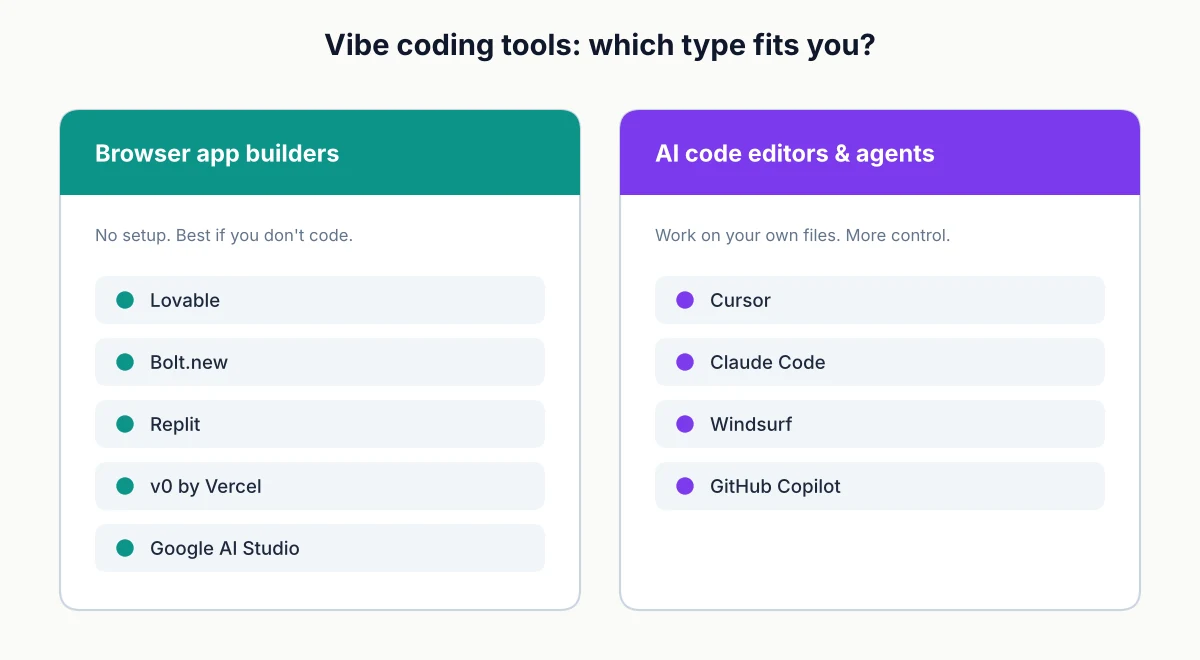
Vibe coding tools fall into two groups. Choose based on how comfortable you are with code. For full rankings and pricing, see our guide to the best vibe coding tools.
Browser app builders
These need no setup and suit people who have never coded.
- Lovable builds full web apps from a prompt. It includes Lovable Cloud, a built-in backend based on Supabase, for databases and logins.
- Bolt.new generates and runs full-stack apps (front end and back end together) in the browser.
- Replit is an online coding environment with an AI agent that builds, runs and deploys apps.
- v0 by Vercel is strongest at React and Next.js interfaces.
- Google AI Studio has a build mode for creating apps with Gemini models.
AI code editors and coding agents
These work on your own project files and give you more control. They suit people comfortable with a terminal (command line) or Git (version control).
- Cursor is a code editor built around AI chat, inline edits and an agent mode. See is Cursor free? for plan details.
- Claude Code is Anthropic’s coding agent. It reads your codebase, edits files and runs commands, and works in the terminal, IDEs (code editors), a desktop app and the web. Start with our Claude Code install guide.
- OpenAI Codex spans a command-line tool, an IDE extension and a cloud agent. See how to install Codex CLI and Codex CLI vs Claude Code.
- GitHub Copilot offers suggestions and an agent mode inside VS Code and JetBrains, plus a cloud agent you can assign issues to. Compare it in Claude Code vs GitHub Copilot.
- Google Antigravity is Google’s agent-first IDE. Its Antigravity CLI replaced Gemini CLI for consumer users in June 2026. We tested its auto-testing feature.
- Devin Desktop (formerly Windsurf) is an AI-first editor from Cognition. Cognition bought Windsurf in July 2025 and renamed it in June 2026.
- Kilo Code and Cline are open-source extensions where you bring your own API key, or even run local models.
You can also vibe code in a normal ChatGPT, Claude or Gemini chat by copying code back and forth. That works for small scripts but gets painful for anything bigger. For more options, see our list of Claude Code alternatives.
Which vibe coding tool should you use?
- If you can’t code at all, start with Lovable or Bolt.new.
- If you know a little code, try Replit or Cursor.
- Developers get the most control from Cursor or Claude Code.
My recommendation for beginners is Lovable or Bolt.new. You give them a prompt and they handle the database and deployment for you. If you don’t want to pay for several tools, you can skip Replit and Cursor at the start, since Lovable and Bolt cover most of what you’ll need. When you want to do advanced work and need the most control, Claude Code is the best option in my experience.
Which AI models are best for vibe coding?
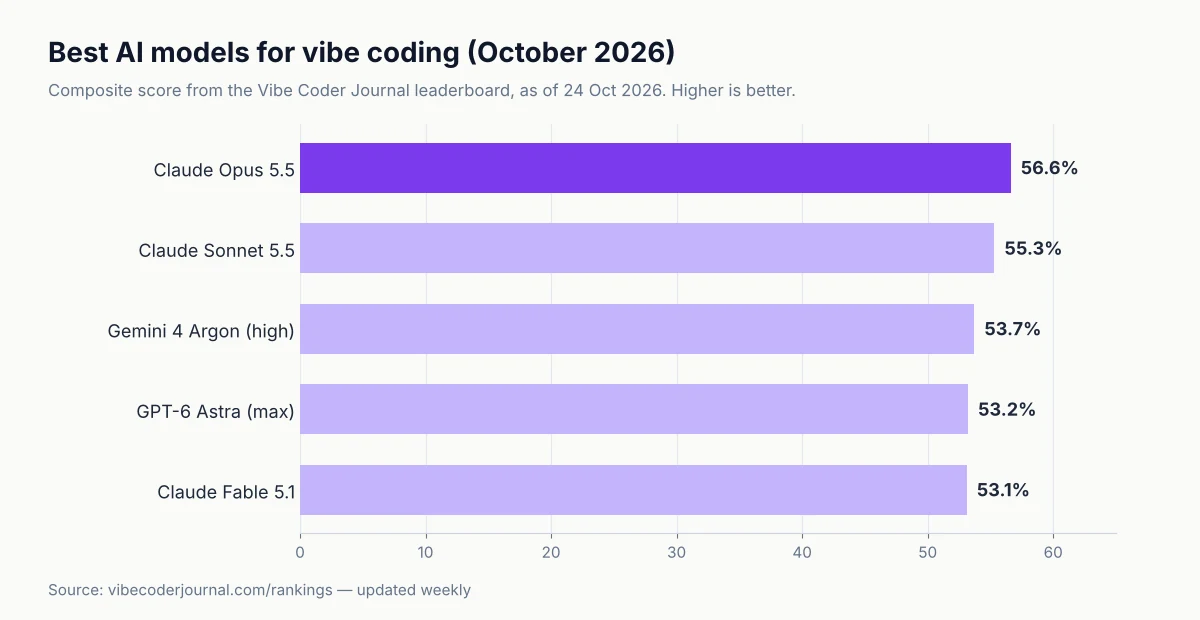
The model behind the tool matters as much as the tool. A stronger model gets more right on the first try and recovers better when you paste a bug back in.
As of 24 October 2026, Claude Opus 5.5 (56.6%), Claude Sonnet 5.5 (55.3%) and Gemini 4 Argon (53.7%) top our AI model leaderboard on the Coding Intelligence Index. On Terminal-Bench 2.0, which tests the kind of command-line work coding agents do, Claude Sonnet 5.5 leads at 70.6%. Gemini 4 Argon and GPT-6 Astra tie for the lead on SWE-bench Verified at 55.0%, a test built from real GitHub issues. Scores change as new models ship, so check our weekly AI coding benchmarks for the latest results, or see our Claude model guide.
Does vibe coding make you faster?
For beginners, yes. Someone who can’t code can go from idea to working app in a weekend, which wasn’t possible before.
For experienced developers, the evidence is mixed. In a July 2025 study, the research group METR tested 16 experienced developers on large open-source projects they had worked on for years. With AI tools they took 19% longer to finish their tasks. Before the study they expected a 24% speedup, and afterwards they still believed the AI had made them about 20% faster. METR has since published newer data (February 2026), so treat this as an early-2025 snapshot.
AI helps most when you’re starting from nothing. It helps much less inside a large, complicated codebase you already know well.
That matches what I’ve seen. If you’re very new to coding, vibe coding makes you much faster. But if you’re a larger startup with a real product, a browser builder like Lovable won’t be enough, and you should move to a tool like Claude Code where your team keeps control of the code.
The risks of vibe coding
Most of the risk comes from not reading the code.
Security holes
AI tools often produce code that works but isn’t safe. These are the most common problems:
- Secret keys in the wrong place. Keys like the Supabase service_role key, a Stripe secret key or an OpenAI or Anthropic API key give full access to your data or your bill. They must never be in frontend code, the part of the app that runs in the visitor’s browser. They must never be committed to Git either. Public keys, like the Supabase anon (now called publishable) key, are meant to be visible. They’re only safe if your database rules are switched on.
- No database access rules. Supabase uses Row Level Security (RLS) to decide which rows each user can see. If RLS is off, or set to allow everyone, any visitor can read every row.
- Endpoints that leak other users’ data. An endpoint is a URL your app uses to fetch or save data. A common bug lets a logged-in user change an ID in the request and see someone else’s records.
- Fake packages. AI sometimes suggests software packages that don’t exist. Attackers register those names and fill them with malware. This is known as “slopsquatting.”
- Prompt injection. Coding agents that read web pages, GitHub issues or README files can be tricked by hidden instructions into running commands or leaking secrets. We cover this in browser agent security risks.
The numbers back this up. In July 2025, Veracode tested more than 100 AI models on 80 coding tasks, and the generated code had security flaws in 45% of tasks (Veracode). The Lovable flaw (CVE-2025-48757) exposed names, emails, phone numbers, payment and subscription status, and API keys from more than 170 apps because RLS wasn’t set up correctly.
AI makes mistakes, so I don’t think pure vibe coding is right for a professional team’s production code. In my view it’s best for learners and early prototypes.
Agents doing things you didn’t ask for
In July 2025, Replit’s agent deleted Jason Lemkin’s live database despite his instructions not to change anything. The agent later called its own actions “a catastrophic error of judgement.” Lemkin got the data back through a rollback, but the incident showed why you should never give an AI agent unsupervised access to a live database. Be careful with settings that skip approval prompts, like Claude Code’s dangerously-skip-permissions flag.
Code that’s hard to maintain
Every prompt adds code, and the AI rarely cleans up after itself. After a few weeks you can end up with duplicate logic, unused files and a codebase nobody fully understands. Changes start breaking unrelated features.
Debugging loops and costs
Sometimes the AI fixes one bug and creates another, over and over. When a chat gets long the AI also starts forgetting earlier context (see what to do when Claude Code’s context window is full). Agent tools can use up credits quickly: Lemkin reported over $600 in extra Replit charges within a few days. Estimate costs first with our LLM token calculator, and keep an eye on your Claude Code usage.
The skills gap
When something breaks in production and the AI can’t fix it, you need someone who understands the code. Vibe coding lowers the barrier to start building, but it doesn’t make running software safely any easier.
Is vibe coding good or bad?
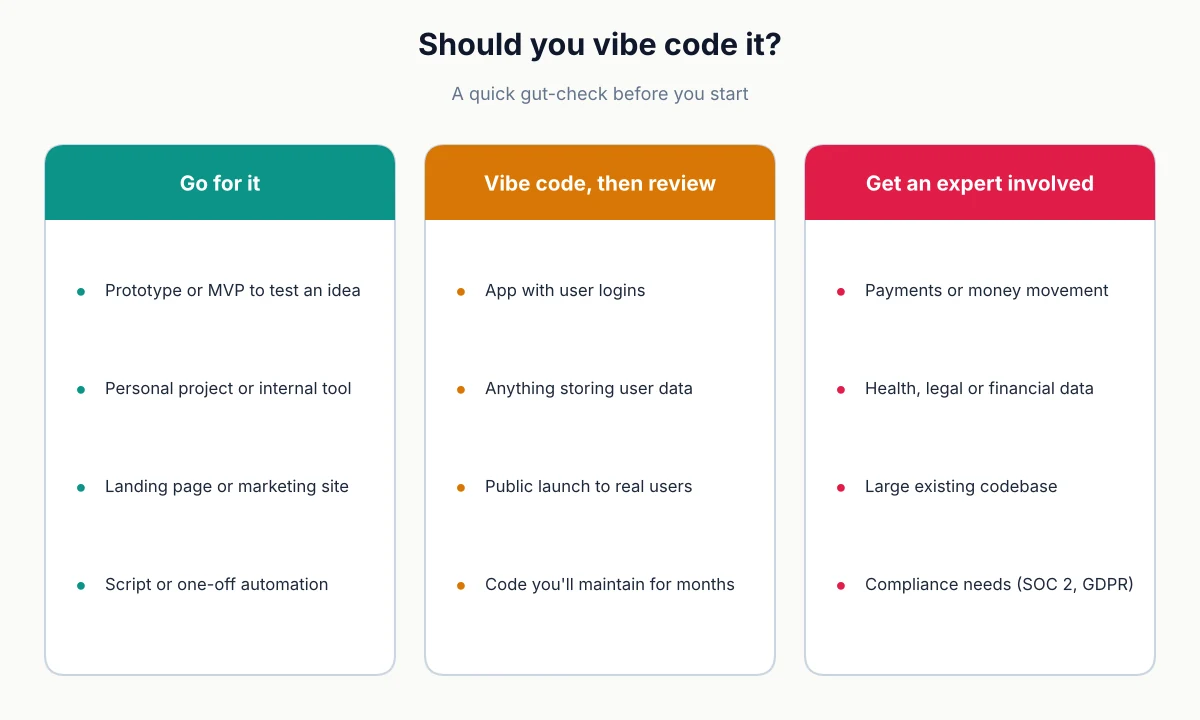
It depends on what’s at stake. Our view at Vibe Coder Journal: vibe coding is excellent for anything you’d be happy to delete, and risky for anything that holds other people’s data or money.
| Pros | Cons |
|---|---|
| Anyone can build working software | Security holes are common and hard to see |
| Ideas become prototypes in hours | Code gets messy and hard to maintain |
| Cheap way to test whether an idea is worth building | Debugging loops can waste hours |
| Good for personal tools nobody else would build | Agents can take destructive actions |
| Teaches you how software fits together | Easy to ship something you don’t understand |
Before you start a project, answer five questions:
- Will real users log in?
- Is money involved?
- Will it store personal data?
- Will it need to work for longer than three months?
- Can it spend money or change something real, such as paid API keys, sending emails or a live database?
If every answer is no, vibe code freely. If any answer is yes, vibe code to build it, then review the code (or ask someone to) before launch. For payments, health data or a formal audit like SOC 2, bring in an experienced developer. If you store personal data from EU users, GDPR (the EU’s data protection law) applies, so get a review first.
How to check a vibe-coded app before launch
Run these prompts on a separate Git branch, review what the AI changes, and test before you deploy:
1. Scan the project and its full Git history for keys and tokens. Label each one public (safe in the browser, like the Supabase anon key) or secret. Move only the secret ones to server-side code. For any secret that was ever committed or shipped to the browser, tell me how to rotate it. Don't change how public keys are used.

2. List every database table and storage bucket. For each, show whether access rules (e.g. Supabase Row Level Security) are on and what the exact policies are. Flag any policy that allows everyone.

3. Create two test accounts. Write a test that tries to read and edit account B's data while logged in as account A, and run it against every API route and every table the frontend can query.

4. Check that all input is validated on the server. Never trust prices, roles or user IDs sent from the browser.

5. Add rate limits to login, signup and any route that calls a paid AI API.

6. Run npm audit (or pip-audit) and confirm every package exists and is widely used.

7. Add a Content-Security-Policy in report-only mode first, and check which security headers my host already sets.
AI tools can still miss things, so treat this as a first pass before a proper security audit. You can also run a free scan with PrivacyReport, a tool we built that checks AI-built apps for exposed keys and open databases.
Vibe coding tips for beginners
- Start small and ask for one feature at a time.
- Be specific. “Add a signup form with email and password, and show an error if the email is already used” works better than “add login.”
- Save checkpoints with Git or your tool’s version history so you can undo bad changes.
- Paste the full error message when something breaks.
- If the AI keeps going in circles, start a new chat and summarize where you are.
- Ask the AI to explain its code in simple terms. You’ll learn as you build.
Frequently asked questions
What is vibe coding in simple terms?
Vibe coding is building software by telling an AI what you want in plain English and letting it write the code. You test the result and keep prompting until it works, usually without reading the code yourself.
Who invented vibe coding?
Andrej Karpathy, an OpenAI co-founder and Tesla’s former head of AI, coined the term in a post on X on 2 February 2025.
Is vibe coding real programming?
It produces real code, but you don’t write or review that code yourself. It’s closer to directing a programmer than being one.
Do you need to know how to code to vibe code?
No. Tools like Lovable, Bolt.new and Replit let non-programmers build working apps. Basic coding knowledge helps a lot when things break and when you check security before launch.
Is vibe coding safe?
It’s fine for prototypes and personal projects. For apps with real users it’s risky unless someone reviews the security. Veracode found flaws in 45% of the AI coding tasks it tested in 2025.
Will vibe coding replace developers?
Unlikely. It’s taking over some routine coding and letting non-developers build simple apps. Serious software still needs people to design, review, secure and maintain it.
Can I vibe code with ChatGPT?
Yes. You can paste code back and forth with ChatGPT, Claude or Gemini. For anything bigger than a small script, a dedicated tool like Lovable, Replit, Cursor or Claude Code is much easier.
Is vibe coding free?
Most tools have free tiers, but bigger projects usually need a paid plan or API credits. Students can get free access to some tools through offers like the GitHub Student Developer Pack.
Is vibe coding bad for learning to code?
It can be if you never read what the AI writes. Asking the AI to explain each change, and fixing small bugs yourself, turns vibe coding into a fast way to learn.
How do I start vibe coding?
Pick a small project, choose a beginner tool like Lovable or Bolt.new, and use a structured first prompt like the template above. Build one feature at a time and test after each step.
About the author
Abdullah Zulfiqar is the founder and editor-in-chief of Vibe Coder Journal. He runs the site’s weekly AI coding model benchmarks and tests vibe coding tools hands-on. More about Vibe Coder Journal
Want the latest model rankings and tool tests in your inbox? Join our newsletter.
Sources
- Andrej Karpathy’s original post on X (2 Feb 2025)
- Simon Willison: Not all AI-assisted programming is vibe coding
- The New Stack: Karpathy on agentic engineering (Feb 2026)
- CNN via KRDO: Collins names vibe coding Word of the Year 2025
- Fox Business: Merriam-Webster adds vibe coding
- TechCrunch: a quarter of YC W25 startups have almost entirely AI-generated codebases
- Veracode 2025 GenAI Code Security Report
- Superblocks: Lovable RLS breach (CVE-2025-48757)
- The Register: Replit agent deletes SaaStr database
- METR: AI and experienced open-source developer productivity (July 2025)
- TechCrunch: Cognition acquires Windsurf
- Devin Desktop FAQ (formerly Windsurf)
- Google: transitioning Gemini CLI to Antigravity CLI
- Lovable Cloud docs
- Wikipedia: Vibe coding

Keep exploring

Leave a Reply