


Data verified on 6 November 2026 from Z.ai’s official pricing page and docs
Short answer: The GLM Coding Plan (also called the Z.ai Coding Plan) is a subscription from Z.ai, the international platform of Chinese AI company Zhipu AI, for using its GLM-5.3 and GLM-5.3-Flash models inside coding tools like Claude Code, Cline, Cursor and Codex. As of 6 November 2026 it costs $18 a month for Lite, $80 for Pro and $168 for Max, with 20% off quarterly and 30% off yearly. Usage is measured in credits with a 5-hour and a weekly limit. To use it in Claude Code, you point Claude Code at https://api.z.ai/api/anthropic with your Z.ai API key. You’re then running GLM models, not Claude.
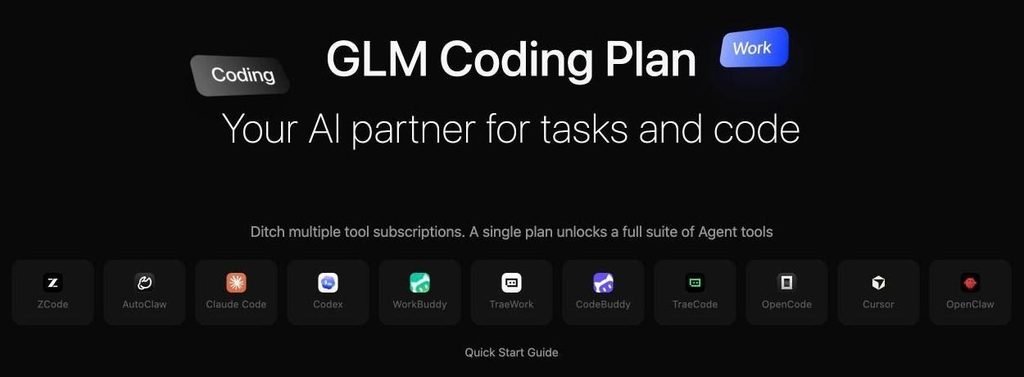
The GLM Coding Plan page, November 2026. Source: z.ai/subscribe
What is the GLM Coding Plan?
The GLM Coding Plan is Z.ai’s flat-price subscription for AI coding. Instead of paying per token through the API, you pay a monthly fee and get a credit allowance you can spend in any supported coding tool.
What you get on every plan:
- Models: GLM-5.3 and GLM-5.3-Flash. As of November 2026, requests for GLM-5.2 and 5.1 are routed to GLM-5.3, and GLM-4.7 to GLM-5.3-Flash.
- Tools: 20+ agent tools, including Claude Code, Cline, Cursor, Codex, OpenCode, Kilo Code, Roo Code, Crush, Goose and Z.ai’s own ZCode IDE.
- MCP tools: Z.ai’s docs say all plans include vision understanding, web search and web reader MCP tools (the overview also lists Zread), billed from your credits. The pricing card highlights MCP tools from Pro up.
- Context: up to a 1M-token context window.
The plan only works inside officially supported tools. You can’t use your plan key as a general API key for your own app.
Z.ai vs bigmodel.cn: Zhipu also sells a coding plan in mainland China on bigmodel.cn, priced in yuan, with its own accounts, keys and base URL (https://open.bigmodel.cn/api/anthropic). Everything on this page is for the international Z.ai plan, and keys from one won’t work on the other.
GLM Coding Plan pricing
As of 6 November 2026, the GLM Coding Plan costs $18 a month for Lite, $80 for Pro and $168 for Max, and every plan includes GLM-5.3 and GLM-5.3-Flash.
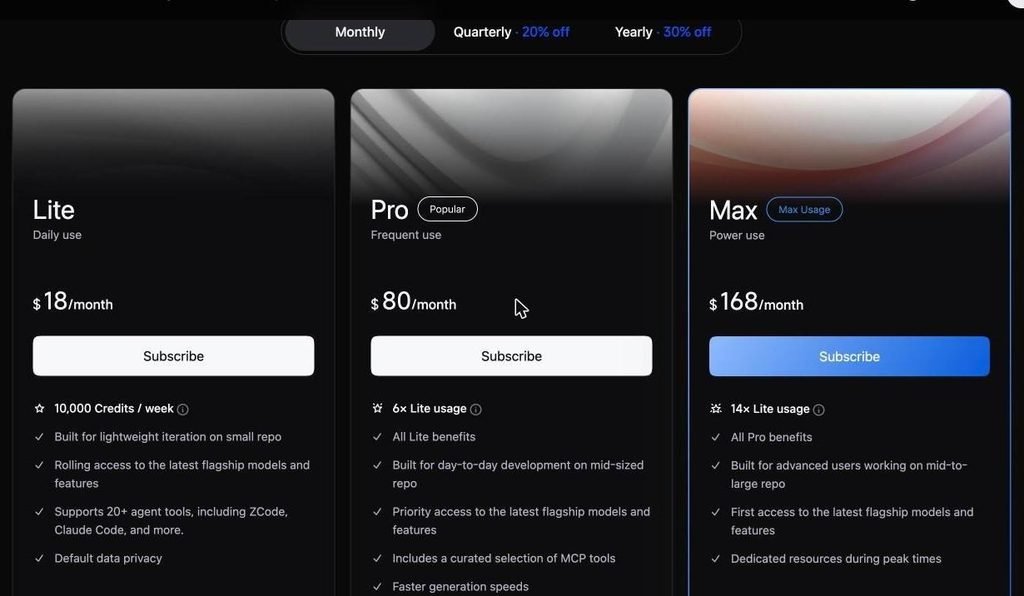
Monthly prices on 6 November 2026. Source: z.ai/subscribe
| Plan | Monthly | Quarterly (20% off) | Yearly (30% off) | Credits per week |
|---|---|---|---|---|
| Lite | $18 | $14.40/mo | $12.60/mo | 10,000 |
| Pro | $80 | $64/mo | $56/mo | 60,000 (6x Lite) |
| Max | $168 | $134.40/mo | $117.60/mo | 140,000 (14x Lite) |
The bigger plans also get priority or first access to new models, faster generation (Pro and up) and dedicated resources at peak times (Max). There’s a separate Team plan with shared seat management.
Before you pay, know the billing rules from Z.ai’s docs:
- No refunds, even if you don’t use the plan.
- Auto-renews. The pricing page says to cancel at least 3 days before your billing date, and the docs FAQ says 24 hours. Cancel 3 days early to be safe.
- Upgrades: moving to a higher tier starts immediately, and the unused value of your old plan becomes account balance. Same-tier changes, like monthly to yearly, start after your current plan ends.
- Discounts: we found no public promo code. The cheapest way in is yearly billing, which brings Lite to $12.60 a month.
How GLM Coding Plan limits work
Every plan has two limits: one that refreshes every 5 hours and one that resets every 7 days from your purchase date.
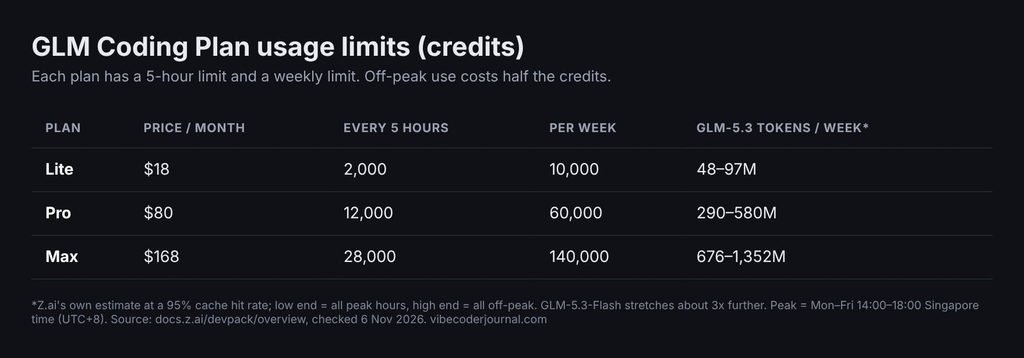
Limits on 6 November 2026. Source: docs.z.ai/devpack/overview
| Plan | Credits every 5 hours | Credits per week |
|---|---|---|
| Lite | 2,000 | 10,000 |
| Pro | 12,000 | 60,000 |
| Max | 28,000 | 140,000 |
Credits are worked out from tokens, with a different multiplier for each model:
| Credit multiplier per token | Input | Cached input | Output |
|---|---|---|---|
| GLM-5.3 | 6.9 | 1.7 | 24 |
| GLM-5.3-Flash | 2.3 | 0.56 | 8 |
Rates from docs.z.ai/devpack/overview, 6 November 2026.
Credits = (input tokens × input rate + cached tokens × cached rate + output tokens × output rate) ÷ 10,000.
Two things stretch your allowance:
- Use Flash for lighter work. GLM-5.3-Flash costs about a third of GLM-5.3 per token.
- Work off-peak. Usage outside peak hours costs 50% of the normal rate. Peak is Monday to Friday, 14:00 to 18:00 Singapore time (UTC+8). That’s 06:00 to 10:00 UTC: 11:00 to 15:00 in Pakistan, and 06:00 to 10:00 in the UK in winter (07:00 to 11:00 in summer).
What does that mean in practice?
Here’s our own rough example. A typical Claude Code turn on a mid-sized repo might send 100,000 input tokens (95,000 of them cached) and get 2,000 output tokens back:
- On GLM-5.3: (5,000 × 6.9 + 95,000 × 1.7 + 2,000 × 24) ÷ 10,000 ≈ 24 credits
- On GLM-5.3-Flash: ≈ 8 credits
So Lite’s 2,000 credits per 5 hours is roughly 80 heavy GLM-5.3 turns, or about 250 Flash turns, at peak rates. Off-peak, double it. Z.ai’s own estimate is 48 to 97 million GLM-5.3 tokens a week on Lite at a 95% cache hit rate. Your real number depends on your repo size and how much of the context is cached.
When you hit a limit, you aren’t charged extra. You wait for the 5-hour window to refresh, or for the weekly reset if you’ve used the whole week’s credits.
How to use the GLM Coding Plan in Claude Code
To use the GLM Coding Plan in Claude Code, set ANTHROPIC_BASE_URL to https://api.z.ai/api/anthropic and ANTHROPIC_AUTH_TOKEN to your Z.ai API key, then open a new terminal. Here are the steps.
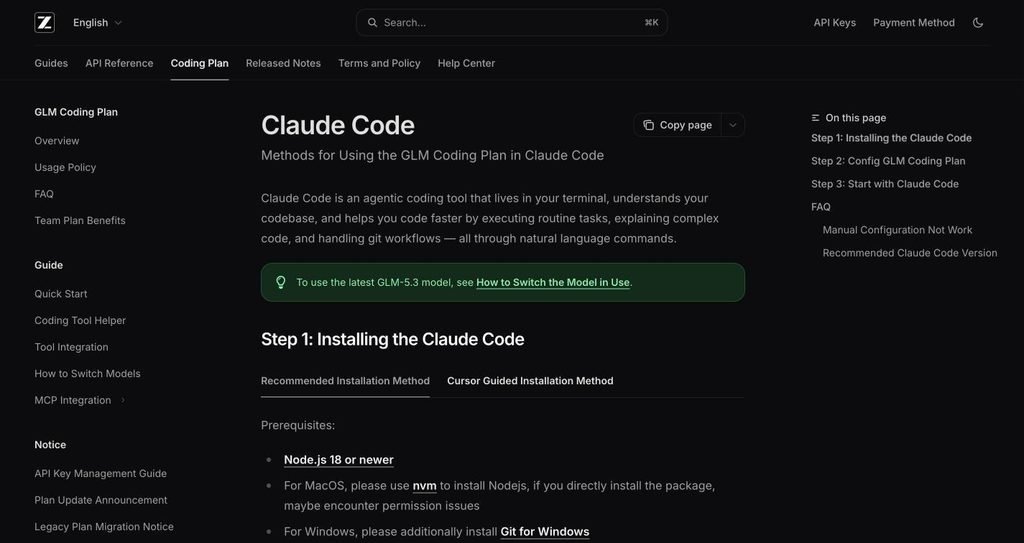
Z.ai’s Claude Code setup guide. Source: docs.z.ai/devpack/tool/claude
Step 1: Install Claude Code
Z.ai’s guide uses npm, which needs Node.js 18 or newer (Windows users also need Git for Windows). Anthropic’s native installer works too.
npm install -g @anthropic-ai/claude-code
Step 2: Get your Z.ai API key
Subscribe at z.ai/subscribe, then open the Z.ai dashboard. Individual plan users create a key under Personal Coding Plan → Plan Overview. Copy it, and keep it private.
Step 3: Connect Claude Code to GLM
Pick one of three ways:
- Easiest (any OS): run npx @z_ai/coding-helper and follow the prompts.
- Script (macOS/Linux): Z.ai provides a script that writes your key, base URL and timeout into the settings file. It doesn’t set the model mapping or 1M context, so add those keys yourself. It’s linked in the official guide.
- Manual: open ~/.claude/settings.json (on Windows, %USERPROFILE%\.claude\settings.json) and add this inside the env block:
{
“env”: {
“ANTHROPIC_AUTH_TOKEN”: “your_zai_api_key”,
“ANTHROPIC_BASE_URL”: “https://api.z.ai/api/anthropic”,
“ANTHROPIC_DEFAULT_HAIKU_MODEL”: “glm-5.3-flash[1m]”,
“ANTHROPIC_DEFAULT_SONNET_MODEL”: “glm-5.3[1m]”,
“ANTHROPIC_DEFAULT_OPUS_MODEL”: “glm-5.3[1m]”,
“CLAUDE_CODE_AUTO_COMPACT_WINDOW”: “1000000”,
“CLAUDE_CODE_DISABLE_NONESSENTIAL_TRAFFIC”: 1,
“API_TIMEOUT_MS”: “3000000”
}
}
Replace your_zai_api_key with your key. The [1m] suffix turns on the 1M-token context window. If you already have other settings in the file, only add these keys. Don’t replace the whole file.
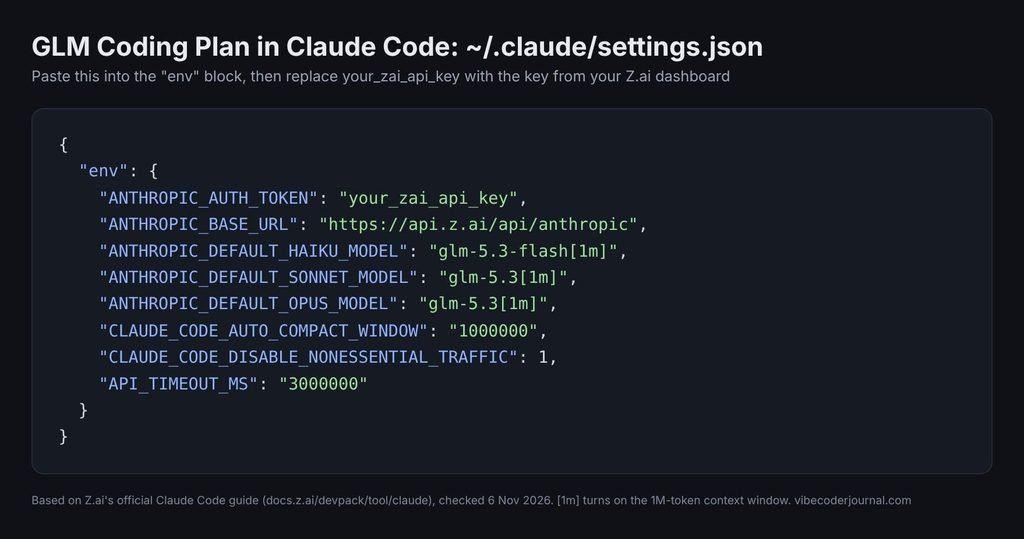
Which models should you map? Z.ai’s main Claude Code guide maps Sonnet and Opus to GLM-5.3 and Haiku to Flash, as above. Its “switch model” guide maps all three to glm-5.3-flash[1m]. Our suggestion: use the mapping above for hard tasks, and switch everything to Flash if you keep hitting your limit. Flash uses about a third of the credits.
Step 4: Start and check it
Open a new terminal (old ones won’t pick up the change), then:
cd your-project
claude
If Claude Code asks “Do you want to use this API key?”, choose Yes. Then type /status, Claude Code’s built-in status command, to confirm the model shows glm-5.3 or glm-5.3-flash and the settings come from your ~/.claude/settings.json.
If it doesn’t work:
- Close every Claude Code window and open a fresh terminal.
- Check the JSON for a missing or extra comma.
- Update Claude Code with claude update. Older versions may say the [1m] model doesn’t exist.
Using the GLM Coding Plan in Cline, Codex, Cursor and other tools
Most other tools use an OpenAI-style endpoint instead of the Anthropic one. Z.ai has a setup guide for each supported tool, including Cursor. In Cline, for example:
- API Provider: OpenAI Compatible
- Base URL: https://api.z.ai/api/coding/paas/v4
- API Key: your Z.ai key
- Model: choose “Use custom” and type glm-5.3 or glm-5.3-flash
- Context window: 1000000
- Support images: off for GLM-5.3 (text only), on for GLM-5.3-Flash (it can read images)
| Your tool’s protocol | Base URL |
|---|---|
| Anthropic (Claude Code, Goose) | https://api.z.ai/api/anthropic |
| OpenAI Chat Completions (Cline and most others) | https://api.z.ai/api/coding/paas/v4 |
| OpenAI Responses (Codex) | https://api.z.ai/api/v1 |
All your tools share the same credit allowance.
Fixing error 1113 “Insufficient Balance”
This is the most common problem. It usually means your requests are going to the pay-per-token API instead of your plan. Z.ai lists three causes:
- Wrong base URL. Claude Code must use https://api.z.ai/api/anthropic. Most other tools need https://api.z.ai/api/coding/paas/v4.
- Unsupported tool. The plan only works in officially supported tools.
- Wrong model. Only GLM-5.3 and GLM-5.3-Flash are covered.
GLM Coding Plan rules to know
- Supported tools only. Z.ai’s FAQ says the plan is “strictly limited” to supported tools, so calling it from your own scripts or apps isn’t covered.
- One person per plan. Sharing an account isn’t allowed. Z.ai says breaking the rules can lead to rate limits or a frozen account, and more than three violations may get you banned.
- Concurrency depends on the plan. Z.ai recommends Lite for one project at a time, Pro for one or two, and Max for two or more.
- Training data: the plan page lists “default data privacy” on every plan and says Team plan data is never used for training. As of 6 November 2026 it makes no such promise for individual Lite, Pro or Max plans, so read Z.ai’s privacy policy before using it on client code.
GLM Coding Plan vs Claude Pro and Max
The GLM Coding Plan costs $2 to $32 a month less than Claude’s matching plans and works in 20+ tools, but it runs Z.ai’s GLM models, not Claude.
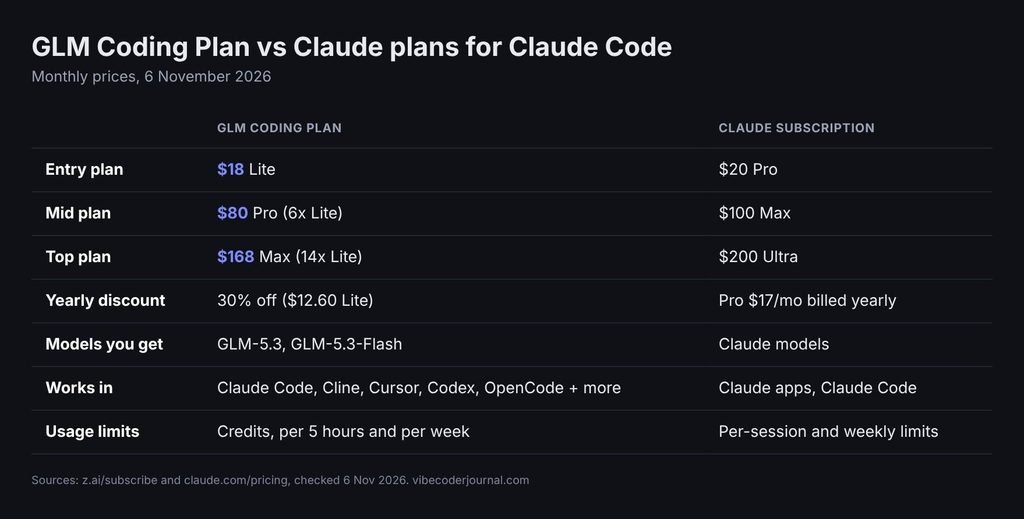
Sources: z.ai/subscribe and claude.com/pricing, 6 November 2026
| GLM Coding Plan | Claude subscription | |
|---|---|---|
| Entry | $18 Lite | $20 Pro |
| Middle | $80 Pro | $100 Max |
| Top | $168 Max | $200 Ultra |
| Models | GLM-5.3, GLM-5.3-Flash | Claude models |
| Works in | Claude Code plus 20+ other tools | Claude apps and Claude Code |
The GLM Coding Plan is a bit cheaper at every tier and works in more tools, so one subscription covers Claude Code, Cline and Cursor. But it isn’t a cheaper way to get Claude. When you connect Claude Code to Z.ai, the Claude Code app stays the same while the model doing the work is GLM. If you want Claude’s own models, you need a Claude plan, and our Claude Pro vs Max guide explains which tier fits. You can track your Claude usage with our guide on how to see Claude Code usage.
A practical setup is to use both: GLM for cheap, high-volume work like boilerplate, tests and refactors, and Claude for the hardest problems.
Is the GLM Coding Plan worth it?
For most solo developers who code daily, yes. Lite’s 10,000 weekly credits work out to roughly 400 heavy GLM-5.3 turns at peak rates, for $18 a month.
Worth it if you:
- Code every day and want a big allowance for under $20 a month
- Switch between tools like Claude Code, Cline and Cursor and want one subscription for all of them
- Can work off-peak, which doubles your allowance
Skip it if you:
- Need Claude’s models specifically
- Want to call the model from your own app (use Z.ai’s pay-per-token API instead)
- Want a refund option. There isn’t one, so start with a monthly Lite plan before paying for a year.
FAQ
How much is the GLM Coding Plan?
The GLM Coding Plan costs $18 a month for Lite, $80 for Pro and $168 for Max, as of 6 November 2026. Paying quarterly saves 20% and yearly saves 30%, which brings Lite down to $12.60 a month. All plans auto-renew and Z.ai doesn’t offer refunds.
What are the GLM Coding Plan limits?
Lite gives 2,000 credits every 5 hours and 10,000 credits a week. Pro gives 12,000 and 60,000, and Max gives 28,000 and 140,000. Credits are based on tokens used, GLM-5.3-Flash uses about a third as many as GLM-5.3, and off-peak usage costs half.
Can I use the GLM Coding Plan in Claude Code?
Yes. Set ANTHROPIC_BASE_URL to https://api.z.ai/api/anthropic and ANTHROPIC_AUTH_TOKEN to your Z.ai API key in ~/.claude/settings.json, or run npx @z_ai/coding-helper. Claude Code will then use GLM-5.3 and GLM-5.3-Flash instead of Claude models. Check with /status.
Is the GLM Coding Plan worth it?
For most solo developers, yes. Lite costs $18 a month (6 November 2026) for 10,000 credits a week, roughly 400 heavy GLM-5.3 turns in Claude Code at peak rates, and it works in Cline, Cursor and 20+ other tools. Skip it if you need Claude’s own models, because you’d be running GLM instead.
How do I check my GLM Coding Plan usage?
Open the subscription page in your Z.ai dashboard, which shows how much of your 5-hour and weekly quota you’ve used, according to Z.ai’s FAQ (checked 6 November 2026). In Claude Code, /status confirms you’re running glm-5.3 or glm-5.3-flash, but it doesn’t show your remaining Z.ai credits.
Is my code used to train GLM models?
Z.ai’s plan page lists “default data privacy” on every plan and says Team plan data is never used for training. As of 6 November 2026 it makes no such promise for individual Lite, Pro or Max plans, so read Z.ai’s privacy policy before using the plan on client or company code.
Which models does the GLM Coding Plan include?
All plans include GLM-5.3 and GLM-5.3-Flash. Older model names like GLM-5.2, GLM-5.1 and GLM-4.7 are routed to these automatically. GLM-5.3 is text-only, while GLM-5.3-Flash can also read images, according to Z.ai’s “switch model” guide.
Why do I get error 1113 Insufficient Balance?
Error 1113 usually means your requests aren’t going through the plan. Check that Claude Code uses https://api.z.ai/api/anthropic and other tools use https://api.z.ai/api/coding/paas/v4, that your tool is officially supported, and that you’re calling GLM-5.3 or GLM-5.3-Flash.
Can I cancel or get a refund?
You can cancel auto-renewal on the subscription page in your Z.ai dashboard. The pricing page says at least 3 days before your next billing date (the docs FAQ says 24 hours), and your plan stays active until the end of the period. Z.ai does not offer refunds on GLM Coding Plan subscriptions.
Final verdict
The GLM Coding Plan is cheaper than Claude’s matching plan at every tier (6 November 2026) and gives a large AI coding allowance in Claude Code and other agents. The GLM Coding Plan Lite tier, at $18 a month, or $12.60 billed yearly, is enough for most solo developers, especially if you work off-peak and use Flash for routine tasks. Just remember you’re paying for GLM models, not Claude, and there are no refunds. Start with a monthly Lite plan, set it up with the steps above, and upgrade only if you keep hitting the 5-hour limit.
Sources
- Z.ai GLM Coding Plan page, checked 6 November 2026
- Z.ai docs: GLM Coding Plan overview and usage limits, checked 6 November 2026
- Z.ai docs: Claude Code setup, checked 6 November 2026
- Z.ai docs: how to switch models, checked 6 November 2026
- Z.ai docs: other tools and base URLs, checked 6 November 2026
- Z.ai docs: FAQ, checked 6 November 2026
- Z.ai docs: usage policy, checked 6 November 2026
- Z.ai privacy policy
- Claude pricing, checked 6 November 2026

Keep exploring

Leave a Reply