


Quick answer: Type /usage inside Claude Code and press Enter. It shows how much of your quota you have used in the current session window, how much is left, and when it resets. You can see the same information, with more detail, at Settings → Usage on claude.ai. If you signed in with an API key rather than a subscription, use /cost instead — API accounts have no quota, only a bill.
That answers the question for most people. But “usage” in Claude Code means three completely different things, and picking the wrong one is why so many developers are confused about why they got cut off. This guide covers every method, what each one actually measures, and two settings that quietly drain your quota that almost nobody knows about.
Quota, context and cost are three different meters
Before any commands, understand this. It is the thing that causes the most confusion, and it takes thirty seconds to learn.
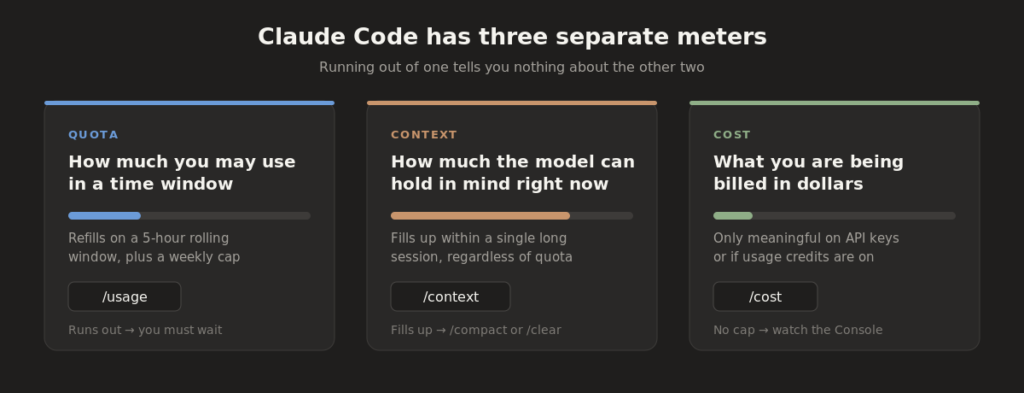
The three meters are unrelated systems with unrelated fixes.
You can have 90% of your weekly quota left and still hit a full context window in one long session. You can have plenty of context left and still be locked out for three hours.
| Meter | Question it answers | Command | What to do when it runs out |
|---|---|---|---|
| Quota | How much am I allowed to use in this window? | /usage | Wait for the reset, switch to a lighter model, or turn on usage credits |
| Context | How much can the model still hold in mind? | /context | Run /compact to summarise, or /clear to wipe |
| Cost | What am I being billed? | /cost | Only applies to API keys and usage credits |
Method 1: The /usage command
If you’re on Pro, Max, Team or a seat-based Enterprise plan, this is the one you want. In Claude Code, type:
/usage
You’ll get your consumption inside the current rate-limit window: how much you’ve used, how much remains, and the reset time.
A caveat worth knowing. Anthropic’s official Claude Code documentation lists /model, /cost, /clear, /compact and /context in its command reference — it does not currently list /usage or /status there. Several third-party guides report both working, and at least one argues /status is the more reliable command for subscription capacity.
The honest advice: run /help in your own install and read the list. Claude Code ships updates constantly and the available slash commands vary by version and by how you signed in. /help is the only source of truth for your machine. If /usage isn’t there, try /status. And if neither is, use the web dashboard below, which definitely works.
Method 2: Settings → Usage on claude.ai
This is the most complete view, and the one I’d actually recommend checking first. Go to claude.ai, open Settings, then Usage.
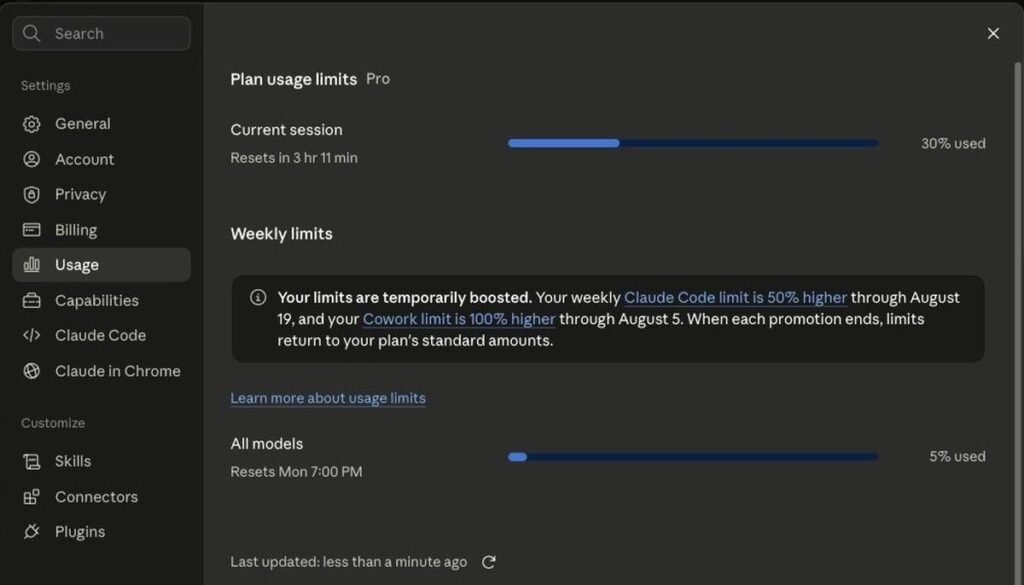
The Usage panel on a Pro account: a rolling session window with a live countdown, and a separate weekly cap that resets on a fixed day.
Three things to read here:
Current session. This is the rolling window that stops you mid-task. In the screenshot above it shows 30% used with 3 hours 11 minutes until reset. It shows a live countdown, not a fixed clock time.
Weekly limits. A separate, longer ceiling. Note that it resets on a specific day and time — “Resets Mon 7:00 PM” — not on a rolling basis like the session window. You can be completely fine on your session limit and still be blocked by the weekly one.
Temporary boosts. Anthropic sometimes runs promotional increases with hard expiry dates. The account above had its weekly Claude Code limit raised 50% through 19 August and its Cowork limit doubled through 5 August. If your capacity suddenly drops for no apparent reason, check whether a boost just expired. This banner is the only place you’ll be told.
Also worth noticing: Claude Code and Cowork have separately tracked weekly limits, even though the session window is shared. The relationship between per-product limits and the “All models” bar isn’t fully documented anywhere I could find.
Your quota is shared across every Claude product
This is the single most common source of “I barely used Claude Code, why am I limited already.” Your session quota is drawn from one pool covering Claude.ai, Claude Code, Claude Desktop and Cowork. Spend the morning chatting on the web and you’ll find your terminal quota already partly gone — and nothing in the terminal warns you that’s what happened.
Method 3: Usage credits — what to do when you hit the limit
Almost no guide covers this, and it’s the actual answer to “I’m blocked and I need to keep working.”
Scroll down on the same Settings → Usage page and you’ll find Usage credits.
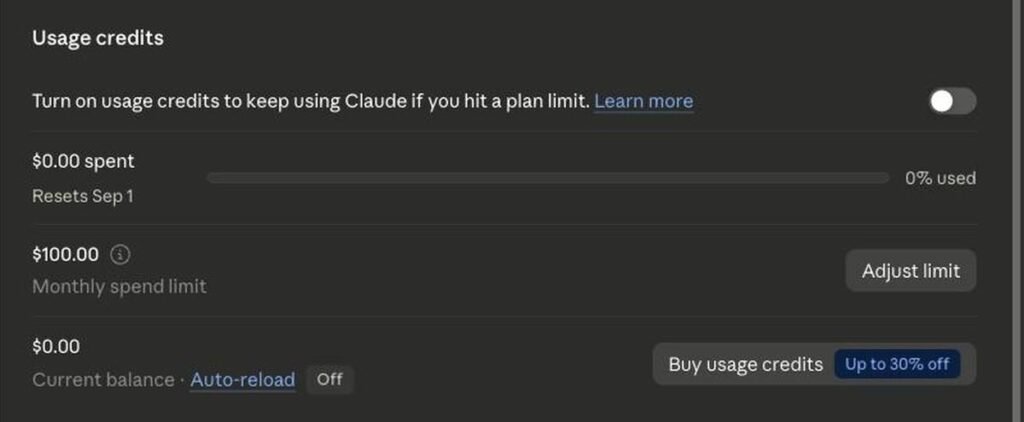
Usage credits let you pay for overflow past your plan limit. Off by default, with a $100 monthly spend cap you can adjust.
Turning this on lets you keep working past your plan limit by paying for the overflow. The controls are:
- The toggle — off by default. Nothing is charged while it’s off; you just get blocked when you hit your limit.
- Spent this period — with its own reset date, separate from your plan’s weekly reset.
- Monthly spend limit — defaults to $100 and is adjustable. This is your safety net. Set it to something you’d be comfortable seeing on a card statement before you turn the feature on.
- Current balance and auto-reload — auto-reload is off by default. Leave it off unless you have a strong reason.
If you regularly hit your limit mid-task, this is a more sensible fix than upgrading a tier you only need occasionally. If you never hit your limit, leave it alone.
Method 4: The setting that spends your quota in the background
Here’s something I found while verifying this article that I haven’t seen documented anywhere else.
In Settings → Claude Code, there’s a toggle called Classify session states, and it is on by default:

“Classifying sessions counts towards your plan usage.” On by default, disclosed only inside a settings panel.
Read the description carefully: “Allow Claude to automatically classify sessions as blocked, ready for review, or done. Classifying sessions counts towards your plan usage. Applies to new sessions.”
So a convenience feature is consuming quota in the background, enabled by default, and the only disclosure is one sentence inside a settings panel you have no reason to open. It’s almost certainly a small amount per session. But if you’re running many parallel sessions and can’t account for where your quota went, this is worth knowing about — and it’s a one-click fix if you don’t use the feature.
There’s a second toggle below it, Switch models when a message is flagged, also on by default, which silently moves you to a different model when safeguards trigger. That one doesn’t mention usage, but it does mean the model you think you’re paying for isn’t always the one running.
Method 5: /cost, for API key accounts
If you authenticated with an API key — through the Anthropic Console, Amazon Bedrock, Google Vertex or Microsoft Foundry — you have no quota to check. You have a bill.
/cost
This shows the token count and dollar spend for the current session only. It resets when you run /clear or start a new session, so it is not a running monthly total.
For history, go to the Usage tab in the Anthropic Console. It breaks activity down by model, API key and day, lets you group by workspace or model, and exports to CSV. Visibility is role-gated — Developer, Billing and Admin roles can see it, so if the tab looks empty on a team account that’s a permissions issue, not a bug.
For programmatic access there’s the Usage and Cost Admin API, which exposes the same data. It needs an Admin API key (sk-ant-admin…), which is separate from your normal key and can only be created by an org admin.
API key accounts have no hard cap. Per Anthropic’s own guidance, unexpectedly high API bills “almost always trace back to very long sessions that were never cleared.”
Method 6: ccusage, for real historical analytics
None of the built-in options give you a day-by-day breakdown in the terminal. ccusage does.
npx ccusage@latest            # summary
npx ccusage@latest daily      # day-by-day breakdown
npx ccusage@latest weekly
npx ccusage@latest monthly
npx ccusage@latest session    # per-session costs
No install, no API key, no account linking. It parses the JSONL log files Claude Code already writes to your local disk, so nothing leaves your machine. It now reads logs from other coding CLIs too — Codex, OpenCode, Amp, Gemini CLI, GitHub Copilot CLI, Goose, Qwen and others — so if you run more than one agent you get a combined view.
One important limitation. For subscription users the dollar figures are estimates, produced by applying published API rates to your token counts. You aren’t billed per token on a Pro or Max plan, so treat them as a relative measure of which sessions were expensive, not as an invoice.
Method 7: /context, for the other kind of “full”
/context
This shows how full the context window is — the model’s working memory for the current conversation. When it fills, you don’t get rate-limited; response quality degrades, because Claude can no longer see the earliest parts of your session clearly.
Two fixes:
- /compact summarises the conversation so far into a short recap, freeing space while keeping the thread. Use it mid-task. Claude Code also auto-compacts as you approach the limit.
- /clear wipes the conversation and starts fresh. Your CLAUDE.md and project files stay; only chat history goes. Use it when switching tasks.
/clear cannot be undone. If you might still need something from the history, /compact instead.
Why your quota disappears faster than you’d expect
A single instruction in Claude Code is rarely a single API call. “Fix the lint errors” might trigger eight to twelve calls behind the scenes — read files, edit, run the linter, read output, fix, re-run.
And every one of those resends the whole conversation. Per Anthropic’s documentation, each turn sends three things: the full conversation history, your project context (CLAUDE.md plus every file Claude has read), and your new prompt. The first grows fastest. A session where Claude has read twenty files and produced fifteen diffs carries all of it on every subsequent message.
This is why /clear between unrelated tasks is the highest-leverage habit available to you. A good test: if your next prompt would make sense in a brand-new terminal, clear before sending it.
Six ways to make your quota last longer
- /clear between tasks. Finished the auth bug, moving to the migration? Clear first.
- Match the model to the job. Opus costs several times more per turn than Sonnet, and Sonnet more than Haiku. Sonnet for most coding, Opus when you’re genuinely stuck or the change is wide, Haiku for mechanical work. Switch with /model.
- Plan with Opus, execute with Sonnet. Built in as /model opusplan. Switching models doesn’t clear the conversation, so Sonnet still sees everything Opus produced.
- Reference file paths instead of pasting. Anything you paste sits in context in full for the rest of the session. Note that the @ prefix injects the entire file plus its CLAUDE.md tree — use a bare path when you’re trying to save tokens.
- Keep CLAUDE.md under about 200 lines. It’s prepended to every turn. Prompt caching makes it cheaper than the line count suggests, but it still occupies context on every message.
- Turn off “Classify session states” if you don’t use the feature. See Method 4.
A warning about the token numbers you’ll find elsewhere
Several popular articles publish tables claiming a specific token allowance per plan — “approximately 44,000 tokens per 5 hours on Pro” and similar. These figures vary wildly between sources, don’t reconcile with each other, and don’t match observed behaviour.
Anthropic has never published a token-denominated limit for subscription plans, and the actual interface doesn’t show one. It shows a percentage and a countdown, as in the screenshots above. Your own /usage output and your Settings → Usage page are the only numbers that describe your account. Ignore the tables.
Frequently asked questions
What is the command to check Claude Code usage?
/usage shows quota and reset time on subscription accounts. /cost shows session spend on API key accounts. /context shows context window usage. Run /help to confirm which commands your version supports.
Why does Claude Code say I hit my limit when I barely used it?
Your session quota is shared across Claude.ai, Claude Code, Claude Desktop and Cowork. Web or desktop usage draws from the same pool as your terminal. Check Settings → Usage on claude.ai for the combined picture.
How often does the Claude Code limit reset?
There are two limits. The session window rolls continuously and shows a live countdown. The weekly cap resets on a fixed day and time shown on your usage page.
Can I keep using Claude Code after hitting my limit?
Yes, if you enable usage credits in Settings → Usage. You then pay for overflow usage up to a monthly spend limit you set, which defaults to $100. It’s off by default.
Does /usage work with an API key?
No. API key accounts have no quota to report. Use /cost for the current session and the Anthropic Console Usage tab for history. If you are comparing monthly usage limits against subscription tiers, see our evaluation of Claude Pro vs Max pricing plans.
What’s the difference between /usage and /context?
/usage measures your allowance over time. /context measures how full the model’s working memory is right now. You can exhaust either one independently.
Is ccusage safe to use?
It reads Claude Code’s local log files on your own machine and needs no API key or account access. It’s open source, so you can read it on GitHub first. Standard caution applies to any npx package — check you’re pulling the right one.
Sources
- Models, usage, and limits in Claude Code — Anthropic Help Center
- Claude Code cheatsheet — Anthropic Help Center
- Cost and usage reporting in Console — Anthropic
- Usage and Cost Admin API — Claude Platform Docs
- ccusage — open source, MIT


[…] people out constantly. The two commands measure completely different things, and our guide to seeing your Claude Code usage and remaining limits explains which meter answers which question, plus two settings that quietly drain quota on […]
[…] up for the first time? Our guides to installing Claude Code and checking your Claude Code usage cover the parts that are in your control. Usage causes 429s, not […]