

- The short answer This message has two unrelated causes that produce identical output. The advice you will find everywhere — raise max_tokens — fixes one of them and does nothing for the other.Check ~/.hermes/logs/agent.log before changing any setting. If the truncation stub recovered zero characters, your problem is a dropped network stream and no token setting will help.If it recovered partial text, it is a genuine output-limit truncation, and raising the ceiling or dropping reasoning_effort from ultra to medium will fix it.Either way, upgrade first: the ultra case is marked fixed in a later release.
Read from NousResearch/hermes-agent issues #90422, #7237, #26425 and #22496, and the official FAQ, on 19 September 2026. Reports are against v0.20.4.
What the error actually is
It is not the first failure. It is the retry-exhausted follow-up to one.
When a response comes back incomplete, Hermes automatically re-prompts the model to continue where it left off. It does this up to three times by default. If every attempt comes back incomplete as well, it gives up and surfaces the message you searched for.
Response truncated (finish_reason=’length’) – model hit max output tokens
…
Error: Response remained truncated after 4 continuation attempts
So the message tells you the retries failed. It does not tell you why the original response was incomplete, and that is the part that matters, because there are two very different answers.
Two causes, one message
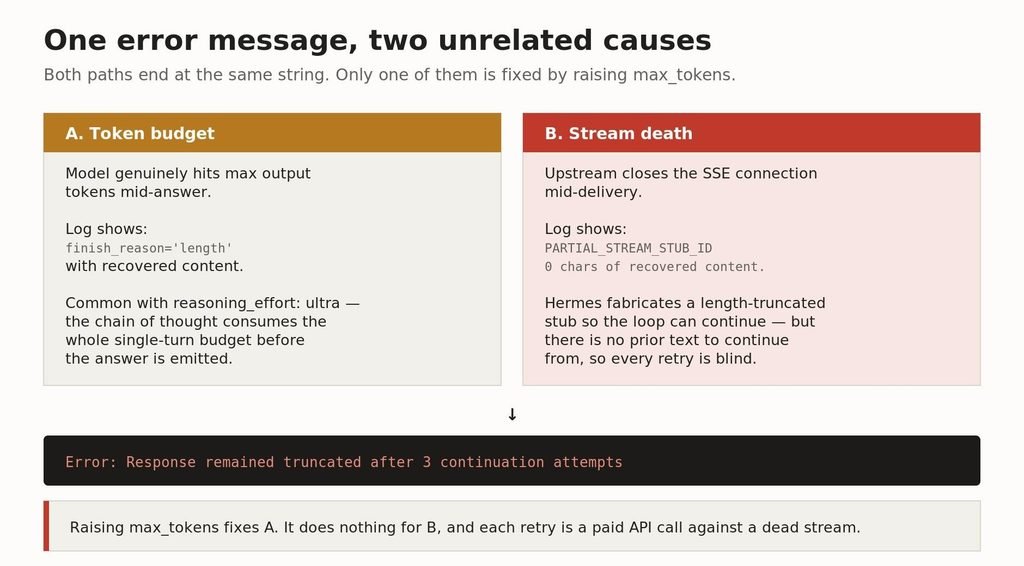
Both paths terminate in the same string. The fixes have nothing in common.
Cause A: the model really did run out of output tokens
The straightforward case. The model hits the provider’s output ceiling mid-answer and the log records finish_reason=’length’ with partial content recovered.
The most common trigger is reasoning_effort: ultra. As issue #90422 describes it, the model spends its single-turn token budget on a long chain of thought before the actual answer is emitted, so Hermes auto-continues and still never finishes the turn. The reporter notes it is deterministic: switching to medium immediately stops the truncation, switching back to ultra immediately reproduces it.
Cause B: the stream died and Hermes pretended it was a truncation
This is the one nobody writes about, and it is why the standard advice so often fails.
When the upstream closes the connection mid-delivery, Hermes does not report a network error. It manufactures a length-truncated stub so the continuation loop can proceed. The log line is explicit about it:
WARNING agent.chat_completion_helpers: Partial stream delivered before
error; returning length-truncated stub with 0 chars of recovered content
so the loop can continue from where the stream died: peer closed connection
without sending complete message body (incomplete chunked read)
Read that carefully. Zero characters of recovered content. The continuation nudge asks the model to continue from where it left off, but there is nothing to continue from. Every retry is blind, every retry hits the same broken transport, and every retry is a billable API call.
Why raising max_tokens so often does nothing
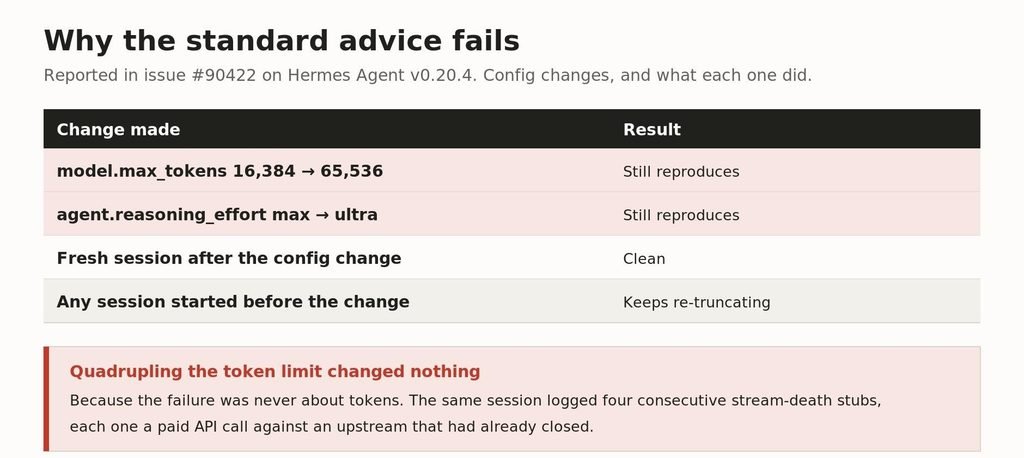
From issue #90422. The obvious fix, applied properly, and what happened.
A reporter on that issue quadrupled the output limit from 16,384 to 65,536 tokens and the error still reproduced. They also raised reasoning effort and it still reproduced. What they found in the logs was a burst of four consecutive stream-death stubs in a single session, each one a paid call against an upstream that had already closed.
Their state database over the preceding hour recorded 41 length finishes against 64 clean stops and 23 tool calls — in other words this was the dominant failure mode on that install, not a rare edge case.
One detail from that report is worth keeping: a fresh session after the config change came back clean, but any session started before the change kept re-truncating. If you change a setting and nothing improves, start a new session before concluding the setting was wrong.
How to tell which one you have
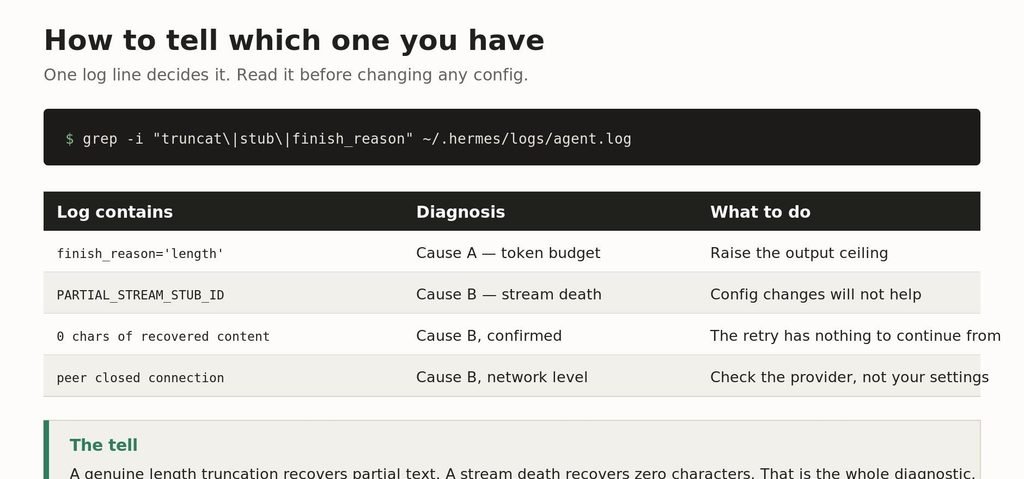
One grep decides it. Do this before changing any configuration.
grep -i “truncat\|stub\|finish_reason” ~/.hermes/logs/agent.log
The distinguishing detail is the recovered character count. A genuine output-limit truncation recovers the partial answer the model had produced. A stream death recovers nothing, and logs PARTIAL_STREAM_STUB_ID alongside a transport error such as peer closed connection or incomplete chunked read.
The fixes, matched to the cause
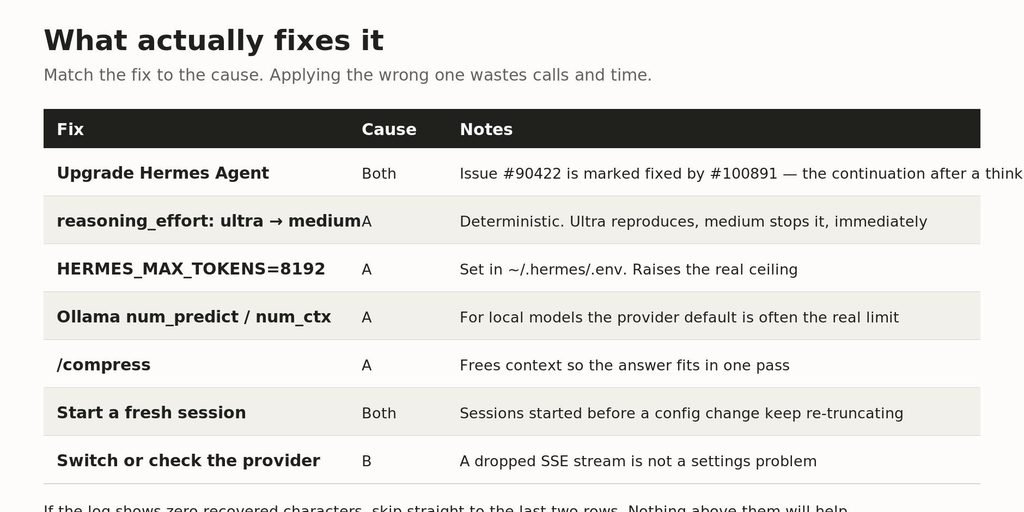
Applying a Cause A fix to a Cause B failure wastes calls and time.
Upgrade first
Issue #90422 is marked fixed. A maintainer notes the resolution changes the continuation after a thinking-only length cut so it runs once with reasoning disabled, which stops ultra-effort models wedging. Before you debug anything, check your version against the current release.
If it is Cause A
Drop agent.reasoning_effort from ultra to medium and restart the gateway. This is the fastest test as well as a fix — if the error disappears instantly, you have confirmed the diagnosis.
Then raise the real ceiling. Set HERMES_MAX_TOKENS=8192 in ~/.hermes/.env. For local models the provider default is frequently the real limit rather than anything in your Hermes config — raise Ollama’s num_predict and num_ctx too.
Running /compress frees context so the answer fits in a single pass, which is worth doing on long sessions regardless.
If Ollama is misbehaving more broadly, we covered the common failures separately in Ollama troubleshooting.
If it is Cause B
Stop changing settings. A dropped SSE stream is a transport problem between you and your provider, and no value in any config file addresses it.
- Check the provider’s status page. Upstream idle timeouts are a common trigger.
- Try a different provider or model endpoint. If the error follows you, it is local networking; if it does not, it was the upstream.
- Watch your bill. Four blind retries against a dead stream is four paid calls for nothing, repeated every turn.
There is active work on this in the project — contributors have proposed escalating to a fallback provider after two consecutive stream stubs rather than burning the full retry budget. Until that lands, detection is manual.
Related issues worth reading
- #90422 — the ultra reasoning_effort case, with the stream-death evidence in the comments
- #7237 and #26425 — the original output-length bug and its reopened regression
- #22496 — the API server returning an output-truncation failure as a successful assistant message, which is how this can fail silently
- #46833 — thinking models on custom and Ollama providers always truncating
Frequently asked questions
What does “response remained truncated after 3 continuation attempts” mean?
Hermes re-prompted the model to continue an incomplete response three times and every attempt came back incomplete as well. It is the retry-exhausted follow-up to a truncation, not the original failure.
I raised max_tokens and nothing changed. Why?
Most likely your failure is a dropped network stream rather than a token limit. Check the log for PARTIAL_STREAM_STUB_ID and zero recovered characters — no token setting fixes that. Also confirm you started a fresh session, because existing sessions keep re-truncating after a config change.
Is reasoning_effort: ultra the cause?
It is a common one. The chain of thought consumes the single-turn budget before the answer is emitted. Switching to medium and restarting the gateway is a reliable test, and the behaviour is deterministic in both directions.
Where are the Hermes Agent logs?
~/.hermes/logs/agent.log. Grep it for truncat, stub and finish_reason before changing any configuration.
Does upgrading fix it?
The ultra case is marked fixed in a later release — the continuation after a thinking-only cut now runs once with reasoning disabled. Check your version first.
How do I raise the output limit properly?
Set HERMES_MAX_TOKENS in ~/.hermes/.env. For local models also raise Ollama’s num_predict and num_ctx, since the provider default is often the real ceiling.
Do the failed retries cost money?
Yes, on a paid provider. Each continuation attempt is a billable call, and against a dead stream all of them are wasted.
Related guides
For local-model setups generally, see how to run LLMs locally and Ollama troubleshooting. If you are hitting limits because the model does not fit comfortably, which LLMs and quants fit in 32GB covers the memory arithmetic, including how the KV cache eats the context you thought you had.
Sources, read 19 September 2026: github.com/NousResearch/hermes-agent issues #90422, #7237, #26425, #22496 and #46833 · hermes-agent.nousresearch.com/docs/reference/faq. Log excerpts are quoted from reports on issue #90422 against v0.20.4. Hermes Agent ships frequently; verify against the current release before acting. Vibe Coder Journal has no affiliation with Nous Research.
When building autonomous agent pipelines with webhook retries, compare tooling costs in our n8n pricing breakdown.

Leave a Reply