
You can run Claude Code with OpenRouter models instead of a Claude subscription — this free tool writes the exact config for you, in your browser, in seconds. Pick your models, your OS, and whether you want the direct OpenRouter connection or the claude-code-router app for per-task routing.
Point Claude Code straight at OpenRouter’s Anthropic-compatible endpoint. No extra software. Best when you want one provider and one bill.
Any provider/model ID from OpenRouter.
Never share the generated file. Your key is only inserted into the text in your browser — we don’t store or send it.
Advanced model slots (optional)
Use claude-code-router (open source, by musistudio, v3.1.3) to route different tasks to different providers and models. Best when you want per-task routing, fallbacks, or providers without an Anthropic-compatible endpoint.
Heads up: claude-code-router v3 configures through its web UI (config is stored in a database, not a JSON file). This mode generates the exact values to enter, plus the install and run commands — and a legacy v1 file only for CCR’s one-time migration import.
Never share the generated file. Your key is only inserted into the text in your browser — we don’t store or send it.
Local models (Ollama, LM Studio) and other providers through claude-code-router. Local models are free after hardware, but small local models may struggle with Claude Code’s tool calls.
Never share the generated file. Your key is only inserted into the text in your browser — we don’t store or send it.
Check your setup
Troubleshooting
| Symptom | Likely cause | Fix |
|---|---|---|
401 authentication error | Wrong or missing key, or ANTHROPIC_API_KEY not blanked | Check ANTHROPIC_AUTH_TOKEN; set ANTHROPIC_API_KEY=""; a stale key is not cleared by /logout — blank it explicitly |
404 model not found | Model ID typo, or the model isn’t on OpenRouter | Use provider/model format; verify the ID on openrouter.ai/models |
| Tool calls fail or loop | Non-Claude models can be weaker at Claude Code’s tool use | Switch the main model to a Claude model (e.g. anthropic/claude-sonnet-5.5); keep cheap models for background tasks |
| Requests time out | Slow gateway or local model | Raise API_TIMEOUT_MS; for local models also set API_FORCE_IDLE_TIMEOUT=0 |
400 errors via a gateway | Gateway rejects beta fields | Set CLAUDE_CODE_DISABLE_EXPERIMENTAL_BETAS=1 |
| Context fills too fast | Gateway model’s window is smaller than assumed | Set CLAUDE_CODE_AUTO_COMPACT_WINDOW to the model’s real context limit |
How to use Claude Code with OpenRouter
The direct method takes five steps: install Claude Code, set four environment variables, pick your models, log out of Anthropic auth, and verify with /status. Every variable name and URL below was checked against OpenRouter's official Claude Code integration guide and Anthropic's environment variable reference on October 10, 2026.
- Install Claude Code (skip if you have it):
curl -fsSL https://claude.ai/install.sh | bashon macOS/Linux,irm https://claude.ai/install.ps1 | iexon Windows, ornpm install -g @anthropic-ai/claude-code. - Set the four variables.
ANTHROPIC_BASE_URLmust be exactlyhttps://openrouter.ai/api— note: no/v1on the end, which is different from OpenRouter's regular API.ANTHROPIC_AUTH_TOKENholds your OpenRouter key.ANTHROPIC_API_KEYmust be explicitly blank (""), otherwise Claude Code tries to authenticate against Anthropic directly. - Pick models with
ANTHROPIC_DEFAULT_SONNET_MODEL(your main coding model) andANTHROPIC_DEFAULT_HAIKU_MODEL(the fast model for quick background tasks). Model IDs useprovider/modelformat, e.g.deepseek/deepseek-chat. The tool above generates all of this for your OS. - Run
/logoutinside Claude Code if you previously logged in with Anthropic — a stale key is not cleared automatically. - Start Claude Code with
claudeand run/status. You should seeAuth token: ANTHROPIC_AUTH_TOKENandAnthropic base URL: https://openrouter.ai/api.
Put the variables in your shell profile or in .claude/settings.local.json under the "env" key. Don't use a .env file — OpenRouter's guide says Claude Code won't pick it up, and values in settings files are used literally (no $VARIABLE expansion), so write the key out in full there.
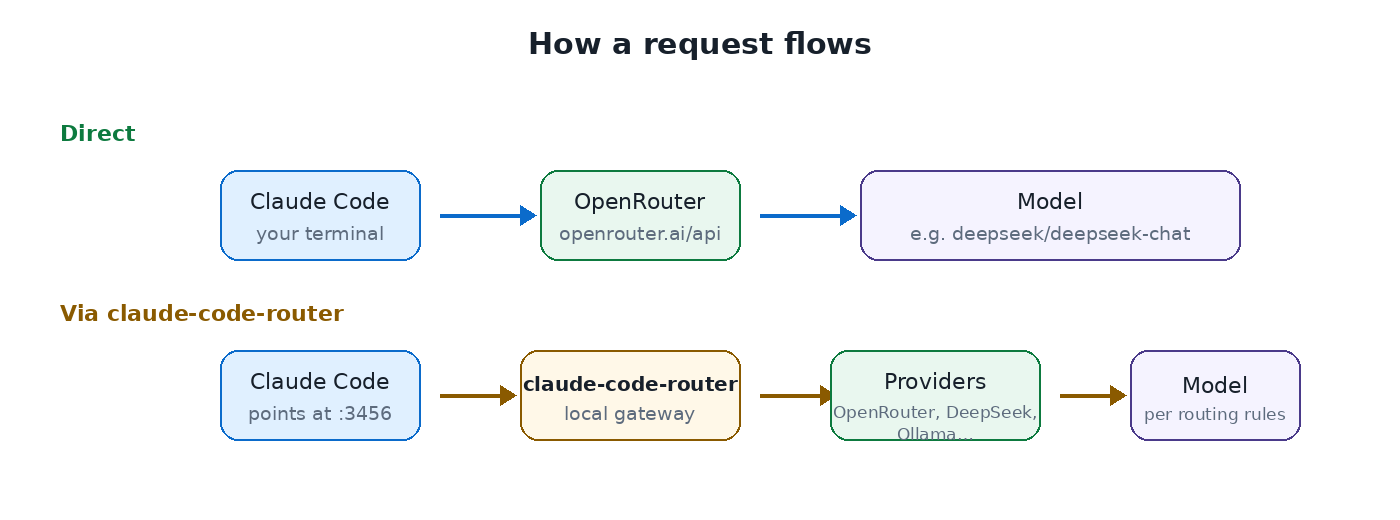
How requests flow: direct to OpenRouter, or through claude-code-router's local gateway. Diagram: Vibe Coder Journal.
What is claude-code-router?
claude-code-router is a free, open-source app (by musistudio, currently v3.1.3) that sits between your coding agent and your model providers, routing each request to the provider and model you choose. It supports Claude Code, Codex, OpenCode and others, and providers including OpenRouter, DeepSeek, Moonshot/Kimi, Mistral and any custom OpenAI- or Anthropic-compatible endpoint — including local ones like Ollama.
Use it instead of the direct method when you want different models for different jobs (cheap model for background tasks, strong model for hard reasoning), automatic fallbacks when a provider fails, or providers that don't offer an Anthropic-compatible endpoint. You configure it through its web UI at http://127.0.0.1:3458 — in v3 there is no live config.json; settings live in a local database.
Install it with npm install -g @musistudio/claude-code-router (needs Node.js 22+), then run ccr ui. Add your providers in the UI, create a client API key, and point Claude Code at the local gateway (http://127.0.0.1:3456) — Mode B of the tool above generates each of these steps with your choices filled in.
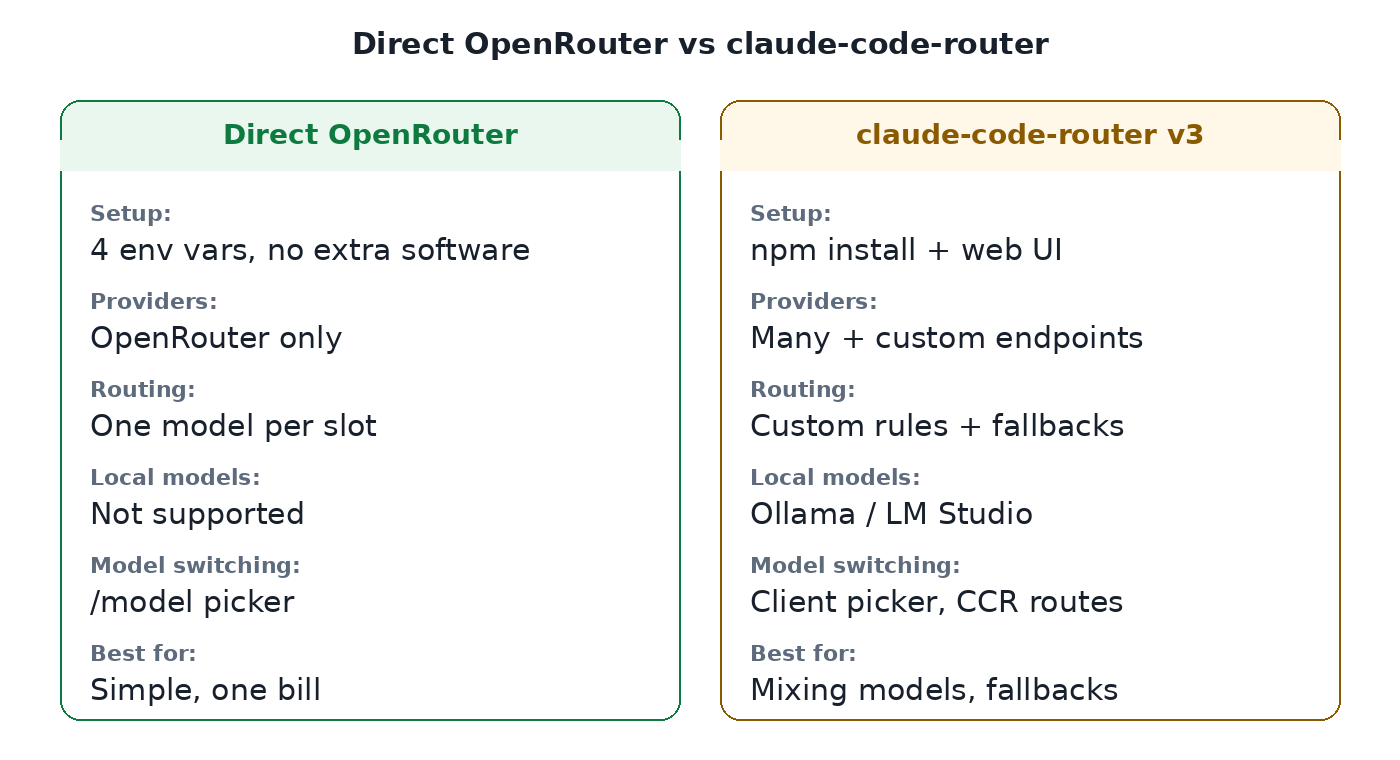
Direct OpenRouter vs claude-code-router at a glance. Graphic: Vibe Coder Journal.
OpenRouter direct vs claude-code-router: which should you use?
Use the direct OpenRouter connection if you want the simplest setup with one provider and one bill; use claude-code-router if you want per-task model routing, fallbacks, or local models.
| Direct OpenRouter | claude-code-router | |
|---|---|---|
| Setup effort | Low — four env vars, no extra software | Medium — install app, add providers in web UI |
| Model switching | /model picker in Claude Code | Client's own model picker; CCR honors recognized names |
| Routing rules | No — one model per slot | Yes — custom rules, per-rule fallbacks, model chains |
| Local models (Ollama/LM Studio) | No | Yes, as custom providers |
| Extra software | None | Node.js 22+ and the CCR app |
| Best for | Saving money with one provider | Mixing providers, fallbacks, local models |
Best models to use with Claude Code via OpenRouter
For the main coding model, Claude models (e.g. anthropic/claude-sonnet-5.5) are the safest choice because Claude Code is optimized for Anthropic models; use cheap non-Claude models for background and bulk tasks. That honesty matters: OpenRouter's own guide warns Claude Code "may not work correctly with other providers," and Anthropic states it doesn't support routing Claude Code to non-Claude models through any gateway. In practice this shows up as weaker tool calling — the exact thing that makes Claude Code useful.
A sensible split, which the tool's "Balanced" preset generates: a Claude model for main coding, a cheap model like qwen/qwen3.7-flash or openai/gpt-6-luna for the fast/background slot, and openrouter/auto as a fallback so requests still complete if your pick is unavailable. If your priority is purely saving money, the "Budget" preset routes everything to the cheapest capable models — just expect to babysit tool calls more. Model prices in the tool are fetched live from OpenRouter's public models endpoint when available, with bundled prices dated October 10, 2026 as fallback.
Is claude-code-router the same as mcp-router?
No. claude-code-router routes LLM API requests between model providers; mcp-router (now archived) was a desktop app for managing MCP servers — different tools, similar names. mcp-router, from the "MCP Router" GitHub organization, gave you a GUI to connect, toggle and organize Model Context Protocol servers across AI clients. Its developers ended support on September 18, 2026 — the repo is archived, its site is offline, and its own notice says new adoption is not recommended. If you were looking for MCP server management, that project is effectively dead; if you want to route Claude Code to cheaper or different models, claude-code-router is the one you want.
Troubleshooting Claude Code with OpenRouter
Most failures are one of four things: a bad key, a blanked variable that isn't blank, a wrong model ID, or a non-Claude model fumbling tool calls.
| Symptom | Likely cause | Fix |
|---|---|---|
401 authentication error | Wrong key, or ANTHROPIC_API_KEY not blanked | Check ANTHROPIC_AUTH_TOKEN; set ANTHROPIC_API_KEY="" explicitly |
404 model not found | Typo in the model ID, or model not on OpenRouter | Use provider/model format; verify at openrouter.ai/models |
| Tool calls fail or loop | Non-Claude model weaker at tool use | Move the main slot to a Claude model; keep cheap models for background |
| Timeouts | Slow gateway or local model | Raise API_TIMEOUT_MS; for local models set API_FORCE_IDLE_TIMEOUT=0 |
400 errors via a gateway | Gateway rejects beta fields | Set CLAUDE_CODE_DISABLE_EXPERIMENTAL_BETAS=1 |
| Context fills too fast | Gateway model's window is smaller than assumed | Set CLAUDE_CODE_AUTO_COMPACT_WINDOW to the real limit |
The tool's built-in checklist walks through the same verifications: key set, base URL exactly https://openrouter.ai/api, ANTHROPIC_API_KEY blanked, model ID valid, Claude Code restarted, and /status showing the right auth token and base URL.
Is it safe and allowed?
Yes, with normal API-key hygiene: the setup uses OpenRouter's documented Anthropic-compatible endpoint, and your key never leaves your machine when you use this page's generator. Treat the generated config like a password — never paste it into chat logs, screenshots, or shared docs. On the provider side, you're subject to OpenRouter's terms and rate limits rather than Anthropic's subscription terms, and usage is billed per token. One thing to know: when you route through a third party, your prompts go to that provider (and onward to the model provider), not to Anthropic — Anthropic neither endorses nor supports third-party gateways. The generator itself is 100% client-side: no inputs or keys are sent to vibecoderjournal.com, stored, or logged.
Frequently asked questions
Can I use GPT or Gemini in Claude Code? Yes — via OpenRouter or claude-code-router with IDs like openai/gpt-6.1-sol or google/gemini-3.8-flash. Expect weaker tool calling than Claude models; keep a Claude model for the main slot if tool use matters.
Is OpenRouter cheaper than a Claude subscription? It can be. You pay per token instead of a flat fee, so light use with cheap models costs very little — but heavy use of flagship models can exceed a subscription. The tool shows per-model prices so you can estimate.
Does prompt caching work? OpenRouter's Claude Code integration docs don't document prompt caching for this path, so don't count on it. (Anthropic documents DISABLE_PROMPT_CACHING for gateway setups, which tells you caching is a known variable here.)
How do I switch models mid-session? With the direct method, use Claude Code's /model picker — set CLAUDE_CODE_ENABLE_GATEWAY_MODEL_DISCOVERY=1 to list gateway models. With claude-code-router v3, switch in the client's own model picker; CCR routes recognized model names automatically. (The old /model provider,model command was v1-only.)
Can I use local models with Ollama? Yes, through claude-code-router: add Ollama as a custom provider with endpoint http://localhost:11434/v1 (Mode C generates this). Small local models may struggle with Claude Code's tool calls — use them for simple tasks first.
Where is the claude-code-router config file? In v3 there isn't a live config.json. Configuration lives in config.sqlite under ~/.claude-code-router (macOS/Linux) or %APPDATA%\claude-code-router (Windows), edited through the web UI at http://127.0.0.1:3458. A legacy config.json is only read once, for migration.
Is my API key stored? No. The generator runs entirely in your browser. If you type a key, it's inserted into the generated text on your device only — masked in the preview, full in what you copy or download. Nothing is sent to vibecoderjournal.com or stored anywhere. The page makes no network requests except an optional fetch of OpenRouter's public model list for prices.
Related tools and reading
- Run LLMs locally — the full guide to local models, including Ollama setup
- Ollama troubleshooting — fix common local-model problems
- Claude Code vs Codex CLI — how the two agents compare
- Claude Code alternatives — other agents worth knowing
- How to see Claude Code usage — monitor what your sessions cost
- Claude pricing plans — compare subscription vs pay-per-token
- ChatGPT Watermark Remover & Detector — another free in-browser tool
- AI Prompt Enhancer & Generator — turn rough ideas into clear, structured prompts for any AI model